Mod Unity [Secret Flasher Manaka] Cosplay Loader Mod 2.2.1

5.00 star(s) 1 Vote

LeoVincent69

Newbie
Aug 19, 2025
66
84
43
Ah, I never thought it would work out with the BepInEx update.
Thank you so much. It worked out perfectly.
Oh, I never know it may cause by BepInEx version. If updating BepInEx version fixed the issue then feel free to ignore my comment here.

If it didn't fix it, I have updated the descriptor.json file in my Mega folder, here is updated descriptor.json file for those 2 specific outfits as well, just download and replace it, the Sweater Open Boobs - Top arm clipping issues should be fixed while the Sweater Virgin Killer - Sleeves arm clipping issues should be fixed ONLY while standing, it will still clip a little when Manaka run because Sweater Virgin Killer - Sleeves is very very close to Manaka arm. So if the issues still persist after all of that, please don't make Manaka arm size to be too thin/small. Hope this comment help.

(Edit 1:
Yea... my lazy ass didn't usually include shrinkTypes code (the code that could fix clipping issues for specific Manaka body parts) if the outfits worked for my own Manaka... Sorry if that bring inconvenience...
)
 

ousawa007

Newbie
Apr 3, 2022
61
39
79
Had to reinstall all of them and back up my save, but:

Baby bib
Skimpy Nurse Top
Every Underboobs Top
Every Happi Breast Band
Virgin Killer Sweater Full Body
Every Ribbon Bra
Christmas Bra
Every Sailor Bikini Bra
Sexy Nurse Shirt
Sexy Sailor Suspenders

Latex harness is bright glowing pink for some reason. Probably intentional, but weird
Everything is listed in the store twice for some reason

And that's not getting into all of the tops that are incompatible with any cup size below H
this mentioned added costumes were clipping thru extreme sliders, they we're made for default big breast manaka with no huge boob and ultra boob slider, i'm not sure about the waist/butt sliders because ever since i got my save corrupted by the mod at first time when trying to change costume from the set tab, i disabled it.

i'm not sure but i can say the safe nipple slider is between 72 and 80
 
  • Like
Reactions: LeoVincent69

micro apple

New Member
Oct 10, 2025
2
1
3
Yes, I think I'll give it a try. I noticed that the raincoats in the original game were transparent. I wonder if we can use this as a reference to change the transparency of the clothing? All in all, I think I'll give it a try. It's an exciting job. :
There is in fact transparent setting and the alpha value (PNG file transparency value) in descriptor.json in ModMaterials. However, I experimented some with them but I didn't get any results, no transparency on my clothes T^T, but feel free to try experimenting yourself out. Just sharing what I know, if anyone get the transparency to work, please share how to, please...
D
 
  • Like
Reactions: LeoVincent69

useruser9527

Newbie
Dec 2, 2025
16
34
64
[引用=“岩岛殿,帖子:18787224,成员:3980855”]
我完美地重现了我最喜欢的角色,穿着你的水手比基尼。
我刚和我心爱的女朋友一起散步回来。
我给她穿了10套衣服,然后我们一起出去了。经过6个阶段,只剩下2套服装+6种精子替代+一个色情标志。
我被侵犯了8次,然后又回来了。
直到昨天,这个女孩的身体依然美丽,即使被侵犯了。这感觉不自然,也不满足。
从今天开始,现在可以用染色它。
你不断满足我的愿望。
你很体贴我的心意......玩游戏时我多次心存感激。
每次我穿上精子装...... View attachment 5489907
 
Last edited:
  • Like
Reactions: Muhdog

unknownwind

New Member
Sep 26, 2025
3
10
3
我搞定了加载第三方着色器,图片使用的是Poiyomi Toon shader,下面两个链接时我发布的视频,建模苦手,如果有人愿意帮助适配模型请联系我。
I’ve managed to load a third-party shader, which uses the Poiyomi Toon shader. Below are two links to the videos I posted. I’m not good at modeling, so if anyone is willing to help with model adaptation, please contact me.
—— Translated by deepseekv3.2


1123123123.png
 

eltiachan

Member
Sep 2, 2023
182
291
182
I will be honest... the Bukkake outfits suppose to look like this: <- the original booth link..., but idk how to make the texture transparency work...

(edit: if anyone manage to do it, please share, please...)
Can you reverse engineer the solution if you have the original outfit?
 
  • Like
Reactions: LeoVincent69

LeoVincent69

Newbie
Aug 19, 2025
66
84
43
The material image for Bukkake is beautifully drawn and semi-transparent.
So I think it would be impossible to do this unless you're very familiar with the "descriptor" in "ModMaterials."
With the additional costumes released so far, I haven't found any semi-transparent costumes whose "descriptors" would be useful as reference.

Even if there were,I think it's very difficult to complete.
Bukkake is a costume that makes the game fun even as it is.
And yep, this comment basically summed up my situation. And yea, I also don't really understand many of the variables in descriptor.json...
 

eltiachan

Member
Sep 2, 2023
182
291
182
And yep, this comment basically summed up my situation. And yea, I also don't really understand many of the variables in descriptor.json...
I fed the json file into GPT and requested an explanation on how to make the materials become transparent / semi-transparent. I followed the tweaks the AI suggested (such as using an alpha value less than 1) but it doesn't seem to produce the desirable results. (In one test the outfit turned magenta.) The only thing GPT suggested but I haven't tried is to provide an alpha map.

Not sure if any of this would help, just something to think about. (Yes, Skynet is coming, I know.)
 

ExoFifth

Newbie
Nov 26, 2023
30
77
102
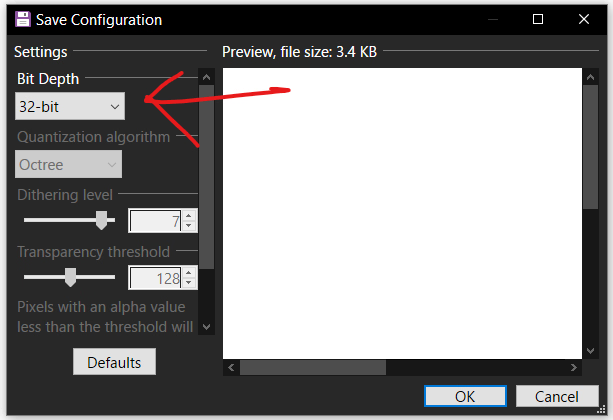
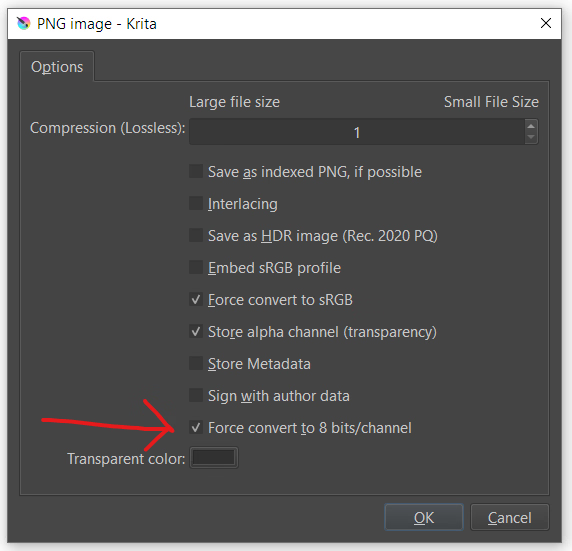
The materials loader appears unable to load PNG textures with a bit depth greater than 32. Some of the outfits shared so far have normal maps with a higher bit depth, in which case it appears to fall back to no normal map.

If you see an error that the texture format is unsupported, try re-exporting the relevant PNG with a bit depth of 32 (8 bits per channel). Examples of how to do that with a couple common tools:

Paint.net:
1765485674410.png

Krita:
1765485762960.png
 

ExoFifth

Newbie
Nov 26, 2023
30
77
102
I tried to add shading by adjusting the contrast and brightness as a normal PNG image instead of a transparent one, but it's difficult.
Perhaps someone much more skilled than me can add beautiful shading.
I downloaded it to have a look. The UnityToonShader is supposed to have transparency, but the transparency part wasn't included in the assetbundles. There's a different transparency shader that looks pretty good with some tweaking. Try this material descriptor.json:

JSON:
{
    "name": "Bukkake.Mat",
    "shader": "Hidden/lilToonTransparent",
 
 
    "textures": {
      "_MainTex": "Texture - Custom.png",
      "_BumpMap": "Normal.png",
      "_MatCapTex": "Texture - Custom.png",
      "_MatCapBumpMap": ""
    },
 
 
    "colors": {
        "_Color":                                    [1.800, 1.800, 1.800, 0.150],
        "_MatCapColor":                                [2.000, 2.000, 2.000, 1.000],
        "_EmissionColor":                            [2.000, 2.000, 2.000, 0.100],
        "_ReflectionColor":                            [2.000, 2.000, 2.000, 5.000]
    },
 
 
    "floats": {
        "_Invisible": 0,
        "_AsUnlit": 0,
        "_UseBumpMap": 1,
        "_UseMatCap": 1,
        "_UseReflection": 1,
        "_ApplyReflection": 1,
        "_UseEmission": 1,
        "_UseRim": 1,
        "_SpecularToon": 1,
        
        "_AlphaBoostFA": 1,
        
        "_BumpScale": 1,
        "_MatCapBumpScale": 1,
        
        "_Cutoff": 0.0,
        "_Smoothness": 1.0,
        "_Metallic": 0.7,
        "_Reflectance": 0.04,
        "_SpecularBlur": 0,
        "_MatCapLod": 0,
        
        "_TransparentMode": 2,
        
        "_SrcBlend": 1,
        "_DstBlend": 4,
        "_SrcBlendAlpha": 1,
        "_DstBlendAlpha": 10,
        "_BlendOp": 0,
        "_BlendOpAlpha": 0,
        "_SrcBlendFA": 1,
        "_DstBlendFA": 1,
        "_SrcBlendAlphaFA": 0,
        "_DstBlendAlphaFA": 1,
        "_BlendOpFA": 4,
        "_BlendOpAlphaFA": 4
    },
    
    "vectors": {
    },
 
 
    "keywords": [],
 
 
    "doubleSided": true,
    "transparent": true
  }
 

ExoFifth

Newbie
Nov 26, 2023
30
77
102
Amazing...
The texture changes depending on the light.
Yesterday I was using a painting program to paint a thin layer of skin color onto a sperm texture.
I was disappointed with the results.
People who can write code are like wizards.
View attachment 5520350

This costume might be the same.
Reverse Bunny
The texture changes depending on the light.
It's beautiful, but...could you make it a normal costume?
When you have time. If it's not too much trouble, please do so.
Here's a hopefully fixed version:
JSON:
{
    "name": "Bukkake.Mat",
    "shader": "Hidden/lilToonTransparent",
 
 
    "textures": {
      "_MainTex": "Texture - Custom.png",
      "_BumpMap": "Normal.png",
      "_MatCapTex": "Texture - Custom.png",
      "_MatCapBumpMap": ""
    },
 
 
    "colors": {
        "_Color":                                    [1.000, 1.000, 1.000, 0.800],
        "_MatCapColor":                                [1.000, 1.000, 1.000, 1.000],
        "_EmissionColor":                            [0.000, 0.000, 0.000, 0.000],
        "_ReflectionColor":                            [1.000, 1.000, 1.000, 1.000]
    },
 
 
    "floats": {
        "_Invisible": 0,
        "_AsUnlit": 0,
        "_UseBumpMap": 1,
        "_UseMatCap": 1,
        "_UseReflection": 1,
        "_ApplyReflection": 1,
        "_UseEmission": 1,
        "_UseRim": 1,
        "_SpecularToon": 1,
        
        "_AlphaBoostFA": 2,
        
        "_BumpScale": 1,
        "_MatCapBumpScale": 1,
        
        "_Cutoff": 0.0,
        "_Smoothness": 1.0,
        "_Metallic": 0.7,
        "_Reflectance": 0.04,
        "_SpecularBlur": 0,
        "_MatCapLod": 0,
        
        "_TransparentMode": 2,
        
        "_SrcBlend": 1,
        "_DstBlend": 10,
        "_SrcBlendAlpha": 1,
        "_DstBlendAlpha": 10,
        "_BlendOp": 0,
        "_BlendOpAlpha": 0,
        "_SrcBlendFA": 1,
        "_DstBlendFA": 1,
        "_SrcBlendAlphaFA": 0,
        "_DstBlendAlphaFA": 1,
        "_BlendOpFA": 4,
        "_BlendOpAlphaFA": 4
    },
    
    "vectors": {
    },
 
 
    "keywords": [],
 
 
    "doubleSided": true,
    "transparent": true
  }
 

LeoVincent69

Newbie
Aug 19, 2025
66
84
43
The materials loader appears unable to load PNG textures with a bit depth greater than 32. Some of the outfits shared so far have normal maps with a higher bit depth, in which case it appears to fall back to no normal map.

If you see an error that the texture format is unsupported, try re-exporting the relevant PNG with a bit depth of 32 (8 bits per channel). Examples of how to do that with a couple common tools:

Paint.net:
View attachment 5519204

Krita:
View attachment 5519208
I see, I assume it is related to the PNG decode failed/unsupported that I purposefully ignore in all of the outfits I exported, will fix that when I am free welp XD.
 

LeoVincent69

Newbie
Aug 19, 2025
66
84
43
Here's a hopefully fixed version:
JSON:
{
    "name": "Bukkake.Mat",
    "shader": "Hidden/lilToonTransparent",


    "textures": {
      "_MainTex": "Texture - Custom.png",
      "_BumpMap": "Normal.png",
      "_MatCapTex": "Texture - Custom.png",
      "_MatCapBumpMap": ""
    },


    "colors": {
        "_Color":                                    [1.000, 1.000, 1.000, 0.800],
        "_MatCapColor":                                [1.000, 1.000, 1.000, 1.000],
        "_EmissionColor":                            [0.000, 0.000, 0.000, 0.000],
        "_ReflectionColor":                            [1.000, 1.000, 1.000, 1.000]
    },


    "floats": {
        "_Invisible": 0,
        "_AsUnlit": 0,
        "_UseBumpMap": 1,
        "_UseMatCap": 1,
        "_UseReflection": 1,
        "_ApplyReflection": 1,
        "_UseEmission": 1,
        "_UseRim": 1,
        "_SpecularToon": 1,
      
        "_AlphaBoostFA": 2,
      
        "_BumpScale": 1,
        "_MatCapBumpScale": 1,
      
        "_Cutoff": 0.0,
        "_Smoothness": 1.0,
        "_Metallic": 0.7,
        "_Reflectance": 0.04,
        "_SpecularBlur": 0,
        "_MatCapLod": 0,
      
        "_TransparentMode": 2,
      
        "_SrcBlend": 1,
        "_DstBlend": 10,
        "_SrcBlendAlpha": 1,
        "_DstBlendAlpha": 10,
        "_BlendOp": 0,
        "_BlendOpAlpha": 0,
        "_SrcBlendFA": 1,
        "_DstBlendFA": 1,
        "_SrcBlendAlphaFA": 0,
        "_DstBlendAlphaFA": 1,
        "_BlendOpFA": 4,
        "_BlendOpAlphaFA": 4
    },
  
    "vectors": {
    },


    "keywords": [],


    "doubleSided": true,
    "transparent": true
  }
AND DANG! Thank you so much for the knowledge! I have 0 knowledge about shader so I never know about other existing shader, now I can refer to the descriptor.json file you share and play around with other outfits as well! Seriously, thank you very much.

(Edit: Now I know what I wanna do in my next free time hehehe)
 

eltiachan

Member
Sep 2, 2023
182
291
182
Attached is the Bukkake Cosplay (a.k.a. sperm outfit) that incorporates the changes by ExoFifth with the bit depth of Normal.png reduces to 32 bits. This is by no means final. Feel free to use this as a basis for future fine tuning or modding.

The pieces of the outfit have been categorized properly (Bukkake Face is categorized under Head, Bukkake Pussy under Genital, etc). This may cause conflict with existing Cosplay mods installed. Backup your save files before trying this out.

Also check out an alternate version with proper specular reflection.

SecretFlasherManaka_2025_12_12_14_36_24_877.png SecretFlasherManaka_2025_12_12_14_41_24_049.png
 
Last edited:

ExoFifth

Newbie
Nov 26, 2023
30
77
102
If anyone wants it but doesn't have it, these are the shader definitions available to modders extracted from the game files. You can open the *.shader files in a text editor and view the name and assignable properties. For example, here's the Toon_ShadingGradeMap shader. You can see the name at the top, and a list of properties you can use in your material definitions under "Properties." Note the second argument showing what data type to classify each property.

Code:
Shader "UnityChanToonShader/Toon_ShadingGradeMap" {
    Properties {
        [HideInInspector] _simpleUI ("SimpleUI", Float) = 0
        [HideInInspector] _utsVersion ("Version", Float) = 2.08
        [HideInInspector] _utsTechnique ("Technique", Float) = 1
        [Enum(OFF,0,FRONT,1,BACK,2)] _CullMode ("Cull Mode", Float) = 2
        _MainTex ("BaseMap", 2D) = "white" {}
        [HideInInspector] _BaseMap ("BaseMap", 2D) = "white" {}
        _BaseColor ("BaseColor", Vector) = (1,1,1,1)
        [HideInInspector] _Color ("Color", Vector) = (1,1,1,1)
        [Toggle(_)] _Is_LightColor_Base ("Is_LightColor_Base", Float) = 1
        _1st_ShadeMap ("1st_ShadeMap", 2D) = "white" {}
        [Toggle(_)] _Use_BaseAs1st ("Use BaseMap as 1st_ShadeMap", Float) = 0
        _1st_ShadeColor ("1st_ShadeColor", Vector) = (1,1,1,1)
        [Toggle(_)] _Is_LightColor_1st_Shade ("Is_LightColor_1st_Shade", Float) = 1
        _2nd_ShadeMap ("2nd_ShadeMap", 2D) = "white" {}
        [Toggle(_)] _Use_1stAs2nd ("Use 1st_ShadeMap as 2nd_ShadeMap", Float) = 0
        _2nd_ShadeColor ("2nd_ShadeColor", Vector) = (1,1,1,1)
        [Toggle(_)] _Is_LightColor_2nd_Shade ("Is_LightColor_2nd_Shade", Float) = 1
        _NormalMap ("NormalMap", 2D) = "bump" {}
        _BumpScale ("Normal Scale", Range(0, 1)) = 1
        [Toggle(_)] _Is_NormalMapToBase ("Is_NormalMapToBase", Float) = 0
        [Toggle(_)] _Set_SystemShadowsToBase ("Set_SystemShadowsToBase", Float) = 1
        _Tweak_SystemShadowsLevel ("Tweak_SystemShadowsLevel", Range(-0.5, 0.5)) = 0
        [HideInInspector] _BaseColor_Step ("BaseColor_Step", Range(0, 1)) = 0.5
        [HideInInspector] _BaseShade_Feather ("Base/Shade_Feather", Range(0.0001, 1)) = 0.0001
        [HideInInspector] _ShadeColor_Step ("ShadeColor_Step", Range(0, 1)) = 0
        [HideInInspector] _1st2nd_Shades_Feather ("1st/2nd_Shades_Feather", Range(0.0001, 1)) = 0.0001
        _1st_ShadeColor_Step ("1st_ShadeColor_Step", Range(0, 1)) = 0.5
        _1st_ShadeColor_Feather ("1st_ShadeColor_Feather", Range(0.0001, 1)) = 0.0001
        _2nd_ShadeColor_Step ("2nd_ShadeColor_Step", Range(0, 1)) = 0
        _2nd_ShadeColor_Feather ("2nd_ShadeColor_Feather", Range(0.0001, 1)) = 0.0001
        _StepOffset ("Step_Offset (ForwardAdd Only)", Range(-0.5, 0.5)) = 0
        [Toggle(_)] _Is_Filter_HiCutPointLightColor ("PointLights HiCut_Filter (ForwardAdd Only)", Float) = 1
        _ShadingGradeMap ("ShadingGradeMap", 2D) = "white" {}
        _Tweak_ShadingGradeMapLevel ("Tweak_ShadingGradeMapLevel", Range(-0.5, 0.5)) = 0
        _BlurLevelSGM ("Blur Level of ShadingGradeMap", Range(0, 10)) = 0
        _HighColor ("HighColor", Vector) = (0,0,0,1)
        _HighColor_Tex ("HighColor_Tex", 2D) = "white" {}
        [Toggle(_)] _Is_LightColor_HighColor ("Is_LightColor_HighColor", Float) = 1
        [Toggle(_)] _Is_NormalMapToHighColor ("Is_NormalMapToHighColor", Float) = 0
        _HighColor_Power ("HighColor_Power", Range(0, 1)) = 0
        [Toggle(_)] _Is_SpecularToHighColor ("Is_SpecularToHighColor", Float) = 0
        [Toggle(_)] _Is_BlendAddToHiColor ("Is_BlendAddToHiColor", Float) = 0
        [Toggle(_)] _Is_UseTweakHighColorOnShadow ("Is_UseTweakHighColorOnShadow", Float) = 0
        _TweakHighColorOnShadow ("TweakHighColorOnShadow", Range(0, 1)) = 0
        _Set_HighColorMask ("Set_HighColorMask", 2D) = "white" {}
        _Tweak_HighColorMaskLevel ("Tweak_HighColorMaskLevel", Range(-1, 1)) = 0
        [Toggle(_)] _RimLight ("RimLight", Float) = 0
        _RimLightColor ("RimLightColor", Vector) = (1,1,1,1)
        [Toggle(_)] _Is_LightColor_RimLight ("Is_LightColor_RimLight", Float) = 1
        [Toggle(_)] _Is_NormalMapToRimLight ("Is_NormalMapToRimLight", Float) = 0
        _RimLight_Power ("RimLight_Power", Range(0, 1)) = 0.1
        _RimLight_InsideMask ("RimLight_InsideMask", Range(0.0001, 1)) = 0.0001
        [Toggle(_)] _RimLight_FeatherOff ("RimLight_FeatherOff", Float) = 0
        [Toggle(_)] _LightDirection_MaskOn ("LightDirection_MaskOn", Float) = 0
        _Tweak_LightDirection_MaskLevel ("Tweak_LightDirection_MaskLevel", Range(0, 0.5)) = 0
        [Toggle(_)] _Add_Antipodean_RimLight ("Add_Antipodean_RimLight", Float) = 0
        _Ap_RimLightColor ("Ap_RimLightColor", Vector) = (1,1,1,1)
        [Toggle(_)] _Is_LightColor_Ap_RimLight ("Is_LightColor_Ap_RimLight", Float) = 1
        _Ap_RimLight_Power ("Ap_RimLight_Power", Range(0, 1)) = 0.1
        [Toggle(_)] _Ap_RimLight_FeatherOff ("Ap_RimLight_FeatherOff", Float) = 0
        _Set_RimLightMask ("Set_RimLightMask", 2D) = "white" {}
        _Tweak_RimLightMaskLevel ("Tweak_RimLightMaskLevel", Range(-1, 1)) = 0
        [Toggle(_)] _MatCap ("MatCap", Float) = 0
        _MatCap_Sampler ("MatCap_Sampler", 2D) = "black" {}
        _BlurLevelMatcap ("Blur Level of MatCap_Sampler", Range(0, 10)) = 0
        _MatCapColor ("MatCapColor", Vector) = (1,1,1,1)
        [Toggle(_)] _Is_LightColor_MatCap ("Is_LightColor_MatCap", Float) = 1
        [Toggle(_)] _Is_BlendAddToMatCap ("Is_BlendAddToMatCap", Float) = 1
        _Tweak_MatCapUV ("Tweak_MatCapUV", Range(-0.5, 0.5)) = 0
        _Rotate_MatCapUV ("Rotate_MatCapUV", Range(-1, 1)) = 0
        [Toggle(_)] _CameraRolling_Stabilizer ("Activate CameraRolling_Stabilizer", Float) = 0
        [Toggle(_)] _Is_NormalMapForMatCap ("Is_NormalMapForMatCap", Float) = 0
        _NormalMapForMatCap ("NormalMapForMatCap", 2D) = "bump" {}
        _BumpScaleMatcap ("Scale for NormalMapforMatCap", Range(0, 1)) = 1
        _Rotate_NormalMapForMatCapUV ("Rotate_NormalMapForMatCapUV", Range(-1, 1)) = 0
        [Toggle(_)] _Is_UseTweakMatCapOnShadow ("Is_UseTweakMatCapOnShadow", Float) = 0
        _TweakMatCapOnShadow ("TweakMatCapOnShadow", Range(0, 1)) = 0
        _Set_MatcapMask ("Set_MatcapMask", 2D) = "white" {}
        _Tweak_MatcapMaskLevel ("Tweak_MatcapMaskLevel", Range(-1, 1)) = 0
        [Toggle(_)] _Inverse_MatcapMask ("Inverse_MatcapMask", Float) = 0
        [Toggle(_)] _Is_Ortho ("Orthographic Projection for MatCap", Float) = 0
        [KeywordEnum(SIMPLE,ANIMATION)] _EMISSIVE ("EMISSIVE MODE", Float) = 0
        _Emissive_Tex ("Emissive_Tex", 2D) = "white" {}
        [HDR] _Emissive_Color ("Emissive_Color", Vector) = (0,0,0,1)
        _Base_Speed ("Base_Speed", Float) = 0
        _Scroll_EmissiveU ("Scroll_EmissiveU", Range(-1, 1)) = 0
        _Scroll_EmissiveV ("Scroll_EmissiveV", Range(-1, 1)) = 0
        _Rotate_EmissiveUV ("Rotate_EmissiveUV", Float) = 0
        [Toggle(_)] _Is_PingPong_Base ("Is_PingPong_Base", Float) = 0
        [Toggle(_)] _Is_ColorShift ("Activate ColorShift", Float) = 0
        [HDR] _ColorShift ("ColorSift", Vector) = (0,0,0,1)
        _ColorShift_Speed ("ColorShift_Speed", Float) = 0
        [Toggle(_)] _Is_ViewShift ("Activate ViewShift", Float) = 0
        [HDR] _ViewShift ("ViewSift", Vector) = (0,0,0,1)
        [Toggle(_)] _Is_ViewCoord_Scroll ("Is_ViewCoord_Scroll", Float) = 0
        [KeywordEnum(NML,POS)] _OUTLINE ("OUTLINE MODE", Float) = 0
        _Outline_Width ("Outline_Width", Float) = 0
        _Farthest_Distance ("Farthest_Distance", Float) = 100
        _Nearest_Distance ("Nearest_Distance", Float) = 0.5
        _Outline_Sampler ("Outline_Sampler", 2D) = "white" {}
        _Outline_Color ("Outline_Color", Vector) = (0.5,0.5,0.5,1)
        [Toggle(_)] _Is_BlendBaseColor ("Is_BlendBaseColor", Float) = 0
        [Toggle(_)] _Is_LightColor_Outline ("Is_LightColor_Outline", Float) = 1
        [Toggle(_)] _Is_OutlineTex ("Is_OutlineTex", Float) = 0
        _OutlineTex ("OutlineTex", 2D) = "white" {}
        _Offset_Z ("Offset_Camera_Z", Float) = 0
        [Toggle(_)] _Is_BakedNormal ("Is_BakedNormal", Float) = 0
        _BakedNormal ("Baked Normal for Outline", 2D) = "white" {}
        _GI_Intensity ("GI_Intensity", Range(0, 1)) = 0
        _Unlit_Intensity ("Unlit_Intensity", Range(0.001, 4)) = 1
        [Toggle(_)] _Is_Filter_LightColor ("VRChat : SceneLights HiCut_Filter", Float) = 0
        [Toggle(_)] _Is_BLD ("Advanced : Activate Built-in Light Direction", Float) = 0
        _Offset_X_Axis_BLD (" Offset X-Axis (Built-in Light Direction)", Range(-1, 1)) = -0.05
        _Offset_Y_Axis_BLD (" Offset Y-Axis (Built-in Light Direction)", Range(-1, 1)) = 0.09
        [Toggle(_)] _Inverse_Z_Axis_BLD (" Inverse Z-Axis (Built-in Light Direction)", Float) = 1
    }
    //DummyShaderTextExporter
    SubShader{
        Tags { "RenderType"="Opaque" }
        LOD 200

        Pass
        {
            HLSLPROGRAM
            #pragma vertex vert
            #pragma fragment frag

            float4x4 unity_MatrixMVP;

            struct Vertex_Stage_Input
            {
                float3 pos : POSITION;
            };

            struct Vertex_Stage_Output
            {
                float4 pos : SV_POSITION;
            };

            Vertex_Stage_Output vert(Vertex_Stage_Input input)
            {
                Vertex_Stage_Output output;
                output.pos = mul(unity_MatrixMVP, float4(input.pos, 1.0));
                return output;
            }

            Texture2D<float4> _MainTex;
            SamplerState sampler_MainTex;
            float4 _Color;

            struct Fragment_Stage_Input
            {
                float2 uv : TEXCOORD0;
            };

            float4 frag(Fragment_Stage_Input input) : SV_TARGET
            {
                return _MainTex.Sample(sampler_MainTex, float2(input.uv.x, input.uv.y)) * _Color;
            }

            ENDHLSL
        }
    }
    Fallback "Legacy Shaders/VertexLit"
    //CustomEditor "UnityChan.UTS2GUI"
}

 

ousawa007

Newbie
Apr 3, 2022
61
39
79
Attached is the Bukkake Cosplay (a.k.a. sperm outfit) that incorporates the changes by ExoFifth with the bit depth of Normal.png reduces to 32 bits. This is by no means final. Feel free to use this as a basis for future fine tuning or modding.

The pieces of the outfit have been categorized properly (Bukkake Face is categorized under Head, Bukkake Pussy under Genital, etc). This may cause conflict with existing Cosplay mods installed. Backup your save files before trying this out.

View attachment 5521763 View attachment 5521764
aaagggggh i wanna try it out!
im gonna cut my save file out!!
 
  • Like
Reactions: mistersodacan

mistersodacan

Newbie
Jul 29, 2017
59
104
79
Attached is the Bukkake Cosplay (a.k.a. sperm outfit) that incorporates the changes by ExoFifth with the bit depth of Normal.png reduces to 32 bits. This is by no means final. Feel free to use this as a basis for future fine tuning or modding.

The pieces of the outfit have been categorized properly (Bukkake Face is categorized under Head, Bukkake Pussy under Genital, etc). This may cause conflict with existing Cosplay mods installed. Backup your save files before trying this out.

View attachment 5521763 View attachment 5521764
Amazing work. This is the only cosplay I ended up using, so having such a better version of it feels like Christmas came early. The fact that it was a collaborative effort is even better.
 

useruser9527

Newbie
Dec 2, 2025
16
34
64
Shared by LeoVincent69.

The "Bukkake" in this post is it.

If you're just looking for the materials, this is it.
Thank you, I have started working, but due to my incomplete understanding of how texture works, the modified results are not satisfactory. How to make semen look equally good during the day and night is also a problem
 
5.00 star(s) 1 Vote