Mod Unity [Secret Flasher Manaka] Cosplay Loader Mod 2.2.1

5.00 star(s) 1 Vote

LeoVincent69

Newbie
Aug 19, 2025
64
83
43
The materials used in the game are 1024x1024.
You may not need a size of 2048x2048.
I've reduced the additional costumes to 512x512, and it looks fine.
The materials loader appears unable to load PNG textures with a bit depth greater than 32. Some of the outfits shared so far have normal maps with a higher bit depth, in which case it appears to fall back to no normal map.

If you see an error that the texture format is unsupported, try re-exporting the relevant PNG with a bit depth of 32 (8 bits per channel). Examples of how to do that with a couple common tools:

Paint.net:
View attachment 5519204

Krita:
View attachment 5519208
Updated most (almost all...) ModMaterials folder, reduced all outfits texture and normal into 1024x1024 pixel with 32 bit depth or less. So far I don't have any PNG file decode error anymore in my BepInEx.

(Edit:
Just wanna share some funny thing, I didn't realize almost all of the outfits texture and normal is 2048x2048, some even go up to 4096x4096, after downscaling all those, my Mega folder went from 1.3GB to 863MB hahahaha XD
)

Attached is the Bukkake Cosplay (a.k.a. sperm outfit) that incorporates the changes by ExoFifth with the bit depth of Normal.png reduces to 32 bits. This is by no means final. Feel free to use this as a basis for future fine tuning or modding.

The pieces of the outfit have been categorized properly (Bukkake Face is categorized under Head, Bukkake Pussy under Genital, etc). This may cause conflict with existing Cosplay mods installed. Backup your save files before trying this out.

View attachment 5521763 View attachment 5521764
Removed my original Bukkake outfit and replaced it with the one shared by eltiachan, credit given to eltiachan, ExoFifth, and biwajimadono. Seriously, thank all three of you for all the help that make transparent outfit work. I hope I don't miss out anyone throughout this journey...

I also tried to make Slime outfit shared by biwajimadono slightly transparent hahaha XD.

I will post the Mega link here again ( ) in case anyone want to download any outfits. Maybe I should put the Mega link in like the little footnote of my comment so it would be easier to access hahaha. Because all I know is my Mega link is still actively been shared and mentioned by biwajimadono. Thank man XD.
 
Last edited:

ExoFifth

Newbie
Nov 26, 2023
30
76
102
Thank you, I have started working, but due to my incomplete understanding of how texture works, the modified results are not satisfactory. How to make semen look equally good during the day and night is also a problem
Semi-transparent materials need high specularity to look right in different lighting conditions, but there's something in the game's renderer that seems to completely disable specular reflections, even for shaders that support them.
 
  • Like
Reactions: eltiachan

ousawa007

Newbie
Apr 3, 2022
59
37
79
If you roughly add costumes without planning... "My Set" becomes another cosplay.
Make sure they're added to the end of the category.
otherwise, you'll have to go through the trouble of recreating your "My Set."
To organize your cosplays, you'll need to change one of the following in "descriptor.json" in "BepInEx\plugins\ModCosplays":
"displayName": "Baby Bib",
"categoryType": "GeneralUpperBody".

When changing "displayName", add X, Y, or Z to the beginning of the name.
Example "zBaby Bib",

The items to use when changing "categoryType" are as follows.
GeneralHead
GenaralUpperBody
GenaralLeg
GenaralGenital
SuccbusCosplay
TacticalMaid
Ninja
Cultist
NekoFril
Bunny
LatexPonyGirl
JumpSuit
LzJailer
Cow
WildBeast
SuitChic
SuitLuxe
Sweater
Glossy
SchoolHoodie
SchoolGal
Please note that there may be typos.

Which "displayName" or "categoryType" you change will vary from person to person.
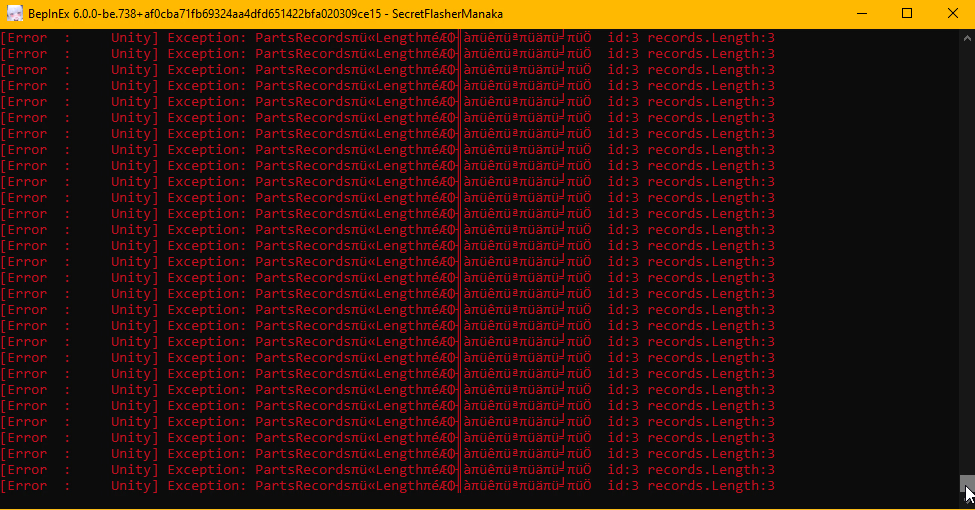
did you encounter a problem that makes manaka stuck in changing animation when you use the [My set] tab to change costume/equip? while the cosplay mod is in effect?
and BepInEx start throwing this error while the game continues to generate more lag and then crashes?
i would like to know the cause

at that time, i only have CustomMissions,Fluid mod and Cosplay Mod in effect Screenshot_55.png
 

LeoVincent69

Newbie
Aug 19, 2025
64
83
43
did you encounter a problem that makes manaka stuck in changing animation when you use the [My set] tab to change costume/equip? while the cosplay mod is in effect?
and BepInEx start throwing this error while the game continues to generate more lag and then crashes?
i would like to know the cause

at that time, i only have CustomMissions,Fluid mod and Cosplay Mod in effect View attachment 5526481
I never met such error before... The mod I am actively running now is Cosplay Mod, Naked Count as Flashing, Voice, and Uncensor mod if that is relevant. But what I can assume if something gone wrong with the Pacifier (item id:3) in GeneralHead category... I might be wrong as there might be other things that are referred as id:3 that Idk in game...

(Edit: Ignore me, I didn't read the post below before replying. Hope the Mod version 2.2.1 fix your problem.)
 

ousawa007

Newbie
Apr 3, 2022
59
37
79
I think I may have experienced the same thing.
Could this be the same phenomenon?
It froze.

The creator of the mod has worked hard to fix it.
2.2.1
It no longer occurs in this version or later.

I am still grateful for his efforts.
yeah i can confirm this is the same issue

but im using the latest version of the mod and it persisted....
what could be the issue then.....
i'll just make a backup of my save then reuse the mod again, i'll try to replicate it again
i downloaded the mod a month ago, never replaced it nor downloaded a new one (the cosplay parts is what im downloading though)
 
Last edited:

ousawa007

Newbie
Apr 3, 2022
59
37
79
I never met such error before... The mod I am actively running now is Cosplay Mod, Naked Count as Flashing, Voice, and Uncensor mod if that is relevant. But what I can assume if something gone wrong with the Pacifier (item id:3) in GeneralHead category... I might be wrong as there might be other things that are referred as id:3 that Idk in game...

(Edit: Ignore me, I didn't read the post below before replying. Hope the Mod version 2.2.1 fix your problem.)
no worries

also the voicepack is great, although i knew it came from the other game made by the same dev but i want to know how to change the values to match the moaning sound to every stroke regardless of speed, (i was expecting the mod included the climaxing line phrase and i appreciate the work)
 
  • Like
Reactions: LeoVincent69

LeoVincent69

Newbie
Aug 19, 2025
64
83
43
Recently learned new thing, so just gonna share here.
Extra: And yea, now that I know what stopping me from importing some outfits properly, I am importing a few new outfits XD.
 
  • Thinking Face
Reactions: nezumitori

LeoVincent69

Newbie
Aug 19, 2025
64
83
43
This will change the order of your shops and categories.
Alternatively, you could change the modelName in the ModCosplays descriptor.json. For example, by adding a number (.01, .02, etc) to the modelName, can refer to attached images for the example. You can see that outfits ZZZ appear before outfits AAA because outfits ZZZ is named as .01 while outfits AAA is named as .02. So you can make something like MySet01.01, MySet01.02, ... MySet02.01, etc. In short, the game arrange the outfits based on modelName, at least that what it seem like it, I didn't test anything too much.

Note: If you accidentally named 2 different outfits with the exact same modelName, both outfits will be loaded as the same outfits in game, so yea, just a tips to know something is named the same XD.

But not gonna lie, the folder method surprise me, I never thought of that XD.

(Edit: and yes, I think I mentioned how the game arrange outfits in the past based on displayedName, I am wrong as well hahaha, whopsie~)
 
Last edited:

unknownwind

New Member
Sep 26, 2025
2
9
3
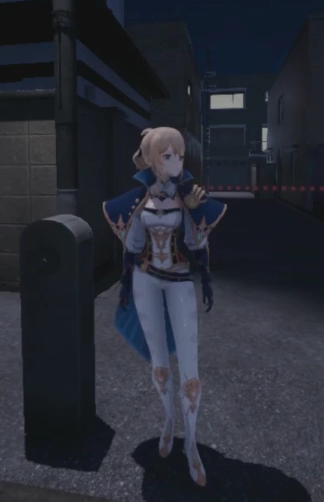
我使用了新方法,使其直接加载prefab,下面是导入原神角色琴的效果,目前只是能够同步一些动画,动作直接没有衔接,也缺少部分动作,但这不是很有趣吗?我不知道能走多远,希望顺利。
I used a new method to directly load prefabs. Here is the effect of importing the Genshin Impact character Jean. Currently, only some animations can be synchronized, and the actions are not seamlessly connected yet, with some movements still missing. But isn't this interesting? I'm not sure how far this can go, but I hope it goes smoothly. Translated by DeepSeek V3.2.

video:
1765861577150.png
 

ousawa007

Newbie
Apr 3, 2022
59
37
79
Alternatively, you could change the modelName in the ModCosplays descriptor.json. For example, by adding a number (.01, .02, etc) to the modelName, can refer to attached images for the example. You can see that outfits ZZZ appear before outfits AAA because outfits ZZZ is named as .01 while outfits AAA is named as .02. So you can make something like MySet01.01, MySet01.02, ... MySet02.01, etc. In short, the game arrange the outfits based on modelName, at least that what it seem like it, I didn't test anything too much.

Note: If you accidentally named 2 different outfits with the exact same modelName, both outfits will be loaded as the same outfits in game, so yea, just a tips to know something is named the same XD.

But not gonna lie, the folder method surprise me, I never thought of that XD.

(Edit: and yes, I think I mentioned how the game arrange outfits in the past based on displayedName, I am wrong as well hahaha, whopsie~)
question, what outfits in your folder have been updated? and are they body slider-fitted? thanks for keeping things up
 

LeoVincent69

Newbie
Aug 19, 2025
64
83
43
Does anyone know how to set the cloths hide body parts?
You can use hiddenPartsType in descriptor.json in ModCosplays. Please refer to image for example. Also give the Google Docs in the main post a read, it have a lot of things that we can experiment with. Sadly, hiddenPartsType does not support array input, which mean you can only hide 1 body part per outfits, and you need to hide 4 body parts to be considered as safe.
Want to create your own custom outfits or load one you found?
I personally just make 4 navel piercing each with 1 hiddenPartsType as the workaround hahaha XD. (Edit: Dumb me forgot to upload the images I suppose to hahaha)
 
Last edited:

LeoVincent69

Newbie
Aug 19, 2025
64
83
43
question, what outfits in your folder have been updated? and are they body slider-fitted? thanks for keeping things up
If I not mistaken (I have very very poor memory hahaha), it should be 2 casual outfits and 3 different stockings, can refer to the images attached. All of the outfits or tops should fit normal breast slider of 0 to 100 (with Breast_Big and Breast_Small shape key in blender), at least I tested on my Manaka and it work. If any outfits doesn't work, do let me know, but anything beyond breast 100 probably will have Manaka's breasts clipping out, that one is unfortunate.

Also some disclaimer, I sometime manually add the breast_small shape key if the original outfits doesn't come with it and/or deform the outfits if the original outfits already clipping through my Manaka..., but since I am not pro in blender... so some outfits might look a little weird if Manaka breast size is less than 50. Any how, have fun XD.

But yea, hmmmm, should have at least mention which outfits I add in or what kind of update I did hahaha. (Edit: I have added a line in my signature on what is newly added, if I add more new outfits in a short period of time I will just change the date and just add the new outfits name on the list. After maybe 1 weeks or so, if I don't add anymore new outfits, I will just delete the line I guess? I not sure how long I will be finding more new outfits that pique my interest for me to add them into the game though, not sure when I will stop or continue to add more hahaha XD)

(Edit 2: Added another one)
 
Last edited:

rumbleweed

Newbie
May 16, 2025
54
122
93
What should I do if the asset is not recognized as shoes or casual?

Based on the expression of the character when wearing it, some mod casual clothes such as newly added Vietnamese clothes still don't seem to be recognized as casual clothes in the game.

Shoes assets such as geta and slides are still recognized as barefoot after wearing them, and the added office shoes are played separately from the foot model.

I found in destriptor files such as shirinktype, costumecategory, and effecttype etc.; maybe I can solve it by modifying the descriptor, but I couldn't find the original data even in uabea, so I don't have any data to refer to.

Also, I remember there was a post on Reverse Bunny legs asset recognition problem in this thread, but when I looked it up... it's hard to find.
 

ExoFifth

Newbie
Nov 26, 2023
30
76
102
What should I do if the asset is not recognized as shoes or casual?

Based on the expression of the character when wearing it, some mod casual clothes such as newly added Vietnamese clothes still don't seem to be recognized as casual clothes in the game.

Shoes assets such as geta and slides are still recognized as barefoot after wearing them, and the added office shoes are played separately from the foot model.

I found in destriptor files such as shirinktype, costumecategory, and effecttype etc.; maybe I can solve it by modifying the descriptor, but I couldn't find the original data even in uabea, so I don't have any data to refer to.

Also, I remember there was a post on Reverse Bunny legs asset recognition problem in this thread, but when I looked it up... it's hard to find.
You can modify cosplay parts after import using this: https://f95zone.to/threads/secret-flasher-manaka-v1-1-3-sheablesoft.256682/post-17643015

This does support array input for hiddenPartsType, and it should still be compatible.
 
  • Like
Reactions: rumbleweed

useruser9527

Newbie
Dec 2, 2025
15
26
64
Semi-transparent materials need high specularity to look right in different lighting conditions, but there's something in the game's renderer that seems to completely disable specular reflections, even for shaders that support them.
Yes, I achieved satisfactory results at night, with slightly yellowish sperm and a sparkling luster. When I switched to daytime, oh my god, is that plaster on my body???
 

LeoVincent69

Newbie
Aug 19, 2025
64
83
43
On the Topic of Shoes:
Shoes assets such as geta and slides are still recognized as barefoot after wearing them, and the added office shoes are played separately from the foot model.
Also, I remember there was a post on Reverse Bunny legs asset recognition problem in this thread, but when I looked it up... it's hard to find.
Here is the post about the shoes issue... Yea, I have no idea why it doesn't recognize as shoes properly yet, so can't help much on that...
View attachment 5491011 View attachment 5491012

I find that the left one(mine) don't work but the right one works(post by TetoraFetora). The right one Reverse bunny bottom displays the heel successfully.Looks like it is the same program and values. So I guess maybe the problem is in the model(glb file). It is not the JSON file's problem.
-------------------------------------------------------------------------------------------------------------------------------------------
On the Topic of Casual Clothes:
Based on the expression of the character when wearing it, some mod casual clothes such as newly added Vietnamese clothes still don't seem to be recognized as casual clothes in the game.
You are not wrong because I didn't code the any hiddenPartsType into any of the outfits I added, I just named the clothes 'Casual' as in the sense of casual daily wear BUT NOT the in-game casual clothes effect... Sorry for the confusion. Anyway, in short, you can make any modded outfits you want into the in-game casual clothes by adding hiddenPartsType code into the descriptor.json in ModCosplays file. I am going to quote myself here, do give it a read, it should be sufficient I hope
You can use hiddenPartsType in descriptor.json in ModCosplays. Please refer to image for example. Also give the Google Docs in the main post a read, it have a lot of things that we can experiment with. Sadly, hiddenPartsType does not support array input, which mean you can only hide 1 body part per outfits, and you need to hide 4 body parts to be considered as safe.
-------------------------------------------------------------------------------------------------------------------------------------------
On the Topic of Descriptor.json in ModCosplays:
I found in destriptor files such as shirinktype, costumecategory, and effecttype etc.; maybe I can solve it by modifying the descriptor, but I couldn't find the original data even in uabea, so I don't have any data to refer to.
Similarly for this topic, do give a the Google Docs that is shared by TetoraFetora in the main post or the one in my own previous quote, the Google Docs have all the details you can use in the descriptor.json file. In short here is what I know that might be relevant and useful for you:

1765947486169.png
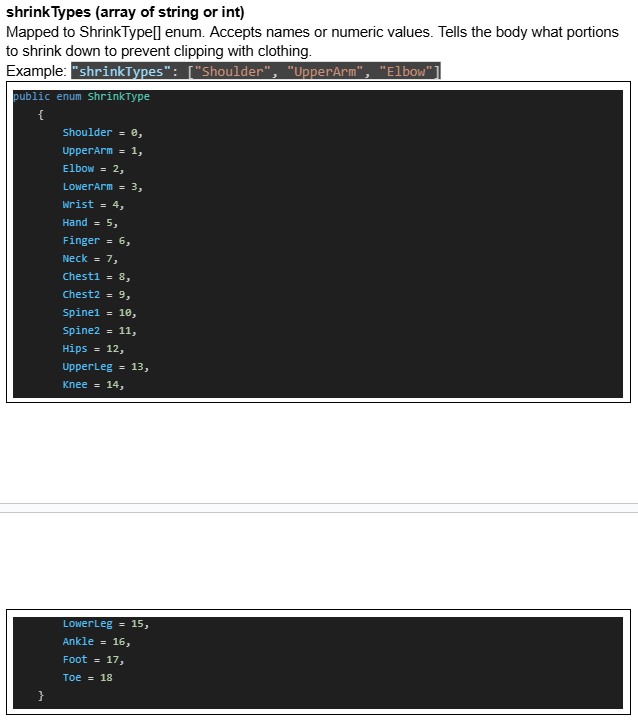
"shrinkTypes" : ["...","...","..."] to collapse the specific body part's mesh or make them look thin like a stick in game. This is useful to prevent the body part from clipping through the outfits.

1765948456085.png
"price" : value to set a price for the modded outfits in the shop.

1765948834448.png
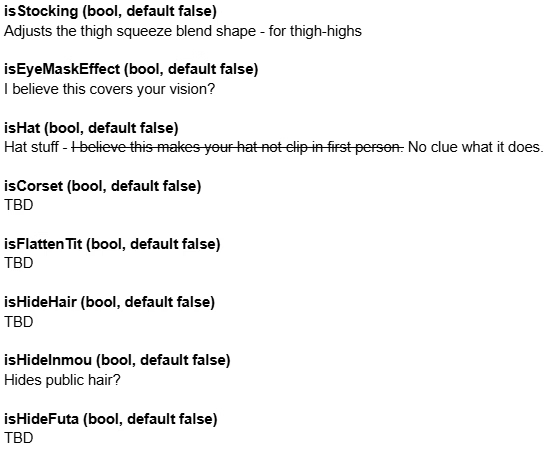
"isStocking": true to create the effects where some stockings will slightly squeeze part of Manaka's thighs.
"isEyeMaskEffect": true to create the effects of wearing blindfold. Side Note: Manaka will close both of her eye all the time during this effect.
"isCorset": true to create the effects where some clothes will slightly squeeze Manaka waist, some modded outfits might need it if Manaka waist is clipping through the outfits because the outfits is designed with the Blender's shape key in mind.
"isFlattenTit": true to flatten/shrink Manaka's tits from 3D to 2D. This is useful to Manaka's tits from clipping through the outfits because the outfits does not support Chikubi Blender's shape key.
"isHideHair": true to shave Manaka's hair. Side Note: emmm, Manaka or most VRC model probably won't have complete head/skull so, yea, you can see through them.
"isHideInmou": true to shave Manaka's public hair.
"isHideFuta": true to disable Manaka's futa. (I never tested this one honestly but I am guessing)

1765949411375.png
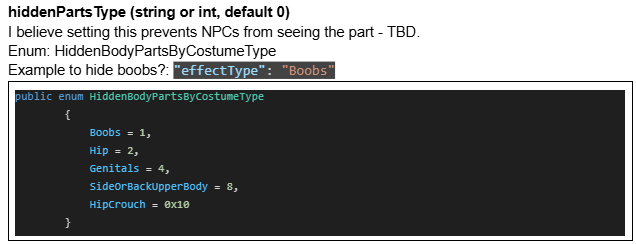
"hiddenPartsType": "..." to create the effect of the in-game Casual clothes. From what I know you need to hide "Boobs", "Hip", "Genitals", "SideOrBackUpperBody" to be completely safe from NPC (I never test "HipCrouch"...). However, one modded outfits can only have 1 hiddenPartsType because the variable does not support array input as of current.

Other codes that I didn't mentioned is because I either didn't test them or I did but I just kind of forgot what they do... Just as a bonus, I never tested the code below but here is what I suspect them to do or related to...
1765949880176.png

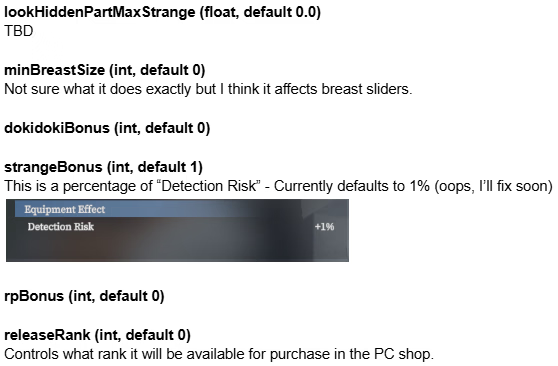
"lookHiddenPartMaxStrange": value I suspect it is related to the NPC detection bar maximum value before it stop (become gray color)
"minBreastSize": 50 forcefully reset your Manaka's breast size to 50 (or any specific value, 50 for example). This is implemented because some outfits (for example, if I recall correctly the original in-game Ninja clothes?) does not support Breast_Small Blender's shape key and it might be hard to properly add the shape key because the clothes mesh will be messy... So SheableSoft (the game creator) probably just add this code to forcefully make those outfits work.
"dokidokiBonus": value I suspect it is related to either the Unease modifier in game OR how fast your Manaka heartbeat will be OR both? It is related to arosal bonus as pointed out by ExoFifth.
"strangeBonus": value well, detection risk... it right there in the images XD
"rpBonus": value I suspect the RP multiplier bonus
"releaseRank": value I suspect the rank your Manaka need to achieve to unlock the modded outfits in shop. Of course useless for already max rank Manaka but usable for new Manaka playthrough ;P
-------------------------------------------------------------------------------------------------------------------------------------------
Anyway that is all I gonna comment, sorry if this get ridiculously too long, very very sorry. But here is a photo of my Manaka closing her eye in the dark. Enjoy.
(Edit: Correction)
 
Last edited:

ExoFifth

Newbie
Nov 26, 2023
30
76
102
On the Topic of Shoes:


Here is the post about the shoes issue... Yea, I have no idea why it doesn't recognize as shoes properly yet, so can't help much on that...

-------------------------------------------------------------------------------------------------------------------------------------------
On the Topic of Casual Clothes:

You are not wrong because I didn't code the any hiddenPartsType into any of the outfits I added, I just named the clothes 'Casual' as in the sense of casual daily wear BUT NOT the in-game casual clothes effect... Sorry for the confusion. Anyway, in short, you can make any modded outfits you want into the in-game casual clothes by adding hiddenPartsType code into the descriptor.json in ModCosplays file. I am going to quote myself here, do give it a read, it should be sufficient I hope

-------------------------------------------------------------------------------------------------------------------------------------------
On the Topic of Descriptor.json in ModCosplays:

Similarly for this topic, do give a the Google Docs that is shared by TetoraFetora in the main post or the one in my own previous quote, the Google Docs have all the details you can use in the descriptor.json file. In short here is what I know that might be relevant and useful for you:

View attachment 5535464
"shrinkTypes" : ["...","...","..."] to collapse the specific body part's mesh or make them look thin like a stick in game. This is useful to prevent the body part from clipping through the outfits.

View attachment 5535482
"price" : value to set a price for the modded outfits in the shop.

View attachment 5535486
"isStocking": true to create the effects where some stockings will slightly squeeze part of Manaka's thighs.
"isEyeMaskEffect": true to create the effects of wearing blindfold. Side Note: Manaka will close both of her eye all the time during this effect.
"isCorset": true to create the effects where some clothes will slightly squeeze Manaka waist, some modded outfits might need it if Manaka waist is clipping through the outfits because the outfits is designed with the Blender's shape key in mind.
"isFlattenTit": true to shrink Manaka's tits or make them 2D. This is useful to Manaka's tits from clipping through the outfits because the outfits does not support Chikubi Blender's shape key.
"isHideHair": true to shave Manaka's hair. Side Note: emmm, Manaka or most VRC model probably won't have complete head/skull so, yea, you can see through them.
"isHideInmou": true to shave Manaka's public hair.
"isHideFuta": true to disable Manaka's futa. (I never tested this one honestly but I am guessing)

View attachment 5535496
"hiddenPartsType": "..." to create the effect of the in-game Casual clothes. From what I know you need to hide "Boobs", "Hip", "Genitals", "SideOrBackUpperBody" to be completely safe from NPC (I never test "HipCrouch"...). However, one modded outfits can only have 1 hiddenPartsType because the variable does not support array input as of current.

Other codes that I didn't mentioned is because I either didn't test them or I did but I just kind of forgot what they do... Just as a bonus, I never tested the code below but here is what I suspect them to do or related to...
View attachment 5535501

"lookHiddenPartMaxStrange": value I suspect it is related to the NPC detection bar maximum value before it stop (become gray color)
"minBreastSize": 50 forcefully reset your Manaka's breast size to 50 (or any specific value, 50 for example). This is implemented because some outfits (for example, if I recall correctly the original in-game Ninja clothes?) does not support Breast_Small Blender's shape key and it might be hard to properly add the shape key because the clothes mesh will be messy... So SheableSoft (the game creator) probably just add this code to forcefully make those outfits work.
"dokidokiBonus": value I suspect it is related to either the Unease modifier in game OR how fast your Manaka heartbeat will be OR both?
"strangeBonus": value well, detection risk... it right there in the images XD
"rpBonus": value I suspect the RP multiplier bonus
"releaseRank": value I suspect the rank your Manaka need to achieve to unlock the modded outfits in shop. Of course useless for already max rank Manaka but usable for new Manaka playthrough ;P
-------------------------------------------------------------------------------------------------------------------------------------------
Anyway that is all I gonna comment, sorry if this get ridiculously too long, very very sorry. But here is a photo of my Manaka closing her eye in the dark. Enjoy.
Correct, except dokidokiBonus, which is arousal bonus, and isFlattenTit just flattens nipples so they don't poke through.
 
5.00 star(s) 1 Vote