Mod Unity [Secret Flasher Manaka] Custom Missions 1.1.9 & Version 2 Beta

5.00 star(s) 1 Vote

beemzz

Newbie
Mar 11, 2018
20
5
121
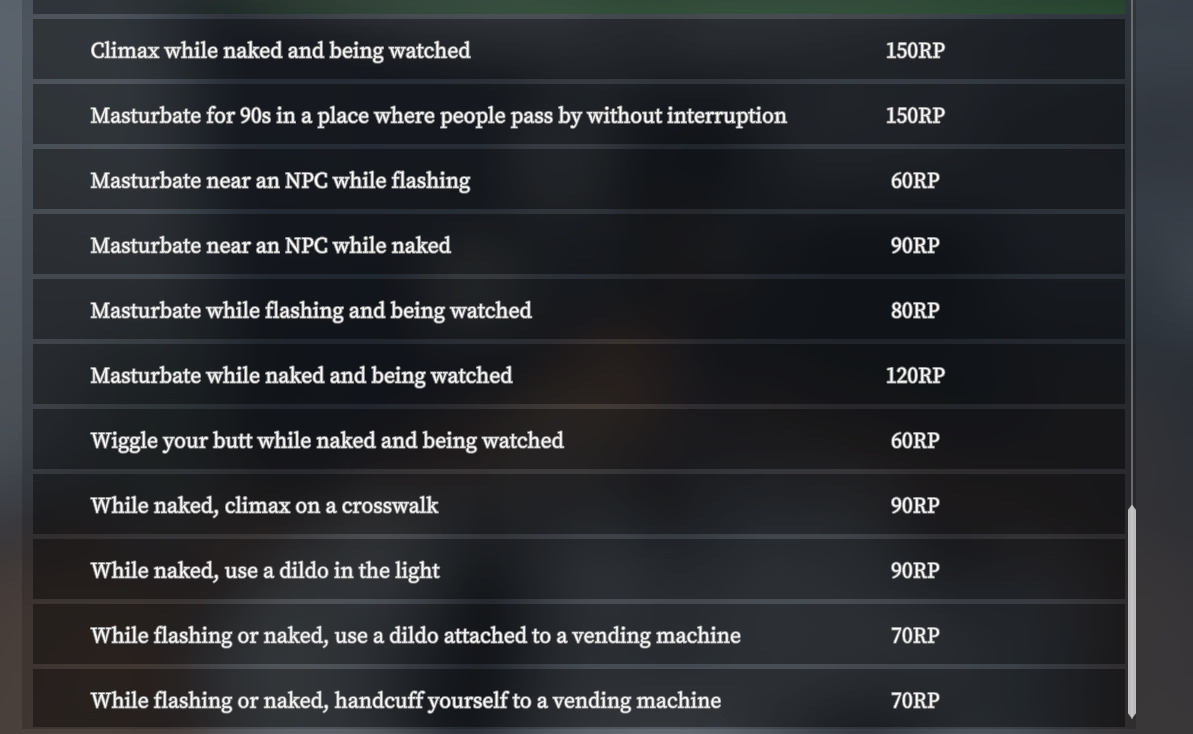
Yes. My missions will be in the mission list, at the bottom. Look at "Residence" in the mission tab and see if you can see " Masturbate while flashing and being watched" or any other mission I've listed in my posts.

EDIT: Also, if you complete the missions then return home, looking in your mission tab they won't show the "Completed" medal nor a completion multiplier.
Oh jeez yes its all worked ahahah! TYSM im so stupid ahah im thinking its standart game missions and dont mind about all this not completed :D
Sry for interrupt
1768846846484.png
 

AkameVanish

Newbie
Jul 21, 2022
31
52
79
I used the latest version of the custom mission V2 with this mod, and the game was extremely laggy. It seems that there was a performance issue.
I could try optimizing the mod but that would be too much work. Maybe your pc specs arent too good so its lagging. I didnt have problems and i didnt hear anyone else complaining about that. Im afraid i cant do anything about that.
 

|||Byo|||

Newbie
Mar 29, 2021
20
55
187
Liking the mod so far but found the customization a bit overwhelming. I notice you provided some examples on how to use the various customized valuesto support different styles of gameplay. Perhaps you could provide different templates for each style of gameplay, and put all the detailed customization into advanced settings. For example, I can just pick an option that says Shibari Rope Ecstasy and the mod will adjust the settings automatically.

At last, is it possible to make the plug animation into a separate mod?
Made some changes to Custom Ecstasy (and Moaning2 too if you're interested), the Custom version got pretty out of hand and it's best to not bloat it if possible, so ... made a Defined Ecstasy script, which is a bit more tailored, it would be much easier to implement playstyles there instead (if anyone has a good combo, let me know, I'll put it in, for now I'm out of ideas what else would work nicely). Also the Anal Plug Animation is a separate mod now too.

A really good addition to this mod would be a functional gag to muffle the moaning sounds and range. We already have some gag models ingame but they currently don't do anything
Well, it would be better with some muffled moaning sounds (I'll gladly put them in if somebody would supply them), but it's not terrible either, go take a look at the link above.
 

SekiYuri

Newbie
Apr 14, 2023
46
70
179
The 90s mission only increases completion when I'm near NPC instead of just "where ppl pass by"
Handcuffing to the glass door on the outside of the apt doesn't count, can you make it count that side as well as inside?
v6.1: Fixed issues mentioned by axelaen, added "While naked" to the 90s masturbation mission's text (this is how I intended the mission, I just forgot to add the text).

EDIT: Expect v6.2 shortly, I've already noticed an issue while I was testing one of the missions.
EDIT: v6.2 uploaded here: Fixed a zone being shown from when I was changing some of them to cuboid and testing they worked
 
Last edited:

LoidM42

Newbie
Dec 13, 2018
37
47
156
Made some changes to Custom Ecstasy (and Moaning2 too if you're interested), the Custom version got pretty out of hand and it's best to not bloat it if possible, so ... made a Defined Ecstasy script, which is a bit more tailored, it would be much easier to implement playstyles there instead (if anyone has a good combo, let me know, I'll put it in, for now I'm out of ideas what else would work nicely). Also the Anal Plug Animation is a separate mod now too.


Well, it would be better with some muffled moaning sounds (I'll gladly put them in if somebody would supply them), but it's not terrible either, go take a look at the link above.
there are many royalty free ones from from dedicated nsfw VAs
I know Geministarsign1 and 728Kaya have some categories dedicated to gags
 
Last edited:

axelaen

Newbie
Jun 19, 2018
91
43
188
EDIT: v6.2
just wondering, why don't you count using a dildo as masturbating?

edit: just make the coat be placed outside since the game already has the mission to put the coat outside the building and go to top floor
 
Last edited:

axelaen

Newbie
Jun 19, 2018
91
43
188
[couple of bugs]
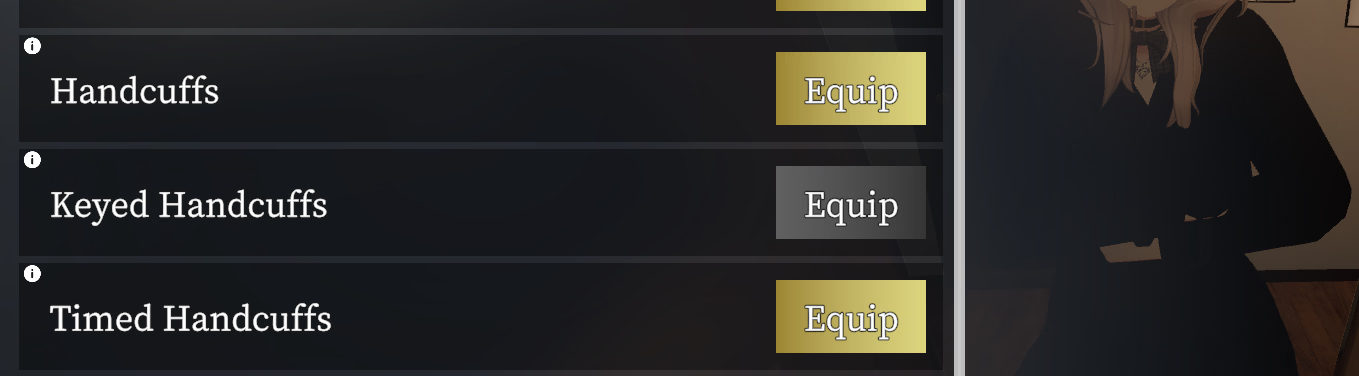
One more major issue: when I equipped timed cuffs and then got kidnapped, they used keyed cuffs. And then after finding the keys and unlocking keyed cuffs, the timed cuffs stayed equipped permanently, even though I can use items normally.
I tried restarting game, emergency escape etc and they're still on. Any help?

edit: the same problem happens with the normal handcuffs. you can see the result in my screenshot. hands are free but game thinks both cuffs are equipped. halp lol

edit2: as a workaround, using the mod in eltiachan's link below and handcuffing then unhandcuffing reset them.

1768874579994.png
 
Last edited:

SekiYuri

Newbie
Apr 14, 2023
46
70
179
just wondering, why don't you count using a dildo as masturbating?
It technically would be, but the amount of missions going at the same time would just create a high RP per second that I wanted to avoid in case anyone didn't want "cheat" type missions. Plus it then let's me make more unique missions specific to dildos.

EDIT: On your edit point, I was going to make it to leave the coat anywhere outside of the elevator, but I couldn't figure out how to make a "not zone" without manually creating several dozen zones that covered the entire map except the elevator. I settled for the lobby since I consider it more challenging than outside - NPCs pass through the lobby a good bit and also group up if they're waiting for the elevator, whereas outside wouldn't be as "risky".
 
Last edited:

eltiachan

Member
Sep 2, 2023
191
301
182
One more major issue: when I equipped timed cuffs and then got kidnapped, they used keyed cuffs. And then after finding the keys and unlocking keyed cuffs, the timed cuffs stayed equipped permanently, even though I can use items normally.
I tried restarting game, emergency escape etc and they're still on. Any help?

edit: the same problem happens with the normal handcuffs. you can see the result in my screenshot. hands are free but game thinks both cuffs are equipped. halp lol

View attachment 5642528
https://f95zone.to/threads/secret-f...ons-1-1-9-version-2-beta.263276/post-18621867
 

SekiYuri

Newbie
Apr 14, 2023
46
70
179
One more major issue: when I equipped timed cuffs and then got kidnapped, they used keyed cuffs. And then after finding the keys and unlocking keyed cuffs, the timed cuffs stayed equipped permanently, even though I can use items normally.
I tried restarting game, emergency escape etc and they're still on. Any help?

edit: the same problem happens with the normal handcuffs. you can see the result in my screenshot. hands are free but game thinks both cuffs are equipped. halp lol

View attachment 5642528
I don't know if it will help your specific issue, but I made this and I got it to remove self-applied handcuffs. Put the file inside in your CustomMissions (v1) folder and there will be a small circle near the exit to Manaka's house that will force remove handcuffs. If it doesn't work, try the post mentioned by eltiachan above.
 

eltiachan

Member
Sep 2, 2023
191
301
182
I’m not entirely sure what you’re having trouble with, but I’ll share what I’m using here in case it helps.

SecretFlasherManaka v1.1.3
BepInEx 6.0.0-be.738
SFM_custom_mission_v2_0.5.1
I ran into this bug and I managed to resolve it by disabling all the plugins (DLL) I am using except Cosplay, Uncensor and Texture Replacement. My suspicious is that it was NPC Behavior Mod that is conflicting.

When the bug occurs, the mission circle disappears. But once I disable most of my plugins, the circle stays.
 
  • Like
Reactions: ria.jamie

axelaen

Newbie
Jun 19, 2018
91
43
188
EDIT: On your edit point, I was going to make it to leave the coat anywhere outside of the elevator, but I couldn't figure out how to make a "not zone" without manually creating several dozen zones that covered the entire map except the elevator. I settled for the lobby since I consider it more challenging than outside - NPCs pass through the lobby a good bit and also group up if they're waiting for the elevator, whereas outside wouldn't be as "risky".
Could you do it the same way the game checks the "outside the apartment" condition? I haven't looked into the custom mission code so idk if that's possible.

> I settled for the lobby since I consider it more challenging than outside
but you have to pass through the lobby twice with no coat when you leave it outside, while if you leave it in the lobby that's safer. so outside is both more evil and lets players do missions more efficiently.
 
Jun 24, 2018
120
256
190
I have this problem too. Problem not mission on other mods. Json photo problem cosplay his do not change clothes
View attachment 5637909
Sorry for taking up everyone’s time.
I’ve made some fixes, so I’d appreciate it if you could try them out when you have the time.

I’ve added an option for cases where a photo cannot be selected, so you should be able to continue with the story for now. I’ve also expanded the shape and size of the area.

The code itself is fairly simple and doesn’t seem to contain any mistakes, and since the bug doesn’t occur at all in my environment, it’s been difficult to track down and fix. Sorry for the trouble.

ria.jamie This json shows whats going wrong and i dont think its your mod. ive noticed the latest version of custom missions v2 disconnects between what cosplay manaka is wearing and what cosplay the mod thinks shes wearing. it happened to me while testing the aftermath mod when i was adding it to hunted. in Vsd177s photo it thinks manaka is wearing the school hoodie outfits rather than the bikini which is why its failing. i havent worked out whats causing the disconnect to happen though so i cant prove for sure its the cause.

- If I set the suspicion bar all the way to 1.0, with nothing exposed (coat on) you get a game over as soon as they see you lol. They don't walk toward you or anything, the game just treats it as you're caught
- The chasing speed is a bit fast. Make it a setting.
- In the park, I saw an npc walking into the corner of a hedge in the double path past the vending machines. And in the clothing shop, one got stuck on the single-mannequin stand near the front. I didn't see that before your mod so I'm guessing those're yours.
Thank you very much for the feedback.
- i should explain that suspicion bar basically its how suspicious the hunters get as soon as they see you. i have a thing that resets their suspicion to the level of that setting so they can see you naked and not freak out but if its too high sometimes it goes up too high before i can reset it making you lose. i cant just disable their suspicion otherwise the circle doesnt appear at all. the idea is to set it as high as you can without getting caught but i should probably just remove the option and leave it at its default.
- theyre meant to be fast but i like making options so ill make it configurable in the next day or so
- the hunters arent very smart because i didnt want to hard code every level with points so they just use the same places the drone missions do. they shouldnt get stuck for too long though after 10 seconds or so the game should notice theyre stuck and get them to go somewhere else. i also didnt realise they would be in the clothing store i might disable that since that seems pretty unfair. if npcs are doing dumb things theyre probably from my mod.
 
  • Like
Reactions: ria.jamie and twoer

beemzz

Newbie
Mar 11, 2018
20
5
121
Sorry for taking up everyone’s time.
I’ve made some fixes, so I’d appreciate it if you could try them out when you have the time.

I’ve added an option for cases where a photo cannot be selected, so you should be able to continue with the story for now. I’ve also expanded the shape and size of the area.

The code itself is fairly simple and doesn’t seem to contain any mistakes, and since the bug doesn’t occur at all in my environment, it’s been difficult to track down and fix. Sorry for the trouble.
Did you write the code for Mistake yourself, or did you use some kind of user interface?
I really want to create missions in a similar style, with dialogues and triggers, but I have no knowledge of how JSON works or of programming in general. For me, code is a real disaster
At the same time, I really want to bring my ideas to life for the entire SFM community. If there are any tools that can help with creating missions, could you please share their names?
Unfortunately, as is obvious, the V.1 mission editor/user program is not suitable for more complex missions in the .code format.
use translator, dont blame me pls~

P.S. btw i open mistake with "visual studio code" for fixing changing room error but structure of code... boy oh boy... so much difficult things for my potato brain :D
 
Last edited:

beemzz

Newbie
Mar 11, 2018
20
5
121
i need guide to create custom missions so bad, im literally feeling despair when starting try to sort all this things where is my legendary hero of python with user interface ,_,
 

Doppio1234

New Member
Jun 21, 2025
11
16
12
i need guide to create custom missions so bad, im literally feeling despair when starting try to sort all this things where is my legendary hero of python with user interface ,_,
beemzz
First you can give it a try this

Since you asked so nicely and also because ai makes writing things much easier than they used to be. My only condition is that once you start making your own missions you have to let me know so I can try them.


Part 1: Getting Started - Your First Mission!
Welcome! This tutorial will guide you through creating your first custom mission. We’ll start with something simple – just printing a message to the console – and gradually build up to a more complex mission.

A Quick Note on Versions: We're focusing on version 2 (v2) of the scripting system, which offers significantly more power than v1. While some concepts from v1 might be familiar, we’ll dive straight into v2 to unlock its full potential.

Step 0: Setting Things Up
Before we begin, you'll need to install the mod itself. There are several guides available in this thread; I'll link to a good one here once someone shares it! (Placeholder for Link).

1. Understanding Threads and Labels – The Building Blocks
Think of missions as being run by "threads." A thread is essentially a sequence of instructions that the game executes, step-by-step. You can have multiple threads running within a mission, but we'll start with just one to keep things manageable.

Labels are like named checkpoints in your script. They mark specific locations where the execution flow can jump to. This allows you to organize your code into logical blocks and control which parts of your mission run when.

2. Creating Your First Thread
Here's the core command that brings it all together:

Code:
mission = CreateThread("testmission")
This line creates a new thread named "testmission." It tells the game, “Hey, I want this to run the code within the label called ‘testmission.’”

3. Defining Your Label – Where the Action Happens
Now, let's define that label:

Code:
testmission:
Important: Notice the colon ( : ) at the end of "testmission." This is essential! It’s how you tell the game that this line marks a label. Any code indented below the label will be executed when the thread runs.

Indentation and Code Structure
Consistent indentation is absolutely crucial for your script to work correctly. The game uses indentation – typically a single Tab character – to determine which lines of code belong to which labels or control structures (like if statements). Make sure you use a consistent number of spaces or tabs for each level of indentation; mixing them up can lead to unexpected errors!

4. Your First Command: Logging a Message
Let’s add our first command within the testmission: block:

Code:
Log("I'm alive")
The Log() function displays messages in the game's secondary console window (usually black). This is your best friend when developing missions! Errors and any output from your Log() commands will appear here. It’s highly recommended to run the game in a windowed mode so you can easily see this console, or use a second monitor if possible.

5. Running Your Mission – Let's See It Work!
  1. Create a Folder: In your <game folder>/CustomMissions2/ directory, create a new folder named super_awesome_mission (or any name you prefer).
  2. Create the Code File: Inside that folder, create a file named main.code. The filename must end in .code. You might need to adjust your Windows settings to show file extensions and prevent it from accidentally being saved as main.code.txt.
  3. Paste Your Code: Open main.code in a text editor and paste the following code:

    Code:
    mission = CreateThread("testmission")
    
    testmission:
        Log("I'm alive")
  4. Save & Launch: Save the file. Start up the game, load a save, and head to your apartment. You should see "I'm alive" appear in the console window!
View attachment 5578655
Congratulations! You’ve just written your first mission! It might not be flashy, but you built it yourself – that's what makes it awesome.

If it doesn't work, look at the console window for any red lines. I'll go over these a little bit in the next post, but there's so many possible causes I'll wait and see what acutally comes up for everyone :)
 
5.00 star(s) 1 Vote