

Hello, this error happens at church's (my room)View attachment 5293953
"Storage error fix"
Jabberwock
This is to fix a warehouse error.
Please note,
If you run this on a warehouse that is not experiencing errors,
the items stored inside cannot be guaranteed.
Only those who experience an error when trying to open the app and are unable to use it should use this patch code.
OK, let's run the modified code.
Are you sure?
Y/N ?

- Jun 24, 2018
- 1,659
- 2,766
- 458
You literally quoted how to fix it.Hello, this error happens at church's (my room)
Sorry, I meant to replyYou literally quoted how to fix it.


JakeMSG
Active Member
- Jul 2, 2017
- 772
- 1,551
- 358
You need to go to Jabberwock, and choose that option, to fix the Warehouse bug (from My Room) that you're experiencing.Sorry, I meant to reply
Maybe someone can help me. (I've tried searching but the term is too generic)
Around half of the battles. After winning the battle. The game doesn't freeze but stops continuing counting up the XP.
I'm forced to tab to another window in my windows 10 os and back a few times to get it unstuck and finish the counting of the XP before I can continue.
IT'S HELLA ANNOYING. Especially with the deadbeat grind the game has.
I've got a top of the line gaming rig (4080 Super) so that's not it.
Changing stuff in the performance did nothing.
Around half of the battles. After winning the battle. The game doesn't freeze but stops continuing counting up the XP.
I'm forced to tab to another window in my windows 10 os and back a few times to get it unstuck and finish the counting of the XP before I can continue.
IT'S HELLA ANNOYING. Especially with the deadbeat grind the game has.
I've got a top of the line gaming rig (4080 Super) so that's not it.
Changing stuff in the performance did nothing.
Callum1998
Newbie
- Mar 10, 2024
- 15
- 12
- 140
Had the same issue.View attachment 5296804
i applied the mod and the save
Just create ,,dummy" files, aka files with the same name at the place the game wants them to be, e.g. ,,Speedhax.js" in the folder ,,plugins".
Got most of the mod working afterwards except for the backupworlds.
JakeMSG
Active Member
- Jul 2, 2017
- 772
- 1,551
- 358
View attachment 5296804
i applied the mod and the save
My bad, I had leftover plugins from my own hacks that I use.Had the same issue.
Just create ,,dummy" files, aka files with the same name at the place the game wants them to be, e.g. ,,Speedhax.js" in the folder ,,plugins".
Got most of the mod working afterwards except for the backupworlds.
Removed them and upped a new version of the Mod, try it out, things should be fixed in it (Backup Dimension function should work, too, let me know if it doesn't).
Idkwhattoputheresoyea
New Member
- Jul 1, 2021
- 3
- 0
- 87
Hey i just tried it and got the exact same errorMy bad, I had leftover plugins from my own hacks that I use.
Removed them and upped a new version of the Mod, try it out, things should be fixed in it (Backup Dimension function should work, too, let me know if it doesn't).

Not sure if im doing something wrong
JakeMSG
Active Member
- Jul 2, 2017
- 772
- 1,551
- 358
which version of the mod did you download?Hey i just tried it and got the exact same error View attachment 5308599
Not sure if im doing something wrong
Idkwhattoputheresoyea
New Member
- Jul 1, 2021
- 3
- 0
- 87
The one you posted literally todaywhich version of the mod did you download?

- Jun 24, 2018
- 1,659
- 2,766
- 458
Because you have to extract the game from the .rar file first...? It's like a zip file. Use winrar, though now I think Windows can do it natively too. Not sure if it was implemented yet.When I try to download the newest version of the game, it is just one massive .rar file rather than a folder with a game in it, does anyone know why?

Sarojin
Well-Known Member
- Jul 9, 2017
- 1,253
- 1,550
- 398
When I try to download the newest version of the game, it is just one massive .rar file rather than a folder with a game in it, does anyone know why?
Here's a basic internet survival guide for you to save you from all kinds of trouble. (not just technical, viruses and such too)
If you're not sure what something is, use a search engine, in this case type into the search engine, what is a .rar file. You can do this with tons of stuff.
JakeMSG
Active Member
- Jul 2, 2017
- 772
- 1,551
- 358
You're pasting the Mod wrong probably, I've double checked, the current Mod files in the "js" folder have no more mentions or calls to "Speedhax" plugin. You shouldn't be getting this error.The one you posted literally today View attachment 5309137
Make sure you paste, from the "Mod" folder, the "www" folder in your game folder (where you should see another "www" folder), then when prompted, agree to overwrite files). (Yes, it should work whether you use the Translated version or not).
If it still doesn't work, just plug these files in the "www\js\plugins" folder, those are the plugins being called (but again, you shouldn't be having this error with the current mod files I share):
Edit: Dawg why's this shit flagged as a virus, it's just the Cliplogger shit are you for real
Edit 2: Alright, I re-upped it and deleted the Cliplogger exe, should still work and give no errors
Last edited:
JakeMSG
Active Member
- Jul 2, 2017
- 772
- 1,551
- 358
Yes.The Opening song is a banger. Does it have any full version of it somewhere in internet? it seems i cant find it
It's part of the game files (in "www\audio\bgm"), useYou must be registered to see the linksto decrypt the files, then find the one for the Title Menu.
Idkwhattoputheresoyea
New Member
- Jul 1, 2021
- 3
- 0
- 87
While checking the compendium ive noticed some animations are still locked even with level 100
What am i supposed to do here to unlock those?
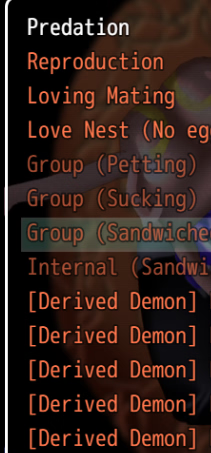
What am i supposed to do here to unlock those?
Last edited: