

which one should we be using then?There's a mismatch between the game version and the version the TR was made for

Flowercat
Newbie
- Jan 4, 2018
- 86
- 204
- 262
which one should we be using then?
To tell which game version to use, you should look at the part of the patch download that says "Gamev(numbers)" the numbers tell you the version of the game the patch is made for which as of posting that's 2.11. I'll be uploading whatever game version the patch is meant for whenever the patch updates, so check out my quoted post for the correct version of the game for the most recent patch.

Flowercat
Newbie
- Jan 4, 2018
- 86
- 204
- 262
Just going to quote this here so people see it without needing to scroll back upEDIT: I decided to convert the FAQ and tips section of the google doc into a PDF to put into the game folders for future downloads, this will hopefully help people figure out whats going wrong with their game if they have problems or otherwise need tips about things. I wanna say thanks to Noctilight for giving me permission to outright take part of the doc to make this and for constructing the original google doc in the first place. I've restructured it and made some minor edits to remove mentions of the rest of the doc (since its not there) and added in a link at the top so that if people are looking for the full walkthrough they can easily find it. The first section is troubleshooting so now if someone can't see sprites or gets an error they could potentially see a fix for it in the game folder and not ask a question in this thread that's been answered about 20 times already. I've also already replaced the 2.11 version of the game I originally uploaded with the one with this PDF in it.
so uuuhmm i got some issues while runing the game soo, its not the game or the translation the problem is actually that the game gets insanely laggy to the point where i cant even see whats happening in the scenes :/ and it only lags insanely hard when the scenes start to happen, i tried everything to decrease the frame drops when the scenes are happening but nothing seems to be working ( i have a laptop with no gpu but still this thing shouldnt be geting 3fps when the scenes are happening) could someone maybe give me the full gallery? or tell me how to fix these terrible framedrops, i tried to lower all the ingame settings and used the performance upgrade plugin for rpgm mv but that didnt help with the h scenes.
Last edited:
Flowercat
Newbie
- Jan 4, 2018
- 86
- 204
- 262
Assuming by this that you went to performance settings and set everything to be at its least intesive, I honestly don't know what the problem could be other than potentially having a program thats hooked into the game running at the same time, something like Mtool, but from my experience with doing that theres only issues if you use the speed up hotkey or have autosaves enabled. I think the scenes are just really performance intensive.the problem is actually that the game gets insanely laggy to the point where i cant even see whats happening in the scenes
i tried to lower all the ingame settings and used the performance upgrade plugin for rpgm mv but that didnt help with the h scenes.
Is it possible to run the patcher through Wine? I have dotnetdesktop7 installed but get the following error when trying to run the patcher.
Code:
wine SHRIFT_II_Translation_Patch.exe
Unhandled exception. System.IO.FileLoadException: Could not load file or assembly 'SHRIFT II Translation Patch
, Version=1.5.0.0, Culture=neutral, PublicKeyToken=null'. Access denied.
File name: 'SHRIFT II Translation Patch, Version=1.5.0.0, Culture=neutral, PublicKeyToken=null'
---> System.UnauthorizedAccessException: Access denied. (0x80070005 (E_ACCESSDENIED))
wine: Unhandled exception 0xe0434352 in thread 24 at address 7BC225D7 (thread 0024), starting debugger...
Fatal error. Internal CLR error. (0x80131506)
Last edited:
so ur saying that i cant really do anything to fix this issue?Assuming by this that you went to performance settings and set everything to be at its least intesive, I honestly don't know what the problem could be other than potentially having a program thats hooked into the game running at the same time, something like Mtool, but from my experience with doing that theres only issues if you use the speed up hotkey or have autosaves enabled. I think the scenes are just really performance intensive.
None iirc since it is saved with a different method compared to regular rpgm. You can still use mtool to edit your level though.is there a way to change the players level via notepad or; like edit a text file to increase the level of the player?
Flowercat
Newbie
- Jan 4, 2018
- 86
- 204
- 262
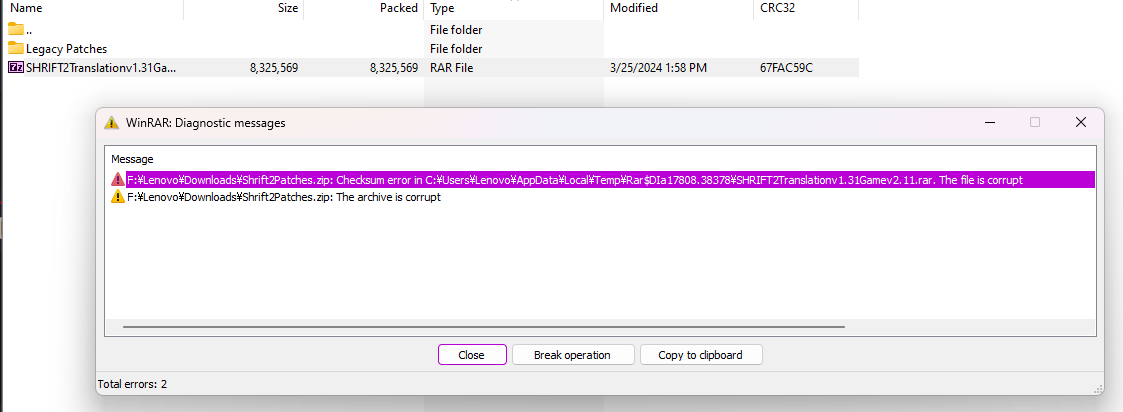
Have you tried JUST downloading the "SHRIFT2Translations1.31Gamev2.11.rar" on its own instead of the whole folder? Instead of pressing the green download at the top just double click on the translation patch.I'm having this error whenever I try to do anything with the new translation. It's the same story on 7zip. I've attempted to download this file from the MEGA link a couple times, and it hasn't worked either time.
View attachment 3508213
This solution worked. Thank you very much!Have you tried JUST downloading the "SHRIFT2Translations1.31Gamev2.11.rar" on its own instead of the whole folder? Instead of pressing the green download at the top just double click on the translation patch.
altertherevenge
New Member
- Jun 13, 2023
- 8
- 0
- 176
Flowercat
Newbie
- Jan 4, 2018
- 86
- 204
- 262
Locale issue, either you need to get a Japanese Locale on your computer or if you used winrar you need to press ctrl+e and select japaneseguys i'm frozen in the beginning, there is any way to fix it?
Flowercat
Newbie
- Jan 4, 2018
- 86
- 204
- 262
Check the first reply under the initial post, the linked guide has a savehate being that guy but anyone got a full save that would work for 2.11
howdoIwalk
Newbie
- Nov 28, 2019
- 26
- 12
- 219
With using the emulator that was suggested before, the cheat it brings lets me cheat getting exp, money, and resetting the husk state. I find that resetting all states just before an orgasm finishes resets me back to 1
games you fight monster girl there 62studio games lust grimm/lust friend/lust grimm again/succubus puttel/succubus in wonderland and there some circle-tekua games like Lilith in nightmare and there other gamesanyone know any games that are similar to shrift or mgq?