

- Thread starter BaasB
- Start date
4.70 star(s)
129 Votes
Ozkan_TURAN
Newbie
- Nov 26, 2017
- 56
- 137
- 52
You must be registered to see the links
that the update is coming out this weekend.
derakino999
Well-Known Member
- Sep 30, 2017
- 1,720
- 1,035
- 307
well, according to google translate it just saysYou must be registered to see the linksthat the update is coming out this weekend.
but who knows what he means, maybe he's going on a picnicI have a feeling I'll be able to go this weekend
Ozkan_TURAN
Newbie
- Nov 26, 2017
- 56
- 137
- 52
Grok's translation iswell, according to google translate it just says
but who knows what he means, maybe he's going on a picnic
Since the original timeframe for the update's release is early-to-mid December, I'm 99% sure he's talking about the update. When he drops random OOC tweets, it's usually in response to something he tweeted or retweeted before. If you check his feed, there's nothing to tie it to.I have a feeling I can make it this weekend.
And if Nennai is bright enough to make SiNiSistar from scratch, he'd have been bright enough to recognize how that post would be misinterpreted by his fans if it really was about something else. But maybe he's cruel. Lilia and Rabiane would certainly make that conclusion.
derakino999
Well-Known Member
- Sep 30, 2017
- 1,720
- 1,035
- 307
i was joking but as a heads up, ike is the plain imperative of ikuGrok's translation is
Since the original timeframe for the update's release is early-to-mid December, I'm 99% sure he's talking about the update. When he drops random OOC tweets, it's usually in response to something he tweeted or retweeted before. If you check his feed, there's nothing to tie it to.
And if Nennai is bright enough to make SiNiSistar from scratch, he'd have been bright enough to recognize how that post would be misinterpreted by his fans if it really was about something else. But maybe he's cruel. Lilia and Rabiane would certainly make that conclusion.
it means go, come, make it, even cum depending on the context
and here there is no context since it's a single tweet, BUT we all know the context
so again ye i was joking
Sumimachine
Newbie
- Oct 26, 2023
- 56
- 36
- 62
>Sinisistar 2 pagei was joking but as a heads up, ike is the plain imperative of iku
it means go, come, make it, even cum depending on the context
and here there is no context since it's a single tweet, BUT we all know the context
so again ye i was joking
>Announces incoming update mid dec
>The only they talk about
Maybe they going picnic hmm
KoKo989898
Newbie
- Feb 22, 2025
- 18
- 33
- 32
That's how japanese work.>Sinisistar 2 page
>Announces incoming update mid dec
>The only they talk about
Maybe they going picnic hmm


trollface25
Newbie
- Feb 20, 2021
- 32
- 13
- 42
I don't think so. As I believe the Spiders were added post launch, and were just meant to be a small addition to the game.
Hence the lack of any persistent debuffs/states from them
Hence the lack of any persistent debuffs/states from them

kokoro1000
Member
- Dec 21, 2018
- 163
- 261
- 82
For 1440x720 resolution you need 6-8GB ram to play it in 60 FPS all the time. Game uses randomly 2-4GB ram depending on scenes. For example: during fight with northeast village boss, game likes to use around 3-3.5GB ram. It should run smoothly even on Intel Graphic card, and 100% smoothly on any Nvidia card.What are the hardware requirements to run Sinisistar 2 on a pc on low graphics smoothly without lags?
For 720x360 resolution you need 4-6GB ram and Intel Graphic card.
If you have Nvidia card you can enable 1/2 refresh rate in "Nvidia Profile Inspector" for SiNiSistar2.exe to force 30 FPS, this will give you a lot performance boost
Last edited:
derakino999
Well-Known Member
- Sep 30, 2017
- 1,720
- 1,035
- 307
XD>Sinisistar 2 page
>Announces incoming update mid dec
>The only they talk about
Maybe they going picnic hmm
sorry, this is what i look like irl

derakino999
Well-Known Member
- Sep 30, 2017
- 1,720
- 1,035
- 307
you save manuallyi have a problem, any progress i made in the game get lost when i close the game. i tried with ChatGPT but no solution works.
have you done that? on the statues
if you do once you do, make sure the proper folders and files are being generated
saves are stored in C:\Users\YourUsername\AppData\LocalLow\Uu\SiNiSistar2\SaveData
and there you should see a bunch of files for the individual saves named File01, File02, and so on alongside a few others that should be system ones

TheDoctor88
Member
- Feb 1, 2021
- 117
- 275
- 187
Update v1.2.0 just got announced. It will be out "sometime tomorrow" if the review goes well
ROCHAAALEX212
Newbie
- Oct 20, 2023
- 50
- 38
- 151
kokoro1000
Member
- Dec 21, 2018
- 163
- 261
- 82
I would check these three things first:i have a problem, any progress i made in the game get lost when i close the game. i tried with ChatGPT but no solution works.
1. Your user lack permissions to make changes in %APPDATA%\LocalLow
2. Your antivirus prevents creating files in %APPDATA%\LocalLow
3. Your User Account Control (UAC) prevents creating files in %APPDATA%\LocalLow
Even if he/she didn't save manually game has auto save, also it saves settings there, so I think thats not it.you save manually
have you done that? on the statues
if you do once you do, make sure the proper folders and files are being generated
saves are stored in C:\Users\YourUsername\AppData\LocalLow\Uu\SiNiSistar2\SaveData
and there you should see a bunch of files for the individual saves named File01, File02, and so on alongside a few others that should be system ones
Last edited:
derakino999
Well-Known Member
- Sep 30, 2017
- 1,720
- 1,035
- 307
what's that?It's launching for Christmas
hanja baby asmr? lol
kokoro1000
Member
- Dec 21, 2018
- 163
- 261
- 82
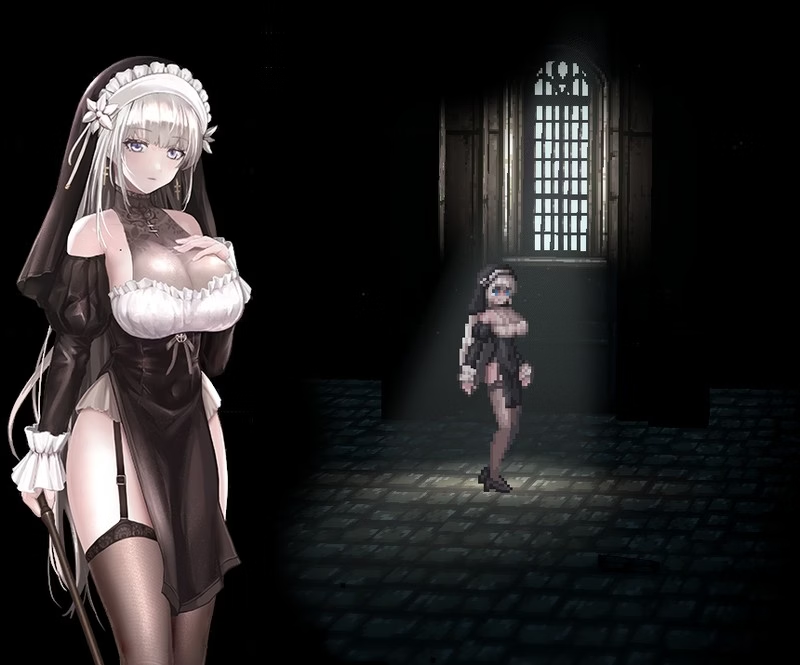
My new favorite costume for Lelia! I love garter belt with straps and stockings!
derakino999
Well-Known Member
- Sep 30, 2017
- 1,720
- 1,035
- 307
it's pretty good yaMy new favorite costume for Lelia! I love garter belt with straps and stockings!
View attachment 5541975
i wonder if we can have that with bare legs