MaybeNotNila
Newbie
- Dec 19, 2019
- 15
- 13
- 37
Her poor wombView attachment 5249901
Is this all of the status effects that can be kept entirely?
Her poor wombView attachment 5249901
Is this all of the status effects that can be kept entirely?

Location - C:\Users\[Name of User]\AppData\LocalLow\Uu\SiNiSistar2 View attachment SaveData.zipPlease give 100% save
1. Craft a certain item near the end of the game.
2. Go to the location as image, use that item and defeat the boss spawned in. View attachment 5247868
3. (optional) You can also use that item here for completion sake. View attachment 5247870
can i get the nude portrait mod?
Hmm the only one I think you are missing is Abomination Broodling pregnancy, though even those buggers may not be able to survive that infested womb lol. I thought I knew about all the effects in the game, but where did you get the Flesh Bud one? Is it from the dream tree?View attachment 5249901
Is this all of the status effects that can be kept entirely?

I'm pretty sure she's already have abomination broodling pregnancy, it just that it doesn't show up on the screen. You can get the flesh bud one from losing to the first boss (abomination broodling nanny) and then struggle before it corrupted her. It doesn't have any effect thoughHmm the only one I think you are missing is Abomination Broodling pregnancy, though even those buggers may not be able to survive that infested womb lol. I thought I knew about all the effects in the game, but where did you get the Flesh Bud one? Is it from the dream tree?
Use the mod creation tool below to make an nude mod yourself.can i get the nude portrait mod?
tool Update v9
- add Broken2(naked) state
You don't have permission to view the spoiler content. Log in or register now.- animation timeline editor & frame data
You don't have permission to view the spoiler content. Log in or register now.- new animation Mod "Succubus Horn"
You don't have permission to view the spoiler content. Log in or register now.- lots of new animations
You don't have permission to view the spoiler content. Log in or register now.You don't have permission to view the spoiler content. Log in or register now.
as always, all feedback is welcome
you can get it here:
Lelia's dressing room v9.7z
enjoy!
-----
250910 fix png filename
Please where is the save game folder?
Location - C:\Users\[Name of User]\AppData\LocalLow\Uu\SiNiSistar2
No idea how feasible it would be to mod such an option, but there is no version that lets you remove her bust portrait. Presumably even the official censored version that will be released on Steam sometime in the coming months will keep the portrait on the screen, since in its default state it's more than SFW enough for the platform.Does anyone know if there is a censored version of the game where I can remove her image from the screen? If so, could you tell me how to do this?
The link don't work for meI tried messing things in the mods for fun and this are the results, for anyone Interested changing clothes of the mc justt put this file in the game folder.
Mega
View attachment 4739951
View attachment 4739945
View attachment 4739937
View attachment 4739934
After customizing this, how do I apply it?? Do I just click the install button?? I’d appreciate it if you could let me know. Or do I have to manually put the files into the folder one by one?? This is my first time applying it, so I’m not really sure how to do it.tool Update v9
- add Broken2(naked) state
You don't have permission to view the spoiler content. Log in or register now.- animation timeline editor & frame data
You don't have permission to view the spoiler content. Log in or register now.- new animation Mod "Succubus Horn"
You don't have permission to view the spoiler content. Log in or register now.- lots of new animations
You don't have permission to view the spoiler content. Log in or register now.You don't have permission to view the spoiler content. Log in or register now.
as always, all feedback is welcome
you can get it here:
Lelia's dressing room v9.7z
enjoy!
-----
250910 fix png filename
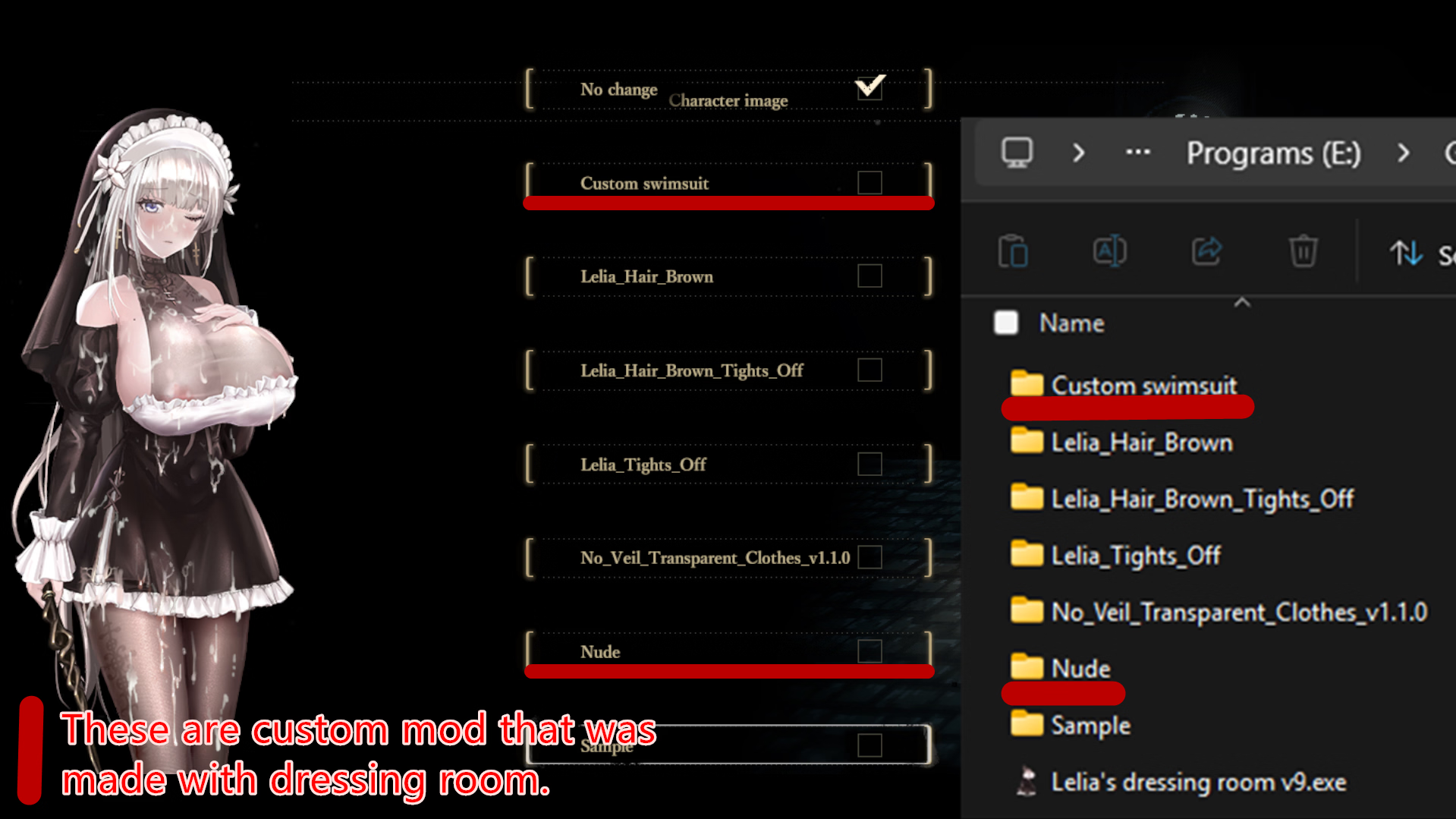
1. Place the exe file at SiNiSistar2\Mod\Player (not necessary, but this way it will auto fill the directory correctly everytime)After customizing this, how do I apply it?? Do I just click the install button?? I’d appreciate it if you could let me know. Or do I have to manually put the files into the folder one by one?? This is my first time applying it, so I’m not really sure how to do it.
point 3, rename to?1. Place the exe file at SiNiSistar2\Mod\Player (not necessary, but this way it will auto fill the directory correctly everytime)
2. After you put on the outfit you wanted, left click and right click the install button. (remember to wait for the progress to finish first, don't use both click at the same time)
3. You'll find a new folder at the directory, rename it.
4. Open the game, load in a save, interact with the book next to Haanja > Character Settings > Character Image
5. In the list, you'll find the one with the name that you just typed in, select it.
What should I name the folder that is created in the directory? And should I leave the downloaded mod file folder as it is in the Player path?1. Place the exe file at SiNiSistar2\Mod\Player (not necessary, but this way it will auto fill the directory correctly everytime)
2. After you put on the outfit you wanted, left click and right click the install button. (remember to wait for the progress to finish first, don't use both click at the same time)
3. You'll find a new folder at the directory, rename it.
4. Open the game, load in a save, interact with the book next to Haanja > Character Settings > Character Image
5. In the list, you'll find the one with the name that you just typed in, select it.
Any name you want, just not the default name.point 3, rename to?
Any name you want, and leave that folder as is, it's already in the correct location.What should I name the folder that is created in the directory? And should I leave the downloaded mod file folder as it is in the Player path?