Create and Fuck your AI Cum Slut –70% OFF
x

Cheat Mod Unity Spirit Valley: Cheat Mod [2.0.0] [Bilbo_Bollocks]

Pduo1

New Member
Oct 3, 2021
1
0
43
In the bepinex/config folder this file can be edited: com.bepis.bepinex.configurationmanager.cfg

Code:
[General]
## The shortcut used to toggle the config manager window on and off.
## The key can be overridden by a game-specific plugin if necessary, in that case this setting is ignored.
# Setting type: KeyboardShortcut
# Default value: F1
Show config manager = F1

There should be an LogOutput.log file in your bepinex folder. Can you please post that?
[Message: BepInEx] BepInEx 5.4.23.4 - SpiritValley (10/9/2025 6:12:27 PM)
[Info : BepInEx] Running under Unity v2022.3.62.7762112
[Info : BepInEx] CLR runtime version: 4.0.30319.42000
[Info : BepInEx] Supports SRE: True
[Info : BepInEx] System platform: Bits64, Windows
[Message: BepInEx] Preloader started
[Info : BepInEx] Loaded 1 patcher method from [BepInEx.Preloader 5.4.23.4]
[Info : BepInEx] 1 patcher plugin loaded
[Info : BepInEx] Patching [UnityEngine.CoreModule] with [BepInEx.Chainloader]
[Message: BepInEx] Preloader finished
[Message: BepInEx] Chainloader ready
[Message: BepInEx] Chainloader started
[Info : BepInEx] 0 plugins to load
[Message: BepInEx] Chainloader startup complete
 

bilbobollocks

Newbie
Feb 17, 2024
58
100
78
[Message: BepInEx] BepInEx 5.4.23.4 - SpiritValley (10/9/2025 6:12:27 PM)
[Info : BepInEx] Running under Unity v2022.3.62.7762112
[Info : BepInEx] CLR runtime version: 4.0.30319.42000
[Info : BepInEx] Supports SRE: True
[Info : BepInEx] System platform: Bits64, Windows
[Message: BepInEx] Preloader started
[Info : BepInEx] Loaded 1 patcher method from [BepInEx.Preloader 5.4.23.4]
[Info : BepInEx] 1 patcher plugin loaded
[Info : BepInEx] Patching [UnityEngine.CoreModule] with [BepInEx.Chainloader]
[Message: BepInEx] Preloader finished
[Message: BepInEx] Chainloader ready
[Message: BepInEx] Chainloader started
[Info : BepInEx] 0 plugins to load
[Message: BepInEx] Chainloader startup complete
It's not loading the plugin, is 'SVMod.dll' in your 'Spirit Valley/BepInEx/Plugins' folder?
 

DevQNull

Newbie
Oct 19, 2020
44
19
98
You only need to replace it if you were using 1.4.0 and had the old patch installed - if you are using the latest 1.4.1 - you can ignore that step.
It very much needs to be pointed out much better in the instructions that the Assembly-CSharp.dll's strictly only if you have Mod v1 installed.
I had crash-on-load without any logfile with BepInEx_win_x64_5.4.23.4 until running across this tidbit.

Also, if you need a 3rd-party program for the mod, why not include a stable version in the archive file? Simple folders for Win32 & Win64 (since the game is Windon't-only) only add a touch over 1MB. If the player wants a newer version, or one for Linux (or Mac which has been Debian Linux based since OS X) then they can follow the BepInEx downloads in their dev page you linked to in the Instructions.
 

bilbobollocks

Newbie
Feb 17, 2024
58
100
78
It very much needs to be pointed out much better in the instructions that the Assembly-CSharp.dll's strictly only if you have Mod v1 installed.
I had crash-on-load without any logfile with BepInEx_win_x64_5.4.23.4 until running across this tidbit.

Also, if you need a 3rd-party program for the mod, why not include a stable version in the archive file? Simple folders for Win32 & Win64 (since the game is Windon't-only) only add a touch over 1MB. If the player wants a newer version, or one for Linux (or Mac which has been Debian Linux based since OS X) then they can follow the BepInEx downloads in their dev page you linked to in the Instructions.
Sure, I could see that, how would you explain that more clearly than below?

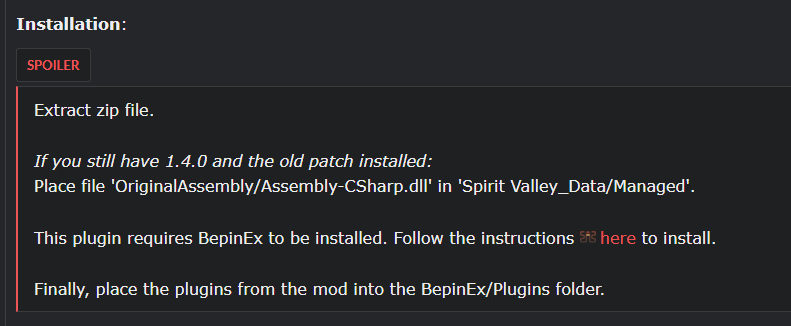
If you still have 1.4.0 and the old patch installed

1761253643045.png

As for BepinEx inclusion, I wanted to keep the download strictly to the modified files. BepinEx is readily available and has a lot of documentation - including the install instructions and an explanation of what it does. I point it out ahead of time so people can see what it is and decide if they want it on their system or if they need the wine version for Linux. Some people may already have it setup as they like it locally and can use that version without conflict. And finally, it also saves me from having to update the files whenever BepinEx next rolls out an update. Small thing, sure, but it's still better to separate IMO.
 

helbyh

Member
Dec 28, 2018
164
42
77

Overview:
A cheat mod for Spirit Valley 1.4.0 with the aim of reducing the grind​

PLEASE NOTE THAT 1.4.1 will likely crash with the old (v1) mod. Please use the v2 one.
V2 has been released and requires BepinEx to be installed.


Updated
: 10/10/2025
Game/Creator: Spirit Valley [Otterside Games]
Modder: Bilbo_Bollocks
Mod Version: 2.0.0
Game Version: 1.4.0+
Language: All

Settings:
View attachment 5329882


Shared XP:
View attachment 4940448

Features:
You don't have permission to view the spoiler content. Log in or register now.

Installation:
You don't have permission to view the spoiler content. Log in or register now.

Change-Log:
You don't have permission to view the spoiler content. Log in or register now.

Download:
-
there is no bepinx/plugins folder?
 

bilbobollocks

Newbie
Feb 17, 2024
58
100
78
I click it and unfortunately nothing happens
There should be an LogOutput.log file in your bepinex folder. Can you please post that?

I followed that and still no plugin folder
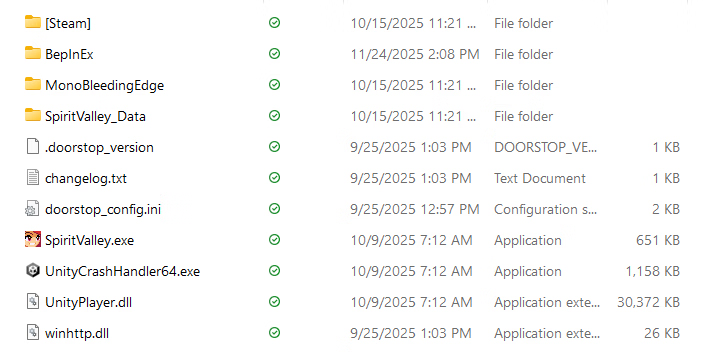
Are the rest of the folders there? Please post a screenshot of your Spirit valley folder, it should look like this: (Ignore the svmod folder, that's my source code)
 
Last edited:

wapitawg

Member
Aug 16, 2017
312
190
202
There should be an LogOutput.log file in your bepinex folder. Can you please post that?
Sure, here it is:

Code:
[Message:   BepInEx] BepInEx 5.4.23.4 - SpiritValley (09.10.2025 13:12:27)
[Info   :   BepInEx] Running under Unity v2022.3.62.7762112
[Info   :   BepInEx] CLR runtime version: 4.0.30319.42000
[Info   :   BepInEx] Supports SRE: True
[Info   :   BepInEx] System platform: Bits64, Windows
[Message:   BepInEx] Preloader started
[Info   :   BepInEx] Loaded 1 patcher method from [BepInEx.Preloader 5.4.23.4]
[Info   :   BepInEx] 1 patcher plugin loaded
[Info   :   BepInEx] Patching [UnityEngine.CoreModule] with [BepInEx.Chainloader]
[Message:   BepInEx] Preloader finished
[Message:   BepInEx] Chainloader ready
[Message:   BepInEx] Chainloader started
[Info   :   BepInEx] 2 plugins to load
[Info   :   BepInEx] Loading [SpiritValleyCheatMod 2.0.0]
[Info   :SpiritValleyCheatMod] Plugin SVMod is loaded!
[Info   :   BepInEx] Loading [Configuration Manager 18.4.1]
[Message:   BepInEx] Chainloader startup complete
Every other function of the Cheat Mod works, only this one doesn't.
 
Jan 8, 2024
43
82
61
bilbobollocks Many thanks. I usually feel too lazy to mod games myself.

I'll try to simplify the process (even further) for anyone still having problems getting this to work.

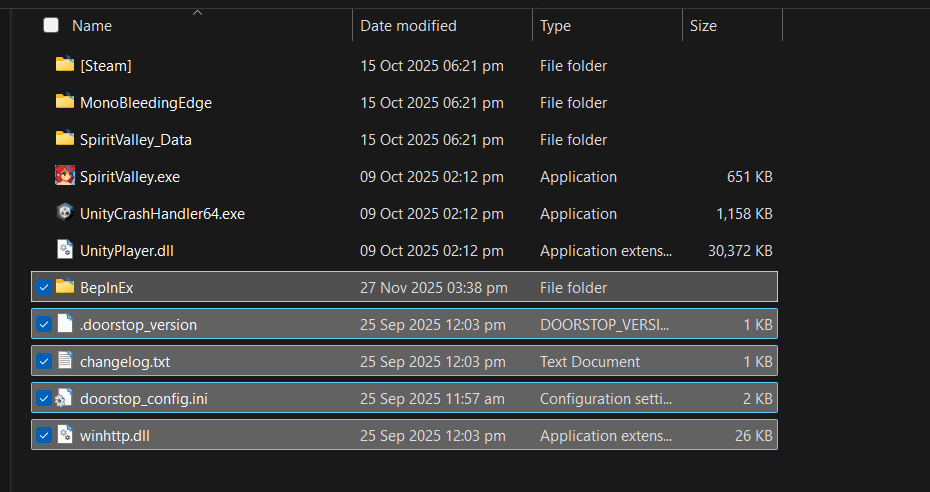
First, you need to download the BepInEx (64bit) and place it in you game folder like so;

Screenshot 2025-11-27 153843.png
The folder itself should look something like this;
Screenshot 2025-11-27 153859.png
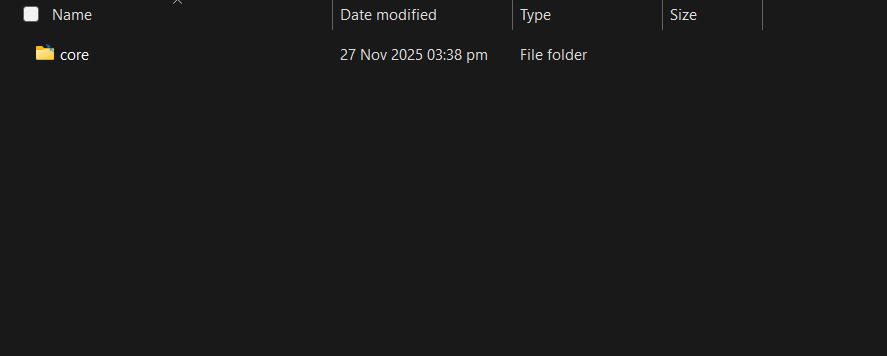
That's fine. At this point, before creating or moving anything else into the game folder, run the game.
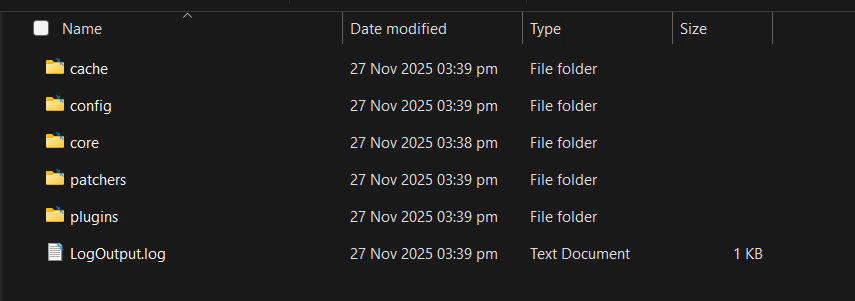
Once it is full loaded, exit out of it. If you've done everything as instructed, the BepInEx folder should look like this;
Screenshot 2025-11-27 153954.png
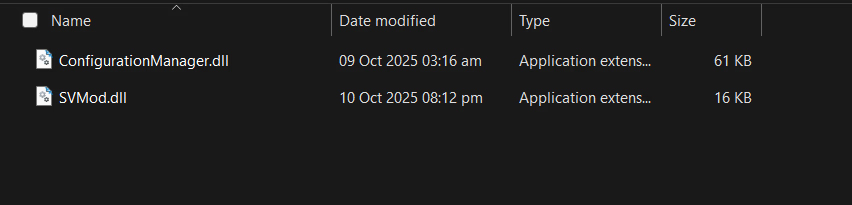
Now, copy the from the mod into the plugins directory. The structure should be \Spirit Valley\BepInEx\Plugins. This is where these two files should be.
1764250756214.png
When you start up the game, press f1 for this menu;
1764250804179.png