


joelurmel
Engaged Member
- Nov 3, 2022
- 2,783
- 4,959
- 448
This is because you are using () in your tree structure, which is not permitted when using a batch file that utilizes the directory.I don't know why, but it's not working.
This is because you are using () in your tree structure, which is not permitted when using a batch file that utilizes the directory.I don't know why, but it's not working.
Just go to python.org, which is the official Python website.I removed them, but it didn't change anything. Otherwise, you wouldn't happen to have a link for the Python software, would you? That might be the problem.
Just to be sure, have you PowerShell here:I removed them, but it didn't change anything. Otherwise, you wouldn't happen to have a link for the Python software, would you? That might be the problem.

I'm sorry, but an uncaught exception occurred.

While running game code:
  File "game/screen_save.rpy", line 31, in execute
    screen load():
  File "game/screen_save.rpy", line 31, in execute
    screen load():
  File "game/screen_save.rpy", line 41, in execute
    use file_slots_v2(_("Charger"), mode="load")
  File "game/screen_save.rpy", line 46, in execute
    screen file_slots_v2(title, mode="save"):
  File "game/screen_save.rpy", line 46, in execute
    screen file_slots_v2(title, mode="save"):
  File "game/screen_save.rpy", line 49, in execute
    use game_menu(title):
  File "game/screens.rpy", line 811, in execute
    screen game_menu(title, scroll, yinitial=0.0):
  File "game/screens.rpy", line 811, in execute
    screen game_menu(title, scroll, yinitial=0.0):
  File "game/screens.rpy", line 819, in execute
    frame:
  File "game/screens.rpy", line 821, in execute
    has hbox
  File "game/screens.rpy", line 824, in execute
    frame:
  File "game/screens.rpy", line 827, in execute
    if scroll == "viewport":
  File "game/screens.rpy", line 827, in <module>
    if scroll == "viewport":
NameError: name 'scroll' is not defined

-- Full Traceback ------------------------------------------------------------

Full traceback:
  File "renpy/common/_layout/screen_main_menu.rpym", line 28, in script
    python hide:
  File "C:\Games\JASON-V1.7.1-s-pc\renpy\ast.py", line 827, in execute
    renpy.python.py_exec_bytecode(self.code.bytecode, self.hide, store=self.store)
  File "C:\Games\JASON-V1.7.1-s-pc\renpy\python.py", line 1178, in py_exec_bytecode
    exec(bytecode, globals, locals)
  File "renpy/common/_layout/screen_main_menu.rpym", line 28, in <module>
    python hide:
  File "renpy/common/_layout/screen_main_menu.rpym", line 35, in _execute_python_hide
    ui.interact()
  File "C:\Games\JASON-V1.7.1-s-pc\renpy\ui.py", line 301, in interact
    rv = renpy.game.interface.interact(roll_forward=roll_forward, **kwargs)
  File "C:\Games\JASON-V1.7.1-s-pc\renpy\display\core.py", line 2215, in interact
    repeat, rv = self.interact_core(preloads=preloads, trans_pause=trans_pause, pause=pause, pause_start=pause_start, pause_modal=pause_modal, **kwargs) # type: ignore
  File "C:\Games\JASON-V1.7.1-s-pc\renpy\display\core.py", line 2745, in interact_core
    root_widget.visit_all(lambda d : d.per_interact())
  File "C:\Games\JASON-V1.7.1-s-pc\renpy\display\displayable.py", line 434, in visit_all
    d.visit_all(callback, seen)
  File "C:\Games\JASON-V1.7.1-s-pc\renpy\display\displayable.py", line 434, in visit_all
    d.visit_all(callback, seen)
  File "C:\Games\JASON-V1.7.1-s-pc\renpy\display\displayable.py", line 434, in visit_all
    d.visit_all(callback, seen)
  [Previous line repeated 1 more time]
  File "C:\Games\JASON-V1.7.1-s-pc\renpy\display\screen.py", line 480, in visit_all
    callback(self)
  File "C:\Games\JASON-V1.7.1-s-pc\renpy\display\core.py", line 2745, in <lambda>
    root_widget.visit_all(lambda d : d.per_interact())
  File "C:\Games\JASON-V1.7.1-s-pc\renpy\display\screen.py", line 491, in per_interact
    self.update()
  File "C:\Games\JASON-V1.7.1-s-pc\renpy\display\screen.py", line 697, in update
    self.screen.function(**self.scope)
  File "game/screen_save.rpy", line 31, in execute
    screen load():
  File "game/screen_save.rpy", line 31, in execute
    screen load():
  File "game/screen_save.rpy", line 41, in execute
    use file_slots_v2(_("Charger"), mode="load")
  File "game/screen_save.rpy", line 46, in execute
    screen file_slots_v2(title, mode="save"):
  File "game/screen_save.rpy", line 46, in execute
    screen file_slots_v2(title, mode="save"):
  File "game/screen_save.rpy", line 49, in execute
    use game_menu(title):
  File "game/screens.rpy", line 811, in execute
    screen game_menu(title, scroll, yinitial=0.0):
  File "game/screens.rpy", line 811, in execute
    screen game_menu(title, scroll, yinitial=0.0):
  File "game/screens.rpy", line 819, in execute
    frame:
  File "game/screens.rpy", line 821, in execute
    has hbox
  File "game/screens.rpy", line 824, in execute
    frame:
  File "game/screens.rpy", line 827, in execute
    if scroll == "viewport":
  File "game/screens.rpy", line 827, in <module>
    if scroll == "viewport":
NameError: name 'scroll' is not defined

Windows-10-10.0.19045 AMD64
Ren'Py 8.3.4.24120703
JASON, Coming of Age V1.7.1-s
Sun Nov 16 16:38:24 2025I've downloaded JASON, Coming of Age-1.7.1-s-market and applied the console patch and encountered no problem.joelurmel when i enable console and developer menu using your Unren in this game https://f95zone.to/threads/jason-coming-of-age-v1-7-1-s-coeurdecochon.95537/ i get this error:
can something be done to circumvent this or did the dev put some extra protection?Code:I'm sorry, but an uncaught exception occurred. While running game code: File "game/screen_save.rpy", line 31, in execute screen load(): File "game/screen_save.rpy", line 31, in execute screen load(): File "game/screen_save.rpy", line 41, in execute use file_slots_v2(_("Charger"), mode="load") File "game/screen_save.rpy", line 46, in execute screen file_slots_v2(title, mode="save"): File "game/screen_save.rpy", line 46, in execute screen file_slots_v2(title, mode="save"): File "game/screen_save.rpy", line 49, in execute use game_menu(title): File "game/screens.rpy", line 811, in execute screen game_menu(title, scroll, yinitial=0.0): File "game/screens.rpy", line 811, in execute screen game_menu(title, scroll, yinitial=0.0): File "game/screens.rpy", line 819, in execute frame: File "game/screens.rpy", line 821, in execute has hbox File "game/screens.rpy", line 824, in execute frame: File "game/screens.rpy", line 827, in execute if scroll == "viewport": File "game/screens.rpy", line 827, in <module> if scroll == "viewport": NameError: name 'scroll' is not defined -- Full Traceback ------------------------------------------------------------ Full traceback: File "renpy/common/_layout/screen_main_menu.rpym", line 28, in script python hide: File "C:\Games\JASON-V1.7.1-s-pc\renpy\ast.py", line 827, in execute renpy.python.py_exec_bytecode(self.code.bytecode, self.hide, store=self.store) File "C:\Games\JASON-V1.7.1-s-pc\renpy\python.py", line 1178, in py_exec_bytecode exec(bytecode, globals, locals) File "renpy/common/_layout/screen_main_menu.rpym", line 28, in <module> python hide: File "renpy/common/_layout/screen_main_menu.rpym", line 35, in _execute_python_hide ui.interact() File "C:\Games\JASON-V1.7.1-s-pc\renpy\ui.py", line 301, in interact rv = renpy.game.interface.interact(roll_forward=roll_forward, **kwargs) File "C:\Games\JASON-V1.7.1-s-pc\renpy\display\core.py", line 2215, in interact repeat, rv = self.interact_core(preloads=preloads, trans_pause=trans_pause, pause=pause, pause_start=pause_start, pause_modal=pause_modal, **kwargs) # type: ignore File "C:\Games\JASON-V1.7.1-s-pc\renpy\display\core.py", line 2745, in interact_core root_widget.visit_all(lambda d : d.per_interact()) File "C:\Games\JASON-V1.7.1-s-pc\renpy\display\displayable.py", line 434, in visit_all d.visit_all(callback, seen) File "C:\Games\JASON-V1.7.1-s-pc\renpy\display\displayable.py", line 434, in visit_all d.visit_all(callback, seen) File "C:\Games\JASON-V1.7.1-s-pc\renpy\display\displayable.py", line 434, in visit_all d.visit_all(callback, seen) [Previous line repeated 1 more time] File "C:\Games\JASON-V1.7.1-s-pc\renpy\display\screen.py", line 480, in visit_all callback(self) File "C:\Games\JASON-V1.7.1-s-pc\renpy\display\core.py", line 2745, in <lambda> root_widget.visit_all(lambda d : d.per_interact()) File "C:\Games\JASON-V1.7.1-s-pc\renpy\display\screen.py", line 491, in per_interact self.update() File "C:\Games\JASON-V1.7.1-s-pc\renpy\display\screen.py", line 697, in update self.screen.function(**self.scope) File "game/screen_save.rpy", line 31, in execute screen load(): File "game/screen_save.rpy", line 31, in execute screen load(): File "game/screen_save.rpy", line 41, in execute use file_slots_v2(_("Charger"), mode="load") File "game/screen_save.rpy", line 46, in execute screen file_slots_v2(title, mode="save"): File "game/screen_save.rpy", line 46, in execute screen file_slots_v2(title, mode="save"): File "game/screen_save.rpy", line 49, in execute use game_menu(title): File "game/screens.rpy", line 811, in execute screen game_menu(title, scroll, yinitial=0.0): File "game/screens.rpy", line 811, in execute screen game_menu(title, scroll, yinitial=0.0): File "game/screens.rpy", line 819, in execute frame: File "game/screens.rpy", line 821, in execute has hbox File "game/screens.rpy", line 824, in execute frame: File "game/screens.rpy", line 827, in execute if scroll == "viewport": File "game/screens.rpy", line 827, in <module> if scroll == "viewport": NameError: name 'scroll' is not defined Windows-10-10.0.19045 AMD64 Ren'Py 8.3.4.24120703 JASON, Coming of Age V1.7.1-s Sun Nov 16 16:38:24 2025
If the path contains either ( or ), the script will currently not work because this will failUnRen-forall.bat (launcher) version 0.35 and UnRen-current.bat version 9.7.14
"%pythondir%\python" -V 2^>^&1No Windows batch file works with () in the path, so no correction is possible. You must delete them.If the path contains either ( or ), the script will currently not work because this will fail
Code:"%pythondir%\python" -V 2^>^&1

I beg to differ.No Windows batch file works with () in the path, so no correction is possible. You must delete them.
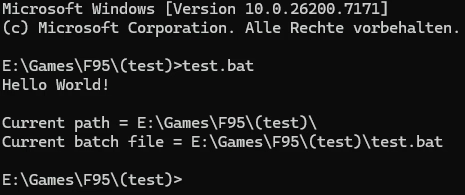
Do the same with an if or a for condition to allow the echo an do the echo of the dir within a variable...
Your test is too simple... try this in the same dirThe batch file:
The output:Code:@echo off echo. echo Current path = %~dp0 echo Current batch file = %~f0 echo. echo %~dp0 | findstr ( > NUL if errorlevel 1 ( echo Path does not contain a "(" ) else ( echo Path does contain a "(" )
View attachment 5464719

Sorry to interrupt,
Sorry, I didn't mean to delete my previous post, I was about to update it with a more advanced script before I realized you already replied to the "old" post... So here's my second attempt on a more advanced script:Your test is too simple...
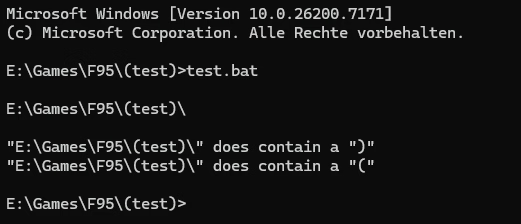
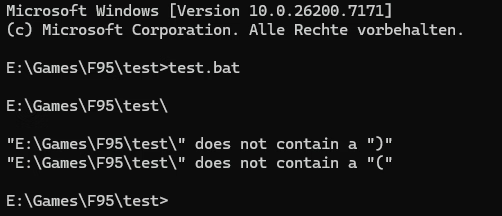
That is what I did, but only after going through the batch file to find what went wrong. So it would be nice to write somewhere that ( and ) are not supported in the path (or better, fix the batch if possible)No Windows batch file works with () in the path, so no correction is possible. You must delete them.
I have found a solution, and it will be integrated in the next release of UnRenThat is what I did, but only after going through the batch file to find what went wrong. So it would be nice to write somewhere that ( and ) are not supported in the path (or better, fix the batch if possible)

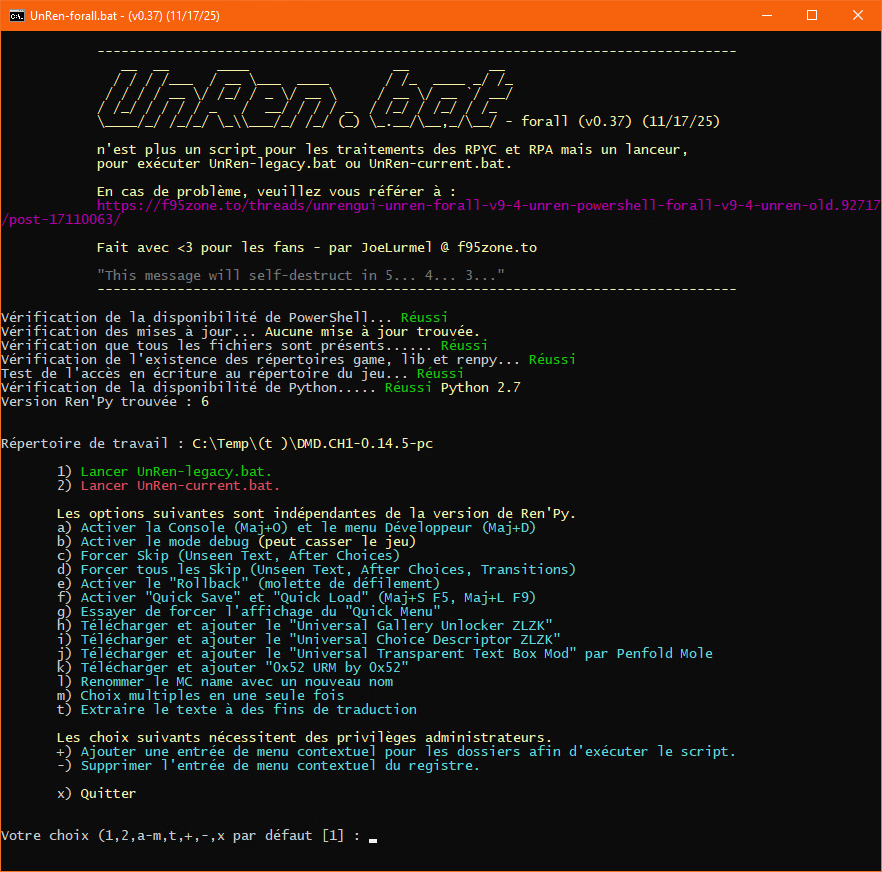
Sure, I've made a little Python script that do the job.Any chance anyone can share a way to extract RPAs for current ver of https://f95zone.to/threads/indecent-wife-hana-v0-46-patreon-fallen-eros.106980/ ?
Reading previous comments in here, it seems to be due to RPA header manipulation causing the RPAs to not be read. UnRen or other extractors don't work.
Thanks
Thank you, works greatSure, I've made a little Python script that do the job.
Extract extrpa.zip to ...\Indecent-Wife-Hana-0.43.3-public-pc\game
Open cmd, Terminal or Powershell go to ...\Indecent-Wife-Hana-0.43.3-public-pc\game and use Python (install it from Python.org if you don't have it) like this: python extra.rpy -l audio.rpa for listing files inside and
python extrpa.py -x . audio.rpa for extracting files in the current directory
