Tool XLibrary - Advanced Game Library Manager for F95Zone

5.00 star(s) 2 Votes

Rogue Blitz

New Member
Oct 23, 2023
1
1
21
This application is amazing. Its great using links. Some very well needed foresight. The application isnt perfect at finding games. Some dont come up at all. If its a problem you can fix great. But using links instead was a smart way to cover your back in case an issue occurred. Also Sandboxie is something I didnt know I needed but glad I have now
 
  • Heart
Reactions: Detsu Kai

ImmaTroll

New Member
Aug 25, 2017
7
23
200
Another thing, XLibrary doesn't check if the game's .exe or folder actually exist. When i delete a folder, i wish it would automatically detect and make the game "not installed" anymore for filtering purposes. It can simply check the games that do have launch config, if said .exe/folder actually exist on start.
 
  • Like
Reactions: Detsu Kai

Detsu Kai

Member
Modder
Sep 30, 2018
129
129
141
Another thing, i'm "installing" my games using XLibrary to try it out, dlsite is missing as a source.
It is not supported yet

When i click on "developer" filter, it's a bit laggy, and "partnership" developers do not work, i wanted to look for all "kagura games" but it only works as a joint name, so i actually can't ever look for kagura games except for a specific one because kagura only does partnerships/localization. The lag makes me not wanna click on the "dev" options(i do have 3k games lul), can a have a syntax, i would expect to be able to simply type "dev: kagura games" in the text box and it would filter it out for me like a lot of modern collection/booru websites have. I feel like that would save me way more time, but another thing that could make the "developer" filter better, is the fact when you search for "kagura..." instead of grouping all options together so i can view them, there's a "blank black" void between each option, now, one can arrow key down and up between each, but would be better if it simply grouped them together instead of making space in between. Also, the filters only work "forward" as in if i type something wrong and try to fix it, it does not update the filter, it only updates to narrow the search. Unless you erase the whole text field, then it updates.
The developer picks up topics from the forum, so if Kagura isn’t there, it won’t be in the app either. Regarding lags – I tried to do something about it, but the list of developers is too large, and its loading takes a fraction of a second, which annoys me as well. I’ll try to do something about it.

Another thing i found a bit annoying when installing games is having to inside a game to actually be able to interact with launch options, i expected to be simply right click and have it be one of the options so i don't have to constantly leave the search window, load screenshots and then do this back and forth multiple times.
Good feature, I think I will add this

Since i'm still using F95Checker, i had some new games added, i tried to import the database again, it said i had 16 new games to import, but there was no option to simply import those new games, so decided to import the whole database to see what would happen, now thankfully the launch options did not get affected.
That's correct, as only the missing information will be imported, and previous games will not be deleted or overwritten

I did read your explanation of how update works, but i found it very confusing, what is the difference between "Enable automatic checking", "Manual check period(check now option)" and "Automatic Game Synchronization"

I assume the first option is for normal daily updates(is this the last 90 day one?) which is to be expected.

Manual i'm not entirely sure, is it meant to be able to check every single game? You did say "... such as 3, 6, or 12 months, or even longer" however the max is 12 months on mine, are you planning on increasing it? Is this meant for maybe someone has an old database on a pc they haven't touched in a while, and they can manually update everything to check? Is that why this option exists?

Now the third and last option, i have no idea what it actually does, what's the difference between "automatic checking" and "automatic synchronization"? What happens if i have both enabled? What's the difference/use case for having both?
Indeed, my mistake, it hasn’t been there for more than a year. There are two types of synchronization: "Game Updates" — it simply checks whether there are updates on f95 with new information about the game or not. If there are, it marks the game as "update available." You can also run this check manually by setting the period to a year instead of the default one month, to see if there’s a game that was updated more than a month ago but you missed it, and your version is outdated and needs updating. The second type of synchronization is "Automatic Game Synchronization," which is the one that retrieves detailed information from websites and downloads it if updates were detected during the first stage (game updates). This is not related to the games you already have on your computer or anything else.

games that only have a steam source don't have a "Engine" nor "Developmento Completion status" despite being the only main "tags" that show up on the non-list games view, and there doesn't seem to be an option to add those manually if steam is the main source. Do we need to change the main source to manual to be able to edit that? How exactly do multiple sources interact with each other? I know there's a "main" one, but how does it actually work?
A source is a source. It is where the game data comes from. If there is no data after switching and updating the source, it means there is no data on the game's page in Steam or F95. Only the Primary source is considered the source of game data, other sources are ignored.

I believe this "Update Available" to be a mistake, the option should not exist because when i clicked on setting version i clicked on "Set to Latest". I've tried closing and opening up XLibrary but this does not change/update.
The issue is most likely that the game has never been checked in the source. Switch the source to the correct one or enable manual mode. The Tooltip for partial data also indicates that the screenshots field is missing because there are none in f95checker, and it doesn't store them. Therefore, they couldn't have been retrieved. You simply need to ensure the link to the game in the sources is correct and update it by clicking on "Update Source" or "Partial Data" (which does the same thing)

Any plans to add "changelog" as one of the "tabs"(Overview, Journal...)
Yes, but much later and only when there will be an external server for processing. In the current version, processing purely with scripts and regular expressions makes it very difficult to write a correctly functioning script that parses the necessary data without errors. So, we are waiting until there is funding for a server and the ability to parse pages through GPT.


When a game's f95zone source is something like this https://f95zone.to/forums/request.119/ (like a translated game on a forum post)
The screenshots do not get added, but the game cover does.
The script is not intended for any section other than games from here: https://f95zone.to/sam/latest_alpha/
This directly relates to the previous point.

Covers don't seem to work as gifs? But "screenshots" do.
It should work, send an example and I will check.

If I didn’t mention something here, I still considered and noted it down. Thanks for the feedback.

 

Detsu Kai

Member
Modder
Sep 30, 2018
129
129
141
This application is amazing. Its great using links. Some very well needed foresight. The application isnt perfect at finding games. Some dont come up at all. If its a problem you can fix great. But using links instead was a smart way to cover your back in case an issue occurred. Also Sandboxie is something I didnt know I needed but glad I have now
Thank you very much for the feedback! If you’re referring to searching for games to add to your library (and not the ones already added), we use the search functionality of the f95zone platform itself, and unfortunately, we cannot resolve any issues related to searching by title. Glad it was helpful! I’m planning to add more features to improve the user experience, so that more people can play safely and conveniently for themselves
 
  • Like
Reactions: zmbr

zmbr

Member
Sep 11, 2020
119
131
167
Thanks for making this! And then, feedback :)

Regarding companion extension - it does it job, but the pop-up is quite big and always present. I would suggest to add "Minimize" button to almost hide it when not in use.
You don't have permission to view the spoiler content. Log in or register now.

And regarding "Portable" XLibrary - is the goal to be able to drag-n-drop the full XLibrary along with games (exe files only, not Steam ones probably)? So for this you probably want
1) Ability to have games be placed inside XLibrary folder and XLibrary storing relative route to exe
2) Create own Sandboxie sandbox with data folder inside XLibrary folder, too, and on each start check it points to running XLibrary's sandbox

Of course, if the goal of "portable" is just to download and run without installing, it works fine as is.

P.S. A funny note - you can in fact add "XLibrary" to XLibrary
You don't have permission to view the spoiler content. Log in or register now.
And another bug BTW - if game's thread is opened on 1st page, XLibrary extension can recognise the game, but on page2 etc it shows "Unknown Game" (Firefox)
You don't have permission to view the spoiler content. Log in or register now.
 
Last edited:

Detsu Kai

Member
Modder
Sep 30, 2018
129
129
141
Thanks for making this! And then, feedback :)

Thank you!


Ability to have games be placed inside XLibrary folder and XLibrary storing relative route to exe

I think I will implement this someday, but exclusively for the Portable version


Create own Sandboxie sandbox with data folder inside XLibrary folder, too, and on each start check it points to running XLibrary's sandbox
Добавлю в бэклог
P.S. A funny note - you can in fact add "XLibrary" to XLibrary
:KEK::KEK:

And another bug BTW - if game's thread is opened on 1st page, XLibrary extension can recognise the game, but on page2 etc it shows "Unknown Game" (Firefox)
Yes, this is a known issue, it will be resolved soon
 
  • Like
Reactions: zmbr

Asome10121

New Member
May 14, 2019
4
0
206
Is there any good way to quickly set all my uninstalled/completed games to the latest version so I can get real update notifications and stop getting fake update notifications? Because I currently have 355 games in my library, most of which I've completed long ago and going through each one to set the version is very tedious.
 

Detsu Kai

Member
Modder
Sep 30, 2018
129
129
141
Is there any good way to quickly set all my uninstalled/completed games to the latest version so I can get real update notifications and stop getting fake update notifications? Because I currently have 355 games in my library, most of which I've completed long ago and going through each one to set the version is very tedious.
I didn't quite understand which notifications you're referring to. There is an automatic synchronization that checks once a day if there are new versions of games and then saves the changes locally automatically as well. After that, all updates happen in the background, and there are no notifications
 

Detsu Kai

Member
Modder
Sep 30, 2018
129
129
141
Version 1.14.0 is here!

Added:

- Drag-and-drop exe files onto game page to quickly create a launcher
- Sandboxie sandbox selection - choose which sandbox to use per launcher or set a default
- Custom Sandboxie path support for portable installations
- Invalid launcher detection - app now checks if game executables exist and shows warning icons
- Dialog to fix or remove launchers with missing files, with option to remove all invalid at once
- Option to set source as primary when adding via browser extension
- Bulk game selection - Shift+click to select games, then use action panel for bulk operations
- Bulk actions: Select All, Deselect All, Set Status, Queue Update, Delete
- Press Escape to cancel bulk selection
- Itch.io now available as a game source with full support (cover, screenshots, rating, developer, engine, status)
- DLSite now available as a game source with full support (cover, screenshots, rating, developer, tags)
- DLSite search when adding games - find games by name directly from DLSite
- Developer name now displayed on game detail page
- Release date can now be edited when manually adding or editing a game
- Change game status directly from right-click context menu on game cards
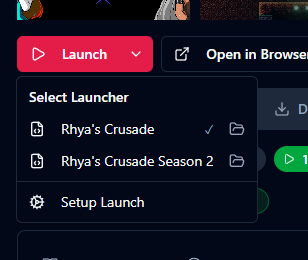
- Launch games directly from right-click context menu with quick access to launch configurations
- Update game from source directly via right-click context menu

Improved:
- Game Updates settings redesigned - update checking and sync now combined into one simple section
- Filter presets now require explicit save - changes show orange indicator, update via menu
- Extension panel can now be dragged from anywhere and minimized to a corner badge
- Steam search now works instantly without pre-loading game list
- Browser extension now adapts to light-themed websites for better readability
- Journal icon now shows on game card even with just 1 entry
- Game navigation buttons (prev/next) are now wider for easier clicking
- Game cover now falls back to first screenshot if cover fails to load, then shows placeholder
- Fullscreen screenshot view no longer closes on single click, use double-click or ESC to exit
- Extension game matching algorithm now better recognizes games with different title variations
- Launch button now shows "Setup Launch" when not configured, opens settings on click
- Open game folder button now available next to each launcher in dropdown menu
- Window size and position now remembered between sessions
- Games added to sync queue now process immediately instead of waiting for next check interval

Fixed:
- Firefox extension no longer disconnects after 30 seconds
- Adding games from F95Zone thread subpages now works correctly
- Tags and Developer filter search now properly hides non-matching items instead of leaving empty space
- Data sync error when editing Itch.io games
- Engine and Status suggestions now properly insert into field when clicked
- Ctrl key no longer "sticks" after Ctrl+click to open game link in browser
- Attempted fix for blank white screen after restoring from tray (please report if issue persists)
- Portable version now correctly saves log files to the application folder
- Log files now correctly rotate to new date file when app runs for multiple days
- Developers and Tags filters now load without delay in large libraries
 
Oct 22, 2025
56
16
8
f95 integrates the first, second, and even third seasons of certain games into a single interface. If downloaded separately, can the xlibrary software allow setting different launch paths for the same game, enabling separate launches?
 

Asome10121

New Member
May 14, 2019
4
0
206
I didn't quite understand which notifications you're referring to. There is an automatic synchronization that checks once a day if there are new versions of games and then saves the changes locally automatically as well. After that, all updates happen in the background, and there are no notifications
Sorry, by notification, I meant that the games are marked as "Updates Available". Currently, most of my library does not have the version set, so if I understand correctly, the app won't mark them as "Updates Available" even if they update because it doesn't know what version of the game I'm using. There were also a few false positives as well (which have since gone away with the latest sync) that said some up-to-date games had updates. I was wondering if there was an easy way to set the game versions to the latest version, but I've since gone and just manually set all the game versions myself.

Also, the new Firefox extension won't let me install it because it is unverified
 
Last edited:

Detsu Kai

Member
Modder
Sep 30, 2018
129
129
141
will you release the source code for this at some point? also the discord invite is invalid

Sorry, I created a limited inivtation link, here is new one:
And I don't think I will ever release the source code till project alive. Firstly, because I don't want my project, whose design and UX I have so carefully worked on, to turn into something incomprehensible. Secondly, I don't have the time to contribute to someone else's code, which would be sent to me in PRs in bulk. Due to my own standards for code quality and UX, this would take much more time than writing everything myself from the start. If I ever decide to completely abandon this project, I think I will release the source code — there's no need to worry about that.
 

Detsu Kai

Member
Modder
Sep 30, 2018
129
129
141
f95 integrates the first, second, and even third seasons of certain games into a single interface. If downloaded separately, can the xlibrary software allow setting different launch paths for the same game, enabling separate launches?
Of course, in the game launch settings, you can specify multiple launchers. These can be different versions of the same game with various mods or different seasons/parts.

1765968025006.png
 

Detsu Kai

Member
Modder
Sep 30, 2018
129
129
141
Sorry, by notification, I meant that the games are marked as "Updates Available". Currently, most of my library does not have the version set, so if I understand correctly, the app won't mark them as "Updates Available" even if they update because it doesn't know what version of the game I'm using. There were also a few false positives as well (which have since gone away with the latest sync) that said some up-to-date games had updates. I was wondering if there was an easy way to set the game versions to the latest version, but I've since gone and just manually set all the game versions myself.

Also, the new Firefox extension won't let me install it because it is unverified

No, these functions are not related to each other in any way. Everything happens in the background completely automatically; just enable automatic synchronization in the settings (in the latest version of the app, this is not necessary as it is enabled by default). "Update available" simply means that the version of the game information stored locally differs from the version available at the source where it was added (f95/steam/itch/dlsite). By clicking on this badge, you can update it immediately or set it to update automatically through the settings.
 
Oct 22, 2025
56
16
8
Of course, in the game launch settings, you can specify multiple launchers. These can be different versions of the same game with various mods or different seasons/parts.

View attachment 5535994
Alright, I thought only one game could be added per page. Also, when will the software's search box get a one-click delete button? Every time I search, I have to press the keyboard's back key to clear it. I'd much rather just click the mouse to delete everything in the box
 

Detsu Kai

Member
Modder
Sep 30, 2018
129
129
141
Alright, I thought only one game could be added per page. Also, when will the software's search box get a one-click delete button? Every time I search, I have to press the keyboard's back key to clear it. I'd much rather just click the mouse to delete everything in the box
Good point, I will include it in the next release
 

WillHammer

New Member
Jun 13, 2018
8
1
32
I have an idea for a cool function.

My collection is huge. Luckily however I've kept a list of all my games so I can copy their names easily to the search bar.
But copying all of them one by one to the search is super tedious. My solution would be to have a bulk search option where you can type or paste multiple queued search queries separated by line breaks and then just go through them individually by clicking a button.

Now I don't know how to actually implement it in terms of code, but aren't us ideas guys still helpful?
 
5.00 star(s) 2 Votes