Tool XLibrary - Advanced Game Library Manager for F95Zone

5.00 star(s) 2 Votes
Oct 22, 2025
59
16
8
Good point, I will include it in the next release
I installed version v1.14.0 yesterday, but the extension remains at version 1.10.1. Yesterday I noticed the web extension's floating window could be moved and minimised. Why, upon reopening today, has this minor feature disappeared and reverted to a fixed mode? Does the extension version need to match the software version?
 

Detsu Kai

Member
Modder
Sep 30, 2018
138
140
141
I have an idea for a cool function.

My collection is huge. Luckily however I've kept a list of all my games so I can copy their names easily to the search bar.
But copying all of them one by one to the search is super tedious. My solution would be to have a bulk search option where you can type or paste multiple queued search queries separated by line breaks and then just go through them individually by clicking a button.

Now I don't know how to actually implement it in terms of code, but aren't us ideas guys still helpful?
Sounds good, but this will be very, very slow because we use services like f95/dlsite directly, and a single search for one title can take 1-2 seconds, and they cannot be done in parallel. Accordingly, searching for 50 games will take around 2 minutes or so
 

Detsu Kai

Member
Modder
Sep 30, 2018
138
140
141
I installed version v1.14.0 yesterday, but the extension remains at version 1.10.1. Yesterday I noticed the web extension's floating window could be moved and minimised. Why, upon reopening today, has this minor feature disappeared and reverted to a fixed mode? Does the extension version need to match the software version?
Do you use Chrome? You need to update the extension in the settings by clicking "Reload" on it.

1. Open Extensions Page: Type chrome://extensions into your Chrome address bar and press Enter.
2. Enable Developer Mode: In the top-right corner of the page, toggle Developer mode to the "On" position.
3. Click Reload: Press the small circular arrow (Reload icon) on your extension's card to instantly apply your code changes.

You can also try fully closing and reopening the application before repeating the update process
 

WillHammer

New Member
Jun 13, 2018
10
2
32
Sounds good, but this will be very, very slow because we use services like f95/dlsite directly, and a single search for one title can take 1-2 seconds, and they cannot be done in parallel. Accordingly, searching for 50 games will take around 2 minutes or so
It would still be so much faster than doing it manually, not to mention effort. Not making the queries in a single parallel bulk would be a good thing in terms of accidentally overloading the site with a one man DDOS.
 

Detsu Kai

Member
Modder
Sep 30, 2018
138
140
141
It would still be so much faster than doing it manually, not to mention effort. Not making the queries in a single parallel bulk would be a good thing in terms of accidentally overloading the site with a one man DDOS.
Got it, I’ll add this to the roadmap and figure out the best way to implement it
 
  • Heart
Reactions: WillHammer
Oct 22, 2025
59
16
8
Do you use Chrome? You need to update the extension in the settings by clicking "Reload" on it.

1. Open Extensions Page: Type chrome://extensions into your Chrome address bar and press Enter.
2. Enable Developer Mode: In the top-right corner of the page, toggle Developer mode to the "On" position.
3. Click Reload: Press the small circular arrow (Reload icon) on your extension's card to instantly apply your code changes.

You can also try fully closing and reopening the application before repeating the update process
I am Edge browser. Upon clicking reload, it continuously flashes “Inactive”. Clicking the extension details displays version 1.12.3, yet when I directly click the extension window, it shows 1.10.1.
 

AVM666

Newbie
Apr 7, 2019
58
73
203
Hi, this is an excellent and very useful tool. I have a question: can I manually add images or screenshots to the game library?

I hope this is clear; I'm using Google Translate.
 

Detsu Kai

Member
Modder
Sep 30, 2018
138
140
141
I am Edge browser. Upon clicking reload, it continuously flashes “Inactive”. Clicking the extension details displays version 1.12.3, yet when I directly click the extension window, it shows 1.10.1.
Try to remove the extension and reinstall it from scratch. It's okay that it shows 1.10.1 (it hasn't been updated, I forgot about it)
 

Detsu Kai

Member
Modder
Sep 30, 2018
138
140
141
Hi, this is an excellent and very useful tool. I have a question: can I manually add images or screenshots to the game library?

I hope this is clear; I'm using Google Translate.
Thank you! Yes, you can, but only by pasting links to these images in manual editing/adding game. Direct image uploads are not supported due to syncing with Google Drive, as this would heavily impact the app's performance and your storage
 
  • Like
Reactions: AVM666

Redhen

New Member
Jan 5, 2021
8
4
85
Hi, My firefox extension says unverified, your old google drive link to download signed version that you gave to someone else no longer works. Can you help? File name:- "xlibrary-1.14.0.xpi"
 
  • Like
Reactions: nd528

Detsu Kai

Member
Modder
Sep 30, 2018
138
140
141
You know what? Take this. That’s everything until February – I need a little break. :3

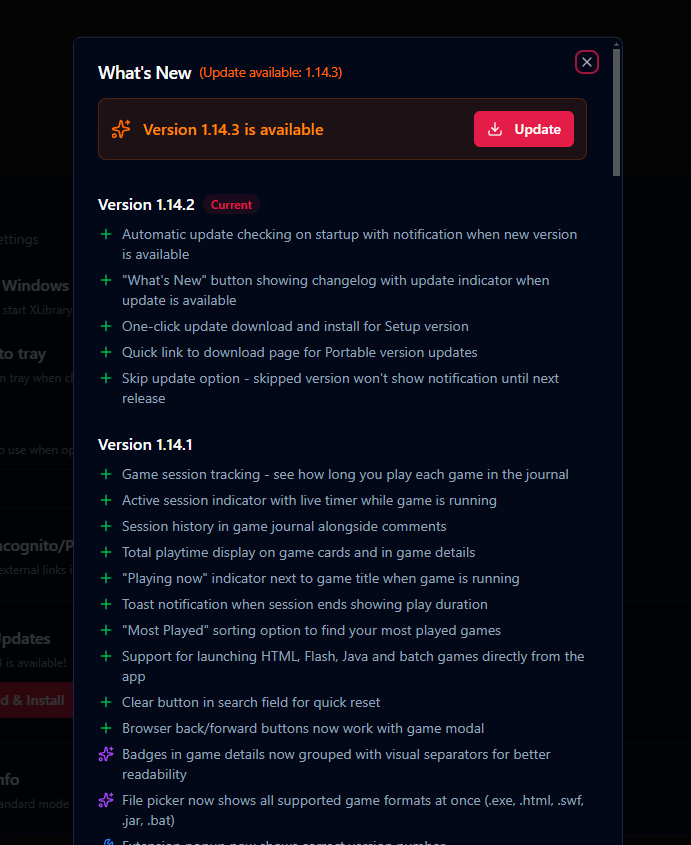
1.14.1
- Added: Game session tracking - see how long you play each game in the journal
- Added: Active session indicator with live timer while game is running
- Added: Session history in game journal alongside comments
- Added: Total playtime display on game cards and in game details
- Added: "Playing now" indicator next to game title when game is running
- Added: Toast notification when session ends showing play duration
- Added: "Most Played" sorting option to find your most played games
- Added: Support for launching HTML, Flash, Java and batch games directly from the app
- Added: Clear button in search field for quick reset
- Added: Browser back/forward buttons now work with game modal
- Improved: Badges in game details now grouped with visual separators for better readability
- Improved: File picker now shows all supported game formats at once (.exe, .html, .swf, .jar, .bat)
- Fixed: Extension popup now shows correct version number
- Fixed: Extension popup "Last Connected" now shows "Now" when connected instead of confusing time ago

 

Detsu Kai

Member
Modder
Sep 30, 2018
138
140
141
Final release, for real this time (hopefully)! :')
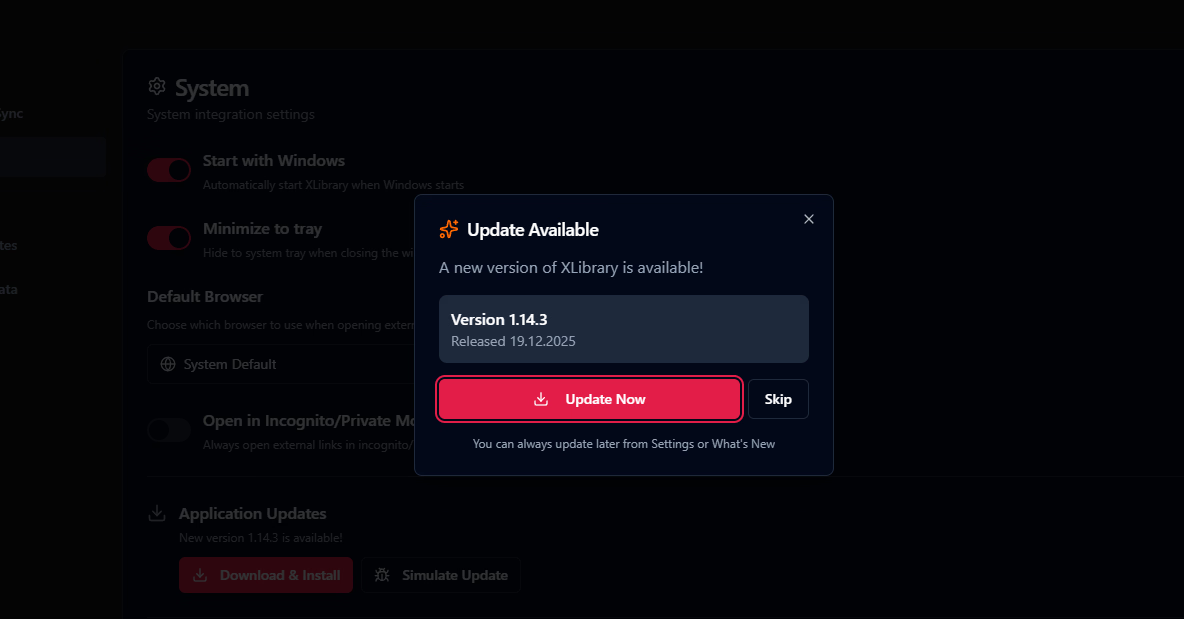
To make my and your life easier — you no longer need to manually update xlibrary

1.14.2
- Added: Automatic update checking on startup with notification when new version is available
- Added: "What's New" button showing changelog with update indicator when update is available
- Added: One-click update download and install for Setup version
- Added: Quick link to download page for Portable version updates
- Added: Skip update option - skipped version won't show notification until next release

1766163743780.png 1766163918147.png
 
  • Heart
Reactions: Miyka and Appotaddi
5.00 star(s) 2 Votes