

Sorry. But that save file is messed up somehow. I can't load it. It's only a few bytes in size.I figured out how to share the save. If youre still interested in helping, id greatly appreciate it!
Ren'Py A Family Venture [v0.09 v3 Supporter] [WillTylor]
- Thread starter N7
- Start date
-
- Tags
- 3dcg anal sex animated bdsm big ass big tits corruption cosplay creampie exhibitionism footjob groping handjob humiliation male domination male protagonist masturbation milf netorare oral sex point & click pregnancy sandbox sex toys spanking stripping titfuck trainer vaginal sex virgin voyeurism
3.60 star(s)
128 Votes

Dr.John Bums
Member
- Apr 29, 2023
- 314
- 476
- 188
Same Problem here.Sorry. But that save file is messed up somehow. I can't load it. It's only a few bytes in size.
The packing program probably messed up, or the save game was already corrupted, which is why the missions aren't working.
my version is 0.09_V3It should auto trigger when you go to sleep sunday night.
Make sure you're not playing the alpha version as that has a lot of bugs.
Dr.John Bums
Member
- Apr 29, 2023
- 314
- 476
- 188
There are two 0.09 V3 versions: an alpha version that was only for testing and was leaked.
The alpha version doesn't have the new events in the gallery and contains various bugs.
Then there's the beta version, which fixes most of the bugs and has the new events in the gallery.

The alpha version doesn't have the new events in the gallery and contains various bugs.
Then there's the beta version, which fixes most of the bugs and has the new events in the gallery.
Last edited:

Thanks for trying. I think im just screwed. Ive tried for 2 hours to get my save data to either compress to a zip file or transfer as the native .save file extension and Google just has a stroke every time I try something. This just sucks.Unfortunately, your zip file is corrupted.
Savegame is not working.
You don't need to put the savegame in a zip file; you can just upload it as is.
Dr.John Bums
Member
- Apr 29, 2023
- 314
- 476
- 188
If you have a Windows PC, you can probably just copy the save game to your PC and upload it to the forum from there.Thanks for trying. I think im just screwed. Ive tried for 2 hours to get my save data to either compress to a zip file or transfer as the native .save file extension and Google just has a stroke every time I try something. This just sucks.
If you're uploading the file from your phone, I would suggest creating a copy of the Savegame in a different location and uploading that, perhaps using a different browser like Firefox.
i just update the mod to v3 and it worked.Did you install a mod?
But i got the problemher :
any there can help fix this problem ?
```
I'm sorry, but an uncaught exception occurred.
While running game code:
File "game/UpdateScript0.09-3.rpy", line 4264, in script
if O >= 1:
File "game/UpdateScript0.09-3.rpy", line 4264, in <module>
if O >= 1:
NameError: name 'O' is not defined
-- Full Traceback ------------------------------------------------------------
Full traceback:
File "game/UpdateScript0.09-3.rpy", line 4264, in script
if O >= 1:
File "C:\Users\jstad\Downloads\Family venture\AFamilyVenture-0.09_V3_supporter-pc\AFamilyVenture-0.09_V3_supporter-pc\renpy\ast.py", line 1842, in execute
if renpy.python.py_eval(condition):
File "C:\Users\jstad\Downloads\Family venture\AFamilyVenture-0.09_V3_supporter-pc\AFamilyVenture-0.09_V3_supporter-pc\renpy\python.py", line 1209, in py_eval
return py_eval_bytecode(code, globals, locals)
File "C:\Users\jstad\Downloads\Family venture\AFamilyVenture-0.09_V3_supporter-pc\AFamilyVenture-0.09_V3_supporter-pc\renpy\python.py", line 1202, in py_eval_bytecode
return eval(bytecode, globals, locals)
File "game/UpdateScript0.09-3.rpy", line 4264, in <module>
if O >= 1:
NameError: name 'O' is not defined
Windows-10-10.0.26200 AMD64
Ren'Py 8.2.1.24030407
A Family Venture 0.09_V3_supporter
Sun Nov 30 08:07:25 2025
``
Did you install a mod?
Ya. That's the mod breaking the game.i just update the mod to v3 and it worked.
But i got the problemher :
believe me i tried a lot of things, that included.If you have a Windows PC, you can probably just copy the save game to your PC and upload it to the forum from there.
If you're uploading the file from your phone, I would suggest creating a copy of the Savegame in a different location and uploading that, perhaps using a different browser like Firefox.
im just restarting on my PC... i'm following the walkthrough to a T this time and I've noticed that the Jacky Nightgown event is off by quite a bit. The Event to steal her gown didnt trigger until the night of Tuesday on Week 2, but in the walkthrough it has it beginning on Tuesday of Week 1, a whole 7 days off. Is that normal or is it supposed to be exact?
ohh i know now. but is my game brok now when i dont have any more in progress or do that mean i need to wait for next update ?Ya. That's the mod breaking the game.
Dr.John Bums
Member
- Apr 29, 2023
- 314
- 476
- 188
The WT has evolved over the years, and due to changes, it's no longer entirely accurate.believe me i tried a lot of things, that included.
im just restarting on my PC... i'm following the walkthrough to a T this time and I've noticed that the Jacky Nightgown event is off by quite a bit. The Event to steal her gown didnt trigger until the night of Tuesday on Week 2, but in the walkthrough it has it beginning on Tuesday of Week 1, a whole 7 days off. Is that normal or is it supposed to be exact?
Furthermore, if you adjust Jacky's and the others' values using the integrated cheat mod, the timing of events can sometimes shift.
However, the WT should show the prerequisites for what needs to be done for specific events.
FallenLondon
Active Member
- Aug 5, 2016
- 726
- 519
- 382
Hi,
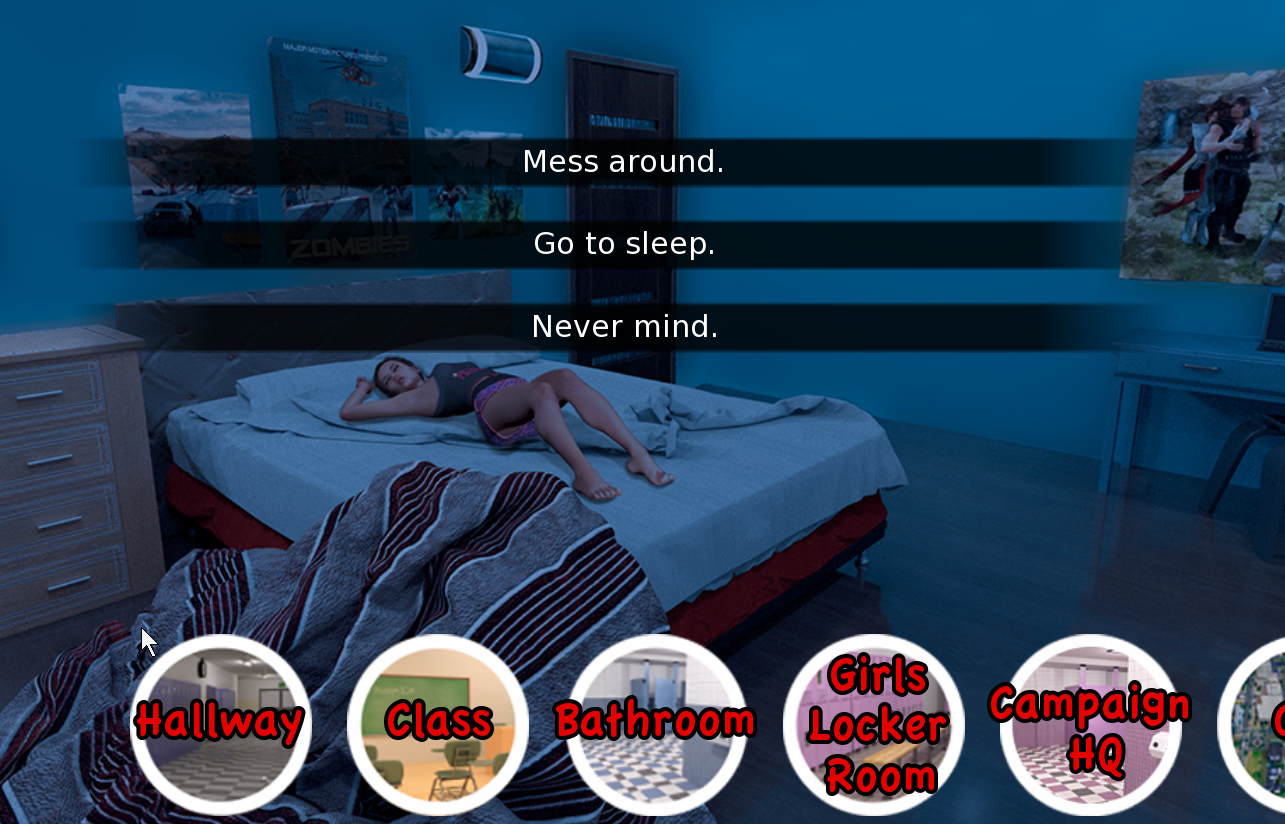
Is there a way to get rid of the travel overlay as shown in the screenshot? It's present after every interaction (ie: everything you click in locations). Toggling the travel bar doesn't fix it, exiting and restarting the game doesn't either.

Is there a way to get rid of the travel overlay as shown in the screenshot? It's present after every interaction (ie: everything you click in locations). Toggling the travel bar doesn't fix it, exiting and restarting the game doesn't either.
AdmiralSpock
Member
- Jan 17, 2022
- 133
- 84
- 80
I, and some others, have already explained this problem being with Shawn's mod. Check here for the fix:View attachment 5483288
I encounter this problem every time I visit Sidney in the morning in the garden of the house. Is there a solution?
https://f95zone.to/threads/a-family-venture-v0-09-v3-supporter-willtylor.24965/post-18752757

capitanqueso
Member
- Jul 6, 2019
- 276
- 250
- 227
Damn, the supporter version is pretty much full of the same bugs:
You don't have permission to view the spoiler content.
Log in or register now.
Last edited:

superxero2
New Member
- Sep 26, 2017
- 10
- 5
- 177
capitanqueso
Member
- Jul 6, 2019
- 276
- 250
- 227
that's a bug that happens when you click the home icon at school, if you go to the city first it won't trigger, but if you triggered already you're screwed, got to load a previous save from before you clicked itHi,
Is there a way to get rid of the travel overlay as shown in the screenshot? It's present after every interaction (ie: everything you click in locations). Toggling the travel bar doesn't fix it, exiting and restarting the game doesn't either.
View attachment 5484680

Grumpybum
Member
- May 9, 2025
- 373
- 516
- 112
It's on the main page my friendSomeone has an Android version?
cryzaeford
Member
- Jul 5, 2017
- 280
- 132
- 267
Im encountering this error when I go to the yard for the just outside event any idea what caused it?
I'm sorry, but an uncaught exception occurred.
While running game code:
File "game/UpdateScript0.09-3.rpy", line 4264, in script
if O >= 1:
File "game/UpdateScript0.09-3.rpy", line 4264, in <module>
if O >= 1:
NameError: name 'O' is not defined
-- Full Traceback ------------------------------------------------------------
Full traceback:
File "game/UpdateScript0.09-3.rpy", line 4264, in script
if O >= 1:
File "D:\DD\AFamilyVenture-0.09_V3_supporter-pc\AFamilyVenture-0.09_V3_supporter-pc\renpy\ast.py", line 1842, in execute
if renpy.python.py_eval(condition):
File "D:\DD\AFamilyVenture-0.09_V3_supporter-pc\AFamilyVenture-0.09_V3_supporter-pc\renpy\python.py", line 1209, in py_eval
return py_eval_bytecode(code, globals, locals)
File "D:\DD\AFamilyVenture-0.09_V3_supporter-pc\AFamilyVenture-0.09_V3_supporter-pc\renpy\python.py", line 1202, in py_eval_bytecode
return eval(bytecode, globals, locals)
File "game/UpdateScript0.09-3.rpy", line 4264, in <module>
if O >= 1:
NameError: name 'O' is not defined
Windows-10-10.0.19045 AMD64
Ren'Py 8.2.1.24030407
A Family Venture 0.09_V3_supporter
Sun Nov 30 22:56:40 2025
I'm sorry, but an uncaught exception occurred.
While running game code:
File "game/UpdateScript0.09-3.rpy", line 4264, in script
if O >= 1:
File "game/UpdateScript0.09-3.rpy", line 4264, in <module>
if O >= 1:
NameError: name 'O' is not defined
-- Full Traceback ------------------------------------------------------------
Full traceback:
File "game/UpdateScript0.09-3.rpy", line 4264, in script
if O >= 1:
File "D:\DD\AFamilyVenture-0.09_V3_supporter-pc\AFamilyVenture-0.09_V3_supporter-pc\renpy\ast.py", line 1842, in execute
if renpy.python.py_eval(condition):
File "D:\DD\AFamilyVenture-0.09_V3_supporter-pc\AFamilyVenture-0.09_V3_supporter-pc\renpy\python.py", line 1209, in py_eval
return py_eval_bytecode(code, globals, locals)
File "D:\DD\AFamilyVenture-0.09_V3_supporter-pc\AFamilyVenture-0.09_V3_supporter-pc\renpy\python.py", line 1202, in py_eval_bytecode
return eval(bytecode, globals, locals)
File "game/UpdateScript0.09-3.rpy", line 4264, in <module>
if O >= 1:
NameError: name 'O' is not defined
Windows-10-10.0.19045 AMD64
Ren'Py 8.2.1.24030407
A Family Venture 0.09_V3_supporter
Sun Nov 30 22:56:40 2025