Jesteon

Newbie
Aug 21, 2017
89
1,173
368
Thanks.
But you should seriously start a separate thread for this new game.:D
Bob69 One small micro thread...without request..pleeeease?:p
Ok.Solved.


It is not very common to find native-linux versions. So you need to take the Win game version, Win BepInEx and then make some changes for "winhttp".
Another option is to do natural decensoring/direct asset edit (if possible). And that solves the problem and you don't need BepInEx.
English isn't my strong suit, so starting a new thread feels a little challenging for me — that’s why I haven’t done it. 035.gif
 
  • Sad
Reactions: DocRipper

DocRipper

Engaged Member
Donor
Dec 27, 2021
2,973
3,967
447
oh i see, personaly havent had a too long path issue, only issue ive had is it just refusing to work on certain unity games (same with bepinex 6)
I know that well too. Sometimes a different/older build can solve it or vice versa it will start working with a newer one. You never know.
But there are games that I've simply never been able to start, no response, no error log.

English isn't my strong suit, so starting a new thread feels a little challenging for me — that’s why I haven’t done it. View attachment 5040586
I'm not a good example either..:HideThePain: But creating a request isn't rocket science. You don't have create the whole thread, just request and the uploader will create the thread. Just add a few screenshots, basic info, a description and a link and that's it.

I was the one who created the request for the first game, so it might look something like this:

https://f95zone.to/threads/corrupt-cave.230023/
 
  • Like
Reactions: Jesteon

Succubus Hunter

Devoted Member
May 19, 2020
9,521
18,648
914
thanks for Jesteon.
uncensor plugin for Corrupt Depths.
may be a SW_Decensor is working too. but game get little bit slow down.
this is BepInEx plugin. use a mono type.
extract BepInEx to game folder.
run game once.
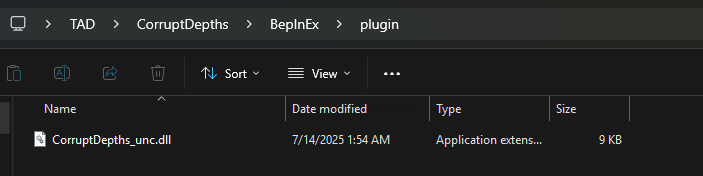
extract plugin to BepInEx\plugins. if don't exists BepInEx\plugins folder, move game folder to another place.

Features
  • Uncensored
  • F4 : Gallery Open
v1.0.0.1
  • Fixed uncensor works on End Scene.
Thank you for making this uncensor mod (y)

lmao the giant boobs are pretty hilarious, but i would love to see a pair of giant butts like that, too. maybe in the next one? ;)
Agreed with adding giant peaches making this game even better :love:

Thank you for sharing this link
 
  • Like
Reactions: DocRipper

Avitus93

Newbie
Aug 9, 2018
19
6
152
im assuming theyer englisch isnt the best
but simply extract bepinex into your games folder
either run the game once with bepinex isntalled or create the plugins folder yourself within the Bepinex folder
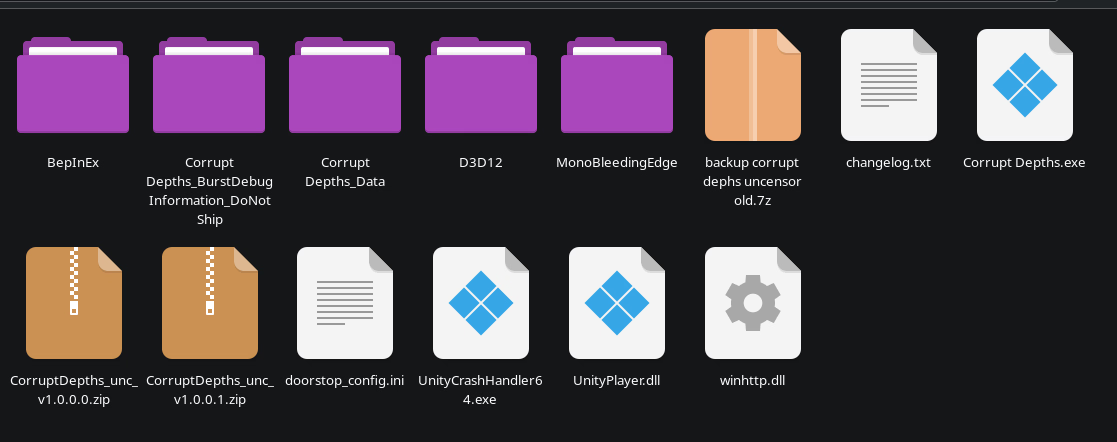
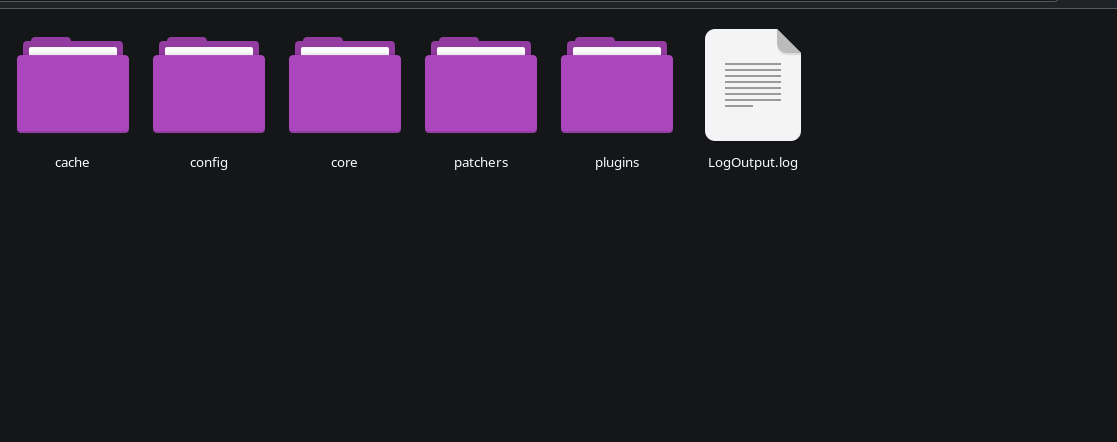
what it should look like with bepinex installed (using linux so icons for files may be different same for folder icons)
View attachment 5040411 View attachment 5040412
My bepinex folder looks like that but it's still censored what do I need to do more?
 
May 13, 2017
41
68
283
Anybody else having the issue, when i extract BepInEx and start the game it just crashes, it does create the Plugins folder but it still crashes?
 

Shirokamisama

Member
Aug 26, 2018
297
279
300
Hi! Sorry for not understanding how this is supposed to work, but I need some help with BepInEx.
I...
1) downloaded BepInEx_win_x86_5.4.23.3.zip and unpacked it into the game file.
2) run the game
3) open the BenInEx folder inside the game folder: Still only the "core" folder there, nothing else.
What am I doing wrong?
Thank you ppl who will answer me in advance!
 

testry

Member
Sep 18, 2017
161
139
204
Hi! Sorry for not understanding how this is supposed to work, but I need some help with BepInEx.
I...
1) downloaded BepInEx_win_x86_5.4.23.3.zip and unpacked it into the game file.
2) run the game
3) open the BenInEx folder inside the game folder: Still only the "core" folder there, nothing else.
What am I doing wrong?
Thank you ppl who will answer me in advance!
is your Windows x86 (32bit processor)? Hardly people use it nowadays.
If you are using Windows11 you must use x64 version of BepInEx.
For windows10 and below to be sure press START+PageBreak (System) and read "System Type" section. (Example System type: 64-bit operating system, x64-based processor)
 
  • Like
Reactions: Shirokamisama

Shirokamisama

Member
Aug 26, 2018
297
279
300
is your Windows x86 (32bit processor)? Hardly people use it nowadays.
If you are using Windows11 you must use x64 version of BepInEx.
For windows10 and below to be sure press START+PageBreak (System) and read "System Type" section. (Example System type: 64-bit operating system, x64-based processor)
I tried both, same happens anyway.
I have windows 11 but I thought I need the x86 cuz my programfiles folder is x86 by default.
 

Memime

Newbie
Jun 14, 2025
76
18
42
I too am in favor of just having an already uncensored version. Even if it is an .exe (I use Linux). It would be much easier even for a Linux system.
 

uwuwuuwuw

Newbie
Oct 30, 2024
36
25
147
I too am in favor of just having an already uncensored version. Even if it is an .exe (I use Linux). It would be much easier even for a Linux system.
im assuming theyer englisch isnt the best
but simply extract bepinex into your games folder
either run the game once with bepinex isntalled or create the plugins folder yourself within the Bepinex folder
what it should look like with bepinex installed (using linux so icons for files may be different same for folder icons)
View attachment 5040411 View attachment 5040412
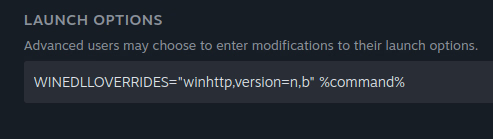
im asuming ur using proton or wine as a compatibility layer if so then use WINEDLLOVERRIDES="winhttp=n,b" %command% as a launch option and bepinex will just work its litteraly what any long term linux gamer does when modding unity games tho it will require the WINDOWS version of bepinex
litteraly already explained how to get bepinex to run really easily on linux its litteraly a buildin command of wine and proton
641223350579888139.png

steam (proton) as a example 1752516335642.png and it just works (requires windows version of bepinex to be existing within the games folder, see my quoted post (without the Version variable as im using that one for smt else)
 
Last edited:

uwuwuuwuw

Newbie
Oct 30, 2024
36
25
147
litteraly already explained how to get bepinex to run really easily on linux its litteraly a buildin command of wine and proton
View attachment 5042828

steam (proton) as a example View attachment 5042852 and it just works (requires windows version of bepinex to be existing within the games folder, see my quoted post (without the Version variable as im using that one for smt else)
THIS IS FOR LINUX ONLY REQUIRING BEPINEX 5 AND OFC THE GAME
1752516463406.png Screenshot_20250714_200808.png Screenshot_20250714_200813.png Screenshot_20250714_200818.png
litteraly this easy to get it to run
 

Memime

Newbie
Jun 14, 2025
76
18
42
I am aware of the instructions provided and perhaps I should have mentioned them. To clarify with my reply here (prior to this one), running an existing .exe file that is already uncensored is a much lesser hassle than having to figure out how to run patches and whatnot that are not designed for anything outside of Windows.

I also have yet tried your instructions. At this moment, I have a finite amount of time, and while the instructions seem simple, I am a bit of a novice user of Linux and somehow run into poor luck often. I also use Lutris most of the time.

Edit: For the post just above mine, I was writing this prior to it showing up.
 
3.60 star(s) 14 Votes