


Goeffel
Well-Known Member
- Sep 10, 2022
- 1,004
- 703
- 213
hm. somewhat reminds me of some other (old) games where windows has problems with displaying them fullscreen on high-dpi-monitors.
translating myself from a German interface (windows 11) :
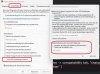
A RMB click on the exe, choose properties -> compatability tab, click the "change high-dpi settings" button, tick the bottom option ("dismiss high dpi scaling"), choose "application", OK, OK.
if that does not help, simply repeat but unchoose that "dismiss high dpi scaling" option -> all is as it was before.
translating myself from a German interface (windows 11) :
A RMB click on the exe, choose properties -> compatability tab, click the "change high-dpi settings" button, tick the bottom option ("dismiss high dpi scaling"), choose "application", OK, OK.
if that does not help, simply repeat but unchoose that "dismiss high dpi scaling" option -> all is as it was before.


