

Ren'Py Double Perception [v5.7] [Zett]
- Thread starter betterzett
- Start date
3.40 star(s)
53 Votes


- Mar 2, 2019
- 25,147
- 352,804
- 1,049
Yeah when I find time later to upload it.any update only patch?
please and thank you mate Bob69

RevenElrick
New Member
- Jan 15, 2026
- 10
- 2
- 0
Just checking to see if this still works.I figured out why I could not slow down the Capture game. The dictionary used for the speed was set as default and is written into your save file so even though I changed the value in the file, when I recalled the save, it would revert back to the original value. I know this because the dev left a print message in the game file that would print a line in the log file for every monster you would encounter. You can check that yourself after a monster hunt.
Conveniently, he declared the monsterspeed dictionary Global in the python statement so I was able to modify it before it assigned the monsterspeed to the mini-game. There is also a reward section that I modified to double the reward amount since I halved the monsterspeed to keep the reward in line. I have not found a place the reward is called yet, but better safe on that.
I also upgraded the efficiency of the tranqs and nets a bit to make the mini-game get to the end quicker.
Finally, on another mini-game completely, I extended the time of the SPA massage game to 60 seconds so you should never fail it.
Attached is v.1 of my small mod file. Extract and copy over your game file.
Let me know what you think if you try it.
Cheers
Nonamejustlike
New Member
- Aug 17, 2020
- 1
- 0
- 95
Anyone know to fix this ?
Code:
I'm sorry, but an uncaught exception occurred.

While running game code:
  File "game/script.rpy", line 33, in script call
    ""
  File "game/script.rpy", line 33, in script call
    ""
  File "game/script.rpy", line 33, in script call
    ""
  File "game/script.rpy", line 33, in script call
    ""
  File "game/script.rpy", line 33, in script call
    ""
  File "game/script.rpy", line 33, in script call
    ""
  File "game/script.rpy", line 33, in script call
    ""
  File "game/script.rpy", line 33, in script call
    ""
  File "game/MC/Events/Sleep.rpy", line 21, in script call
    call interaction_end(0)
  File "game/Dialog System/Dialog system.rpy", line 8, in script
    $ timeManager()
  File "game/Dialog System/Dialog system.rpy", line 8, in <module>
    $ timeManager()
  File "game/Overworld Screens/Python/Time python.rpy", line 104, in timeManager
    new_npc_location_manager()
  File "game/Overworld Screens/Python/NPC python.rpy", line 683, in new_npc_location_manager
    temp_anissa_activity = renpy.random.choice(possible_events_anissa)
IndexError: list index out of range

-- Full Traceback ------------------------------------------------------------

Full traceback:
  File "game/script.rpy", line 33, in script call
    ""
  File "game/script.rpy", line 33, in script call
    ""
  File "game/script.rpy", line 33, in script call
    ""
  File "game/script.rpy", line 33, in script call
    ""
  File "game/script.rpy", line 33, in script call
    ""
  File "game/script.rpy", line 33, in script call
    ""
  File "game/script.rpy", line 33, in script call
    ""
  File "game/script.rpy", line 33, in script call
    ""
  File "game/MC/Events/Sleep.rpy", line 21, in script call
    call interaction_end(0)
  File "game/Dialog System/Dialog system.rpy", line 8, in script
    $ timeManager()
  File "renpy/ast.py", line 928, in execute
    renpy.python.py_exec_bytecode(self.code.bytecode, self.hide, store=self.store)
  File "renpy/python.py", line 2245, in py_exec_bytecode
    exec(bytecode, globals, locals)
  File "game/Dialog System/Dialog system.rpy", line 8, in <module>
    $ timeManager()
  File "game/Overworld Screens/Python/Time python.rpy", line 104, in timeManager
    new_npc_location_manager()
  File "game/Overworld Screens/Python/NPC python.rpy", line 683, in new_npc_location_manager
    temp_anissa_activity = renpy.random.choice(possible_events_anissa)
  File "/home/tom/ab/nightly-build/tmp/install.linux-x86_64/lib/python2.7/random.py", line 277, in choice
  File "renpy/python.py", line 992, in __getitem__
    rv = list.__getitem__(self, index)
IndexError: list index out of range

Windows-10-10.0.19041
Ren'Py 7.4.10.2164n
Double Perception 5.7
Thu Jan 15 18:43:07 2026zzy1536940398
Member
- May 24, 2018
- 110
- 63
- 224
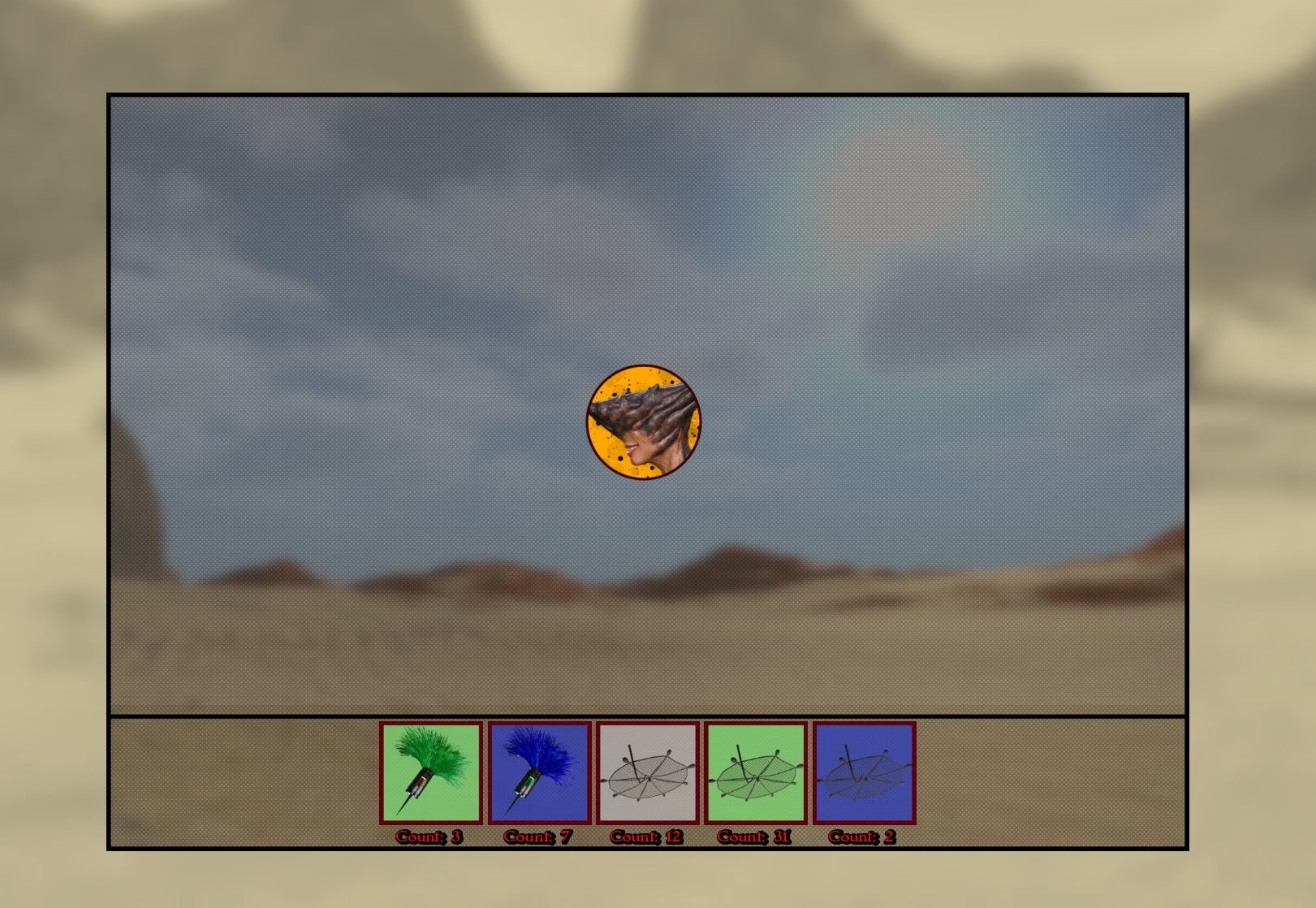
click on one of the darts, then click on the monster, it should slow down eventually if you hit (I think there is rng here) when it is slow enough select a net and click on it (more rng here so it might take several nets).Hey guys, I've been trying to figure out how this event works for a few days now. I haven't managed to slow down the moving head or catch the monster... Is there anything specific I need to do? Any tips would be greatly appreciated! View attachment 5628741
FYI I doubt 7 darts will be enough (I normally go through at least 10... though maybe I'm just a bad clicker)
an alternate plan might be to use cheat engine to slow the game, or use a mod, I think someone posted one just for this a little while ago
I had over 20 arrows and even more nets, but I'm just not good at clicking the icon at that high speed... and unfortunately, nothing has slowed down so far either :/click on one of the darts, then click on the monster, it should slow down eventually if you hit (I think there is rng here) when it is slow enough select a net and click on it (more rng here so it might take several nets).
FYI I doubt 7 darts will be enough (I normally go through at least 10... though maybe I'm just a bad clicker)
an alternate plan might be to use cheat engine to slow the game, or use a mod, I think someone posted one just for this a little while ago
Stil996 i found it and it rly helps.. thx mate =)I figured out why I could not slow down the Capture game. The dictionary used for the speed was set as default and is written into your save file so even though I changed the value in the file, when I recalled the save, it would revert back to the original value. I know this because the dev left a print message in the game file that would print a line in the log file for every monster you would encounter. You can check that yourself after a monster hunt.
Conveniently, he declared the monsterspeed dictionary Global in the python statement so I was able to modify it before it assigned the monsterspeed to the mini-game. There is also a reward section that I modified to double the reward amount since I halved the monsterspeed to keep the reward in line. I have not found a place the reward is called yet, but better safe on that.
I also upgraded the efficiency of the tranqs and nets a bit to make the mini-game get to the end quicker.
Finally, on another mini-game completely, I extended the time of the SPA massage game to 60 seconds so you should never fail it.
Attached is v.1 of my small mod file. Extract and copy over your game file.
Let me know what you think if you try it.

Overlord070
Engaged Member
- Jan 21, 2021
- 2,350
- 5,422
- 641
I remember trying to play this one twice, with different update versions and both times I had exceptions at the beginning of the game, has that been fixed?

Boobaassloving
Member
- Dec 7, 2018
- 314
- 611
- 278

- Oct 15, 2016
- 2,813
- 5,088
- 701
Don't use mods is the easiest fix.Anyone know to fix this ?
Code:I'm sorry, but an uncaught exception occurred. While running game code: File "game/script.rpy", line 33, in script call "" File "game/script.rpy", line 33, in script call "" File "game/script.rpy", line 33, in script call "" File "game/script.rpy", line 33, in script call "" File "game/script.rpy", line 33, in script call "" File "game/script.rpy", line 33, in script call "" File "game/script.rpy", line 33, in script call "" File "game/script.rpy", line 33, in script call "" File "game/MC/Events/Sleep.rpy", line 21, in script call call interaction_end(0) File "game/Dialog System/Dialog system.rpy", line 8, in script $ timeManager() File "game/Dialog System/Dialog system.rpy", line 8, in <module> $ timeManager() File "game/Overworld Screens/Python/Time python.rpy", line 104, in timeManager new_npc_location_manager() File "game/Overworld Screens/Python/NPC python.rpy", line 683, in new_npc_location_manager temp_anissa_activity = renpy.random.choice(possible_events_anissa) IndexError: list index out of range -- Full Traceback ------------------------------------------------------------ Full traceback: File "game/script.rpy", line 33, in script call "" File "game/script.rpy", line 33, in script call "" File "game/script.rpy", line 33, in script call "" File "game/script.rpy", line 33, in script call "" File "game/script.rpy", line 33, in script call "" File "game/script.rpy", line 33, in script call "" File "game/script.rpy", line 33, in script call "" File "game/script.rpy", line 33, in script call "" File "game/MC/Events/Sleep.rpy", line 21, in script call call interaction_end(0) File "game/Dialog System/Dialog system.rpy", line 8, in script $ timeManager() File "renpy/ast.py", line 928, in execute renpy.python.py_exec_bytecode(self.code.bytecode, self.hide, store=self.store) File "renpy/python.py", line 2245, in py_exec_bytecode exec(bytecode, globals, locals) File "game/Dialog System/Dialog system.rpy", line 8, in <module> $ timeManager() File "game/Overworld Screens/Python/Time python.rpy", line 104, in timeManager new_npc_location_manager() File "game/Overworld Screens/Python/NPC python.rpy", line 683, in new_npc_location_manager temp_anissa_activity = renpy.random.choice(possible_events_anissa) File "/home/tom/ab/nightly-build/tmp/install.linux-x86_64/lib/python2.7/random.py", line 277, in choice File "renpy/python.py", line 992, in __getitem__ rv = list.__getitem__(self, index) IndexError: list index out of range Windows-10-10.0.19041 Ren'Py 7.4.10.2164n Double Perception 5.7 Thu Jan 15 18:43:07 2026
- Oct 15, 2016
- 2,813
- 5,088
- 701
This generally has not been a problem unless you were using mods. Maybe way back the save games from one version didn't work with another, but that's been years ago, if it even happened.I remember trying to play this one twice, with different update versions and both times I had exceptions at the beginning of the game, has that been fixed?
What "mods" you are blaming, for the most part the mods in this thread are fan made workarounds.This generally has not been a problem unless you were using mods. Maybe way back the save games from one version didn't work with another, but that's been years ago, if it even happened.
Use the Easier SPA Massage/Monster Capture* in the extras.Hey guys, I've been trying to figure out how this event works for a few days now. I haven't managed to slow down the moving head or catch the monster... Is there anything specific I need to do? Any tips would be greatly appreciated! View attachment 5628741
Makes the monsters go slower and therefor easier to catch.
Same goes for the massage, easier to play this way.