

- Thread starter dazedanon
- Start date
-
- Tags
- 2d game 2dcg adventure ahegao anal sex bdsm big tits bukkake censored corruption creampie dilf exhibitionism fantasy female protagonist futa/trans group sex handjob humiliation internal view japanese game lactation lesbian male domination masturbation milf multiple penetration multiple protagonist oral sex pregnancy prostitution romance spanking teasing tentacles titfuck transformation trap turn based combat virgin voiced voyeurism
3.60 star(s)
24 Votes

Arima Bery
Member
- Dec 16, 2017
- 457
- 177
- 289
anyone got full save ? cant get it easily on wolf rpg sadly and any acerola game is kinda grindy
SparkyDoodle
Newbie
- Feb 13, 2018
- 69
- 17
- 43
I got the new version, but I can't get it to play in EnglishHello everyone, I got ver.2.00 from
You must be registered to see the links
Link serve 3 :
You must be registered to see the links
but the format Language of ver.2.00 is still in Japanese.
I also want to ask how to fix this?
View attachment 5123764
themagiman
Well-Known Member
- Mar 3, 2018
- 1,929
- 622
- 324
Same to me, i dont kwon why i just put part Tl ENG in folder game but noting change still JPI got the new version, but I can't get it to play in English

peanutstando
Member
- Jun 20, 2023
- 228
- 40
- 212
Here's my gallery save for 2.0.
Edit: This is for the raw game not the patched version.
Edit: This is for the raw game not the patched version.
Last edited:

ntccc
New Member
- Aug 8, 2025
- 1
- 0
- 1
JennaJJ,帖子:17050647,会员:3244243 said:
Berserk985
Member
- Apr 18, 2022
- 108
- 28
- 152
I got the new version, but I can't get it to play in English
Most likely because the 2.0 content hasn’t been translated yet.Same to me, i dont kwon why i just put part Tl ENG in folder game but noting change still JP
Berserk985
Member
- Apr 18, 2022
- 108
- 28
- 152

lastjournals
Member
- Dec 4, 2018
- 486
- 268
- 99

Solidkvothe
Newbie
- Apr 28, 2022
- 88
- 29
- 78
Is my game bugged? I can't use the airship at all, it keep saying I don't have any map available.

Chuuni Badger
Member
- Aug 17, 2016
- 293
- 470
- 370
Based on some earlier comments you have to patch the game and start from the beginning as saves made before the patch are borked.Is my game bugged? I can't use the airship at all, it keep saying I don't have any map available.
peanutstando
Member
- Jun 20, 2023
- 228
- 40
- 212

Tannin00
Member
- Jul 1, 2017
- 426
- 362
- 260
So no translation for 2.00?
None at the moment it seems
I got the new version, but I can't get it to play in English
And then we wonder why the species is so close to extinction by our own hand.Same to me, i dont kwon why i just put part Tl ENG in folder game but noting change still JP
Okay... I'll outline the steps.
1. Download version 2.0 from the Ryuu link.
2. Download the English patch file from the Ryuu website link.
3. Go to
You must be registered to see the links
and download UberWolf.exe from the first blue option.4. Unzip the 2.0 JP game wherever you want.
5. Place UberWolf.exe in the folder where you unzipped the game and open it.
6. Drag the game's exe file into the UberWolf.exe program box where it says "Drop it here exe"
7. Click "Proceed."
8. Wait for the program to finish unzipping the game into the data folder. You'll know it's finished if the event list no longer shows anything with (...) waiting to be "done" or if the last "done" item was the voice_B file.
9. Delete all the .wolf files from the data folder and leave only the files the program decompressed, which are all in folders.
10. Unzip the English patch file into the game folder. If it asks to replace anything, click "yes."
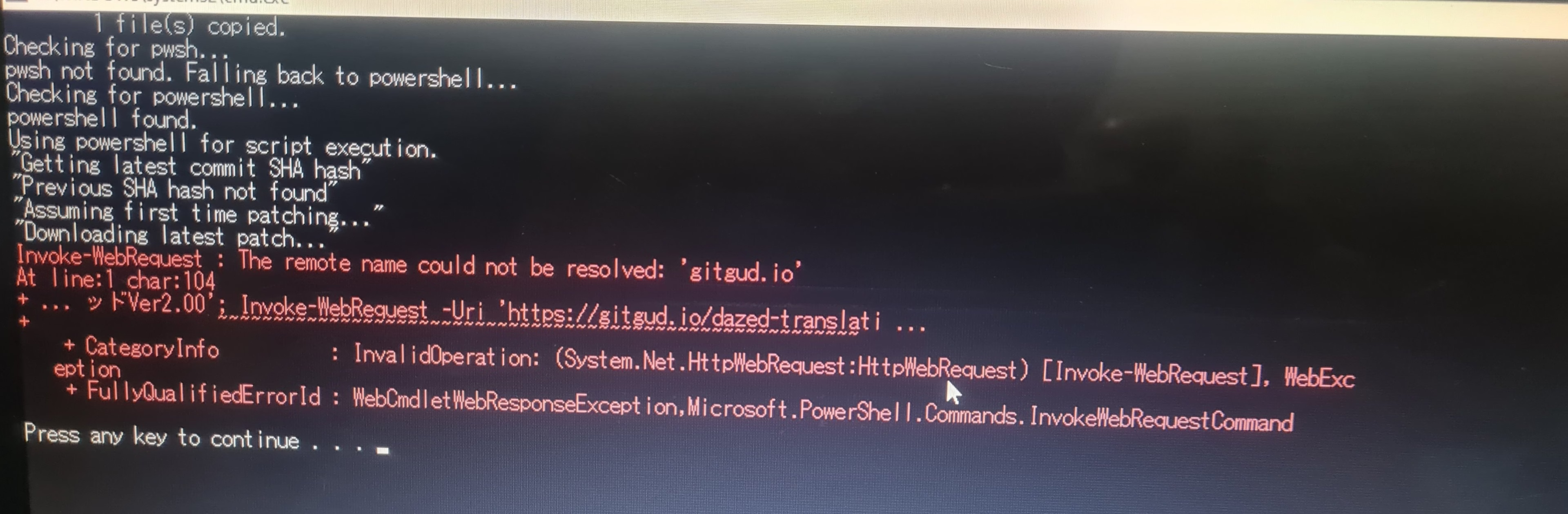
11. Click GameUpdate.bat and let the patch apply. A command prompt will open (this is normal, there's no danger). When the patch finishes applying, press any key on the keyboard to close the window.
12. You can now play, although from what I've tested, the patched game isn't compatible with save files from previous versions or the 2.0 JP version, so you'll have to replay the entire game if you want to unlock the gallery... (I mean, you can actually use a previous save, but it sometimes gives errors) or if someone later shares the save in the patched version itself.
I don't know if the file Ryuu provided is updated with the new content, but at least the interface, menu, and other elements are translated, so at least you can get a handle on what's going on in the game.
All of this (although not very well explained or in a more user-friendly way) is written in the READ ME file that comes in the patch rar, especially in the part at the beginning where it says "For WOLF games, an extra step must be taken if it's not originally from Dlsite."
Anyway, I hope this helps at least have a usable version of the game in the new version if the new content is still missing translation, but at least makes it easier to update from an existing base.
And if anyone still wondering why this had to be done, the READ ME explains it: the game's exe gives .Wolf files priority over the translation, so you first have to extract the 2.0 files to have them free and delete the .Wolf files so the files used by the exe be the ones from the combined free and patch.
Or, at least that's what I understand. My technical knowledge of the subject isn't very deep, so if I made any mistakes, I apologize.

JumpNeet44
Member
- Jan 22, 2021
- 349
- 252
- 209
sorry but this is not working for me, once i run gameupdate it reverts back to 1.24 , the only viable option would be to use dazedtool or mtool on the new version of the gameAnd then we wonder why the species is so close to extinction by our own hand.
Okay... I'll outline the steps.
1. Download version 2.0 from the Ryuu link.
2. Download the English patch file from the Ryuu website link.
3. Go toYou must be registered to see the linksand download UberWolf.exe from the first blue option.
4. Unzip the 2.0 JP game wherever you want.
5. Place UberWolf.exe in the folder where you unzipped the game and open it.
6. Drag the game's exe file into the UberWolf.exe program box where it says "Drop it here exe"
7. Click "Proceed."
8. Wait for the program to finish unzipping the game into the data folder. You'll know it's finished if the event list no longer shows anything with (...) waiting to be "done" or if the last "done" item was the voice_B file.
9. Delete all the .wolf files from the data folder and leave only the files the program decompressed, which are all in folders.
10. Unzip the English patch file into the game folder. If it asks to replace anything, click "yes."
11. Click GameUpdate.bat and let the patch apply. A command prompt will open (this is normal, there's no danger). When the patch finishes applying, press any key on the keyboard to close the window.
12. You can now play, although from what I've tested, the patched game isn't compatible with save files from previous versions or the 2.0 JP version, so you'll have to replay the entire game if you want to unlock the gallery... (I mean, you can actually use a previous save, but it sometimes gives errors) or if someone later shares the save in the patched version itself.
I don't know if the file Ryuu provided is updated with the new content, but at least the interface, menu, and other elements are translated, so at least you can get a handle on what's going on in the game.
All of this (although not very well explained or in a more user-friendly way) is written in the READ ME file that comes in the patch rar, especially in the part at the beginning where it says "For WOLF games, an extra step must be taken if it's not originally from Dlsite."
Anyway, I hope this helps at least have a usable version of the game in the new version if the new content is still missing translation, but at least makes it easier to update from an existing base.
And if anyone still wondering why this had to be done, the READ ME explains it: the game's exe gives .Wolf files priority over the translation, so you first have to extract the 2.0 files to have them free and delete the .Wolf files so the files used by the exe be the ones from the combined free and patch.
Or, at least that's what I understand. My technical knowledge of the subject isn't very deep, so if I made any mistakes, I apologize.
Tannin00
Member
- Jul 1, 2017
- 426
- 362
- 260
Are you using Ryuu's link?sorry but this is not working for me, once i run gameupdate it reverts back to 1.24 , the only viable option would be to use dazedtool or mtool on the new version of the game
It's assumed everything is updated to at least the previous version, not a version that far back. The link is on this same thread page.
Edit: The previous page. This reply has been updated on a new page.