

malaac2025
Well-Known Member
- Mar 17, 2024
- 1,339
- 1,181
- 300

if you expand the commandline field further you will see that they have different commandlines and do different things. one is for the notification handler. its very common for programs to run separate processes, your browser runs hundreds of processes.

Thanks, that explains it clearly now....a change of version number means it counts as an update. since i changed *what* version it uses, it means all the version numbers for mods are now different, which counts as an "update".
this is a one time occurrence over the next week while all mods get the correct version applied to them, and from then on it will detect mod version updates correctly, which it did not before.
and sorry for the condescending tone, i was having a bad day. glad its clear nowThanks, that explains it clearly now.
(I thought any edit to a topic would have a date of that edit showing somewhere, but I see that's not the case.)


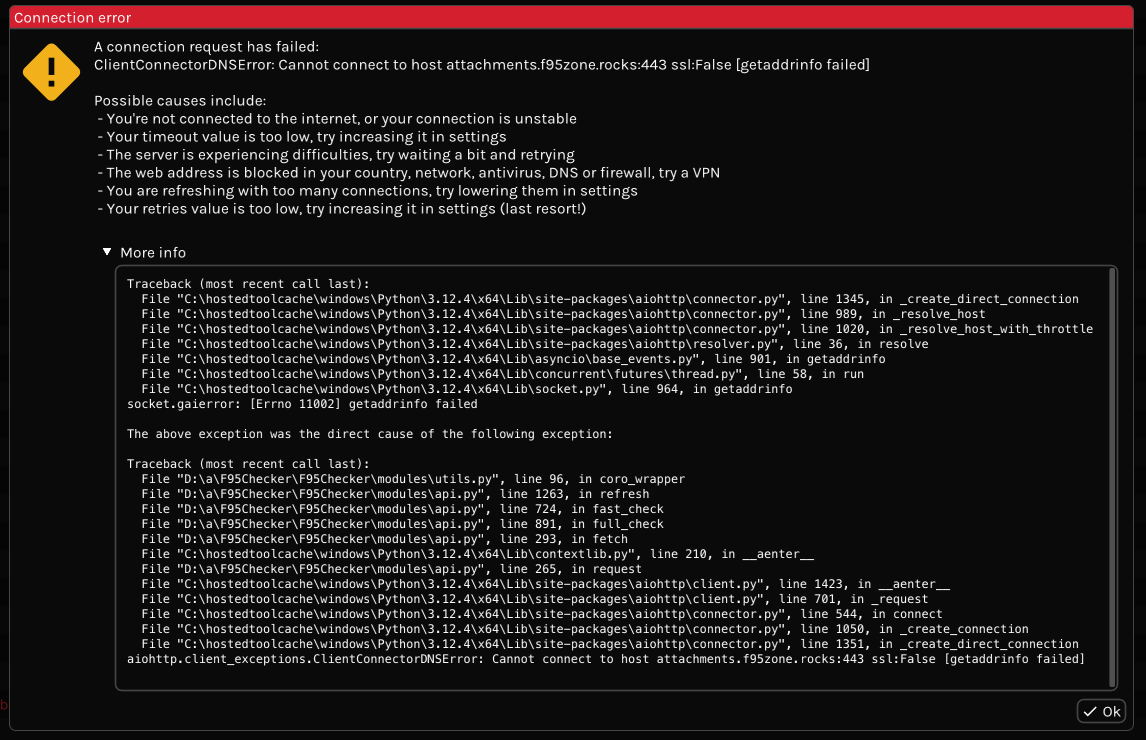

Is this working now? Your error seems to be that the F95 attachments server was unreachable, this often passes over time.Dunno what happened but when I try to do full recheck for recently added games it's just getting stuck on downloading images
View attachment 5298187
Not yet, same error. Let's check tommorowIs this working now? Your error seems to be that the F95 attachments server was unreachable, this often passes over time.

Not sure if this adding another folder level to the DDL unpacker is an improvement. Games almost always come zipped with the game name as top level. So when they get unpacked, you get a folder with the name of the zip file, and inside a folder with the name of the game.downloading in separate folders for each thread might be better
depends entirely on how its packaged and also for things other than games like collections this is a huge improvement, previously it was all dumped into the same folder, and sometimes its not zip files sometimes its just a single mp4 file so you would have some zips some mp4 files all in the same top-level downloads firectory, now its organized based on "game" which could be a game or a collection or whateverNot sure if this adding another folder level to the DDL unpacker is an improvement. Games almost always come zipped with the game name as top level. So when they get unpacked, you get a folder with the name of the zip file, and inside a folder with the name of the game.
At least, that's how it was, now you get a folder with the name as it is displayed in the checker (cut short if the name in the checker exceeds a certain length), then a subfolder with the name of the zipfile, and lastly another subfolder with the name of the game.
Seems overcomplicated to have to dig 3 levels down just to copy/move the game files to the target folder.
as the error text says this is a DNS failure, either your ISP or antivirus is blocking that domain at DNS level. change DNS in your system settings to something more sane like cloudflare's 1.1.1.1 or use a VPN, your ISP (like all others) is evil anywaysDunno what happened but when I try to do full recheck for recently added games it's just getting stuck on downloading images
View attachment 5298187
As far as games go, they're always packed with the name of the game as topfolder. And like you said, it depends on what you use the checker for. For me, using it strictly for games, it's not that much of an improvement, just more clicks to access the files.depends entirely on how its packaged and also for things other than games like collections this is a huge improvement,

I am using cloudflare DNS's and getting this error.as the error text says this is a DNS failure, either your ISP or antivirus is blocking that domain at DNS level. change DNS in your system settings to something more sane like cloudflare's 1.1.1.1 or use a VPN, your ISP (like all others) is evil anyways
Are you using the 1.1.1.3 (with 1.0.0.3) per chance (this is filtered for no adult content)? I use 1.1.1.1 (with 1.0.0.1) and it works fine.I am using cloudflare DNS's and getting this error.
Edit: Tried VPN and it works. It checks newly added positions.

search less then.I just found and downloaded this today and I keep running into issues with the ratelimit getting limited after a few searches.
I did not even know about existence of the former.Are you using the 1.1.1.3 (with 1.0.0.3) per chance (this is filtered for no adult content)? I use 1.1.1.1 (with 1.0.0.1) and it works fine.

Dude, get your game list put together, and one click checks them all. And no game is worth checking in less than 24 hours. Uhmmm... well, almost!I just found and downloaded this today and I keep running into issues with the ratelimit getting limited after a few searches.
. But BG mode is helpful.
What he means is the program checks already checked games but chokes when it comes across newly added titles. Check the few post above. Someone posted an error traceback.Dude, get your game list put together, and one click checks them all. And no game is worth checking in less than 24 hours. Uhmmm... well, almost!
The error happens even when you want to check a single position that is unchecked.search less then.
I would suggest using the site to search, then with the browser plug-in you can right click and 'Add this link to F95Checker' to build your library:I just found and downloaded this today and I keep running into issues with the ratelimit getting limited after a few searches.
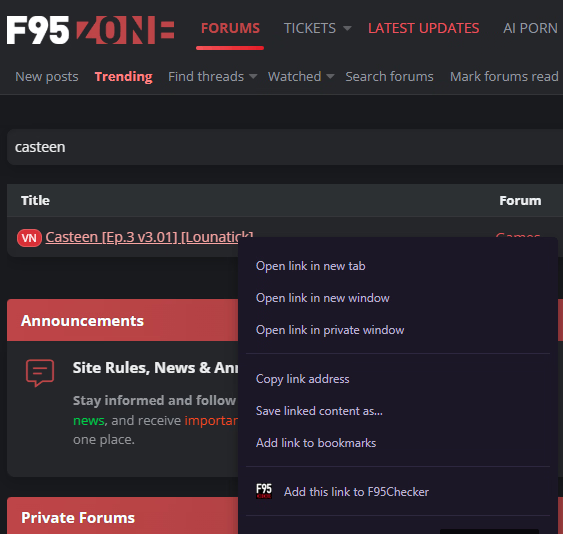
the traceback posted by russianIvan has absolutely nothing to do with the ratelimit Cake3Purple6Cheese948 complaiend about. and your conclusion is wrong too. the program works the exact same with newly added or already know titles, they all pass through the cache api and therefore are not subject to ratelimits from f95zone forum servers. what is subject to ratelimits is the forum, and during hours of peak traffic is can obstruct even normal usage in browser, let alone someone making searches on it via a third party tool. whether or not f95zone forum servers hate you and/or everyone else at a certain hour of the day is beyond my control, and not something i can fix, it is not a problem with my program.What he means is the program checks already checked games but chokes when it comes across newly added titles. Check the few post above. Someone posted an error traceback.
it does not. there is absolutely no way for my cache api to spuriously return a "ratelimit". and "check"ing games goes to the cache api, not f95zone. f95zone can ratelimit you, and searches go to f95zone, so searches can be ratelimited. checking/refreshing games cannot.The error happens even when you want to check a single position that is unchecked.
