


MeAndTheDevil
Newbie
- Apr 15, 2025
- 39
- 28
- 57

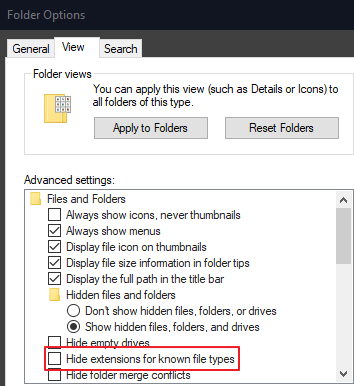
You may need to clear this checkbox ...All I found in there is cache folder with files with no extension. So do not appear to be data files at all.

i assume you mean from bottom to top of the images that are visible on screen (as opposed to loading iimages that are not visible)? this is just a side effect of how it is implemented. the intention is for images to be loaded only when shown, but since images take time to load they are inserted at the beginning of the list when they are first shown, so that if you happen to scroll, the newly shown images take precedence in the queue of images to load, and images that were shown previously stay behind in the queue since they may now be off screen; and because of that, since images are drawn top left to bottom right, and each image being shown is inserted at the beginning of the queue, they end up with the last drawn image (the furthest bottom right image) being first in the queue. effectively, images are added to the queue in the inverse order that they are drawn. but still, its only visible images that this happens to, so it shouldnt make much difference usually. if you have the "preload nearby images" option enabled, then this is made a bit worse because the same concept applies of the furthest bottom right image being first in queue to load, but it also considers an extra screen length's off screen of images to queue loading, so effectively it starts first loading images that are not visible when initially shown.silly observation but I noticed on the "game updated" screen the picture load from from bottom order to top.
As a yes or not question, was this intended and, priority list aside, is it possible to load the pictures from top to bottom?
i think you got those the wrong way round.This was indeed intended. The idea behind it was that it would preload the images that were currently not on screen, so that when you scroll down, it would already have the images loaded. That means without editing the code and running from source, it currently isn't possible to change this. You might try enabling thepreload nearby imagesoption in the images section(sidebar). It would still load them from bottom to top order but might show the ones you need/want to see faster.
no, the way "preload nearby images" works is tied into "unload off-screen". what "preload nearby images" does is make the range of images that is considered "on screen" larger than it actually is, considering ones up to a window height above/below and a window width right/left of where the window ends. this means that it will try loading these images regardless of the other image options, and that "unload off-screen" will only consider unloading ones outside the bounds of "on screen" which may be the actual window size, or triple that if "preload nearby images" is enabled.However, since we now also have the option to unload images currently not showing, this behavior may now be counterproductive (@WillyJL ?).
yeah i do want to make it a bit better in the C rewrite. what "unload off-screen" and "preload nearby images" will be mostly the same, but i hope to make image loading overall more intuitive. something like still prioritizing actually on-screen images before preloading nearby off-screen ones if "preload nearby images" is enabled, and (if compression is enabled) compressing images in the background as soon as it notices they are not compressed rather than when they are shown.Meaning, this behavior may change in the C rewrite version or perhaps change behavior depending on whether or not theunload off-screen imagesis checked or not.
Correct me if I'm wrong, but didn't you once explain to me, the bottom-right to top-left loading order was intentional? So that when you scrolled down, images would already be loaded, instead of having to wait until they showed? You even pointed me to the old code where it still loaded them top to bottom. Mind you, this was way before the two mentioned options got added.i think you got those the wrong way round.
by default, it will only try loading images that are visible, the fact it does this from bottom right to top left of what is visible on screen is an unintended side effect of the way i implemented it.
with the "unload off-screen" option you can decide if they should be unloaded when no longer visible.
Which is why I suggested this, even though the loading order wouldn't change, the ones currently off-screen would still be loaded faster than without it enabled because the 'range' is smaller.with the "preload nearby images" option you can make it try to also load images that are not visible, and due to the fact they are loaded bottom right to top left this can unfortunately mean it considers loading the ones off screen before the ones visible
hm maybe i did add an afterthought excuse for why its "better" like "hey it kinda works out because if you want to scroll, the bottom row is what will be the top row after scrolling so it appears to load faster", now that you mention it i vaguely remember saying something to that effect, but yeah originally the behavior was not intentional.Correct me if I'm wrong, but didn't you once explain to me, the bottom-right to top-left loading order was intentional? So that when you scrolled down, images would already be loaded, instead of having to wait until they showed? You even pointed me to the old code where it still loaded them top to bottom. Mind you, this was way before the two mentioned options got added.

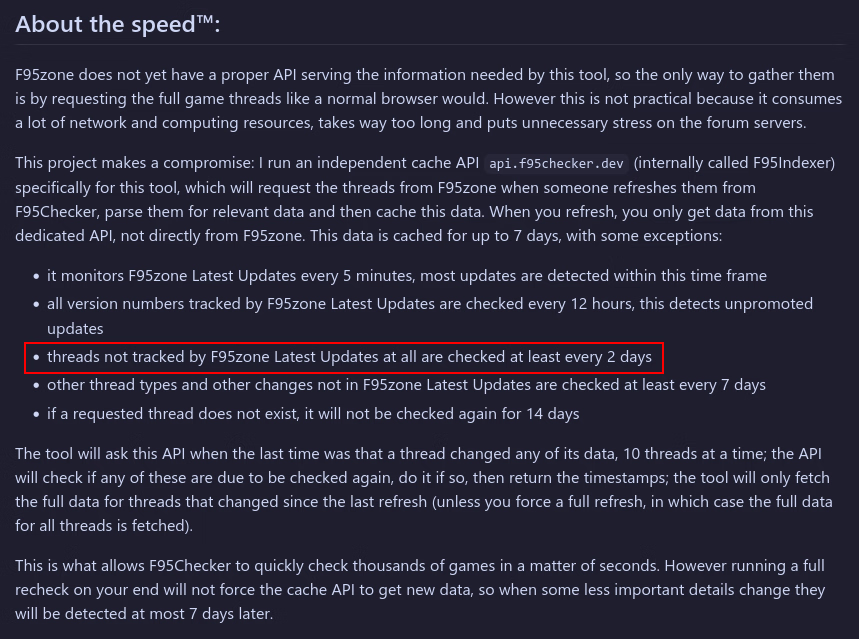
the github readme explains this in detail. the OP in this thread is outdated, i keep putting it off and forgetting to update it. you fall into this category:Does the F95Checker update-checks mod topics less often than game ones?
I've already updated my mod's original topic-post several times the last 3-4 days, but the checker still shows the messed up updated-date and wrong version number.
https://f95zone.to/threads/the-null-hypothesis-tnhuxmod-v0-8b1-12-freddygonzo.262923/
No idea how this works, but if the update-frequency is also dependent on popularity then I guess I see the next update next year or so.
I could correct some entries if I did something what the checker can't read correctly.
I just tried this myself, and while doing so I see a message flashing bottom-right "Waiting for F95zone ratelimit...". Meaning, the app takes the rate limit into account, resulting in all of my watched threads getting imported.Hi there, this tool is fantastic and I use it frequently, thanks so much for putting it together. Unfortunately, as of yesterday I get hit with a rate limit whenever I try to import my watched threads, is there any way to fix this or do I have to sift through my watched threads to find the ones not currently in the app and add them manually? Hopefully the former because the latter would really suck given how many threads there are lol.
I'm on 11.0.3. What happens for me is that it gets stuck forever at a certain percentage and then just fails and tells me I've been rate limited, but yes I also see the message in the bottom right. A similar problem happens for refreshing, but it just stops at 100% and when I cancel it everything pops up as if it worked.I just tried this myself, and while doing so I see a message flashing bottom-right "Waiting for F95zone ratelimit...". Meaning, the app takes the rate limit into account, resulting in all of my watched threads getting imported.
Are you on the latest beta?
Go to WillyJL'sI'm on 11.0.3. What happens for me is that it gets stuck forever at a certain percentage and then just fails and tells me I've been rate limited, but yes I also see the message in the bottom right. A similar problem happens for refreshing, but it just stops at 100% and when I cancel it everything pops up as if it worked.
)
I'm on 11.0.3. What happens for me is that it gets stuck forever at a certain percentage and then just fails and tells me I've been rate limited, but yes I also see the message in the bottom right. A similar problem happens for refreshing, but it just stops at 100% and when I cancel it everything pops up as if it worked.
both these issues are related to the same thing. f95checker does handle forum rate limits as much as it can:1647 == 11.0.3, I have the same version and am seeing the same behavior.
Sometimes the refresh completes and the "ratelimit" message goes away, and anything new does pop up by itself in a separate window.
But other times it just sits there with the ratelimit message in bottom right, with the window in top right all Red, saying 100% After a full minute or two I get impatient (imagine that, lol) and I click the red window to cancel it. But when I do that, anything new does pop up in a window, too.
This isn't life-ruining, it's just a very minor annoyance. I can deal with it. I just thought I'd add to the reports of this happening. Not sure anything can be done about it since the site has to limit this (and I understand why).
yeah might consider something like thatToo bad you can't specify the filter options from the "Watched threads" page in the checker directly. (@WillyJL? Idea for the C Version? Unread, Last Updated and Sort by seems to be the most useful to limit the number of pulled threads if it does indeed cause a hard forum rate limit. Same with the F95 Bookmarks, pulling the labels wouldn't be necessary, since the user will know which labels he/she applied. They would simply need to enter each label one at a time.
re-read my in-depth explanation please. in particular this part:So it seems like there's no workaround for importing watched threads? Unlike just refreshing, I can't get this one to work at all. If not then thanks anyway, the tool is still amazing otherwise. I'm still a bit confused why this is happening now though, as it never used to happen even like last week.
just so happens that this week is more busy then last week i guess. its out of my and your control.so during busy hours of the day it can just be nearly impossible to get through, and the best thing the tool can do is give up and you wait a few minutes or a few hours.
Uh... no, it isn't, that should be 11.1 beta...1647 == 11.0.3, I have the same version and am seeing the same behavior.


Sidewinder, you can download build 1647 here -1647 == 11.0.3, I have the same version and am seeing the same behavior.
