

- Thread starter Silentce
- Start date
4.10 star(s)
32 Votes
Don't like to read all here. I think the download version is already patched. "Energy Enhancer -> Sexual Energy Enhancer" is already in game.Can't run the uncensored patch. It keeps telling me that fall in labyrinth software not found, to download the game and try again. But I've done this multiple times. Am I missing something?
Don't like to read all here. I think the download version is already patched. "Energy Enhancer -> Sexual Energy Enhancer" is already in game.
Yeah, I noticed it was uncensored when I actually played it. Not sure if it's because I downloaded the patch with the game, but it was uncensored. I just forgot to mention it.
NamesAreForTheWeak
Active Member
- Aug 22, 2018
- 530
- 501
- 298
There's a save *way* back that should still work to unlock all the scenes.No 100% save? Anyone?
CaptDaddy24
Newbie
- Aug 3, 2022
- 37
- 43
- 167

Daisuki_kun04
Newbie
- May 5, 2022
- 33
- 26
- 128

EricBauman
Member
- Jun 15, 2020
- 482
- 284
- 212
Sure, ask your doctor for details.can we change male to female?

BlackElite
Well-Known Member
- Sep 18, 2018
- 1,594
- 1,055
- 347
I heard the latest version is 1.33, What's the difference between that and this? Or, no difference?
The game is a combination of a difficult dungeon crawler and a dating sim...
However what completely ruins it, is the forced scenes
Whoever came up with that design philosophy, needs to seek psychiatric help. What's next "my daughter is still asleep and will be late for school. I have no choice but to rape her". ?
However what completely ruins it, is the forced scenes
- Beahilda forces you to torture a girl (you can not refuse)
- Beahilda forces you to have sex with her (you can not refuse)
- You can not kill Beahilda, your slaves feel sorry for her.
- Tiny is high and we don't have time for it to wear off, the only option is to rape her (no choice here)
- Beahilda is borderline suicidal because she believes that just the touch from the bandits has "defiled" her... Rape her, to prevent her suicide (no choice)
- Leaze is depressed and essentially brain dead, raping her will fix everything... (No say in the matter
- Pristina lost a duel with you and even though she's saying "NO" and wants to remain a virgin, all you can think about is popping her cherry. (Game goes into auto-battle/auto-win mode for this battle and sex scene. Player has zero control)
Whoever came up with that design philosophy, needs to seek psychiatric help. What's next "my daughter is still asleep and will be late for school. I have no choice but to rape her". ?

Yonnediwalter
Newbie
- May 6, 2024
- 83
- 13
- 145

You can still have the scene by raising the horniness level to a high number, between 90 to 100, once horniness reaches that level, you can unlock that scene. By doing again "squeezing her boobs" to unlock the scene.How do i to unlock the missing scene like "Forte Boobs Squeezing High Fondness"?
'cause her Fondness is already Maxed at 100
And i already proposed her to get married.
All Star Gamers
New Member
- Dec 21, 2024
- 1
- 0
- 36
Hello, how to get the last weapon (between Death Scythe & Fragments of The Gods) & last costume (between Bunny Ears Black & Red)? The latter though which floor chest does this costume more likely to drop? My RNG for that costume is trash.
Last edited:

Merkitas
Newbie
- Apr 17, 2017
- 15
- 18
- 179
Does anyone know who is the artist that composed the song called あなたの優しさは in the BGMs? The BGM that played at the end of Torte's quest line.

demongoddesslilith
Member
- Apr 1, 2020
- 108
- 109
- 70
Getting these two errors when I try to run the application on Linux, anyone know a fix?
Using WINE 10.20, I used WINE to install RPGMaker AceVx RTP already, not sure what else I'm missing.
Using WINE 10.20, I used WINE to install RPGMaker AceVx RTP already, not sure what else I'm missing.
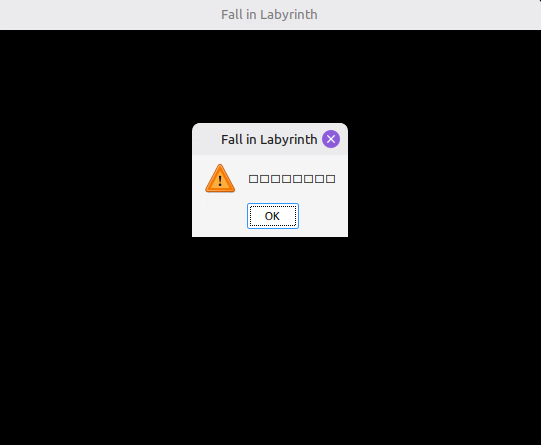
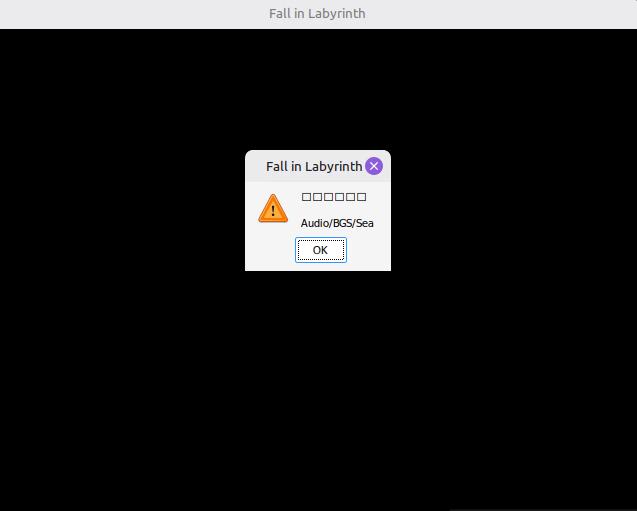
Haven't tried this on Linux yet, but the square characters look like a missing font. Try using Winetricks to install the cjk fonts pack.Getting these two errors when I try to run the application on Linux, anyone know a fix?
Using WINE 10.20, I used WINE to install RPGMaker AceVx RTP already, not sure what else I'm missing.
View attachment 5574503 View attachment 5574504
That'll probably show you the error message in Japanese, which you can either trying to read yourself, or use an OCR tool (like Frog) to read the characters and put them into a translator (like DeepL).
From the path in the second image, my guess is that the game can't find a file. Likely reasons are:
1. You installed the RTP in a separate Wine prefix, not the one that the game is using.
2. You installed the wrong RTP. From the DLSite page it looks like VXAce is the right one. I've confused VX and VXAce before, so maybe double-check that you really installed VXAce (as opposed to one of the other RTPs).
3. The game has a typo in the file that it's looking for, using the wrong capitalization. Since Windows made the (insane) decision to ignore capitalization when looking for files, it might work fine on Windows, but not on most Linux filesystems. Often this is as simple as finding the file, copying it, then changing the copy's capitalization to match what the game is looking for. (You could rename the original file, but that'll lead to issues if the game is using the correctly capitalized file name in other places. It's usually better to just have two copies of the same file, one with the original capitalization and one with the capitalization in the error message.)
4. You had the wrong encoding when extracting the game. This resulted in the filenames being garbled jibberish instead of Japanese characters. Japanese computers usually use Shift-JIS encoding, so when extracting Japanese games, I usually use the command
unzip -O shift-jis "name_of_the_file.zip".Hope that helps solve the issue. If it doesn't, but you get some more information, feel free to reply to this message and I can try to help.
demongoddesslilith
Member
- Apr 1, 2020
- 108
- 109
- 70
Font installation went without issue (aside from Winetricks spamming the 64-bit warning, but I don't think that's an issue).Haven't tried this on Linux yet, but the square characters look like a missing font. Try using Winetricks to install the cjk fonts pack.
That'll probably show you the error message in Japanese, which you can either trying to read yourself, or use an OCR tool (like Frog) to read the characters and put them into a translator (like DeepL).
From the path in the second image, my guess is that the game can't find a file. Likely reasons are:
1. You installed the RTP in a separate Wine prefix, not the one that the game is using.
2. You installed the wrong RTP. From the DLSite page it looks like VXAce is the right one. I've confused VX and VXAce before, so maybe double-check that you really installed VXAce (as opposed to one of the other RTPs).
3. The game has a typo in the file that it's looking for, using the wrong capitalization. Since Windows made the (insane) decision to ignore capitalization when looking for files, it might work fine on Windows, but not on most Linux filesystems. Often this is as simple as finding the file, copying it, then changing the copy's capitalization to match what the game is looking for. (You could rename the original file, but that'll lead to issues if the game is using the correctly capitalized file name in other places. It's usually better to just have two copies of the same file, one with the original capitalization and one with the capitalization in the error message.)
4. You had the wrong encoding when extracting the game. This resulted in the filenames being garbled jibberish instead of Japanese characters. Japanese computers usually use Shift-JIS encoding, so when extracting Japanese games, I usually use the commandunzip -O shift-jis "name_of_the_file.zip".
Hope that helps solve the issue. If it doesn't, but you get some more information, feel free to reply to this message and I can try to help.
For #1, how would I determine that the game's wine prefix is different to where I installed the RTP?
For #4, the available downloads here are in .rar archives, not .zip, is there any special procedure required for .rar archive extraction? I've just been using the Archive Manager associated with my distro.
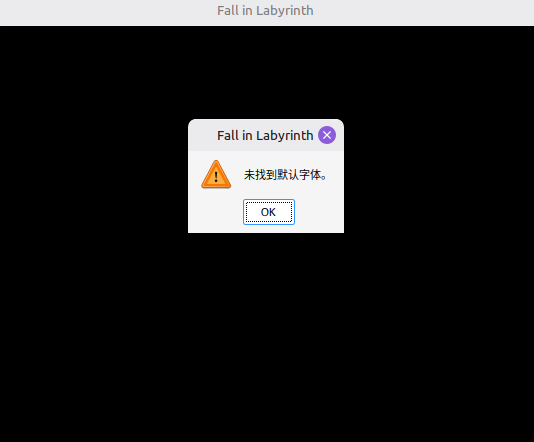
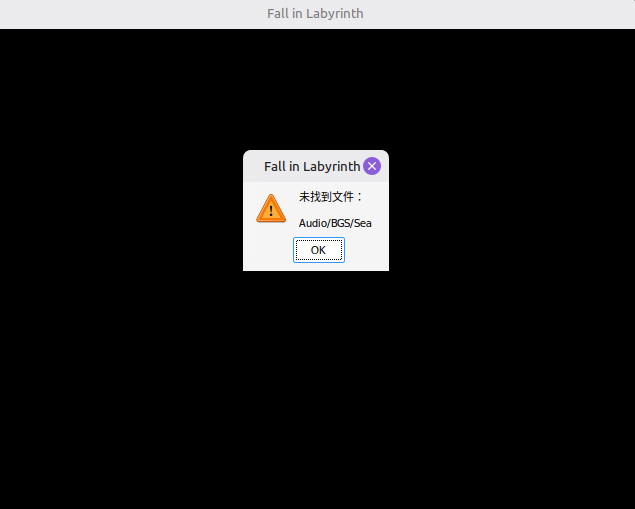
For #1, just try running the RTP in the prefix again and seeing what the window says (it should detect if the RTP is already installed). Personally I use Lutris to manage all my prefixes and run stuff in them, but there are other options as well.Font installation went without issue (aside from Winetricks spamming the 64-bit warning, but I don't think that's an issue).
For #1, how would I determine that the game's wine prefix is different to where I installed the RTP?
For #4, the available downloads here are in .rar archives, not .zip, is there any special procedure required for .rar archive extraction? I've just been using the Archive Manager associated with my distro.
View attachment 5575838 View attachment 5575840
For #4, I've never had to deal with encodings in rar files so I'm not sure. From a quick Google search, apparently it's possible for rar files to have different encodings, so check whatever tool you're using to see if there's options there. Other option would be to just check wherever the path is pointing at and see if the file names look reasonable. If it looks like "bla_123.png" or "日本語.jpg" then it's probably fine, if it looks like "adæфðasdfógdvуðкsедaíAWллд.png" then it's probably an encoding issue.
Have you tried translating the error messages? I can partially read the first one and it says something about fonts. You could use an OCR tool or a text extractor (like
You must be registered to see the links
) to get the text and feed it to your translation tool of choice (like Google Translate or DeepL). If you can't get any tool to extract the text, you could use the radical selection option on Jisho.org to pick out each character by parts; it'll just take a while to do so.