Tutorial [ILLUSION] HS2 Studio Neo|Chara Maker - (Help & guides Thread)

5.00 star(s) 2 Votes

ExhibitGames

Female Exhibitionist
Donor
Game Developer
Nov 10, 2020
71
166
217
You mean the crosshair?
It serves as your orbit center point.
Just hold and drag the scroll button to move it around.
If you dont want it to be displayed, there's a toggle for it at left side menu.
I knew about the scroll button, but I thought I remembered removing it all together while posing a scene. I could be remembering it wrong though. Thanks anyways.
And by removing it I mean just not hiding it but removing it so it didn't stop me from moving around the map freely.
 
Last edited:

RSD534

New Member
May 10, 2020
14
11
22
Hello, it’s me again. Let me ask you something, do you guys have a chart, diagram, or any kind of guide on how to parent character bones together so they can move with each other in Studio? I want to learn how to create short animations in Studio for my next game. I tried downloading some premade scenes from the official hs2 Discord and learned a few ways to make characters move together, or even adult scenes, but everything still feels too stiff, and I think I need to improve more. I think the best way is to animate things manually so they look better instead of using Ekan’s pistons. So if any of you have a detailed guide on how to parent specific bones together in Studio, please share it with me, I’ll repay the favor later.
 

AmaNo04

Active Member
Jul 6, 2020
869
742
227
I tried downloading some premade scenes from the official hs2 Discord and learned a few ways to make characters move together, or even adult scenes, but everything still feels too stiff, and I think I need to improve more.
Both timeline based animation (Timeline and VNGE) and gimmick will look stiff if you don't integrate a physics to your rig.
I think the best way is to animate things manually so they look better instead of using Ekan’s pistons.
There is no correct answer for this. Some people like to use timeline based method while others prefer gimmick based.
I used to animate with VNGE few years ago and personally I think it's more difficult. It's true that I have more control over the animation but that also backfired to me as I ended up with too many things to be animated.
 

Psychopomp

New Member
Jan 12, 2018
9
2
58
I'm creating a trap character and would like to achieve this effect (with the erect penis deforming the panties and "peeking" up a bit), anyone know how this would be achievable? I use Koikatsu Sunshine, but the studio logic is very similar, and I couldn't find an in-depth thread for it like this one. The attachment is an AI image I generated for this example.
 
Last edited:

GIGABRAZ

Newbie
Jun 1, 2025
32
24
8
Hello, it’s me again. Let me ask you something, do you guys have a chart, diagram, or any kind of guide on how to parent character bones together so they can move with each other in Studio? I want to learn how to create short animations in Studio for my next game. I tried downloading some premade scenes from the official hs2 Discord and learned a few ways to make characters move together, or even adult scenes, but everything still feels too stiff, and I think I need to improve more. I think the best way is to animate things manually so they look better instead of using Ekan’s pistons. So if any of you have a detailed guide on how to parent specific bones together in Studio, please share it with me, I’ll repay the favor later.
There you go for the parenting tutorial : (Supposed to start at 14:10. If it's not do it manually).

The shortkey for the parenting panel can be different. Check with F1 yours.
 
  • Heart
Reactions: RSD534

Neunpli

Newbie
Nov 5, 2020
47
74
61
I'm creating a trap character and would like to achieve this effect (with the erect penis deforming the panties and "peeking" up a bit), anyone know how this would be achievable? I use Koikatsu Sunshine, but the studio logic is very similar, and I couldn't find an in-depth thread for it like this one. The attachment is an IA image I generated for this example.
I don't know if this is the best way, but if I were to attempt it with my knowledge would just make a copy of the character, at the same position, with an invisible body. If your scene is static, this should be very easy, otherwise you will need to mirror the movements via bone parenting.

The visible one should have the panties removed, and the invisible one should have only the panties on. I would then use HSPE to deform the bones of the invisible one so that the panties gain a bulge in the lower front, and are pushed off of the visible character's pubic area in the upper front. Then, I would use a posable penis model and either place Dynamic bone items around the panties to have it sit how I want it, or just pose the penis with FK.
 

Psychopomp

New Member
Jan 12, 2018
9
2
58
I don't know if this is the best way, but if I were to attempt it with my knowledge would just make a copy of the character, at the same position, with an invisible body. If your scene is static, this should be very easy, otherwise you will need to mirror the movements via bone parenting.

The visible one should have the panties removed, and the invisible one should have only the panties on. I would then use HSPE to deform the bones of the invisible one so that the panties gain a bulge in the lower front, and are pushed off of the visible character's pubic area in the upper front. Then, I would use a posable penis model and either place Dynamic bone items around the panties to have it sit how I want it, or just pose the penis with FK.
Interesting. Simple, but effective. Is there an easy way to properly sync their positions? Like, to make sure they're in the exact same spot instead of eyeballing it? Node constraints?
 

Neunpli

Newbie
Nov 5, 2020
47
74
61
Interesting. Simple, but effective. Is there an easy way to properly sync their positions? Like, to make sure they're in the exact same spot instead of eyeballing it? Node constraints?
Yep, node constraints. That's what I meant by bone parenting.
 

genericNeet

Member
Jul 6, 2022
114
147
61
Hello, I was wondering how I could get animation on an ass like It bounces nicely, I used HS2PE's force/gravity on my attempt but eventually gave up because it seemed extremely limited. is the animation I've got so far, and I would like to add a bounce to her ass but no matter what I do it just doesn't look right, what is the technique?
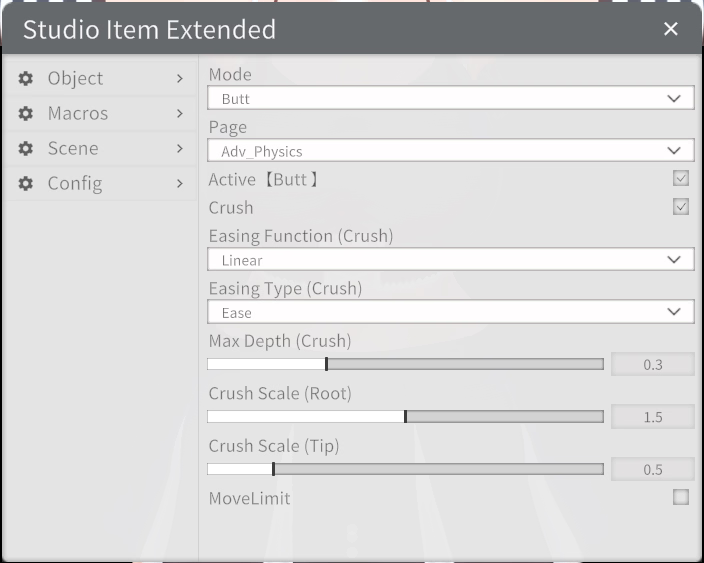
I decided to take a look because I couldn't get the ass to act that way. To have that "squish" effect you need to use crush feature.
mb.png
You need for that (There is a mega link in the page)
With some tweaking I got this, not perfect, but close enough
You don't have permission to view the spoiler content. Log in or register now.
 

zir175

Newbie
Aug 6, 2022
51
13
18
Dont use VideoExport's video generation feature.
It's slow and prone to stuck.
Only use the frame capture feature and use 3rd party program to generate the video.
The easiest one is Blender.
If you understand command line, you can try use FFmpeg.
Actually VideoExport uses FFmpeg too. But for unknown reason, getting stuck when generating the video is a known issue since back then.
Also, this way you can capture frame and generate video on parallel.
How exactly do you use Blender to capture a scene in StudioNeo?
 

AmaNo04

Active Member
Jul 6, 2020
869
742
227
How exactly do you use Blender to capture a scene in StudioNeo?
No.
You don't use Blender to capture the scene.
You use HS2's VideoExport but only for capturing the image sequence. Tick off the "auto generate video" option in the VideoExport window.
This will make VideoExport only take a number of screenshot and not proceed to generate the video.
You don't have permission to view the spoiler content. Log in or register now.
In Blender, go to Video Editing tab.
In the Sequencer, add image.
Select all of the images that makes the sequence. Make sure the first frame of the sequence placed at Blender's frame 1, not frame 0.
Configure the output parameter and hit Ctrl+F12 to start exporting.
You don't have permission to view the spoiler content. Log in or register now.
 
  • Like
Reactions: GIGABRAZ

Psychopomp

New Member
Jan 12, 2018
9
2
58
I don't know if this is the best way, but if I were to attempt it with my knowledge would just make a copy of the character, at the same position, with an invisible body. If your scene is static, this should be very easy, otherwise you will need to mirror the movements via bone parenting.

The visible one should have the panties removed, and the invisible one should have only the panties on. I would then use HSPE to deform the bones of the invisible one so that the panties gain a bulge in the lower front, and are pushed off of the visible character's pubic area in the upper front. Then, I would use a posable penis model and either place Dynamic bone items around the panties to have it sit how I want it, or just pose the penis with FK.
Sorry to bother you again, but I've been trying for a little while now, and I can't seem to specifically manipulate the lower front and the upper front of the panties for the life of me. I've managed to sync both characters and all, like you've said, but I can't adjust the panties around the balls and the shaft no matter how much I try. Been trying to use the Kokan and Waist bones, but I can only seem to position, scale or rotate the entire thing, and it ends up looking gigantic, almost like a diaper. Is there a way to manipulate bones only in specific areas that I'm not aware of? Something besides KKPE/HSPE advanced? Or maybe I'm using the wrong bones for this?
Again, I'm using Kotatsu, but the studio is so similar I think the same logic should apply. Unless there's more specific bones in HS, and I'm just screwed on that front.
 

zir175

Newbie
Aug 6, 2022
51
13
18
No.
You don't use Blender to capture the scene.
You use HS2's VideoExport but only for capturing the image sequence. Tick off the "auto generate video" option in the VideoExport window.
This will make VideoExport only take a number of screenshot and not proceed to generate the video.
In Blender, go to Video Editing tab.
In the Sequencer, add image.
Select all of the images that makes the sequence. Make sure the first frame of the sequence placed at Blender's frame 1, not frame 0.
Configure the output parameter and hit Ctrl+F12 to start exporting.

Oh okay, thank you! By the way, sorry to spam questions, but I spent hours looking for a thorough explanation for a few questions I have and couldn't find one...

1) How exactly do I use "Paperplane Gimmick" properly? Is it just like a normal piston where you use it as a parent for character bones?

2) On the paperplane gimmick, why are there bones called "tracker" and "child"? What exactly is a tracker and what exactly is the difference between these two?

3) Can you post ekan's mods? I scoured the internet but couldn't find them.

4) How do I properly use ekan's mods?

5) What is the advantage of using empty folders? I see this a lot in advanced animation scenes, where there are a ton of folders nested in folders nested in folders ect.
 

AmaNo04

Active Member
Jul 6, 2020
869
742
227
Oh okay, thank you! By the way, sorry to spam questions, but I spent hours looking for a thorough explanation for a few questions I have and couldn't find one...

1) How exactly do I use "Paperplane Gimmick" properly? Is it just like a normal piston where you use it as a parent for character bones?

2) On the paperplane gimmick, why are there bones called "tracker" and "child"? What exactly is a tracker and what exactly is the difference between these two?

3) Can you post ekan's mods? I scoured the internet but couldn't find them.

4) How do I properly use ekan's mods?

5) What is the advantage of using empty folders? I see this a lot in advanced animation scenes, where there are a ton of folders nested in folders nested in folders ect.
1. Yes. In nutshell paperplane gimmick combine piston, curve, rotator and record tracker. You can use all of them at once or just few of them. I usually only use piston and curve.
The advantage of paperplane is you can set the starting point. In hooh's piston, the starting point always at the maximum. While in paperplane you can set it in the middle, 20% of the maximum point or 80%. Wherever you like it. This also applies in the curve and rotation mode.
For example the piston starting point is at 0.25, curve at 0.4 and rotation at 0.8. It's possible.

2. Tracker and Child are used when you also want to use the physics. The Child node hold the value of physic applied motion.
For example the paperplane overall speed is 2.0 with intense motion configuration. If you're using Lerp physics, the Child node usually dampened. But if you're using Velocity physics, the Child node might be not moving at all or it move to the end of the world. This example might sounds like a joke, but I'm being serious here.

3. Now you can only get them through his Gumroad page bcs his main page (Fantia) is gone.

4. Ekan made a lot of stuff.
Reactive stuff (blue cube with red sphere inside) are controlled with "Controller" item (green sphere).
Transmitter is paired with Receiver.
It's kinda confusing since his naming sense is kinda bad. He used to make a demo video every time he released a new gimmick. Not sure if you still can watch them somewhere else.

5. Personally I'm practicing this to simulate the bone structures and makes the bones below them inherit the parent's value.
The easiest example is when I want to control finger movement. Each finger has 3 bones.
This what will happen if I have 3 loose folders paired to each finger nodes.
You don't have permission to view the spoiler content. Log in or register now.
While this what happen if I simulate the bone structure with empty folders.
You don't have permission to view the spoiler content. Log in or register now.
 

Neunpli

Newbie
Nov 5, 2020
47
74
61
Sorry to bother you again, but I've been trying for a little while now, and I can't seem to specifically manipulate the lower front and the upper front of the panties for the life of me. I've managed to sync both characters and all, like you've said, but I can't adjust the panties around the balls and the shaft no matter how much I try. Been trying to use the Kokan and Waist bones, but I can only seem to position, scale or rotate the entire thing, and it ends up looking gigantic, almost like a diaper. Is there a way to manipulate bones only in specific areas that I'm not aware of? Something besides KKPE/HSPE advanced? Or maybe I'm using the wrong bones for this?
Again, I'm using Kotatsu, but the studio is so similar I think the same logic should apply. Unless there's more specific bones in HS, and I'm just screwed on that front.

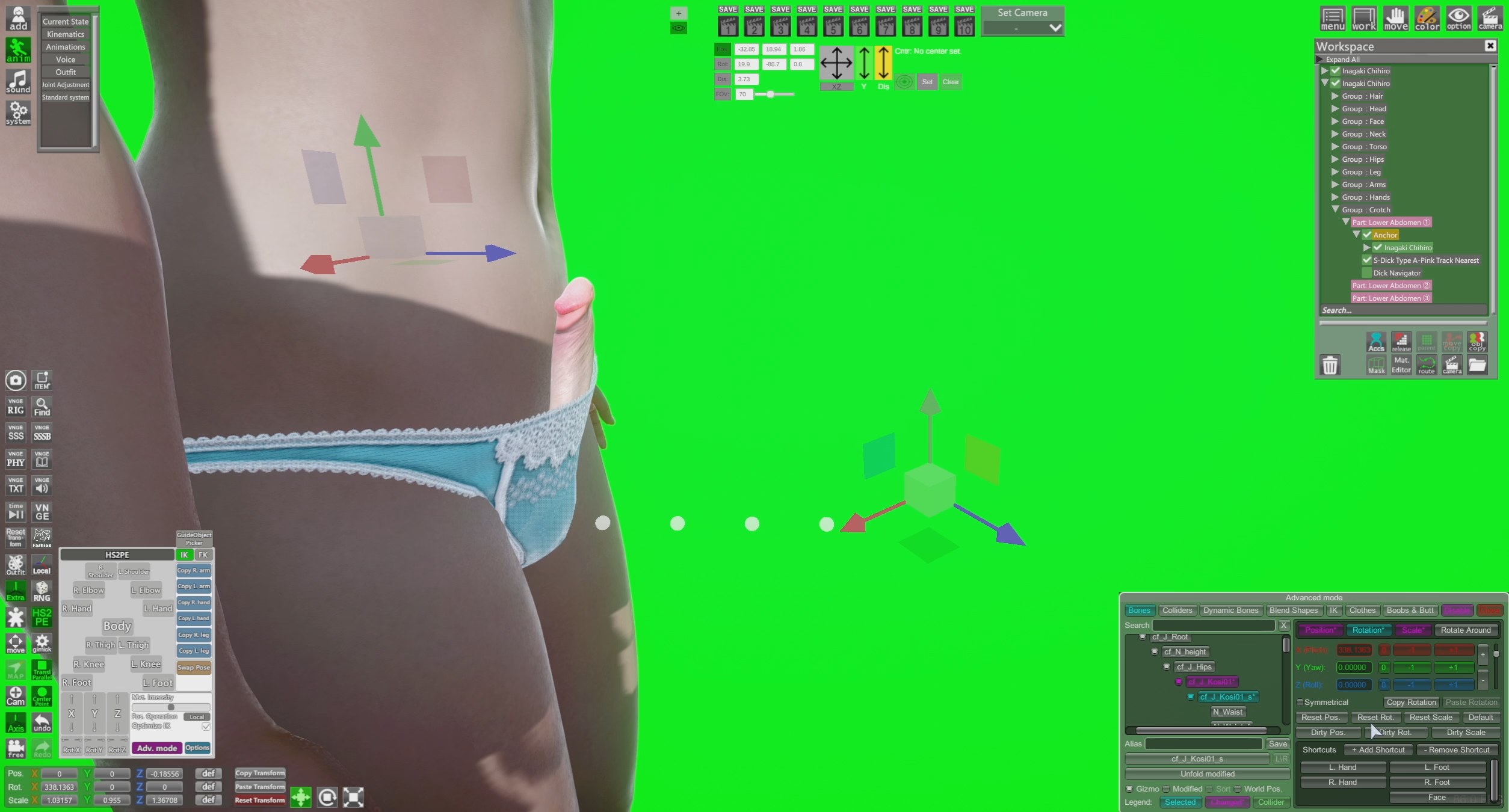
screenshot.png


Enjoy. Video and scene included in the above link(Though only the video is likely to be helpful given you're on koikatsu)

I used one of the default characters.

No node constraints were needed.

Anchored the duplicate invisible panties-only character to a folder on crotch 1.

Scale and position of the penis (bound to the visible character) and the entire invisible character were modified before the bones, so check the video for that.

Bones modified on the duplicate were:

cf_J_Kosi01
cf_J_Kosi01_s
cf_J_Kokan
cf_J_LegUpDam_L
cf_J_LegUpDam_s_L
cf_J_LegUpDam_R
cf_J_LegUpDam_s_R

Bones modified on the penis:

root
balls
ball_l_s
ball_r_s
stick_01


Exact values are visible in the video. This setup seems to move well with animations.

If you plan to use FK/IK, then set up your initial model with that and duplicate BEFORE modifying any bones. FK/IK enabled models don't line up well with non FK/IK enabled ones.

I used a dick navigator to pose the penis within the panties and against the tummy, as shown. No FK posing.

Hope this is sufficient for what you're after. You owe me :)
 

pgyrund

Newbie
Oct 24, 2022
54
24
18
I am running into an issue with the volumetric light settings. The Scattering setting is not getting saved in any of my scenes. It always reverts to the default 0.10 when I load the scenes up. This looks like a bug. Does anyone know how to fix it?

EDIT: this only seems to happen when setting the Scattering to zero.
 
Last edited:

Polarman

Newbie
Sep 19, 2019
25
37
168
Perhaps one of you can wise chaps could enlighten me on finding a solution to this situation.

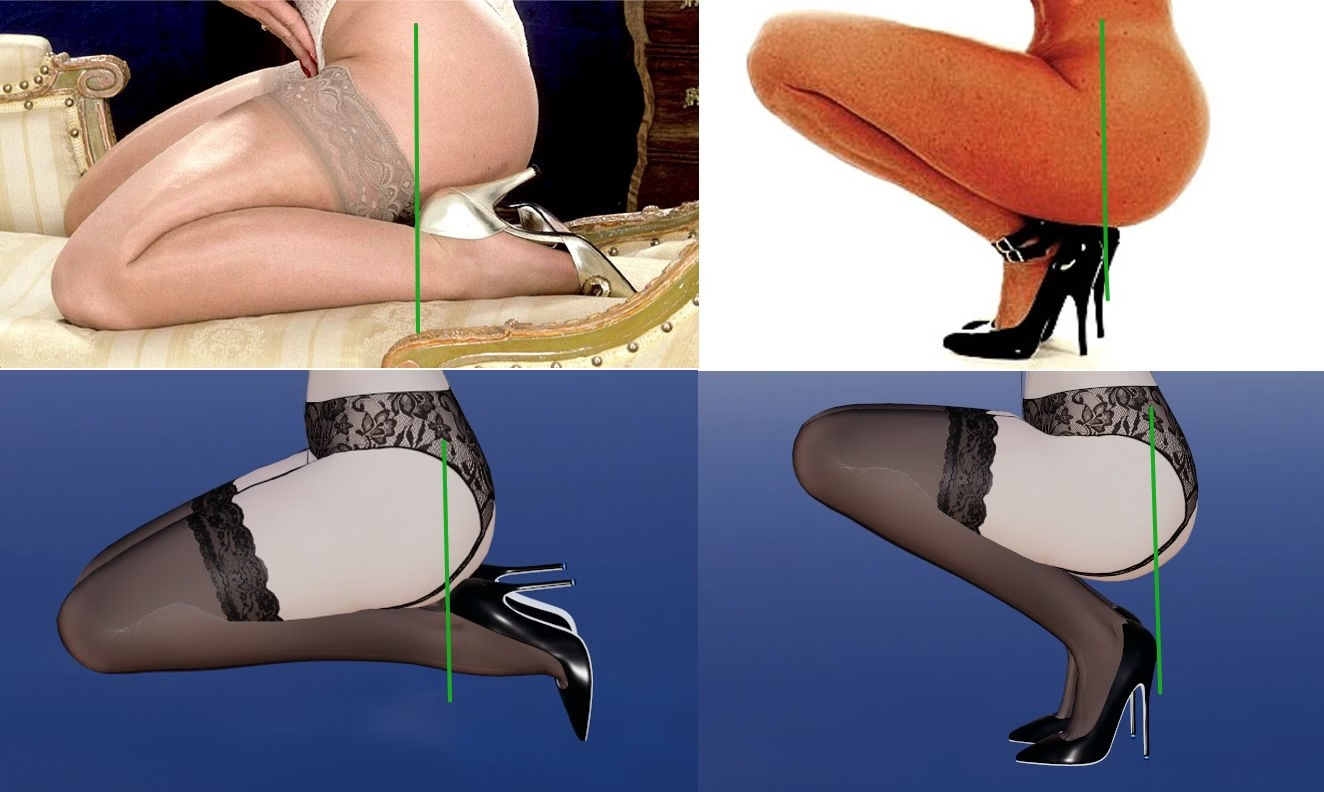
I am trying to get an accurate leg length without deforming the foot/shoe using the advance bone thingy but cannot get proper results.

Here's an example of reality vs HS2 Studio. Note that the heel lines up with the center of the body but In HS2 it's way off to the back. What settings would you use?

Thank you.

Studio-Render.jpg
 

Psychopomp

New Member
Jan 12, 2018
9
2
58
View attachment 5497831


Enjoy. Video and scene included in the above link(Though only the video is likely to be helpful given you're on koikatsu)

I used one of the default characters.

No node constraints were needed.

Anchored the duplicate invisible panties-only character to a folder on crotch 1.

Scale and position of the penis (bound to the visible character) and the entire invisible character were modified before the bones, so check the video for that.

Bones modified on the duplicate were:

cf_J_Kosi01
cf_J_Kosi01_s
cf_J_Kokan
cf_J_LegUpDam_L
cf_J_LegUpDam_s_L
cf_J_LegUpDam_R
cf_J_LegUpDam_s_R

Bones modified on the penis:

root
balls
ball_l_s
ball_r_s
stick_01


Exact values are visible in the video. This setup seems to move well with animations.

If you plan to use FK/IK, then set up your initial model with that and duplicate BEFORE modifying any bones. FK/IK enabled models don't line up well with non FK/IK enabled ones.

I used a dick navigator to pose the penis within the panties and against the tummy, as shown. No FK posing.

Hope this is sufficient for what you're after. You owe me :)

You're a legend for this, goddamn. I got so much more than I was hoping for hahaha. Thank you so, so much for your disposition and patience, lad. Cheers. Will try to replicate this on Koi as soon as possible and leave you alone now. You might have saved my running gag character.
 
  • Like
Reactions: Neunpli

Neunpli

Newbie
Nov 5, 2020
47
74
61
You're a legend for this, goddamn. I got so much more than I was hoping for hahaha. Thank you so, so much for your disposition and patience, lad. Cheers. Will try to replicate this on Koi as soon as possible and leave you alone now. You might have saved my running gag character.
Let me know how it goes, I'm curious now :)
 
5.00 star(s) 2 Votes