After reloading, and maybe a day after, he will respawn. Do not kill him immediatly. With the mouse hove over him and when "rope" target appears, click and try to cut the rope. Not easy to target and can take a couple of time. But the girl will be freed and run away. Then kill the bad guy. You will see a quest marker later north east of the boss camp.
Native Boss will immediately respawn when reloading a save. Waiting a day is not necessary.
Either sneak up on him from behind or pause the game if you have problems clicking the rope in the middle of the fight. (Note you can't sneak if you haven't killed him before because he auto-aggroes in the event boss fight.) Also only Man (the Male MC) can cut the rope; Yona isn't tall enough.
And the first marker say "under development" is the only one i can see, ent king quest is ended but nothing happen..
WAIT until night.
Thanks, that helps. is anyone aware of a way to change the “simulation distance” through tweaks?
2. I have no experience modding or tweaking Unity engine games through actual unity tools(I have no idea if there are even any sort of unity engine tools that allow for that). I am comfortable tweaking code through notepad++ when there are enough comments or self-explanatory english variables or instructions. Does anyone know some line/lines of code that can be easily changed to increase the number of chunks that load?(my computer can probably handle a larger or maybe much larger distance.)
It's hardcoded in the game. No easy way unless you decompile the game and change the code. Hopefully someone might write a BepInEx plugin mod for this.
The only workaround so far is to exploit raids to load another 9 MapID chunks in memory, but this isn't changing the "simulated chunk radius", per se.
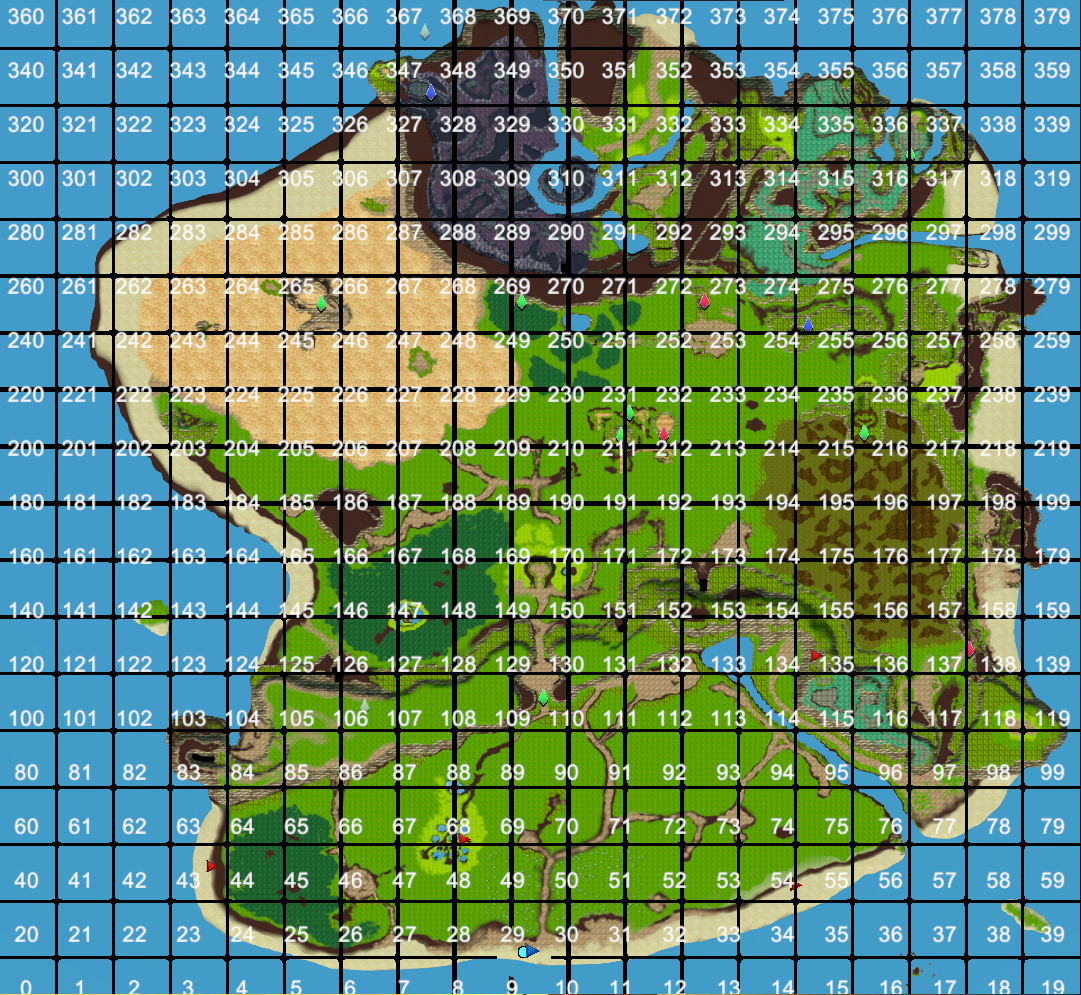
1. Also, I am confused about how to interpret the map with /mapID on. I drew some squares going by eye over a screenshot. Which is most correct for the loaded area, assuming that the player is in chunk 135, for example? My impression is that the red square is approximately chunk 135, the green square is the area I assume is loaded when in 135, and the blue square is my second guess.
Green square. The entire chunk you're in, plus the entirety of the 8 surrounding chunks.
Is there a command to check which chunk the player is in?
Not aware if there's one, sorry.
Maybe I will attempt to make some sort of approximate grid map in paint.net once I understand this, but I assume I would need to pause and alt-tab to use it(assuming the map is not in an easily acceptable image format)
One workaround for making a grid map if the actual map image(or the /mapID overlay) is not accessible would be if I could figure out how to disable exploration, since I could probably figure out a way to tweak the map png associated with save files. I'll need to experiment with it to see if I can keep it from being overwritten/deleted and maybe even toggle-able in game. Even if I can't disable exploration,the grid would just get partially erased by exploration between reloads
Use flags to mark chunk boundaries. Just need one flag per "chunk border" and you can mentally draw horizontal and vertical lines through the flags to complete the border. If flags are too "visually noisy" because you already have a lot of flags in the area you can use "favorited" NPCs to mark the map with a star instead.
To figure out the exact border you can use /tp [mapID number] to teleport to the center of a chunk, then count 25m to the sides using 10 platforms (platforms are 2.5m by 2.5m and snap to adjacent platforms if you wiggle your mouse a bit). Once you figure out one boundary you can then move 50m orthogonally to reach the next one using a flag at the chunk boundary to count distance; 50m will cost you 5 food to fast travel.
This can of course get tiresome really quickly especially in mountainous terrain, It's probably easier to just eyeball everything and build the stuff you need to keep loaded well within a chunk at a bit of distance from the borders instead of trying to figure out the exact boundaries.