Barnabass2224
New Member
- Jan 12, 2019
- 10
- 2
- 36
¿Pudiste resolverlo? No puedo jugar.En la versión 0.82, una de las bibliotecas DLL contiene algo malicioso. Tenga cuidado
Go to the bathroom downstairs and click the roll of toilet paper, then go into your inventory and use it on the toilet.How can i clog the toilet
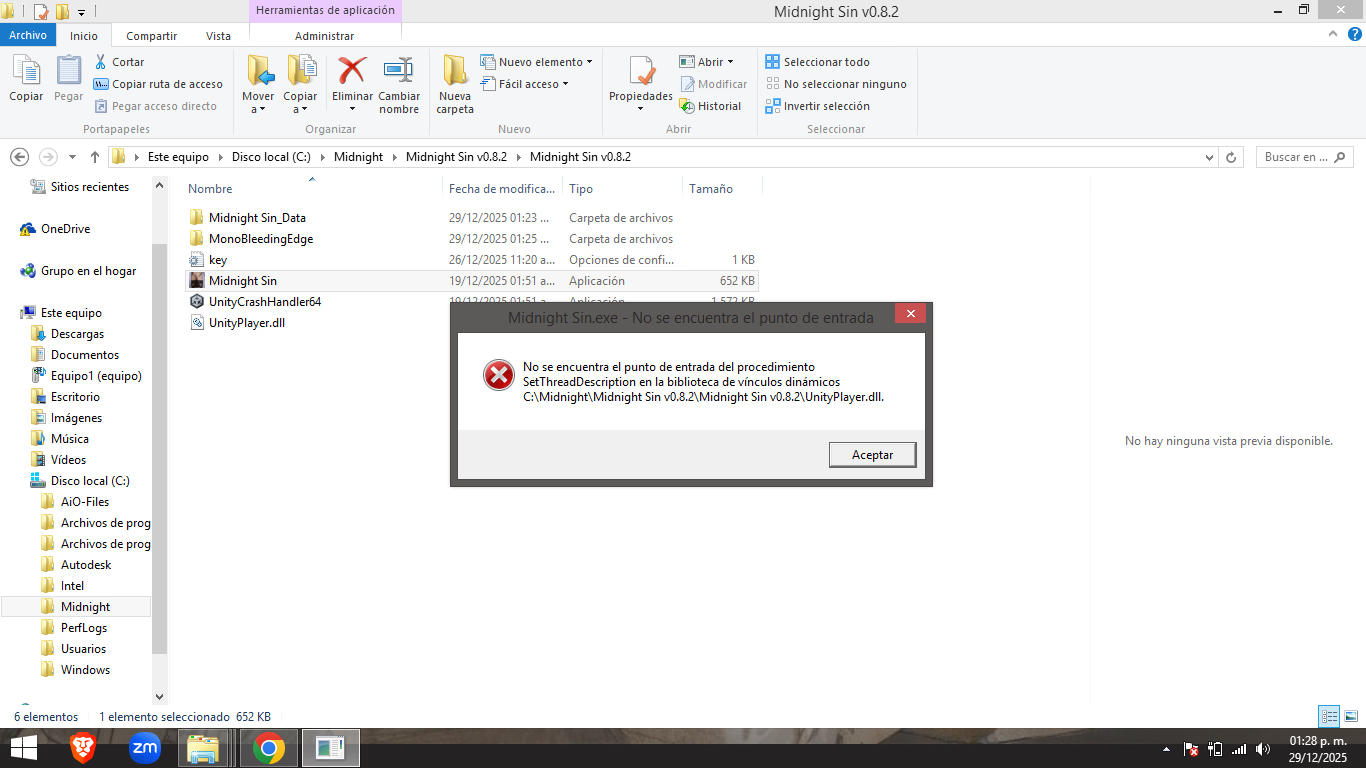
It appears you are using the Users folder. Move the game's folder out to C: so the path is C:\Midnight Sin v0.8.2 instead ofView attachment 5575857
Hello. Help! I wanted to play version 0.8.2 but I get this message saying "procedure entry point not found". What can I do?
Take a look at the post here.I tried, i really tried to discover the numbers of the keyboard for the elevator. But nothing make sense. So, any tips??
That's a false positive. The game is completely safe to play.In version 0.82, one of the DLL libraries contains something malicious—be careful
Hi, I already moved the folder to C and I'm still getting the same error. What else can I do?Go to the bathroom downstairs and click the roll of toilet paper, then go into your inventory and use it on the toilet.
It appears you are using the Users folder. Move the game's folder out to C: so the path is C:\Midnight Sin v0.8.2 instead of
C:\Users\
Take a look at the post here.
That's a false positive. The game is completely safe to play.
Can you attach your player log, please?Hi, I already moved the folder to C and I'm still getting the same error. What else can I do?
¿Puedes adjuntar tu registro de jugador, por favor?
Utilice las teclas Windows + R y pegue lo siguiente en el cuadro Ejecutar:
%userprofile%\AppData\LocalLow\Faerin Games\Midnight Sin
Agrega el registro a un archivo .zip, .rar o .7z antes de subirlo
[/CITA]
According to the log, you still have the game in your Users folder:
I already moved my entire folder to C: but it still appears the same.According to the log, you still have the game in your Users folder:
C:\Users\Equipo1\Desktop\Juegos\Midnight\Midnight Sin v0.8.1\Midnight Sin v0.8.1
That is why the game is giving you error messages. It needs to be out of the Users folder.
Ex: C:\Midnight Sin v0.8.2
What program did you use to extract the game with?I already moved my entire folder to C: but it still appears the same.
View attachment 5576461
WinRaRWhat program did you use to extract the game with?You must be registered to see the links,You must be registered to see the linksorYou must be registered to see the links? Or did you use Windows built-in extractor?
Did you notice any error messages during extraction? Files missing, or something? Or did you overwrite a previous version instead of extracting the update to a new folder?WinRaR
No, it doesn't show any errors or that anything is missing, it works normally. This is the first time I haven't been able to play. Could it be that they changed the system's operation for playing?Did you notice any error messages during extraction? Files missing, or something? Or did you overwrite a previous version instead of extracting the update to a new folder?
Well, Faerin updated his Unity engine, but that shouldn't have caused any unusual errors like that. I didn't notice anything out of the ordinary while we were testing the game and it extracted fine for us. No one on the team reported any anomalies with it.No, it doesn't show any errors or that anything is missing, it works normally. This is the first time I haven't been able to play. Could it be that they changed the system's operation for playing?
I understand, it's just that my system is Windows 8, and if it's updated, that might prevent me from opening it. No, I'm not using any mood board.Well, Faerin updated his Unity engine, but that shouldn't have caused any unusual errors like that. I didn't notice anything out of the ordinary while we were testing the game and it extracted fine for us. No one on the team reported any anomalies with it.
And sadly, because the game didn't load, there's really no information to go by when I looked at your log. So it's just a matter of going through the process of elimination to determine what's going on here.
Are you using one of the mods posted in OP? Like the cheat mod or Extra Crack?
Theoretically, it should still work on Windows 8, but we've never tested it in that OS, so I'd need to do a bit of research to make sure. It might require a newer version of Windows. Give me a few minutes to run a test on my end, and in the meantime, I'll ask Faerin about it and let you know.I understand, it's just that my system is Windows 8, and if it's updated, that might prevent me from opening it. No, I'm not using any mood board.
En teoría, debería seguir funcionando en Windows 8, pero nunca lo hemos probado en ese sistema operativo, así que necesitaría investigar un poco para asegurarme. Podría requerir una versión más reciente de Windows. Dame unos minutos para hacer una prueba y, mientras tanto, le preguntaré a Faerin y te aviso.
[/CITA]
Thank you so much!
Is your Windows 8 a 32-bit OS or 64-bit?
Is Windows 8.1 a 64-bitIs your Windows 8 a 32-bit OS or 64-bit?