Ashmedai

Newbie
Oct 17, 2017
99
310
218
So, tried starting the game with the new version, clean install and all that and I get a fatal error when booting the game: Unhandled Exception: EXCEPTION_ACCESS_VIOLATION reading address 0x0000000000000000

Any ideas?

Update : Updated my gpu drivers and works fine now, coolio
 
Last edited:

veil1667

Newbie
Nov 10, 2018
43
48
216
Why is free a key criterion for you? Since that's the case, maybe it's worth releasing free releases every six months?
I was trying to highlight the absurdity and entitlement of being impatient for something that the dev is in no way obligated to provide. As others have pointed out, there are relatively few devs that offer free public versions with all the features intact. Some of them do so quickly, which is just a bonus on top of what is already a gift, but to expect that to be the norm feels like just another example of the choosing beggar.

To be clear, this isn't a knock on piracy in general, nor on leakers like you since the site wouldn't exist without them. I just think it takes some interesting mental gymnastics to contend that people who probably aren't going to give the dev a single cent at any point ought to have access to something immediately that they'd get for free eventually anyways.
 

therandompers

Newbie
Jul 31, 2017
37
40
94
I keep getting a fatal error every time I try to load. No error code, no explanation, just click to load, black screen for about 20-30 seconds, then fatal error. I updated my computer to windows 11, I updated my nvidia drivers, and still the same thing. Any thoughts?

(edit) Resolved
And how did you resolve it? Ran into what sounds like the same issue myself.
 

Muninn

New Member
May 2, 2019
9
10
79
I keep getting a fatal error every time I try to load. No error code, no explanation, just click to load, black screen for about 20-30 seconds, then fatal error. I updated my computer to windows 11, I updated my nvidia drivers, and still the same thing. Any thoughts?

(edit) Resolved
I am on AMD and getting the same thing.
 

karthmanter

New Member
Jul 17, 2023
11
50
146
Does not work for me might have installed it wrong. I also don't see the mods folder in UE4SS
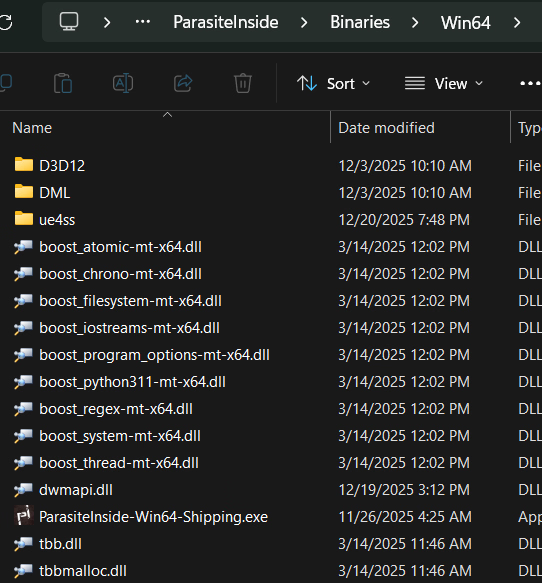
The mods folder is inside ue4ss, so you probably installed it incorrectly. Your exe folder (ParasiteInside/Binaries/Win64) should look something like this. The "ue4ss" folder and "dwmapi.dll" are from ue4ss. This is the exact download you need from ue4ss in case you downloaded something different:
1766278241870.png
 

zackcage6

Member
Oct 30, 2020
102
40
141
The mods folder is inside ue4ss, so you probably installed it incorrectly. Your exe folder (ParasiteInside/Binaries/Win64) should look something like this. The "ue4ss" folder and "dwmapi.dll" are from ue4ss. This is the exact download you need from ue4ss in case you downloaded something different:
View attachment 5547567
mine is correct but nothing happens when clicking CTRL+F1
 

karthmanter

New Member
Jul 17, 2023
11
50
146
mine is correct but nothing happens when clicking CTRL+F1
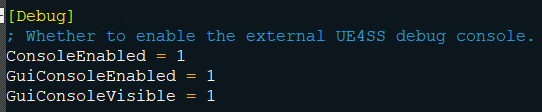
I use windows, so I have no idea how anything works on linux. I don't think ue4ss officially supports linux unless you're using proton or something similar (you probably know more than I do about that stuff). You can go into "UE4SS-settings.ini" and set all of these to 1, which should enable the debug console when the game starts. If it doesn't show up, then I guess ue4ss just doesn't work on linux because your game folder looks just like mine. If it does show up, then make sure "mods.txt" has my mod listed and enabled since ue4ss doesn't automatically load new mods.
image_2025-12-20_200658200.png
 
Last edited:

zackcage6

Member
Oct 30, 2020
102
40
141
I use windows, so I have no idea how anything works on linux. I don't think ue4ss officially supports linux unless you're using proton or something similar (you probably know more than I do about that stuff). You can go into "UE4SS-settings.ini" and set all of these to 1, which should enable the debug console when the game starts. If it doesn't show up, then I guess ue4ss just doesn't work on linux because your game folder looks just like mine. If it does show up, then make sure "mods.txt" has my mod listed and enabled since ue4ss doesn't automatically load new mods.
View attachment 5547619
i did all this yet nothing happened, i guess the mod works only on windows
 

Darkjv88

Newbie
Jan 10, 2020
90
29
141
I made a ue4ss mod to skip the new verification menu. Install the latest experimental release for ue4ss from their (Extract "ue4ss" and "dwmapi.dll" into "ParasiteInside/Binaries/Win64"), then extract my mod "verification_bypass" into the "ue4ss/Mods" folder. You can replace the default mods.txt with mine if you want just to enable it quicker, otherwise you gotta edit mods.txt to enable it manually.

Use Ctrl-F1 once the verification screen fades in to skip it. It'll probably break the UI if you use it anywhere else, so don't do that.

OK call me stupid but I have no idea what to download or how to download this from github.
Some helpful information would be greatly appreciated.
 

zackcage6

Member
Oct 30, 2020
102
40
141
OK call me stupid but I have no idea what to download or how to download this from github.
Some helpful information would be greatly appreciated.
download the .zip file in the assets section (click on the assets button to reveal it "ue4ss.zip")
 

zackcage6

Member
Oct 30, 2020
102
40
141
There's this in the ue4ss github about getting it to work on linux. Idk if it works but you could give it a shot and maybe it'll help.
i did all nothing happened lol, wtf is going on with this dev + why he chose this "verification path ? i smell a steam release, hmm maybe he got greedy.
 
3.80 star(s) 74 Votes