

Unreal Engine PASEC [v2.1.4] [Star vs Fallout]
- Thread starter EscapesMe
- Start date
2.90 star(s)
50 Votes
PASEC1.71\Pasec1\Saved\Config\WindowsWhere's the file to change the settings? in the older vers it was called GameUserSettings now i cant even find it so now the game runs super slow for me. Can someone please help me out and thank you for reading.
Well, I'll have to (again) put this game off for another time, as it's impossible to play.
Although it looks great and is fun (I managed to play one of the previous versions from last year), this update is impossible. By disabling the console, I can't set r.VSync = 1, which is why I end up with a blue screen because the RTX3060 is at 100% all the time.
I tried to fix it by installing Pasec1.exe from 1.6.1, but while playing, I ran into bugs that broke the elevators, dead enemies continued to animate alive, menus were graphically broken and rendered unusable, and every game over forced me to close and reopen the game.
There are already too many bugs for this to be enjoyable. I'll keep waiting.
Although it looks great and is fun (I managed to play one of the previous versions from last year), this update is impossible. By disabling the console, I can't set r.VSync = 1, which is why I end up with a blue screen because the RTX3060 is at 100% all the time.
I tried to fix it by installing Pasec1.exe from 1.6.1, but while playing, I ran into bugs that broke the elevators, dead enemies continued to animate alive, menus were graphically broken and rendered unusable, and every game over forced me to close and reopen the game.
There are already too many bugs for this to be enjoyable. I'll keep waiting.

mrgoodman24
New Member
- Oct 20, 2024
- 4
- 1
- 13
Yo thx for the help back there but actually the folder doesn't exist now in this version for some reason. but you can find it here in:Well, I'll have to (again) put this game off for another time, as it's impossible to play.
Although it looks great and is fun (I managed to play one of the previous versions from last year), this update is impossible. By disabling the console, I can't set r.VSync = 1, which is why I end up with a blue screen because the RTX3060 is at 100% all the time.
I tried to fix it by installing Pasec1.exe from 1.6.1, but while playing, I ran into bugs that broke the elevators, dead enemies continued to animate alive, menus were graphically broken and rendered unusable, and every game over forced me to close and reopen the game.
There are already too many bugs for this to be enjoyable. I'll keep waiting.
C:\Users\(Username)\AppData\Local\Pasec1\Saved\Config\Windows.
and you can change the settings so it can run faster and smoother. i actually beat this game with these settings: (can’t send the file cuz it says: (The uploaded file does not have an allowed extension.) so copy and paste my settings brother have fun with the game. Sleeping saves yo progress but it can be buggy, enemies respawn, and objectives are reset until you update the objective)
Edit: i forgot to mention the file is called: GameUserSettings.ini
[ScalabilityGroups]
sg.ResolutionQuality=50
sg.ViewDistanceQuality=0
sg.AntiAliasingQuality=2
sg.ShadowQuality=2
sg.GlobalIlluminationQuality=1
sg.ReflectionQuality=1
sg.PostProcessQuality=2
sg.TextureQuality=3
sg.EffectsQuality=0
sg.FoliageQuality=0
sg.ShadingQuality=1
[/Script/Engine.GameUserSettings]
bUseVSync=False
bUseDynamicResolution=False
ResolutionSizeX=1280
ResolutionSizeY=720
LastUserConfirmedResolutionSizeX=1280
LastUserConfirmedResolutionSizeY=720
WindowPosX=-1
WindowPosY=-1
FullscreenMode=1
LastConfirmedFullscreenMode=1
PreferredFullscreenMode=1
Version=5
AudioQualityLevel=0
LastConfirmedAudioQualityLevel=0
FrameRateLimit=0.000000
DesiredScreenWidth=1366
bUseDesiredScreenHeight=False
DesiredScreenHeight=768
LastUserConfirmedDesiredScreenWidth=1366
LastUserConfirmedDesiredScreenHeight=768
LastRecommendedScreenWidth=-1.000000
LastRecommendedScreenHeight=-1.000000
LastCPUBenchmarkResult=-1.000000
LastGPUBenchmarkResult=-1.000000
LastGPUBenchmarkMultiplier=1.000000
bUseHDRDisplayOutput=False
HDRDisplayOutputNits=1000
Last edited:

Severthe
Newbie
- Aug 17, 2019
- 89
- 268
- 112
Thanks for pointing me to this file. Tip for anyone else struggling with the performance demands of this game (totally insane for the low res pixel game this is): Set "bUseVSync=False" in that file to "bUseVSync=True". Fixed all cpu/gpu overload issues for me without having to make any changes to the resolution quality.Yo thx for the help back there but actually the folder doesn't exist now in this version for some reason. but you can find it here in:
C:\Users\(Username)\AppData\Local\Pasec1\Saved\Config\Windows.
and you can change the settings so it can run faster and smoother. i actually beat this game with these settings: (can’t send the file cuz it says: (The uploaded file does not have an allowed extension.) so copy and paste my settings brother have fun with the game. Sleeping saves yo progress but it can be buggy, enemies respawn, and objectives are reset until you update the objective)
Edit: i forgot to mention the file is called: GameUserSettings.ini
[ScalabilityGroups]
sg.ResolutionQuality=50
sg.ViewDistanceQuality=0
sg.AntiAliasingQuality=2
sg.ShadowQuality=2
sg.GlobalIlluminationQuality=1
sg.ReflectionQuality=1
sg.PostProcessQuality=2
sg.TextureQuality=3
sg.EffectsQuality=0
sg.FoliageQuality=0
sg.ShadingQuality=1
[/Script/Engine.GameUserSettings]
bUseVSync=False
bUseDynamicResolution=False
ResolutionSizeX=1280
ResolutionSizeY=720
LastUserConfirmedResolutionSizeX=1280
LastUserConfirmedResolutionSizeY=720
WindowPosX=-1
WindowPosY=-1
FullscreenMode=1
LastConfirmedFullscreenMode=1
PreferredFullscreenMode=1
Version=5
AudioQualityLevel=0
LastConfirmedAudioQualityLevel=0
FrameRateLimit=0.000000
DesiredScreenWidth=1366
bUseDesiredScreenHeight=False
DesiredScreenHeight=768
LastUserConfirmedDesiredScreenWidth=1366
LastUserConfirmedDesiredScreenHeight=768
LastRecommendedScreenWidth=-1.000000
LastRecommendedScreenHeight=-1.000000
LastCPUBenchmarkResult=-1.000000
LastGPUBenchmarkResult=-1.000000
LastGPUBenchmarkMultiplier=1.000000
bUseHDRDisplayOutput=False
HDRDisplayOutputNits=1000
Also thanks to :
for tipping me off on the vsync.Well, I'll have to (again) put this game off for another time, as it's impossible to play.
Although it looks great and is fun (I managed to play one of the previous versions from last year), this update is impossible. By disabling the console, I can't set r.VSync = 1, which is why I end up with a blue screen because the RTX3060 is at 100% all the time.
I tried to fix it by installing Pasec1.exe from 1.6.1, but while playing, I ran into bugs that broke the elevators, dead enemies continued to animate alive, menus were graphically broken and rendered unusable, and every game over forced me to close and reopen the game.
There are already too many bugs for this to be enjoyable. I'll keep waiting.

TanukiDanuki
Member
- Jan 31, 2018
- 103
- 151
- 246
When using the workaround I seem to get the error of tbb.dll not being found, am I missing something?Still works for me on 1.7.1 too.
MasterChef304
New Member
- Aug 9, 2020
- 8
- 9
- 13
All I did was take 1.6.1 and 1.7.1 and make sure they launchWhen using the workaround I seem to get the error of tbb.dll not being found, am I missing something?
Then move the file
PASEC1.6.1\Pasec1\Binaries\Win64\Pasec1.exe
to
PASEC1.7.1\Pasec1\Binaries\Win64\Pasec1.exe
then I just launch that exe directly.
TanukiDanuki
Member
- Jan 31, 2018
- 103
- 151
- 246
Thank you, I see what I was doing wrong, for some reason I thought to replace the normal Pasec1.exe in the main directory with the debug one, this way makes a lot more sense now.All I did was take 1.6.1 and 1.7.1 and make sure they launch
Then move the file
PASEC1.6.1\Pasec1\Binaries\Win64\Pasec1.exe
to
PASEC1.7.1\Pasec1\Binaries\Win64\Pasec1.exe
then I just launch that exe directly.

KING_VOODOO
New Member
- Oct 14, 2023
- 5
- 18
- 22
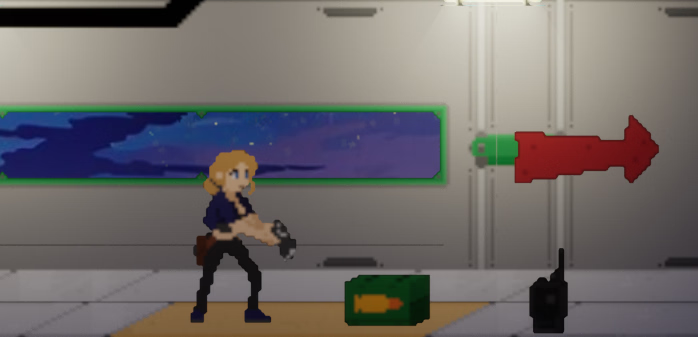
Any way to fix this smoothing in the game files? I already checked my global graphics settings and I don't see anything turned on that would smooth out pixel edges like this.
pewpewsmurf
Active Member
- May 9, 2018
- 515
- 405
- 216
is there a way to change keybinds?
Also isn't 1.71 game over screen still bugged? instead of crash it just stucks at the game over black screen. Also the part where it ask me to escape from the big crab, the elevator at the end doesn't even activate. I only manage to get it to work once but the game decided to bug out when I interact with the Vesta computer or whatever it's called
Game seems to have potential but all these gamebreaking bugs make it unplayable
Also isn't 1.71 game over screen still bugged? instead of crash it just stucks at the game over black screen. Also the part where it ask me to escape from the big crab, the elevator at the end doesn't even activate. I only manage to get it to work once but the game decided to bug out when I interact with the Vesta computer or whatever it's called
Game seems to have potential but all these gamebreaking bugs make it unplayable
Last edited:
Cristopherbaldur
New Member
- Jul 25, 2024
- 10
- 4
- 32

ArteFakTum
Newbie
- Nov 18, 2019
- 48
- 61
- 151
Severthe
Newbie
- Aug 17, 2019
- 89
- 268
- 112
Same thing on my end. Can anyone who has played earlier versions of the game confirm whether it has always looked like this or not?Any way to fix this smoothing in the game files? I already checked my global graphics settings and I don't see anything turned on that would smooth out pixel edges like this. View attachment 4708003
Edit: To clarify, I can see in the screenshots in OP that it looks clearer, but I'm wondering if this weird smoothing/blurriness to the textures was introduced with v1.7 or if it has been like this for a while?
Last edited:

Caernunnos
Member
- Aug 20, 2024
- 141
- 202
- 121
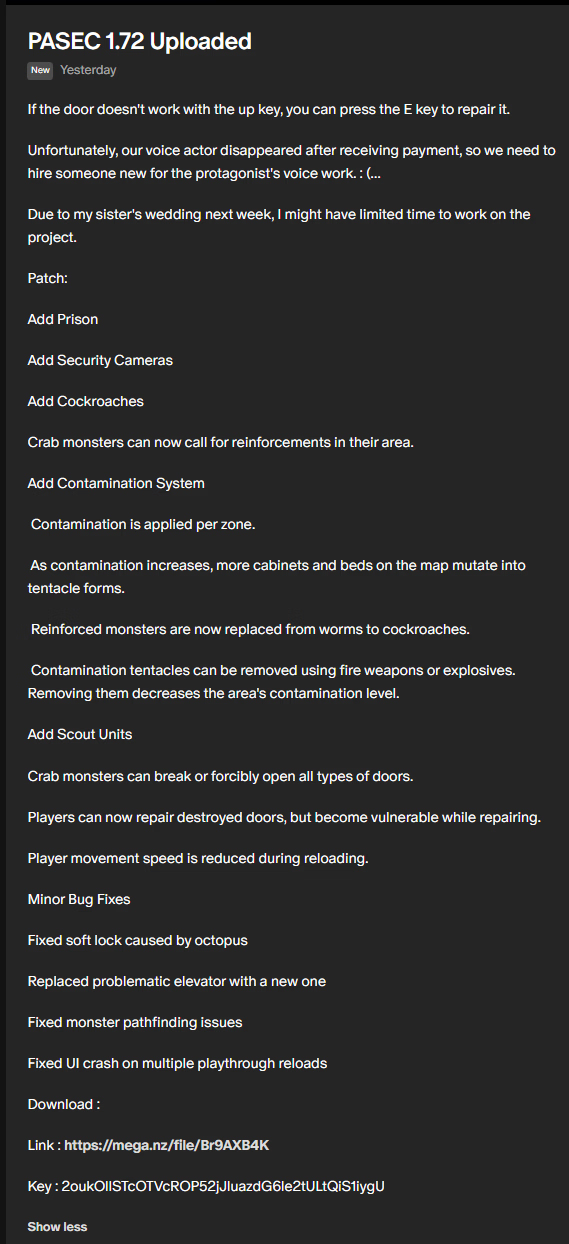
Here's 7.21.7.2 has updated anyone got a file for it?
You must be registered to see the links
Key : 2oukOllSTcOTVcROP52jJluazdG6le2tULtQiS1iygU
Thanks mate
OMEGASTRIKE28
Member
- Aug 18, 2024
- 400
- 285
- 141