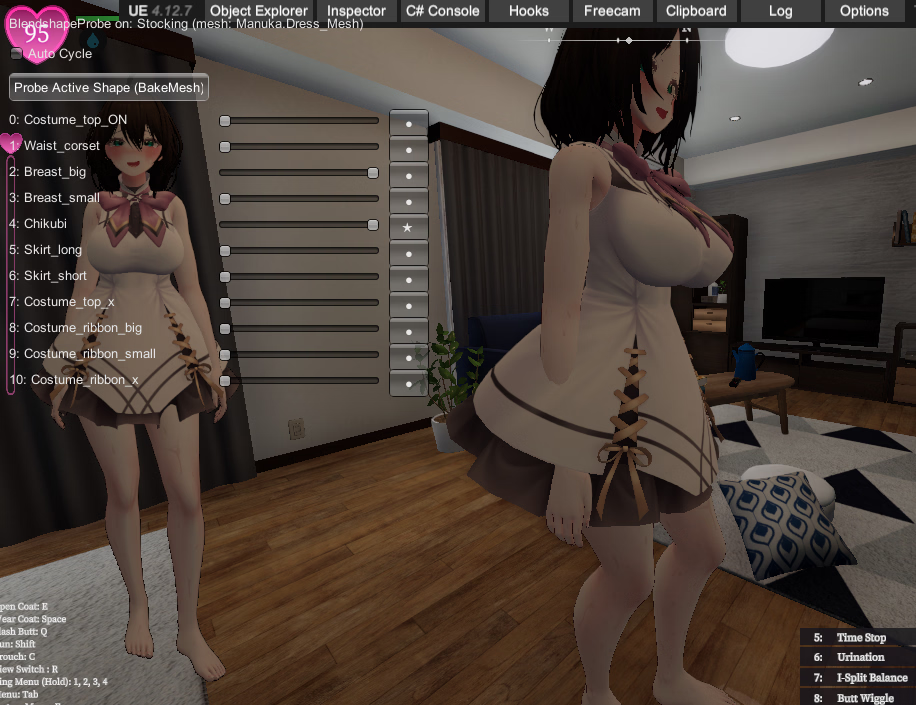
This site someone linked that has some clothes for Selestia.I've been troubleshooting for hours wondering why the mesh booba wouldn't animate with the jiggle physics only to find that the in game rig has like 4 different sets of breast bones. Still super janky, gotta work out more kinks with the bone mapping and blend shapes but custom clothes almost done.Anyone have any Selestia clothes they'd like to see modded in? I'll need several to test against.
View attachment 5293711
F12 is airplane mode for me. Doesn't do anything. I just have a laptop.Putting new images into the "Modimages" folder made no difference?
I wanted to share the joy of changing the textures.
I'm so sad.
Just press F12. No need for the "Alt" key.
Try it one last time.
But I don't think that's the problem.
Like you, I'm not a creator, so I can't give you any more advice.
I'm sure my explanation is exhausting.F12 is airplane mode for me. Doesn't do anything. I just have a laptop.
Sorry for the off-topic reply.F12 is airplane mode for me. Doesn't do anything. I just have a laptop.
No worries, it's a porn game so there's nothing to get heated about. I'm simply trying to learn. I moved my plugin folder somewhere else and put in yours with the vending machine mod. Tested it, and the mod only works Downtown. There has to be a way to make it for the entire game instead of just Downtown.I'm sure my explanation is exhausting.
Please bear with me a little longer.
I suddenly encountered the same problem.
Pressing F12 doesn't display the change folder.
The background images of my custom vending machines, posters, etc. don't change either.
"Modimages," "Modimages\Select," "Modimages\Select\001"
They were all changing until yesterday.
Suddenly, they stopped changing.
So I went back to the folder structure that worked the first time.
I placed them in "Modimages\Select\StationFront."
I pressed F12 in-game and they changed.
If that doesn't work, go to the downtown area in-game.
There, press "Alt+F11."
The image data will be extracted and a 1.35GB file named "ModImagesDump\StationFront" will be created.
Leave this folder alone.
Please place the downloaded penis and sperm images in "Modimages\Select\StationFront".
Or, you can just paste my folder structure as is. (This is a vending machine modification.)
I know you're probably fed up. I'm sorry. Please try it when you feel like it.
I placed a vending machine image in the "Modimages\Select\StationFront" folder.No worries, it's a porn game so there's nothing to get heated about. I'm simply trying to learn. I moved my plugin folder somewhere else and put in yours with the vending machine mod. Tested it, and the mod only works Downtown. There has to be a way to make it for the entire game instead of just Downtown.
Edit: I put new textures in Modimages/Select/StationFront but only the vending machine mod works. No idea why it's doing that. Hopefully someone can help figure it out?
I can't thank you enough.I'm writing this because I think people are confused about how to use texture_replacer.
The explanation is a bit rough, the usage is a bit complicated, and there are bugs.
Sorry.
They seem to work now, thank you very much. For some reason, this texture doesn't work. No idea why.I'm writing this because I think people are confused about how to use texture_replacer.
The explanation is a bit rough, the usage is a bit complicated, and there are bugs.
Sorry.
About the "Select" function
If you're simply replacing texture A with texture B, "Select" isn't necessary. This applies to cases where you need to change multiple textures, such as multiple eye colors.
For example, if you want to use a Drago928's mod texture, simply download it and place it appropriately under "ModImages". don't needed "Select".
About MD5
downloaded file has
value of green is "MD5"
- otinpov3_normal_682d0122e092b9d729f0968dda052b0d.png
- otinpov3_texture1_729a68a8c866640d85c7aa08f7d559b8.png
I dumped these files. it's like below.
compare, "otinpov3_normal"'s value of MD5 is same. but "otinpov3_texture1" is different.
- otinpov3_normal_682d0122e092b9d729f0968dda052b0d.png
- otinpov3_texture1_53e2102d70ae2db5b7046f844c12dd83.png
my GPU is AMD. MD5 values may vary depending on your GPU.
why use an MD5? This is to distinguish cases where textrure names are duplicated.
but it seems "otinpov3_texture1"'s name is not duplicated. then remove an MD5's value.
now those textures are working on ANY GPU.
- otinpov3_normal_,png
- otinpov3_texture1_.png
More about the "Select" function
if "another man" made a another mod for orinpov3, file names are same as Drago928's.
if you want to switching 2 texture's set on run-time, use a "Select" function. folder id like below.
texture_replacer will changes all texture below "ModImages" foider except "Select".
- BepInEx
- plugins
- ModImages
- Select
- mod of another man
- otinpov3_normal_.png
- otinpov3_texture1_.png
- mod of Drago928
- otinpov3_normal_.png
- otinpov3_texture1_.png
- another mod textures files
- another mod for UI
- some mod files
- hand_icon_.png
change "Select\mod of another man" first. (It is processed in sorted name order. If you want a special order, you can also put a number in front)
if you press F12, all texture of otinpov3_normal & otinpov3_texture1 are changed with "mod of Drago928" folder. press agasin ? changed all with "mod of another man" folder. you can switch.
realtime apply
you can edit a texture with image editor(windows paint & so on).
if you run a game & edit "BepInEx\plugins\ModImages\another mod for UI\hand_icon_.png". when you save the file, it will be applied to the game in real time.
Color bug on dump
many game's dumpped image are bit darker. so I recommend that use another dump apps. (AssetStudio, AssetRipper)
My Manakas
You don't have permission to view the spoiler content. Log in or register now.
Yes I made a bodypoint that looks like she had a bukkakke so imsharing it too
Press E. Bottom left of the screen shows controls.yo guys im new to this, how to remove the black coat tho? T.T
I mean like totally remove tho. Cuz i saw some gameplay manaka not wearing the black coat at allPress E. Bottom left of the screen shows controls.
how about try that rename "selestia Tex1_a95dc18dae26fc6399515ee1edbd13a8.png" to "selestia Tex1_.png"They seem to work now, thank you very much. For some reason, this texture doesn't work. No idea why.
Rank up. You can't remove the coat at the beginning.I mean like totally remove tho. Cuz i saw some gameplay manaka not wearing the black coat at all
By default you can open the front with E.I mean like totally remove tho. Cuz i saw some gameplay manaka not wearing the black coat at all