AI Porn is here, Create and Fap TRY FREE
x

account007

New Member
Dec 20, 2025
9
4
3
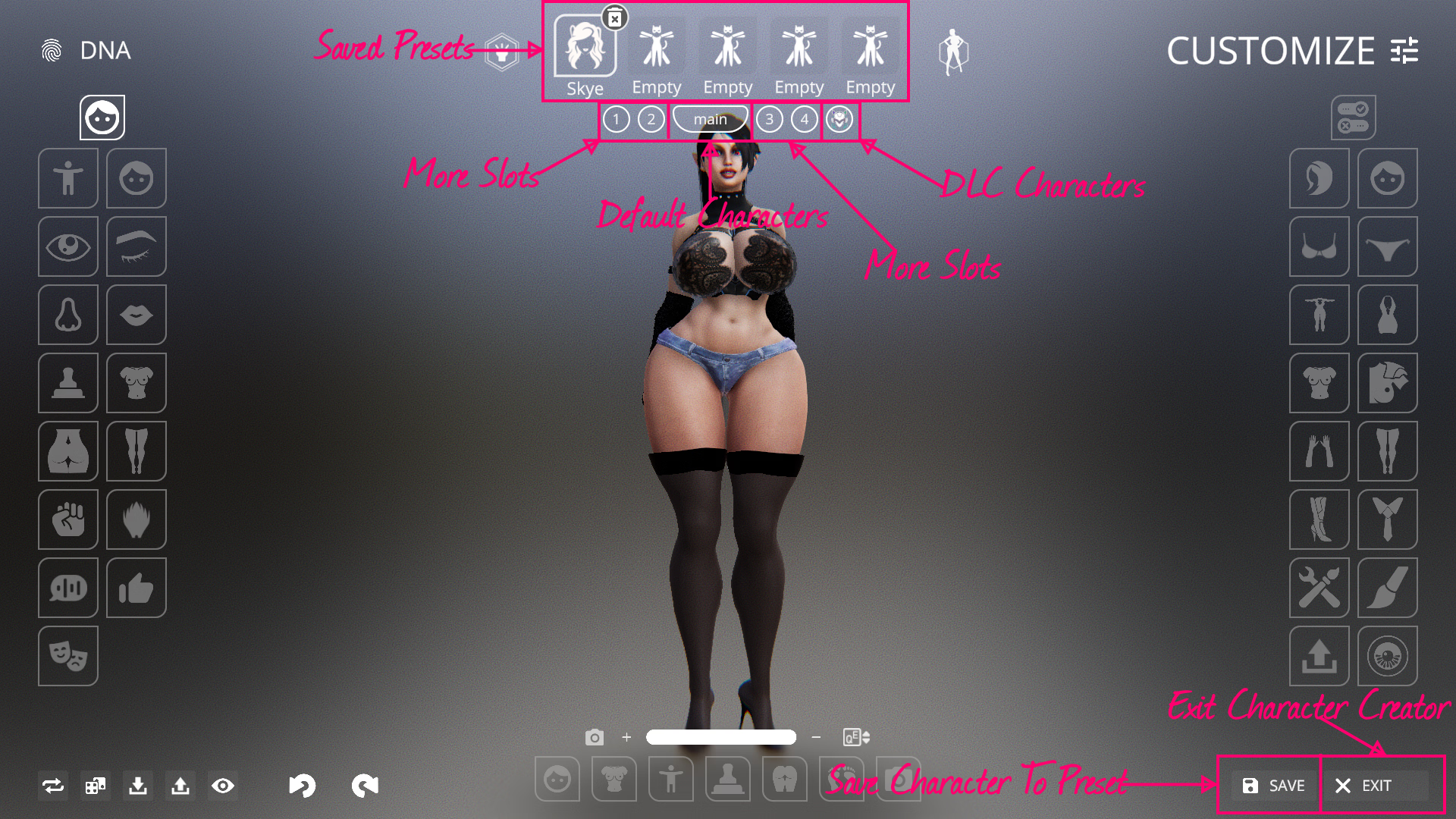
I have found some models that I can see in the character creator but I don't understand how to save them so I can use them in game?

I don't even understand how to exit character creator without alt+f4 the game

I find the UI in this game very unintuitive and the game itself very hard to play and full of bugs
 

RedAISkye

Well-Known Member
Apr 10, 2017
1,210
2,752
449
I have found some models that I can see in the character creator but I don't understand how to save them so I can use them in game?

I don't even understand how to exit character creator without alt+f4 the game

I find the UI in this game very unintuitive and the game itself very hard to play and full of bugs
For non-labeled buttons, it's understandable but the save and exit are literally labelled. Not sure how you missed it.
Try experimenting around with buttons first when things aren't made obvious. It'll save you a lot of time.

If you play enough games with customization system, these things easily translate for the most part.

Guide.png

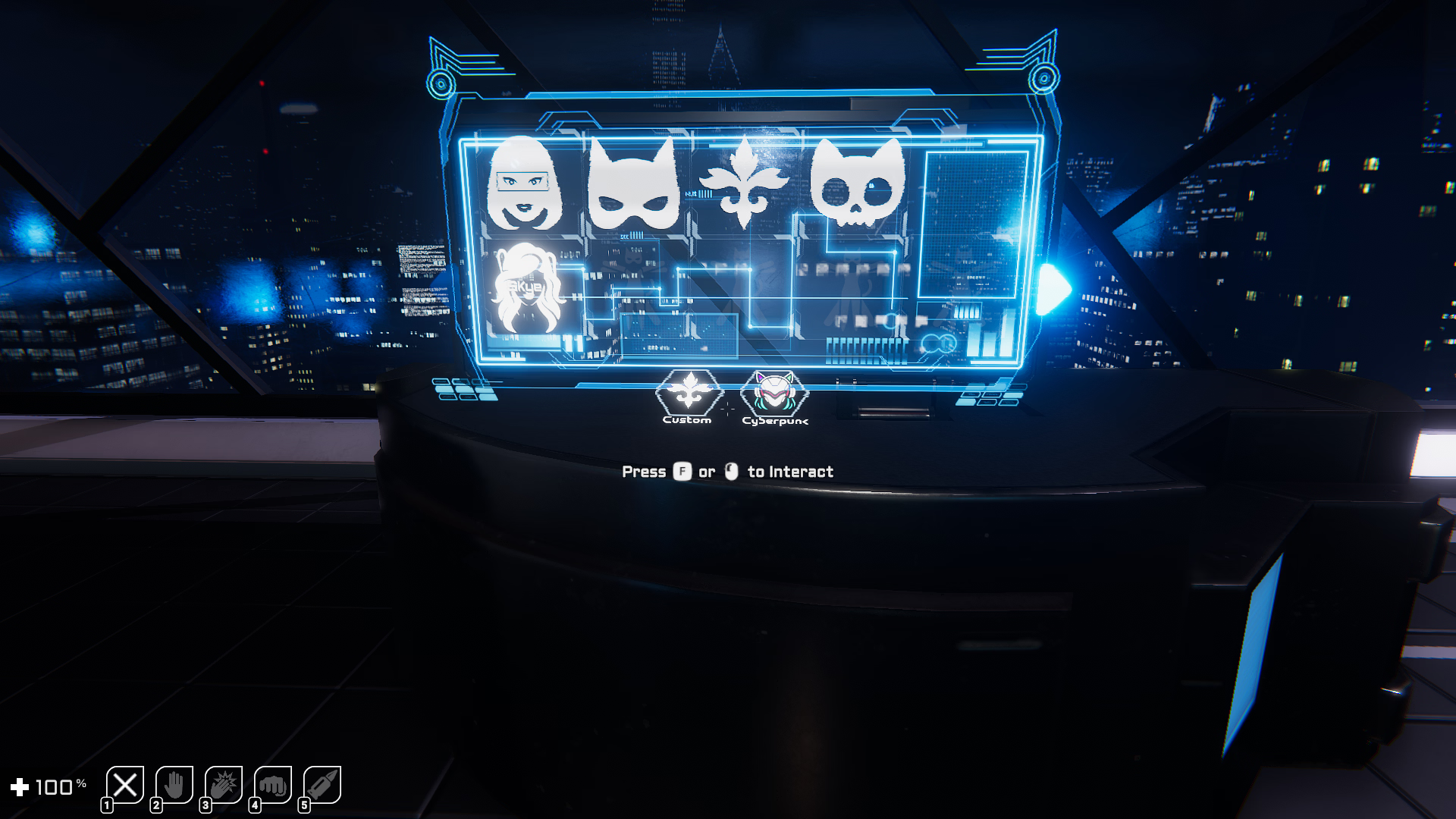
And before you ask, this is where you load the presets.

Guide 2.png
 
  • Like
Reactions: Rempa1

RedAISkye

Well-Known Member
Apr 10, 2017
1,210
2,752
449
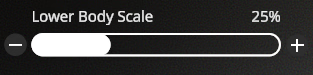
I dont know if it is intentional or not but the scale sliders for lower body and upper body scale are not able to go lower than 25% I think it was. I was qurious if I could change that so I tried using DnSpy and modified the Assembly-CSharp dll file a bit and I can now get the sliders to 0. If they dont intend to fix it so that you can I guess I could upload my file if someone wants it
Would be better to share which function is responsible for that, as the changes would only work for that specific version you compile for.

Edit: Nevermind, I noticed there's a cheat toggle which lifts the restriction.
 
Last edited:

account007

New Member
Dec 20, 2025
9
4
3
For non-labeled buttons, it's understandable but the save and exit are literally labelled. Not sure how you missed it.
Try experimenting around with buttons first when things aren't made obvious. It'll save you a lot of time.

If you play enough games with customization system, these things easily translate for the most part.

View attachment 5556901

And before you ask, this is where you load the presets.

View attachment 5556918
Thank you

Turns out the game didn't go fullscreen even if it said it did, had to rechange settings that's why
 

account007

New Member
Dec 20, 2025
9
4
3
I have played a bit this game, but it's so unpolished it's painful

I can't manage to decrease the power of the gun only increase it, at least in VR

I've found so many bugs, some game-breaking in like1 hour or so of gameplay

the game is frustrating I don't think I am gonna continue playing it
 

RedAISkye

Well-Known Member
Apr 10, 2017
1,210
2,752
449
According to what I read here, there was never malware injected but a blue screen would pop up in the game with fake text about being hacked an random russian characters as a jumpscare tactic to not pirate the game, when downloading from kemono.

Now, if you download from Kemono characters get a giant head and high pitched voices. I thought it was pretty funny, reminded me of N64 Goldeneye giant heads cheat.
Irrelevant whether it did something malicious at the time or not.
It goes to show that the dev is not trustworthy at all. Especially when they blatantly even lied about not caring about piracy.

Just like they went out of their way to execute fake imports on Kemono with links to a tampered build, at any point in time, they could very well pretend to be a pirate and share a malware embedded build here (and not just in Kemono) that is no longer just a "scare tactic" but either actively executes destructive actions, or more intrusive silent spyware that logs data to expose potentially sensitive info from the user.

I have reported it to Kemono, and also changed the rating on Itch from originally 5 stars to now 1. Would highly encourage others to do the same and possibly even report it to Patreon if you're a sub, if you care about getting rid of bad actors. They used the pirate community to advertise and benefit first and when they grew big enough, they backstab them all, even banning subs from their discord for being a F95 user.
 
Last edited:

Paulde

New Member
Dec 3, 2025
5
4
3
I asked this before, but in beta 47, whenever there is any sort of vaginal penetration, the vagina mesh seems to detach from the rest of the body, you can see seams where the meshes are supposed to touch that are see-through. Does anyone else notice this or has anyone found a fix? I'm still on 46.2 since it bothered me too much. It seems to be related to ragdoll / physics behavior, but I'm unable to find in the code the part that handles this in order to try to patch it.


Would be better to share which function is responsible for that, as the changes would only work for that specific version you compile for.

Edit: Nevermind, I noticed there's a cheat toggle which lifts the restriction.
There is? Lmao, when I read that I also went in with a decompiler and removed the restrictions (and fixed certain bugs for characters with lower body scale below 55%). I had no idea there was even a cheat menu option (never used the cheats).

In any case, the functions are CheckUpperLowerBodyLimit, SetUpperLowerBodyLimit and SetupUpperLower. Easiest way to patch it seems to change the float value in the set function and basically delete the contents of the check method (dnspy couldn't compile some existing classes, but you can edit individual methods and compile just fine). I just did this to the check function.

C:
private void CheckUpperLowerBodyLimit()
    {
        return;
    }
 
Last edited:
  • Like
Reactions: Leafless Twig

Leafless Twig

Member
Dec 18, 2018
165
650
300
Would be better to share which function is responsible for that, as the changes would only work for that specific version you compile for.

Edit: Nevermind, I noticed there's a cheat toggle which lifts the restriction.
You mean by this toggle?
1766749253892.png
In both cases the slider doesn't go under 25%
1766749378075.png
1766749402937.png
>no big tiddy goblin
why even fap
 

RedAISkye

Well-Known Member
Apr 10, 2017
1,210
2,752
449
You mean by this toggle?
View attachment 5565069
In both cases the slider doesn't go under 25%
View attachment 5565072
View attachment 5565073
>no big tiddy goblin
why even fap
Yeah, I assumed it did because of what it's labelled as.
Didn't actually test it since I had already deleted the game.

Anyway, the dnSpy modification can always be made to lift it.

dnspy couldn't compile some existing classes, but you can edit individual methods and compile just fine
Usually it's because it can't find the dependent dll or function from another class it's calling.
It can be fixed manually by going through the errors, in the case you require editing the entire class, but most of the time you only really need to edit the method.
 
  • Like
Reactions: Leafless Twig

Paulde

New Member
Dec 3, 2025
5
4
3
Unfortunaly I don't know how to do it.
Anyway thanks to you both. :)
It's actually quite straightforward. You download Dnspy.

You load the assembly-csharp.dll from the game folder into dnspy. Then just search for the functions I mentioned within that dll file using the search function. Then right click and "edit method" or something like that.

If I remember correctly, SetupUpperLower requires no change.
For SetUpperLowerBodyLimit, just change both of the 50f to 0f and compile/save
For CheckUpperLowerBodyLimit, edit the method and replace it with the following:

C:
private void CheckUpperLowerBodyLimit()
    {
        return;
    }
Optionally, if you're bothered by the fact that characters with lower body size below 55% cannot receive cervix damage, edit the CervixDamageCheck method, find this line and change the float value to 0.175f:

C:
         if (distanceFromHoleEntranceToTip <= 0.175f)
I have no idea why it behaves like that but this is the most optimal value I found to make it function on all body scales. Characters above 55% lower body size can take slightly less cock without losing health as a side effect.

Back up the original assembly-csharp.dll from the game files in case you muck something up so you can try again. If you did it right, you should get no errors when compiling/saving.

 
Last edited:
  • Heart
Reactions: Leafless Twig

wadew

New Member
Aug 4, 2017
1
0
11
I'm sure this has been asked before, playing on the itch demo in VR and I can't figure out how to pull my dick out. Nothing I've tried works.
 

Paulde

New Member
Dec 3, 2025
5
4
3
I'm sure this has been asked before, playing on the itch demo in VR and I can't figure out how to pull my dick out. Nothing I've tried works.
I only got an oculus dev kit 2 and I ain't bothering to test the game with that prehistoric piece of hardware, but according to in-game tooltips, you just have to look at your crotch, allegedly. Maybe that functionality is not in the demo?
 

Dala89

New Member
Nov 28, 2024
2
1
62
TheVillainSimulator-Beta-47\TheVillainSimulator_BurstDebugInformation_DoNotShip there's this weird folder in the file. is that sus or legit?
 

EdPopoka

Newbie
Jul 27, 2025
42
28
18
TheVillainSimulator-Beta-47\TheVillainSimulator_BurstDebugInformation_DoNotShip there's this weird folder in the file. is that sus or legit?
Thats just a file created by the compiler with build information that the devs were too lazy to remove.
 
3.70 star(s) 45 Votes