Unity True Facials [v0.59 Pro] [HenryTaiwan]

3.90 star(s) 73 Votes

DenabuNeko

Member
Nov 3, 2018
133
240
247
Why does the game freeze on a black screen when I load my captures? Help!!!
Are you using old ones? I ran into the same thing, you'll have to remake them in the new version.
I've not had any issues with old captures. Getting a black screen when loading captures that previously worked is usually due to having an incorrect common.lua file in /Mods/Scripts/

This file should never be copied over from previous versions, it's not related to any community created mods, but does sometimes get included in mod collections that people create accidentally, which could end up causing people to put in versions of the file from older versions of TF.
You can try re-extracting that file from the archive for TF 0.59
 

CheerBunny

Member
Oct 11, 2017
401
1,190
354
is there a way to change places on a map without having to drag teh character's? i mean everytime i click sitting blowjob the guy is sitting on thin air...
 

JhonLui

Well-Known Member
Jan 13, 2020
1,252
1,244
335
I got "more" fps but then "less" fps. in 0.58 i could run the game with fsr in "performance" or "balanced" with no problems; in 0.59 i HAVE TO run it with "ultraperformance"enabled or i get slides. Something tells me the GPU side of it was improved but the CPU side took a hit. Probably we´ll get more improvements through the (next) year but also, we updating our pc´s and giving hardware feedback to the devs will help a lot!
Did you lower the game's screen resolution? if you didn't it'll help you a ton: like going back to FSR quality.
 

JhonLui

Well-Known Member
Jan 13, 2020
1,252
1,244
335
yep, performance with no fsr is much worse then before.. me with no fsr i could get 28-45 fps, depending.. fsr on i get 50-60, but now with no fsr, i cant get pass the 30 frames, so i have to use fsr in quality no matter what.. kinda sucks... maybe it needs to be reported to the devs..? i dont use discord much, i am not a super fan of real time chats,, but someone could give them the call? it should be fix imo.
I hate IIRCs too (also because of that guy who mounted a crusade against Lossless Scaling).

But here things are trickyer than it seems. They messed up big times with the Cpu, more than in 0.57
And the real problem is the 1%low drammatically unstable and even -60% in some cases unless you stay above 45 fps, than it tends to stabilize at -15/20%.
This means that to use Frame generation (Smooth motion/L.S.) you have to be above said 45 fps or you'll get motion stutter.

Funny stuff is that gets more stability and performance upscaled in 4K than in native 1080p... so there must be some problems with texture handling as well.

I made a modificataion on 0.58 in the Boot config that addressed this issue a bit, I'll try on this later and report back

--Edit--
It didn't work... the magic number is still 45 fps for a fluid play (you might try 42 or43 but the downspikes can go as low as 20). There you can activate frame generation and paly at a decent framerate maxed out w/o frying your Cpu [stays below 30%]

For weaker systems the only solution seems to lower the resolution via UnitySettings.exe or forcing the resolution via link command like:
-force -screen-fullscreen 1 -screen-height 831 -screen-width 1477

For example if your native is 1920*1080: 1632*918 gives me a 35% boost with still decent graphics, 1477*831 a 90% boost with a graphics downgrade similar to FSRQ. Tip is to keep the cpu around 30% or lower to let the gpu work at its best
 
Last edited:
  • Like
  • Wow
Reactions: Zilcho and LePorn

decade789

Member
Jan 19, 2019
242
85
194
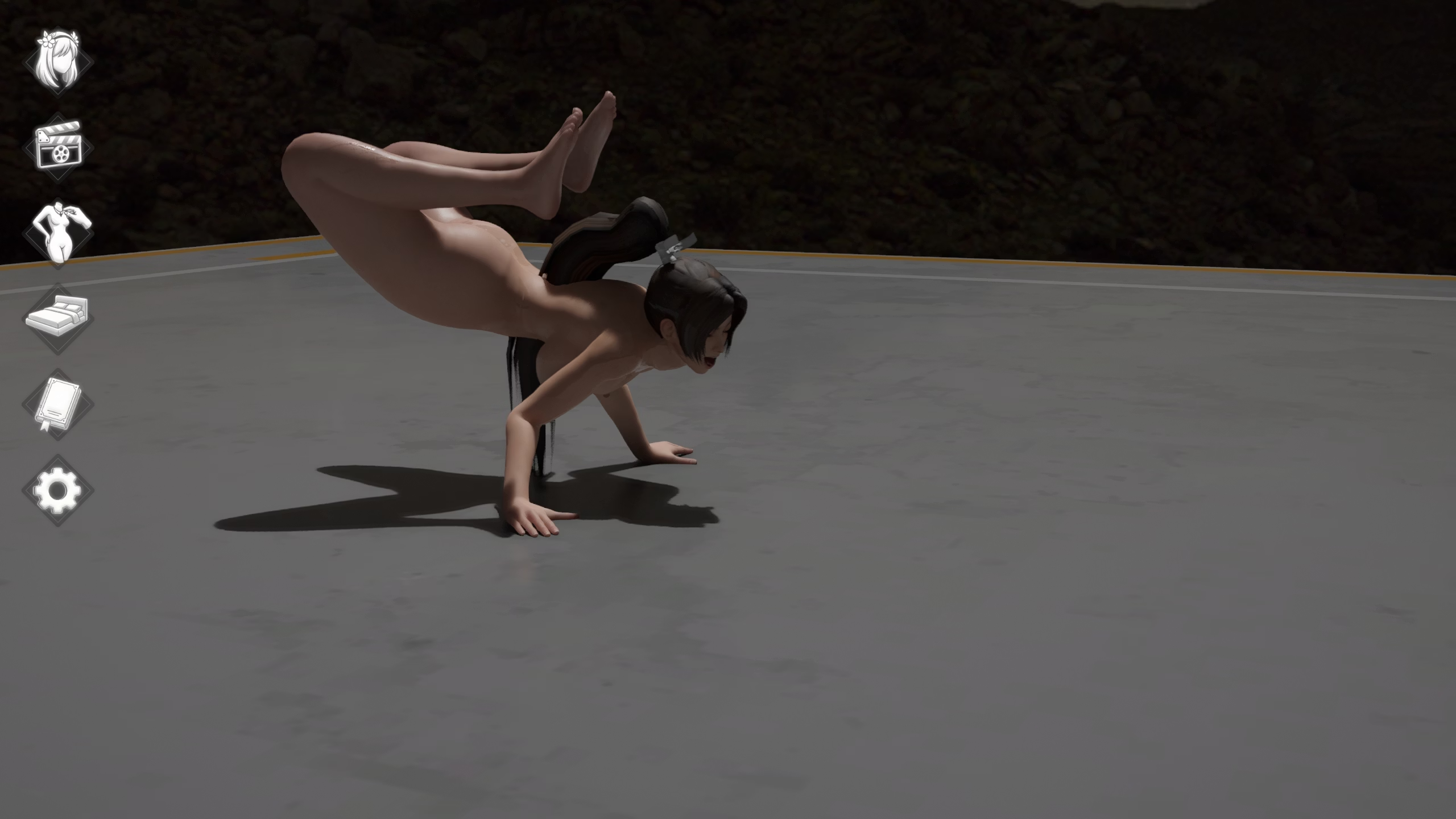
Jeez first time I tried on making my own pose using the table spread as base and this is what I end up with. For some reason I can't find the node to adjust the male's upper body. I really should put a itty bit of time practicing poses or adjusting nodes lol.
 
  • Like
Reactions: AlmostEntirelyNSFW

DinoAlpaca

Member
Aug 18, 2024
255
436
166
This game/pose editor is the embodiment of pleasure and pain. Pleasure, spending time creating the poses/actions you want. Pain, all the hard work ruined by a lapse in concentration. This feeling of pain I had was very similar to what K (played by Ryan Gosling) from the film Blade Runner 2049 (2017) felt, as demonstrated from this clip:

After my fit of anger, pressing the right mouse button to reset something, it did present to me a happy accident. Introducing Mai " " Shiranui:

Mai Rene Higuita Shiranui.jpg

Dubbed Rene Higuita because Mai and Rene both share the ability to do a "Scorpion kick". Rene Higuita, a former national goalkeeper for Colombia during the 1990's, nicknamed "El Loco", had moments of madness and genius in his playing career. His moment of genius was this: . What I like about this image of Mai doing an accidental Scorpion kick is that she's doing this with her tongue sticking out.

I do have a question, is there a way to save a model's body proportion settings, so I don't have to readjust them each time I summon them?
 
  • Haha
Reactions: Zilcho and TFfan1

あの野郎

Newbie
Oct 31, 2019
32
70
88
I do have a question, is there a way to save a model's body proportion settings, so I don't have to readjust them each time I summon them?
You have to script that functionality yourself. It's not overly complex, but keep in mind, that the game saves body adjustments of characters in a scene, so if you load a scene that someone else has created or that was created for other charactes the body adjustments will be overwritten with the settings inside the scene file.

One way to do this:

1. Create a function that applies body presets to a character - let's call it' ApplyBodyPreset(human)'.
The character is identified by its name (which you can get from the human object), and the body adjustments values (you could also apply changes in hair color etc.) are applied accordingly.

2. Call the function you created in:

function OnCreateHuman(human)
ApplyBodyPreset(human)
end

That way your adjustments are applied when loading a character.

3. Delete all body proportion settings from the scene files you are using.
 
  • Like
Reactions: punhetas

DenabuNeko

Member
Nov 3, 2018
133
240
247
I do have a question, is there a way to save a model's body proportion settings, so I don't have to readjust them each time I summon them?
You have to script that functionality yourself.
あの野郎 is correct that this is one way you can do it. If you don't mind a few extra clicks after loading the character, you could also use the Material Selector mod that I created. Technically it was made for saving material presets, but it can really be used for this as well.

If you follow the tutorials I provided for it and understand how to add a material preset to it, you can do the exact same with the body customization by just copying that out of a capture file and into a preset in the mod.

Edit: The shareable set of presets I put together for the mod included one like this for Aunt Cass that edits her body proportions, so that's one you could reference. It was linked here
 
Last edited:
  • Like
Reactions: Zilcho and punhetas

Lonewolf1985

Member
Nov 16, 2018
154
44
194
Hi, in older versions when pressing ALT that showed body parts in colours to move and drag, but in 0.59 can't, maybe changed the key to do that? or is just disabled?
 

TFfan1

Member
Jul 8, 2024
355
447
175
Did you lower the game's screen resolution? if you didn't it'll help you a ton: like going back to FSR quality.
Nope, I bought my 1440p monitor and i´ll get the best resolution out of it even if that means my humble 1070 working extra time to do so (i´m also planning to upgrade next year)
 
  • Haha
Reactions: Zilcho

DenabuNeko

Member
Nov 3, 2018
133
240
247
  • Heart
Reactions: Lonewolf1985

JhonLui

Well-Known Member
Jan 13, 2020
1,252
1,244
335
Nope, I bought my 1440p monitor and i´ll get the best resolution out of it even if that means my humble 1070 working extra time to do so (i´m also planning to upgrade next year)
Lol! stubborn a.f., I like it.
Yet if you run the game at 1080p on a 1440 screen you shouldn't see any texture degradation and get close to 30fps in fsr quality, give it a try just for science, it takes one second.

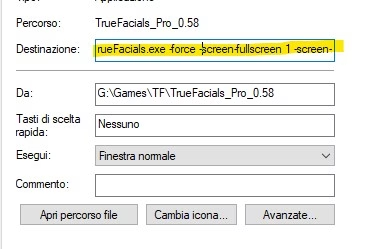
Just create a link to the .exe and paste the following after the file address (with a space) in the target tab:

-force -screen-fullscreen 1 -screen-height 1080 -screen-width 1920
Immagine 2025-12-13 180704.jpg

Apply, than use the link to start the game. Lemme know, I'm curious.
(Also 1632x918 should work just fine, it should still use 1080p textures)
 
  • Like
Reactions: TFfan1

TFfan1

Member
Jul 8, 2024
355
447
175
Apply, then use the link to start the game. Lemme know, I'm curious.
(Also 1632x918 should work just fine, it should still use 1080p textures)
Ilaunched the game as you told me and i got large textures when i get close to an object but the game itself ran somewhat faster. I took 3 diffrent pics with 3 different fsr settings. Honestly? they look VERY similar, and run kind of the same quality.png performance.png balanced.png
 
  • Like
Reactions: JhonLui

JhonLui

Well-Known Member
Jan 13, 2020
1,252
1,244
335
Ilaunched the game as you told me and i got large textures when i get close to an object but the game itself ran somewhat faster. I took 3 diffrent pics with 3 different fsr settings. Honestly? they look VERY similar, and run kind of the same
fps?
besides.. the whole point of this is to ease the cpu, since fsr is really cooking it, that way you can max the Gpu output and, if you find an acceptable resolution that let you reach the magic 45 (sadly, before it was 32), you can kick in Lossless Scaling's FSR and framegen and play at a comfy 80 fps (maybe a lil' less, but fluid)
 
Apr 5, 2025
24
3
63
i play it too and i my system can reach 64 fps in ultra performance

in normal performance i got 40 fps .. in quality or native, i get a slideshow :D

when i startet the 0.57 version i get 54 fps in ultra performance.


but my cpu is always at 94% and gpu 45%


so.. my only change is that i got 10 fps more then before :D

maybe someone want to know it
 

JhonLui

Well-Known Member
Jan 13, 2020
1,252
1,244
335
maybe someone want to know it
Hi,
download Lossless scaling:
https://f95zone.to/threads/true-facials-v0-59-pro-henrytaiwan.35192/post-18241369
extract it where you want. (the file is clean, I'm using it since July)
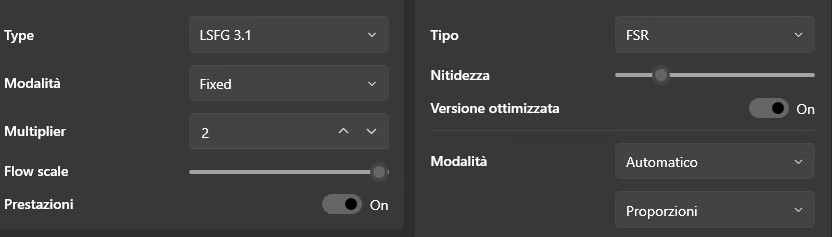
run it with the following configuration:

Immagine 2025-12-14 013702.jpg

Create a shortcut to TrueFacials.exe, right click on it and select properties add in the target tab the following line after the game address:

-force -screen-fullscreen 0 -screen-height 720 -screen-width 1280
(there must be a space between Truefacials.exe and the line above, so: ...acials.exe -force...)

click apply and start the game with that link. The game will start windowed.
set the game to Native AA
(you should have the framerate around 30+ but the cpu at 50% and the gpu around 90%, if the gpu is still below 90% raise the resolution in the link you created try 831*1477 or 1632*918 also try to stay above 32fps). ((if the cpu is still high and the gpu is below 90% try 635*1130, but shouldn't be the case))

Never resize the window or it'll go back to your screen native res.

Now go back to LosslessScaling you opened before and click the Scale button on top right.
A countdown will start, just click on the game within 5 secs. to bring it on top and wait for it to go fullscreen.

What you did was just apply a better FSR (3.5) than the one in game (2) and framegen 2x with only a 10% weight on your cpu instead of the 50% of the game's one.
To exit: Alt+Tab than Unscale, or just close the game.
If everything went right, you can now play at the same framerate but much better quality (and if your cpu is quite can even try higer framegen up to 4x).
My suggestion is to set the framerate at the minimum possible with fluid gameplay: 32to45 and let the computer chill.

Hope it helps

 
  • Like
Reactions: Vegetta9801
3.90 star(s) 73 Votes