

- Thread starter Papa Ernie
- Start date
3.90 star(s)
15 Votes

EricBauman
Member
- Jun 15, 2020
- 480
- 281
- 187
Does anyone know for the karin quest for her satisfaction? mine already 2/3 but i don't know the rest, i already unlocked the hot spring and the snake boss and i don't know the last one
You're still exploring the cave, right? All of her quests involve exploring certain areas and finding 3 points of interest, one of them is always some unique decorative object she takes home and another one is always a boss battle. I guess you're missing the object, keep going around the cave and interact with anything odd you see.

User is the name
New Member
- Nov 21, 2024
- 1
- 0
- 11
Bro forget the tits, this game is grindy as HELL. At some point I was grinding mobs just to level up.
mangoman66
New Member
- Jan 30, 2021
- 5
- 0
- 11
mynameisnotje
Newbie
- Nov 27, 2019
- 22
- 6
- 126
Has anyone successfully ran this game on a Mac? I've tried both Crossover (where I receive a 'script is hanging' error after the title screen, even after changing the locale of the bottle to Japanese and installing the VXAce RTP) as well as RPG-Maker-Launcher, which uses MKXP-Z (which cannot load the first CG because it can't locate the proper file; pretty sure this error is locale-related).

EddyGordo
Member
- Oct 16, 2017
- 189
- 201
- 174
I'm having issues launching the game on win10 as well
Game extracted in jp, local emulator or system jap local not working
There is no file named like this in the game :
This error only pops when launching the game as is, and nothing happens when launch with the local emulator
(RTP installed as well)
I've played this game 2, 3 times in the past without any issues, but I really don't know how to get it working this time around
Any help would be awesome if any of you found a workaround
Game extracted in jp, local emulator or system jap local not working
There is no file named like this in the game :

This error only pops when launching the game as is, and nothing happens when launch with the local emulator
(RTP installed as well)
I've played this game 2, 3 times in the past without any issues, but I really don't know how to get it working this time around
Any help would be awesome if any of you found a workaround

The Very Horny Man
New Member
- Apr 14, 2021
- 4
- 5
- 46
just wanted to thank you for this short but clear and concise guide. I maxed my intimacy with all girls except that ghost girl which I couldn't find her in the first place. Also the cheat you recommended helped me a lot with cutting the grind.I tried my best making this guide / walkthrough on how to do some of the tasks / quests because I know it's sometimes hard when you have no idea how to find things like the gems, drops of life, the hot springs, and Karin's task even though this thread is old. I did cheat but hopefully if people play legitimately, they can find my guide a bit helpful
You must be registered to see the links
SoulWhite6
Newbie
- Jan 21, 2019
- 54
- 26
- 162
I was having this same issue but I found out a solution 1 year ago.I'm having issues launching the game on win10 as well
Game extracted in jp, local emulator or system jap local not working
There is no file named like this in the game : View attachment 4894845
This error only pops when launching the game as is, and nothing happens when launch with the local emulator
(RTP installed as well)
I've played this game 2, 3 times in the past without any issues, but I really don't know how to get it working this time around
Any help would be awesome if any of you found a workaround
You said you extracted the game in JP, did you extract the game on Japanese settings with WinRAR in this way?

Go to Options -> Name encoding, select Japanese and click on Save current, close WinRAR and try to extract the files again. Then play the game using
You must be registered to see the links
.I hope this helps, because the WinRAR method worked for me.
EddyGordo
Member
- Oct 16, 2017
- 189
- 201
- 174
That's what I meant by extracted the game in JP, I also tried moving the game on the C drive (which worked in the past for another game / another RPG Maker error) but that didn't work out as wellI was having this same issue but I found out a solution 1 year ago.
You said you extracted the game in JP, did you extract the game on Japanese settings with WinRAR in this way?
Go to Options -> Name encoding, select Japanese and click on Save current, close WinRAR and try to extract the files again. Then play the game usingYou must be registered to see the links.
I hope this helps, because the WinRAR method worked for me.
Thanks for the help, but sadly this doesn't cut it for my specific case :/
I checked my own version of the game and that picture doesn't exist at all. Considering the file name it should be this picture here, so just rename it to what it claims is missing.I'm having issues launching the game on win10 as well
Game extracted in jp, local emulator or system jap local not working
There is no file named like this in the game : View attachment 4894845
This error only pops when launching the game as is, and nothing happens when launch with the local emulator
(RTP installed as well)
I've played this game 2, 3 times in the past without any issues, but I really don't know how to get it working this time around
Any help would be awesome if any of you found a workaround

Edit: Actually now that I look at it, I read the error message wrong. The image name seems to be the first thing, but the file path seems strange. Can you post the full error message?
As for my own folder, the file path leading to that image is listed like this

Last edited:
EddyGordo
Member
- Oct 16, 2017
- 189
- 201
- 174
I renamed the image and changed the path toI checked my own version of the game and that picture doesn't exist at all. Considering the file name it should be this picture here, so just rename it to what it claims is missing. View attachment 4898059
Edit: Actually now that I look at it, I read the error message wrong. The image name seems to be the first thing, but the file path seems strange. Can you post the full error message?
As for my own folder, the file path leading to that image is listed like this View attachment 4898129
 like it wanted (also tried your title : ロリ巨乳の里にてver1.03a+)
Now I have no error message and game doesn't launch with or without the local emulator
I feel like the version of the game has an issue, I don't remember having any issues when I played the game in the past
I tried downloading the game from multiple sources, but the problem persists
This is the txt in the Game.ini file
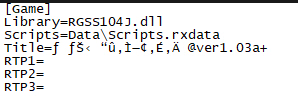
Seems a bit weird but it might not be the issue
Idk what it could be tbh, thanks for the help ^_^
Based on the title it looks like it didn't extract properly. Those symbols look more like the type that come when not extracting in jp locale. Just to confirm, since you said you tried jp locale, you changed your windows settings to this correct?I renamed the image and changed the path to View attachment 4898422 like it wanted (also tried your title : ロリ巨乳の里にてver1.03a+)
Now I have no error message and game doesn't launch with or without the local emulator
I feel like the version of the game has an issue, I don't remember having any issues when I played the game in the past
I tried downloading the game from multiple sources, but the problem persists
This is the txt in the Game.ini file View attachment 4898429
Seems a bit weird but it might not be the issue
Idk what it could be tbh, thanks for the help ^_^
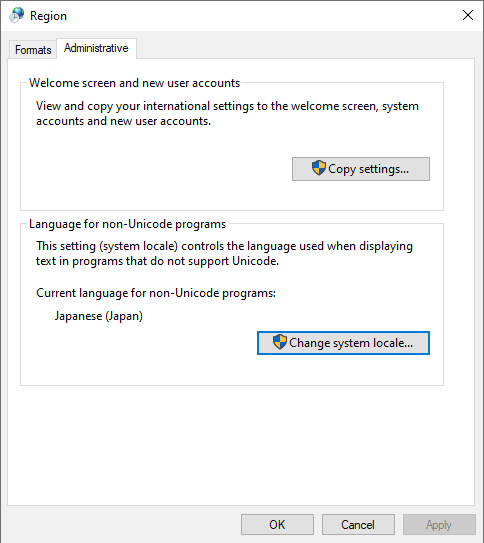
Also, is your game still in grf mode or is it extracted into folders?
EddyGordo
Member
- Oct 16, 2017
- 189
- 201
- 174
Yes, I've changed my local like soBased on the title it looks like it didn't extract properly. Those symbols look more like the type that come when not extracting in jp locale. Just to confirm, since you said you tried jp locale, you changed your windows settings to this correct?
View attachment 4898474
Also, is your game still in grf mode or is it extracted into folders?
I've also tried extracting the game multiple times, it seems to extract well
I don't have any errors (when in jp local), game doesn't launch at all
I'm not sure what you mean by grf mode, it is into folders keeping the files architecture intact
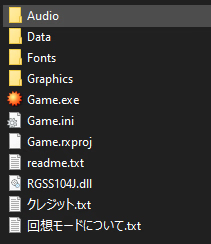
I'll try to find another source to see if it is the issue, or maybe another extractor ?
I'm not sure what to do
follow up : tried to move the game on the C drive (tried that before when I had other errors and it didn't change anything)
But it now works !
I thought about trying this since I encountered another game which required the same "setup/conditions" to work
Thanks again for the help ^_^
Arigato !
If anyone ever stumbles upon this message and has a similar issue (hope it helps)
-Make sure to download the RPG Maker RTP (important)
-Extract in JP (932 ANSI/OEM) (important)
-Change system local to JP (or try skipping this step with the local emulator, it should also work)
-Change game folder title to ロリ巨乳の里にてver1.03a+ (It shouldn't matter, just tested renaming the folder "hamlet" and it still works)
-Move game to C drive (important)
-Get the translation files from UMLF
It should now work
Last edited:
I was thinking of a different game so I confused the file names. I meant these files, which were part of older rpg maker versions.I'm not sure what you mean by grf mode, it is into folders keeping the files architecture intact

Basically older games were compressed into these files and you'd need an extractor to pull out the files and folders. Normally it's already done for older games that have been translated since the translations need to be applied to the folders themselves.
P.S. Nice Artemis.
EricBauman
Member
- Jun 15, 2020
- 480
- 281
- 187
You can't walk in normally but springs get added to the fast travel list of locations (interact with the stone lamp in the village).Does anyone knows if you can return to the spring found in the cave? Found it with Karin but when I tried to take Kuko to it, it doesn't look you can fall again
The cave one is the Forgotten Spring.

checock
Newbie
- Dec 10, 2021
- 27
- 17
- 22
Thanks! This completely went over my head.You can't walk in normally but springs get added to the fast travel list of locations (interact with the stone lamp in the village).
The cave one is the Forgotten Spring.

BillBlass
New Member
- Apr 1, 2025
- 6
- 0
- 1
Hello everyone, I tried to search for my specific problem and didn't find anything so if this was answered my apologies. I have gotten the English translation courtesy of SaintLucian, but putting the folder inside the main game folder doesn't seem to prompt it to replace the folders during extraction, is there a way to replace the data so it translates into English?
You extracted it to this folder correct?Hello everyone, I tried to search for my specific problem and didn't find anything so if this was answered my apologies. I have gotten the English translation courtesy of SaintLucian, but putting the folder inside the main game folder doesn't seem to prompt it to replace the folders during extraction, is there a way to replace the data so it translates into English?
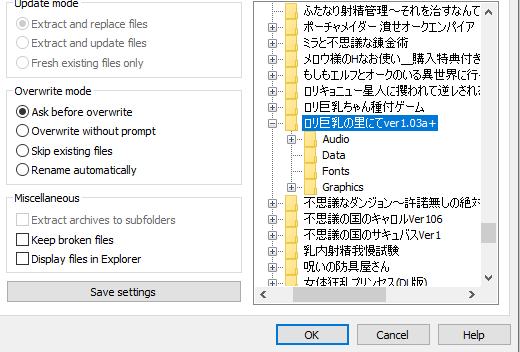
Worst case scenario, you can just take all the files out and drop them in that data folder.