tonzak

Member
Dec 18, 2016
148
80
206
after the first handjob drunk scene she didnt allow the mc to stay the night, but after that i wasnt able to find any more wine lying around to get her drunk again
I think having Adrianna allow you to stay the night in her room depends on your relationship level/points, so try to get those numbers up, rookie.
As for the wine, I had some trouble finding them as well in my first hour of this game. I skipped Natasha's speech about where she would hide them, mistakenly remembering the words "storage" and "night".
But to make this short and sweet, you can find wine bottles in the evening and night (I think, night definitely) in the following locations (all are part of the Flight Deck area):
  • Med-bay, right of the door after entering, on the table
  • Cockpit, left of the door after entering, on the ground
  • Cockpit, right of the right pilot's chair, on the ground
  • Cockpit, on the dashboard of the left pilot's chair, in front of it
Only one may spawn at a time, I believe. Also you might have some trouble picking the bottles up for some reason, but just keep moving around them and "using" them until you pick them up.
 
Last edited:

hammerface

Newbie
May 18, 2018
80
88
97
This is the exact same problem I'm having every time. I have no idea how to fix this mess but I'm glad to see that I'm not the only one having this problem.
yeah, haven't seen many mentions of it. i suppose it's something to do with how the game uses your hardware? hope the dev find the issue
 
D

Deleted member 321684

Guest
Guest
Got 100/100 on every girl but cant trigger fancy dinner, there is no option and i have like 4 bottles of wine. But no dialog option to trigger it. Every other scene I unlocked
Same here, 100 everyone, every scene so far. Can't find anyone at any time with other than red border.

BTW. weren't there 2 dreams? Did not play from scatch, so I thought I had both, but only one is shown on "my" PC
 

yourdesire8

Member
Jul 1, 2017
307
190
154
This is really a good game but for now its just handjob,blowjob kind of a deal, will be better in some updates, but one of most innovative games out there :)
 

-lull-

Newbie
Jun 15, 2019
65
60
194
Same here, 100 everyone, every scene so far. Can't find anyone at any time with other than red border.

BTW. weren't there 2 dreams? Did not play from scatch, so I thought I had both, but only one is shown on "my" PC
2nd dream is bugged you can repeat it from the main menu extra
 
Jun 13, 2018
351
363
135
yeah, haven't seen many mentions of it. i suppose it's something to do with how the game uses your hardware? hope the dev find the issue
I've tried setting it to be a high priority when it's running but that hasn't helped. I've even closed everything else on my pc and it doesn't help. So whatever it's doing with my hardware while running must be pretty big.
 

jc12

Newbie
Jan 19, 2018
20
18
34
I've tried setting it to be a high priority when it's running but that hasn't helped. I've even closed everything else on my pc and it doesn't help. So whatever it's doing with my hardware while running must be pretty big.
Laptop/PC specs? You're probably going to have a tough time trying to play this on integrated graphics if you don't have a dedicated GPU.
 
Jun 13, 2018
351
363
135
Laptop/PC specs? You're probably going to have a tough time trying to play this on integrated graphics if you don't have a dedicated GPU.
Where do I find my specs? You can tell how much I must clearly know about my pc and this stuff just from that question so you might have to speak in simple terms to me.
 

jc12

Newbie
Jan 19, 2018
20
18
34
Where do I find my specs? You can tell how much I must clearly know about my pc and this stuff just from that question so you might have to speak in simple terms to me.
No problem, do you know what operating system you're using? Windows 7, 10 etc?
On most versions of windows, you should be able to press the start button, type in dxdiag in the search and open that.
Only important thing to check is what processor you're using which you can find on the 'system' tab, then click the 'display' tab and check what graphics device you're using. Need more help just ask.
 
Last edited:

gun506

Member
Dec 1, 2017
204
192
249
Seems to be several bugs. Played it for 7 hours on a new game, never triggered the Fancy Dinner scene, the workout scene gets looped, couldnt get Katherine to wear Virgin Killer outfit much less Adrianna's fancy clothes. I think there needs to be a progress bar or % indicator on progression or make it like milftoon drama when your at the end get a warning and exit the game or something similar to that effect.
Explained how to get the fancy dinner and even included a post with a save during the event literally 3-5 post before yours.
 

gun506

Member
Dec 1, 2017
204
192
249
Got 100/100 on every girl but cant trigger fancy dinner, there is no option and i have like 4 bottles of wine. But no dialog option to trigger it. Every other scene I unlocked
Are you talking to the aunt/natasha at her table or while she is walking to her table at about 6 or 7 p.m, because you may have to talk to her to trigger it while she is walking back from the pool. Also I included a save during the event about 3-4 pages back.
 
Jun 13, 2018
351
363
135
No problem, do you know what operating system you're using? Windows 7, 10 etc?
On most versions of windows, you should be able to press the start button, type in dxdiag in the search and open that.
Only important thing to check is what processor you're using which you can find on the 'system' tab, then click the 'display' tab and check what graphics device you're using. Need more help just ask.
Alright using Windows 7 ultimate 64-bit. Which thing am I looking for to tell me graphic device?
 

jc12

Newbie
Jan 19, 2018
20
18
34
Alright using Windows 7 ultimate 64-bit. Which thing am I looking for to tell me graphic device?
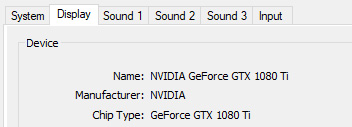
If you're on Dxdiag, just go to the 'Display' tab, first thing you should see is a section called 'device' and right under that it says 'name'. Should look like this:
353957

Will most likely say 'Intel HD Graphics xxxx' if you're using integrated graphics, which may not be enough to run this unfortunately. :(
Hopefully down the line the creators will be able to optimise and clean it up and allow lower end hardware to run it.
 
Jun 13, 2018
351
363
135
If you're on Dxdiag, just go to the 'Display' tab, first thing you should see is a section called 'device' and right under that it says 'name'. Should look like this:
View attachment 353957

Will most likely say 'Intel HD Graphics xxxx' if you're using integrated graphics, which may not be enough to run this unfortunately. :(
Hopefully down the line the creators will be able to optimise and clean it up and allow lower end hardware to run it.
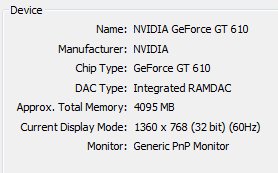
353983

There you go. That's what mine saids.
 
Jun 13, 2018
351
363
135
That's your problem there really, the GT 610 is more of an 'extra video-out card' than it is a graphics card, and is about 7 years old. Not really the hardware you can expect to play this on I'm afraid. :(
I see. Well that explains a lot of my gaming troubles then. Sadly though with no money coming in I can't upgrade any time soon. Thanks for helping me with this though.
 
4.50 star(s) 248 Votes