

Unity ProjectR [v0.6.0.4] [Team-Apple Pie]
- Thread starter Ω Nelo Angelo Ω
- Start date
4.00 star(s)
41 Votes
this helped alot thankscan someone walk me through adding traits to player via notepad?
The slaves themselves? Not at this time. Only the Shortstacks because the Player can produce a Woman with the Shortstacks modifiers.
I might make a small script if I can figure it out to give the player traits.
Edit: Just to let people know, the traits and chances are in the character files. If you only wanted to modify things so values are 'positive', just change the values in the general.trait file with a text editor. I'd keep a backup file though.
Edit 2: It is easy to start the game with a Player with any trait. It'll take you 2 files. I've added a small readme to hopefully help if you need it, and tried to comment things if you want to change things. This file only works on a new game, because I was being lazy. The file only gives the Player DeploymentCost: -1, because as of now, there was no way else to get the trait. Not that useful currently, though making Archers and Shortstacks Cost 1 is a benefit. Units (as of now) can't cost 0.

puddinbutt
Newbie
- Apr 20, 2023
- 73
- 62
- 70
I have english and i used the regular system os. guess i'll try 7zip??I changed the computer language to English, and it worked ( I used standard OS to extract files and I was in French).
DraconisOminous
Member
- Jan 6, 2018
- 242
- 358
- 267
I typically recommend Winrar, just because it is easier to tell it to extract using X language shift. I generally use it for Japanese when it is needed, but English should work as well. It doesn't force language conversion as far as I know.I have english and i used the regular system os. guess i'll try 7zip??
7zip works fine for me.I have english and i used the regular system os. guess i'll try 7zip??

Samiambutagain
Member
- Oct 2, 2022
- 465
- 385
- 186
It's difficult to say. A hefty chunk of development has been dedicated to sorting game mechanics. Once those stabilize, updates will probably come faster. After all, once gameplay is stable, the only things needed will be bug fixes, character/dialog implementation and animation rigging.
turtletamer
Newbie
- Jan 29, 2020
- 44
- 81
- 77
I'm not quite following how to get his working. I'm assuming the .cs goes in the ProjectR_Data\StreamingAssets\script folder. Is there a change that needs to be made to the player1.character file too?this helped alot thanks

Nanna95
Newbie
- Feb 6, 2019
- 42
- 20
- 84
Hope to see monster girl have sex with monster too.
DraconisOminous
Member
- Jan 6, 2018
- 242
- 358
- 267
For future reference, you might want to ping the person who wrote the original in the first place, luckily I usually check in daily.I'm not quite following how to get his working. I'm assuming the .cs goes in the ProjectR_Data\StreamingAssets\script folder. Is there a change that needs to be made to the player1.character file too?
Yes, any .cs file goes into the Script Folder. I'll also point out that if you wanted to, you could change the skin colors if you wanted to play with the hex code. But if you are adding traits (like the one I made an example for), you need to modify the general.trait file found in the \trait folder. You don't need to mess with the Player1.character file for that.
The DevelopmentCost0 just forces a cost of -1, and requires you to copy a development cost trait given in file, change the name to DevelopmentCost0, and then make the cost [-1]. You can do the same for any other trait, but give them a new name and probably a positive value like [10] or something. Or just skip breeding to be overpowered and do like [10000]. You do you.
i changed it to speed up breeding with playerI'm not quite following how to get his working. I'm assuming the .cs goes in the ProjectR_Data\StreamingAssets\script folder. Is there a change that needs to be made to the player1.character file too?
and also this guy nailed itFor future reference, you might want to ping the person who wrote the original in the first place, luckily I usually check in daily.
Yes, any .cs file goes into the Script Folder. I'll also point out that if you wanted to, you could change the skin colors if you wanted to play with the hex code. But if you are adding traits (like the one I made an example for), you need to modify the general.trait file found in the \trait folder. You don't need to mess with the Player1.character file for that.
The DevelopmentCost0 just forces a cost of -1, and requires you to copy a development cost trait given in file, change the name to DevelopmentCost0, and then make the cost [-1]. You can do the same for any other trait, but give them a new name and probably a positive value like [10] or something. Or just skip breeding to be overpowered and do like [10000]. You do you.
puddinbutt
Newbie
- Apr 20, 2023
- 73
- 62
- 70
damn, i tried and nothing changed. guess it's over for me bros.7zip works fine for me.
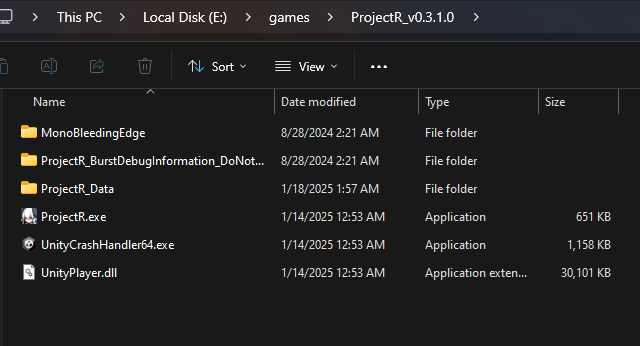
Can you share a screenshot of the folder where your game is located? Please make sure we can see the full path.damn, i tried and nothing changed. guess it's over for me bros.
puddinbutt
Newbie
- Apr 20, 2023
- 73
- 62
- 70
It's been on my E drive for months, i only downloaded the updated files and dropped/replaced them in the folder, it shouldn't have anything anywhere else but hereCan you share a screenshot of the folder where your game is located? Please make sure we can see the full path.

Torao Chadabe
Member
- Jan 9, 2018
- 459
- 1,988
- 296
Why would you copy pasta the changed files instead of just redownloading the entire game?It's been on my E drive for months, i only downloaded the updated files and dropped/replaced them in the folder, it shouldn't have anything anywhere else but here
View attachment 4472265
It's not like it's 50 GB
dustbeen43
Member
- Feb 19, 2023
- 129
- 105
- 149
Why are you playing in the 0.3.1.0 version (deduced from the name of the folder) while the 0.4.0.4 is out right now ?It's been on my E drive for months, i only downloaded the updated files and dropped/replaced them in the folder, it shouldn't have anything anywhere else but here
View attachment 4472265
Delete everyting you can in "AppData/Local/Temp", delete everything in "AppData\LocalLow\TeamApplePie", delete your old "ProjectR_0.3. 1.0" folder and then download the last version of the game and launch it. There is no reason why the game won't work with a new game.
DraconisOminous
Member
- Jan 6, 2018
- 242
- 358
- 267
They shouldn't need to delete everything in AppData\Local\Temp and LocalLow\TeamApplePie. I'd say delete the old folder though, since it is a mess now.Why are you playing in the 0.3.1.0 version (deduced from the name of the folder) while the 0.4.0.4 is out right now ?
Delete everyting you can in "AppData/Local/Temp", delete everything in "AppData\LocalLow\TeamApplePie", delete your old "ProjectR_0.3. 1.0" folder and then download the last version of the game and launch it. There is no reason why the game won't work with a new game.
Honestly though, try not to do that unless it is small version increments. If saves are made in a local folder, you can just port those later (they aren't in this case). Otherwise, you might want to lead in the future that you've just overwritten stuff. Also, in the future, if something like this does happen. . . try a fresh install.It's been on my E drive for months, i only downloaded the updated files and dropped/replaced them in the folder, it shouldn't have anything anywhere else but here
View attachment 4472265
FluffyRaKu
Member
- Jan 2, 2023
- 113
- 181
- 143
The last major update added orcs to the game. No other monsters have been outright confirmed, but there's concept art of monster/human hybrids (the monmusus) of all 5 types of monster from the Dev's previous game, Monster Black Market. Realistically, we will probably see those monsters return eventually, so we will end up with werewolves, minotaurs and salamanders.will different monsters be added or will it only be goblins?

Belkezar
Newbie
- Jun 9, 2024
- 99
- 146
- 111
Found the concept art of from the original project (two years back when it was hentai Darkest Dungeon) for the types of girls.
So regular girls (dragonoid, human, catgirl, dwarf, and elf) on the top row and monster girls (Lamia, cowgirl, Kitsune, Goblin, and Oni) on the bottom row.
Right now in ProjectR we only have the regular and elite (sister) humans, the fem-gobbos, and the oni.
My guess is that we might gets elves and werewolves sooner rather than later, but the rest of the girls and monsters will probably be on hold until the actual core systems get hammered out.
I'm curious is if the eventual intent is that you need combine specific species to get monster girls (possible example: werewolf + catgirl = foxgirl), or if any monster can produce its monster girl with slaves of any race.
You don't have permission to view the spoiler content.
Log in or register now.
So regular girls (dragonoid, human, catgirl, dwarf, and elf) on the top row and monster girls (Lamia, cowgirl, Kitsune, Goblin, and Oni) on the bottom row.
Right now in ProjectR we only have the regular and elite (sister) humans, the fem-gobbos, and the oni.
My guess is that we might gets elves and werewolves sooner rather than later, but the rest of the girls and monsters will probably be on hold until the actual core systems get hammered out.
I'm curious is if the eventual intent is that you need combine specific species to get monster girls (possible example: werewolf + catgirl = foxgirl), or if any monster can produce its monster girl with slaves of any race.
Last edited: