

Mods probably. Try clean install and test. If you are playing homework mod on old version, lags way way more than a pure game.Anyone have any idea why my game all o a sudden stared lagging like crazy?


- Aug 10, 2019
- 105
- 239
- 208
Worst install instructions i ever seen.Please find attached the latest experimental Monkey v1.15.2.
It was designed and tested to work with SMA 21.3f1 or later ONLY.
This is a minor release to fix a bug with default JSON values and improves player shadow control.
If you encounter breaking issues using Monkey that are not already in the release notes, PM me on Discord or F95 with a description of the problem and reproducible steps.
-Thora-
Important note
Microsoft defender is often generating false positives. The only solution to prevent this worldwide is to pay for an EV code signing certificate, which I won't do.
Never trust anything that triggers your AV, this includes Monkey. ALWAYS double check on VirusTotal and make sure the SHA-256 signature matches.
Key new features
- Player shadow control now includes the shadows cast by the phone and camera. You can control shadows via the menu, API, or XML. Set EnablePlayerShadows to false in in monkey_configuration.xml to disable male player shadows on restart.
Bug fixes
- Default JSON values are now set properly
- Male shadows are now working in the spa/studio
- Fixed male delayed clothing listener in the spa/studio
Known issues and limitations
- Interpretations don't refresh properly
- Content prior to 20.1 needs to be updated, and only works from the old office
- Sluttifying a character make a perverted slut that orgasm too quickly
- Sluttified characters have low personality ratings. This is because the game defaults to a respectful/low sex experience profile that can't be changed. Manually rate the sluttified values to 10 to preserve them.
- Changing clothes in the editor is slow and glitches - caused by the game code
- Monkey inputs are not blocked on the character creation panel
- Emotions may show scaling issues and range may not show properly
- Makeover editor beta has issues and is incompatible with Monkey
See Monkey_readme.txt for install instructions.
--
Name: Monkey1_15_2.7z
Size: 553466 bytes : 540 KiB
SHA256: dfc1cdcf7a040d54e9272cc1f5c327c781e5861f522d3d170992cd395751440f
NocturnalDark
New Member
- Jul 13, 2020
- 10
- 30
- 80
I have to edit the guide since there are some things that aren't entirely correct or missing information. If the model starts out with a shield icon, meaning her minimum favorability is 100 or over at the start of the session, she can't be fucked. If you gain the shield icon by raising the favorability bar past 100 when she didn't start out with shield, then she will STILL let you fuck her. If she gains shield before her favorability reaches 100, then she can't be fucked unless she has low favorability requirements for sex. Fatigue IS a necessity if the model starts out with shield/over 100 minimum favorability every interview. You need enough fatigue to make it so she doesn't have 100 or more minimum favorability at the start. If she does, she will never let you fuck her even if you had sex before or you have a good relationship.The SHIELD indicates a number of things, but that isn't one of them. Most importantly it means favorability won't go lower, so there's one benefit, though it goes along with locking out favorability gains through photos. You can still increase favorability through dialog options, caressing certain body parts, and of course delivering orgasms. That favorability protection will not extend to rage/pain/fear gauges, so if that shield appears at lower favorability rating than required for particular interactions, it will present a challenge. You may get around it by raising her arousal gauge, though that's still a steep cliff to climb with some.
What? Uh, no that's not a necessity. Fatigue may have some tangential effect on the other factors you metnioned, but it's more significant to job performance. You could spend a whole week of relationship building with her and fatigue won't matter that much. That's if you can afford to slack off from earning for that long, but it does pay off in reduced favorability reqs, and diminishing rage/pain/disappointment multipliers. Also new to this version is the fatiguability multiplier, which decrements each time she orgasms, so she'll have more stamina for the job the more you make her cum.
I'd like to repeat here that hiring a talent will never make economic sense; it's purely an indulgence. Don't ever hire someone you don't like enough to want to keep, because the only benefits to having her will be subjective, and therefore the only payoff for the relationship investment will be subjective. So if your progression with her is more challenging than it's worth, it may be worth it to fire her and find another.
NocturnalDark
New Member
- Jul 13, 2020
- 10
- 30
- 80
Go through the Documents\TValle Games\Some Modeling Agency\Poses\your version folder. Make it so you can see the thumbnails of the poses. If you see any that are not loading, delete those poses and then try to view the poses in game again. It should have fixed your problem.How to fix this?
enkephalin07
Active Member
- Dec 13, 2017
- 650
- 459
- 184
Does someone have any anime style girls to share? I'd like to have a look at their traits. I know I have a few somewhere in my cards, but I can't even tell by looking at them which ones they'd be.
This game has incredible potential, and it’s surprisingly addictive, especially after I discovered the JSON files that can make customizing favorite builds a bit easier. But I have one question: why isn’t there an option to set a reasonable resolution? Reading those tiny task lists is a nightmare. Maybe at least something like 1440x900 could be added? Or is there a way to set it manually in the config?

dypan_22
Newbie
- Oct 14, 2024
- 59
- 56
- 86
how do u guys look at traits?? this is the one thing im confused about for this gameDoes someone have any anime style girls to share? I'd like to have a look at their traits. I know I have a few somewhere in my cards, but I can't even tell by looking at them which ones they'd be.
enkephalin07
Active Member
- Dec 13, 2017
- 650
- 459
- 184
In the profile editor, one of the facial types is anime, and traits are then rated in comparison to that cluster of traits that TValle has mysteriously determined to match. After they're generated it's all pretty much guesswork unless you use Monkey.how do u guys look at traits?? this is the one thing im confused about for this game
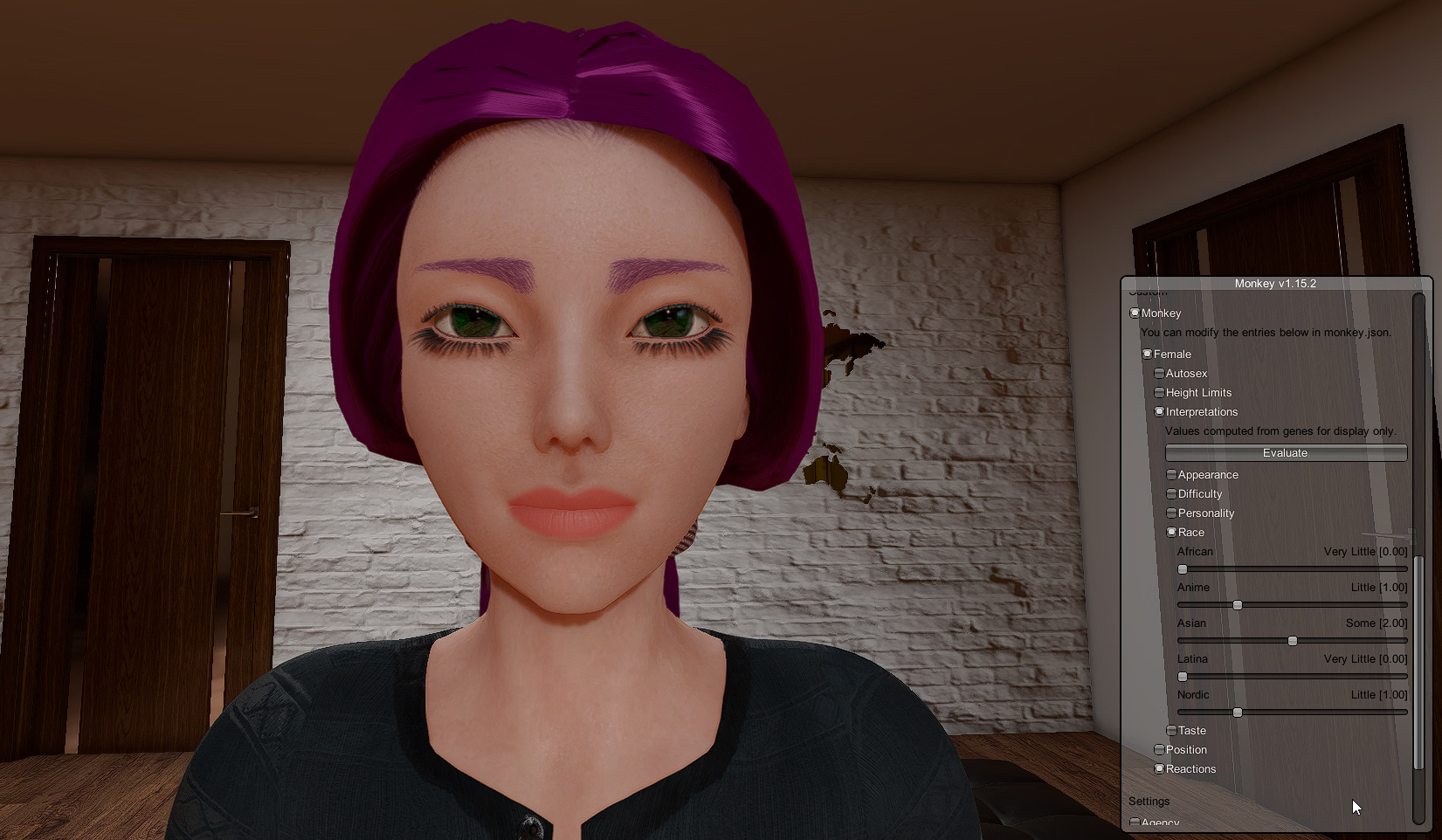
This group was supposed to be anime type, but none of them have been anime enough. I guess she does look a little Asian, but I've got hundreds of cards interpreted as asian who don't look remotely that.
Speaking of mysterious, I found that sliding head size to minimum increases the anime slider. Can anyone name a single anime with disproportionately small heads?
dypan_22
Newbie
- Oct 14, 2024
- 59
- 56
- 86
i see, thank youIn the profile editor, one of the facial types is anime, and traits are then rated in comparison to that cluster of traits that TValle has mysteriously determined to match. After they're generated it's all pretty much guesswork unless you use Monkey.
View attachment 5522374
This group was supposed to be anime type, but none of them have been anime enough. I guess she does look a little Asian, but I've got hundreds of cards interpreted as asian who don't look remotely that.
Speaking of mysterious, I found that sliding head size to minimum increases the anime slider. Can anyone name a single anime with disproportionately small heads?
Secondorapos0
New Member
- Sep 13, 2023
- 8
- 5
- 22
bro, reup plsOkay so for those wanting to remove hired models and edit other stats like money etc without Monkey I made a save editor I have been using my self:
Link: Gofile
To remove a hired NPC:
- Click open to open your save (I'd recommend making a backup copy first)
- expand the bottom "m_children" node
- expand node [10]
- expand "m_children" node of node [10] (the m_id will say "Hired" this is the record of your hired NPCs)
- your models will be listed as the children of this node 10.
- right click to delete the node (models are listed in order of hiring but if you want to be sure you are deleting the right one you can find the names under the main m_children node [1] (NPCs) by searching through these child nodes you can find the names and match the IDs
- Save the file in your save folder as "Default.sav"
- load up the game and continue.
If things go wrong, open your backup save in the save editor and then without making any modifications click save and overwrite your Default.sav" to restore everything.
View attachment 4892445
I know this isn't the most user friendly for most but it does the job