Create and Fuck your AI Cum Slut –70% OFF
x

RPGM None [Translation request][RPGM][None]Hitozuma Meister!ヒトヅマイスター![0.92][Golden pot][RJ01461468]

otomegokoro

Member
Apr 27, 2022
253
399
186
what in the version jump? anyway 1.6 . God knows what the dev put in there, new content? maybe, bug fix? most definitely. sorry I can't give a definite answer since there's no specifications written anywhere on what 1.06 contains, all I know is 1.05 is a bug fix.

You don't have permission to view the spoiler content. Log in or register now.


Ill try to make a machine translation when 1.6 is posted… might try to figure out how to connect gpt to translator+ and use it
You could try dumping a manual translation file using Mtool and feed it to gpt though idk how viable that is, there was a warning that manual translation using Mtool isn't recommended so there's that
 
Last edited:

1324354657

Newbie
Feb 27, 2018
85
82
155
Extract and paste to folder

Machine translation 1.6 + rogeroo img translation for 1.3

Couldnt get and advanced translation software or use AI so there's some nonesense and other issues (like "Pie touch" which should be boobs) but it's better than nothing for anyone who wants to plug and play or cant get Mtool (and it's not as bad as some "poetry" translations)

 
  • Like
Reactions: dungeon_seige

dungeon_seige

Newbie
Sep 12, 2023
49
81
151
Extract and paste to folder

Machine translation 1.6 + rogeroo img translation for 1.3

Couldnt get and advanced translation software or use AI so there's some nonesense and other issues (like "Pie touch" which should be boobs) but it's better than nothing for anyone who wants to plug and play or cant get Mtool (and it's not as bad as some "poetry" translations)
Since you're providing a translation, I might as well contribute the other info I've learned when I was working on this.

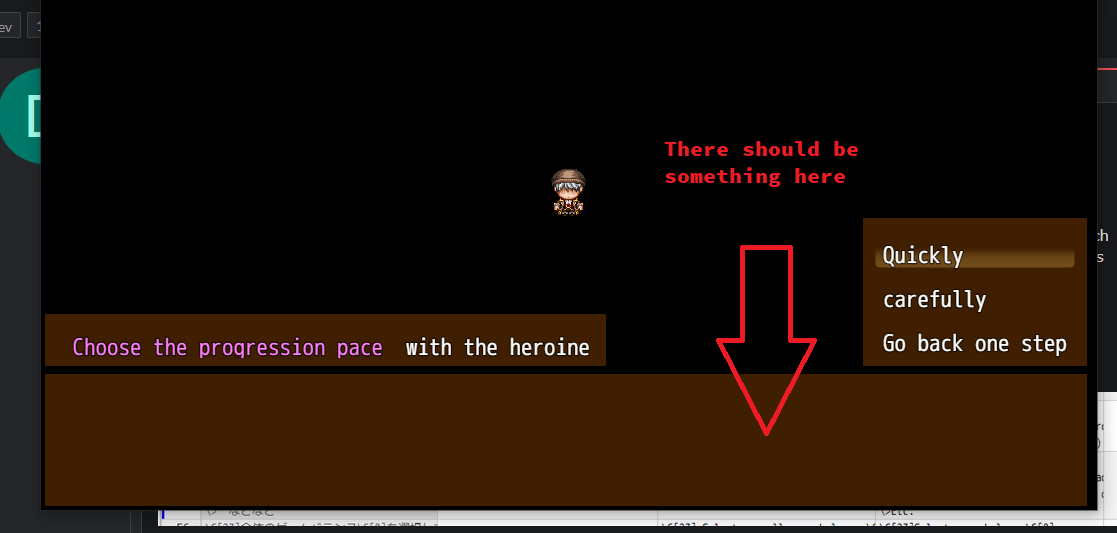
If you see sections like this one (i.e., "Choice helper")
1764870957338.png

You have to keep the first line in its original text. Otherwise, nothing would appear on the dialog box when you're selecting choices.

1764871008249.png

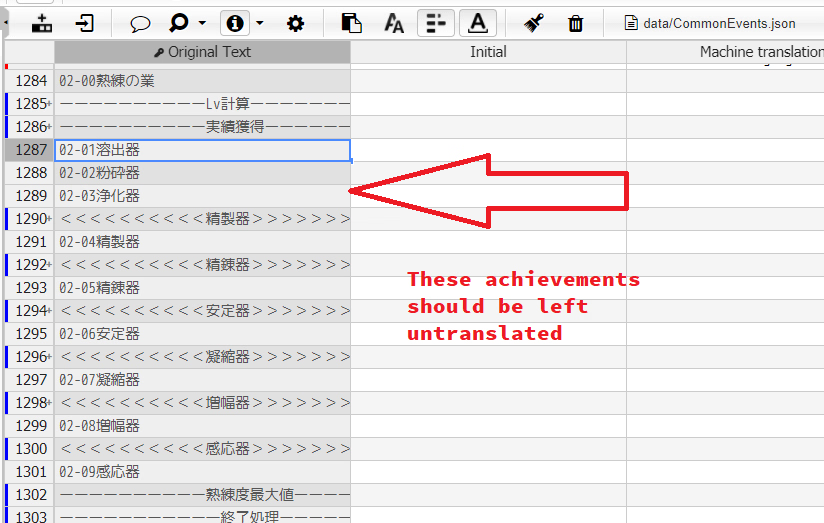
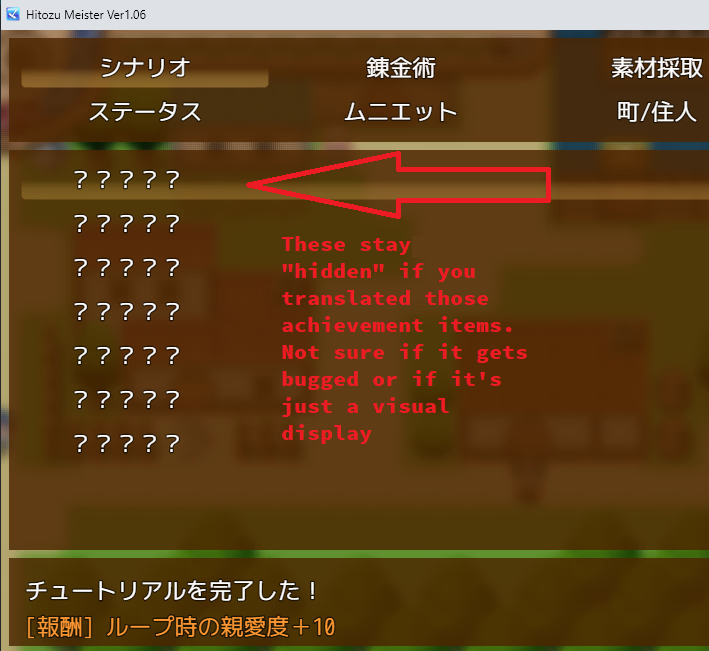
Also, these texts under /data/CommonEvents should be left untranslated (there should be another approach to translate them) so they appear properly under achievements.

1764871340415.png

1764871462703.png
 
Feb 24, 2019
41
53
146
Question: for the code on the 2nd stair, what's the logic behind it? It seems related to the cat, but I haven't figured out the answer myself and used walkthroughs to get the code. Can someone explain the legit way to find the code?
 

Uzur123

Member
Jan 23, 2020
471
339
197
Since you're providing a translation, I might as well contribute the other info I've learned when I was working on this.
Please forgive me in advance, I'm a bit off-topic in your comment, but I'm also talking about translation.

I use Mtool to translate the game, but I select "manual translation," then create a new file Game_by_translatorname.json (for example Uzur123_Hitozumeister.json) and add only the lines I need. So, while adding new lines, I've developed several "rules" to ensure everything displays correctly.
1. Mtool doesn't insert single characters in the game (e.g., "Axe," "Husband"), but it can insert characters with punctuation marks (periods, commas, exclamation and question marks, etc.).
2. Lines separated by line ( "\n" ) breaks have to be manually broken up and translated individually. However, despite this, spaces in the game itself will be equal to the number of original characters, so it's a bit inconvenient.
3. Color-coded (etc.) parts of the lines need to be split into separate parts, but spaces will be ignored, so I use the "_" symbol as a space replacement.
4. To display special characters in the translation, you can use the symbol "\" before a special character
5. Everything inside the beautiful quotation marks will be translated without them, but unfortunately, other untranslated strings containing matches will be partially translated. After the full translation, everything will display more correctly.

Now, why am I answering you specifically? Because I haven't translated everything, but the interface is mostly translated. Despite this, my achievements are working correctly, and Mtool displays the game in a fairly understandable language (albeit partially).
I'm not translating into English, but I think the screenshots will make it clear what I'm talking about.
You don't have permission to view the spoiler content. Log in or register now.
It would be possible to translate everything using Translator++, but then you'd have to edit, delete, or correct a lot manually. My approach to partial translation displays only the necessary text, but much more accurately. It doesn't disrupt game scripts, and if it does, it's immediately clear what exactly it is, allowing you to roll back the translation or delete the unnecessary line.

Finally, a few numbers. Mtool extracted about 18,000 lines for manual translation, and the file size is approximately 1.4 MB. My manual translation has 1,850 lines, and the file size is 137 KB.
If there are translation conflicts in Mtool, you can copy the original text and add it to the partial translation file in the "Log" tab. After updating the translation, you will be able to see the result in the game.
 
Last edited:
  • Like
Reactions: sulrimereman

dungeon_seige

Newbie
Sep 12, 2023
49
81
151
Uzur123 I would like to use MTool, but it doesn't patch the game directly. And what I hate the most about it is it requires me to use the latest version whenever I use it. It's honestly annoying.

My use case for Translator++ is to create a proper translation. It's natural that I'd need to edit everything and even test each line in the game, so I don't mind that part. With that said, Translator++ is a bad tool anyway because it doesn't easily show me which texts are displayable. If the goal is a quick translation, then Mtool would indeed be better.
 

Uzur123

Member
Jan 23, 2020
471
339
197
Uzur123 I would like to use MTool, but it doesn't patch the game directly. And what I hate the most about it is it requires me to use the latest version whenever I use it. It's honestly annoying.

My use case for Translator++ is to create a proper translation. It's natural that I'd need to edit everything and even test each line in the game, so I don't mind that part. With that said, Translator++ is a bad tool anyway because it doesn't easily show me which texts are displayable. If the goal is a quick translation, then Mtool would indeed be better.
Your case is understandable.

The question arises: have you tried creating a partial translation file using a translator and seeing how it works with the game? Something like removing everything unnecessary and compiling only what you've translated. Or does the translator not have this functionality?
 

dungeon_seige

Newbie
Sep 12, 2023
49
81
151
The question arises: have you tried creating a partial translation file using a translator and seeing how it works with the game? Something like removing everything unnecessary and compiling only what you've translated. Or does the translator not have this functionality?
I'm not sure if I understand the question, but translator++ works by editing the game files directly to produce a translated version. You then use it to overwrite the files in the original game to apply the translation. You can try it with the one this guy made.

I tried to make the changes you suggested, some of the stuff works better i think
But if you specifically only mean compiling what I've personally translated, that's also possible with Translator++.
 

F1r

Newbie
Sep 20, 2020
25
9
123
hey, slightly stupid question, but the rationality stat's value isnt just meant to be a "-" right? is there any way to fix this yet? Using the 1.6 version and translation posted yesterday
 

Uzur123

Member
Jan 23, 2020
471
339
197
hey, slightly stupid question, but the rationality stat's value isnt just meant to be a "-" right? is there any way to fix this yet? Using the 1.6 version and translation posted yesterday
In fact, this parameter has a value closer to "Sanity", but in theory such an indicator can easily fall not only into the Minus, but also into the irrational "imaginary" part.

For any "madman" this parameter will not be equal to zero

I wouldn't be surprised if this parameter for the scenes of chapters 2 and 3 would need to be strongly negative.
 

otomegokoro

Member
Apr 27, 2022
253
399
186
hey, slightly stupid question, but the rationality stat's value isnt just meant to be a "-" right? is there any way to fix this yet? Using the 1.6 version and translation posted yesterday
In fact, this parameter has a value closer to "Sanity", but in theory such an indicator can easily fall not only into the Minus, but also into the irrational "imaginary" part.

For any "madman" this parameter will not be equal to zero

I wouldn't be surprised if this parameter for the scenes of chapters 2 and 3 would need to be strongly negative.
no, F1r chose the easiest difficulty for the heroine relationship (not necessarily the dungeon diving or alchemy aspects) by choosing that, it removes rationality and replaces it with a "~" or "-". This is done at the start of the game right before the tutorial

You don't have permission to view the spoiler content. Log in or register now.

You don't have permission to view the spoiler content. Log in or register now.

You don't have permission to view the spoiler content. Log in or register now.
 
Last edited:

Uzur123

Member
Jan 23, 2020
471
339
197
I'm not sure if I understand the question, but translator++ works by editing the game files directly to produce a translated version. You then use it to overwrite the files in the original game to apply the translation. You can try it with the one this guy made.
I'm not familiar with working with the translator directly.
I've only used the translator to translate "manual translations" from an exported Mtool, and even then, after installing plugins. So my question isn't entirely accurate. Thanks for the answer, it's clearer now.
 

Uzur123

Member
Jan 23, 2020
471
339
197
no, F1r chose the easiest difficulty for the heroine relationship (not necessarily the dungeon diving or alchemy aspects) by choosing that, it removes rationality and replaces it with a "~" or "-". This is done at the start of the game right before the tutorial
Yes, but in reality, the fastest, instant mode sometimes doesn't work as quickly as it should (I've tried the fast-instant and time-consuming-gradual modes, but haven't tried the intermediate modes).

The game has two types of scene triggers. The first trigger is skills available to the protagonist. They are unlocked during scenes in the city after fulfilling certain conditions. Then, they are supposed to be leveled up by fighting monsters. It's relatively simple and straightforward, and faster than spawning scenes in various houses around the city (although most of these skills aren't implemented in the game at all). So, when a skill is used the required number of times, a second trigger unlocks, and that's "Achievements." As if that weren't enough, there are three sub-levels for each achievement in the first chapter.

Skills are unlocked after watching scenes in the city, and Achievements are instantly maxed out in "instant" mode. As a result, you are not starting scenes with an indication of the lack of Achievements, that supposedly there are no different achievements of "second triggers", although there are no "first triggers" yet.

And I'm not even taking into account triggers for the order of the scenes themselves (including story progression). And I'm not even taking into account the presence of certain items in your inventory, which are checked during scenes, but there's no indication that they're actually needed. This applies to all game modes. There's a scene, everything seems to be completed, but the scene doesn't start... And it's completely unclear why...
 
Last edited:

F1r

Newbie
Sep 20, 2020
25
9
123
no, F1r chose the easiest difficulty for the heroine relationship (not necessarily the dungeon diving or alchemy aspects) by choosing that, it removes rationality and replaces it with a "~" or "-". This is done at the start of the game right before the tutorial

You don't have permission to view the spoiler content. Log in or register now.

You don't have permission to view the spoiler content. Log in or register now.

You don't have permission to view the spoiler content. Log in or register now.
ohhh shit, yeah no that makes sense, i didnt know thats what it meant, but thanks both for the answers!
 
  • Like
Reactions: otomegokoro

Uzur123

Member
Jan 23, 2020
471
339
197
A quick note: after about 20 hours of play, the slowest mode becomes even easier than the fast one. When your stamina is over 1 kk, performing 100,000 stamina-consuming actions is simply impossible.
Until try a gradual relationship development, it's unclear why it doesn't work in in instant mode. So perhaps the medium speed mode really is optimal. Or maybe the other two modes aren't balanced yet.
 

otomegokoro

Member
Apr 27, 2022
253
399
186
Yes, but in reality, the fastest, instant mode sometimes doesn't work as quickly as it should (I've tried the fast-instant and time-consuming-gradual modes, but haven't tried the intermediate modes).

The game has two types of scene triggers. The first trigger is skills available to the protagonist. They are unlocked during scenes in the city after fulfilling certain conditions. Then, they are supposed to be leveled up by fighting monsters. It's relatively simple and straightforward, and faster than spawning scenes in various houses around the city (although most of these skills aren't implemented in the game at all). So, when a skill is used the required number of times, a second trigger unlocks, and that's "Achievements." As if that weren't enough, there are three sub-levels for each achievement in the first chapter.

Skills are unlocked after watching scenes in the city, and Achievements are instantly maxed out in "instant" mode. As a result, you are not starting scenes with an indication of the lack of Achievements, that supposedly there are no different achievements of "second triggers", although there are no "first triggers" yet.

And I'm not even taking into account triggers for the order of the scenes themselves (including story progression). And I'm not even taking into account the presence of certain items in your inventory, which are checked during scenes, but there's no indication that they're actually needed. This applies to all game modes. There's a scene, everything seems to be completed, but the scene doesn't start... And it's completely unclear why...
I think there are some that are inconsistent, some descriptions and requirements are listed while others have none. That's mostly because of machine translation or some of the text is overflowing outside the text box and not wrapping or a combination of both, because I don't think I've personally run into any issue that you've described, maybe during dungeon diving when you harass muniette but that's dungeon diving, it's probably the buggiest part of the whole game. What scene are you having issues with?
 

Uzur123

Member
Jan 23, 2020
471
339
197
I think there are some that are inconsistent, some descriptions and requirements are listed while others have none. That's mostly because of machine translation or some of the text is overflowing outside the text box and not wrapping or a combination of both, because I don't think I've personally run into any issue that you've described, maybe during dungeon diving when you harass muniette but that's dungeon diving, it's probably the buggiest part of the whole game. What scene are you having issues with?
I don't have any problems now, but I did have them in earlier versions of the game, like 0.95 or so. I chose to play quickly and instantly, and the heroine was constantly getting angry during scenes, losing that "Intimacy" factor, and the scene description only said "get a little closer." Even though the game's story itself wasn't really developed for such scenes yet.

In the current version, 1.04, scenes now have more detailed descriptions, and it's at least clear where to improve.

And by the way, thanks for the offer to help.