poiuzxcklj

Newbie
Mar 31, 2020
88
94
98
Does the game still need vr head set? Kinda lazy have set up again my quest 3 for this
Using this with a quest 3 is super easy if you can connect wirelessly. You just need virtual desktop, then launch vam from a short like this: "C:\Program Files\Virtual Desktop Streamer\VirtualDesktop.Streamer.exe" "C:\Games\VAM\VaM.exe". This lets you bypass steam vr completely.
 

ficent

Member
Jul 28, 2025
113
202
43
Does anyone know a plugin I can use that allows for good workflow with oral? SilverBJ and ControlledBJ don't quite cut it, I'm looking for something that allows you to configure oral with bigger objects so to speak.
 

arenem

Newbie
Dec 9, 2022
18
14
178
Does anyone know a plugin I can use that allows for good workflow with oral? SilverBJ and ControlledBJ don't quite cut it, I'm looking for something that allows you to configure oral with bigger objects so to speak.
CrablikeCrab's OpenUp plugin handles penetration pretty well. For animation, the old classic Vinput Autothruster works well enough, alongside FloatparameterRandomiser to handle finetuning and variations of depth, angle, speed etc. An advantage of autothruster is that it's easy to set up complementary movements...hand, receiver's hip etc. ... that sync with the main thrust. DiviningRod can help keep things aligned, but I prefer to turn the penisbase joint on and align it roughly where it needs to be, then set the other penis joints to comply and adjust the springs and dampeners to keep things as sturdy as they need to be.

You can combine the above with MacGrubers RandomChoice and RandomTimer to create kind of mini-sequences...fast/hard, slow/deep etc. ... that play randomly.

Most expression plugins can handle triggers, so you can combine some random facial movement with triggered lip/mouth morphs.

And an easy way to add subtle random movements of limbs and joints not 'directly involved' in the action is to just use FloatParameterRandomiser on individual joint springs and dampers. Just kind of experiment with that.


It's a bit more work, and probably not the most efficient way to do it, but you'll get more natural and varied movement this way.
 
  • Like
Reactions: ficent

deadshots2842

Member
Apr 30, 2023
248
316
130
So I'm having problem with transaction between different positions (legs and hands out of ordinary) in some downloaded scenes from here while some are working fine any reason why this is happening?

And also is there a way I can add voice to a look ( yes look) instand of secne? Like getting ada wong from here and also adding her voice lines to her look?

Thanks.
 

keycode

Newbie
Aug 21, 2017
84
60
272
So I'm having problem with transaction between different positions (legs and hands out of ordinary) in some downloaded scenes from here while some are working fine any reason why this is happening?

And also is there a way I can add voice to a look ( yes look) instand of secne? Like getting ada wong from here and also adding her voice lines to her look?

Thanks.
question 1: poses changing/transition problems
please be more specific or post a video sample of "out of ordinary" (misalignment?) issues. It can happen if you play vam with a weak performant pc, loading scenes with more than two persons or too heavy physics tasks for your cpu

question 2: yes, there is also a "recent" vam native lip-sync function that can give a very (imho, quite ugly) approximative illusion of a reality talk to your favorite person-look. You should watch related video tutorials available in vam-hub about how to load mp3 or other sound formats in your scene. Be ready to use some hours of a lot boring learning time and good luck.
 

deadshots2842

Member
Apr 30, 2023
248
316
130
question 1: poses changing/transition problems
please be more specific or post a video sample of "out of ordinary" (misalignment?) issues. It can happen if you play vam with a weak performant pc, loading scenes with more than two persons or too heavy physics tasks for your cpu

question 2: yes, there is also a "recent" vam native lip-sync function that can give a very (imho, quite ugly) approximative illusion of a reality talk to your favorite person-look. You should watch related video tutorials available in vam-hub about how to load mp3 or other sound formats in your scene. Be ready to use some hours of a lot boring learning time and good luck.
Yes misalignment problems between changing positions (blowjob to standing position) I downloaded some already made scenes from this place. I don't think cpu is a problem because it happens only in some. other it's works nicely. My cpu is i5 12400f 6c/12t. Is this cpu weak for this game?

And this lip sync thing is it too hard I'm still new to this "game". Or is there a plugin or something for nubs like me?
 
  • Like
Reactions: keycode

moc587

Member
Jun 6, 2022
359
323
214
Yes misalignment problems between changing positions (blowjob to standing position) I downloaded some already made scenes from this place. I don't think cpu is a problem because it happens only in some. other it's works nicely. My cpu is i5 12400f 6c/12t. Is this cpu weak for this game?

And this lip sync thing is it too hard I'm still new to this "game". Or is there a plugin or something for nubs like me?
you have to be more specific man. like wat kind of misalignment issues? dick not going in or something? you can try (uptodate version of ) if thats the case.
 

keycode

Newbie
Aug 21, 2017
84
60
272
Yes misalignment problems between changing positions (blowjob to standing position) I downloaded some already made scenes from this place. I don't think cpu is a problem because it happens only in some. other it's works nicely. My cpu is i5 12400f 6c/12t. Is this cpu weak for this game?

And this lip sync thing is it too hard I'm still new to this "game". Or is there a plugin or something for nubs like me?
Very good cpu that i5 !...and there is one thing that is important to remember when you play a vam scene: checking at first if you miss dependencies it is a priority... maybe you have a wrong timeline plugin release (not compatible with that animated transition) ?? or maybe that scene was born problematic because of its creator mistakes (it happens even in the worst families) :p
I downloaded some centuries ago a "very very good creator" (indeed he was/is one of my best favorites) scene that was also giving many issues with pose transitions. He was needing some years (!!) to admit that he was making a badly optimized timeline setting...so:

fighting with such problems it's a good start point for learning how to use vam with all its historical issues ... if I was you I was simply trashing that scene ... but sometimes wasting time it's part of the game. Your choice. And (please allow me to say this) forget being lazy about googling answers to your questions if you would like to get a reasonable satisfaction playing vam. Forums are fully overdosed with questions and answers about everything concerning vam playing-issues.


Last edited:

deadshots2842

Member
Apr 30, 2023
248
316
130
Very good cpu that i5 !...and there is one thing that is important to remember when you play a vam scene: checking at first if you miss dependencies it is a priority... maybe you have a wrong timeline plugin release (not compatible with that animated transition) ?? or maybe that scene was born problematic because of its creator mistakes (it happens even in the worst families) :p
I downloaded some centuries ago a "very very good creator" (indeed he was/is one of my best favorites) scene that was also giving many issues with pose transitions. He was needing some years (!!) to admit that he was making a badly optimized timeline setting...so:

fighting with such problems it's a good start point for learning how to use vam with all its historical issues ... if I was you I was simply trashing that scene ... but sometimes wasting time it's part of the game. Your choice. And (please allow me to say this) forget being lazy about googling answers to your questions if you would like to get a reasonable satisfaction playing vam. Forums are fully overdosed with questions and answers about everything concerning vam playing-issues.


Hmm. Now that I think about it maybe I have not downloaded everything that is needed I'll check once I'm back home. I'm okay with learning I did do some research. So I already found out about saving present with plugin so I don't have to add voice each time. Now is there a way I can load present like a look without it spawning in random places? Basically is there a plugin which can load a preset just like a look (Same position as previous look position but instead of loading a look i want to load a preset with all the voice plugin attached).
 

deadshots2842

Member
Apr 30, 2023
248
316
130
I'll upload photos if after going back home trying to download everything same problem are still there.

So to tell everyone here what I'm exactly trying to do is

First I want to add voices line and sound to my character (look) and then save it (as a present) so I don't have to do that again but problem is a present doesn't load like a look does. So I'm looking for a plugin which can maybe load a preset in same position just like loading a look.
And finally I'm going to download lot of already created scene from this place and just swap my character in that scene.

So is this possible? Let me know if there any problem with what I'm trying to do.

Thanks..
 

Obitron

Newbie
Oct 14, 2020
92
101
180
I'll upload photos if after going back home trying to download everything same problem are still there.

So to tell everyone here what I'm exactly trying to do is

First I want to add voices line and sound to my character (look) and then save it (as a present) so I don't have to do that again but problem is a present doesn't load like a look does. So I'm looking for a plugin which can maybe load a preset in same position just like loading a look.
And finally I'm going to download lot of already created scene from this place and just swap my character in that scene.

So is this possible? Let me know if there any problem with what I'm trying to do.

Thanks..
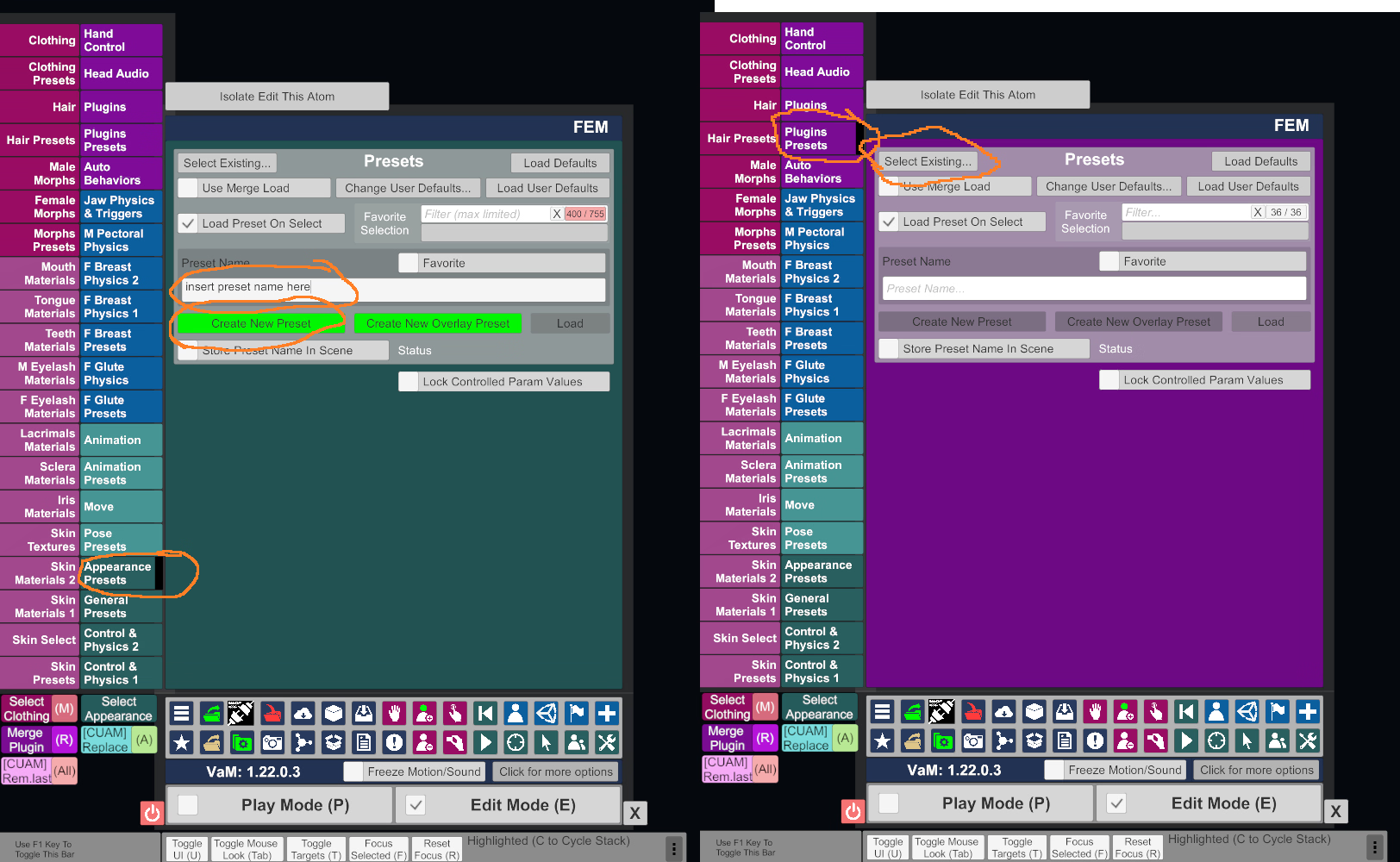
Make a separate appearance preset from the appearance preset tab for the look, and then a standalone plugin preset for just your setup of the voice/lipsync plugins that you merge load onto the the model in the existing scene. Do not use the save/load "look" function as that is a legacy way of doing things that also overwrites atom names and will break any plugins currently on them in the scene. If you merge load plugins all the existing scene plugins will remain and the ones in the preset being merge loaded will be added at bottom of the list. So ideally take a model with no plugins at all in a basic or empty scene and setup your voice plugins by themselves and save a preset of it to use in other scenes.

There are general presets but I don't remember what those include and hub seems to be having issues so I can't check the preset definition post/resource. Once it goes back up this should be it I think:


So looks like legacy preset that includes plugin also overwrite atom name so I think the separate plugin preset will be your only alternative.
 
Last edited:

zackcage6

Member
Oct 30, 2020
104
40
202
VAM doesnt work on Linux in my end (BazziteOS), it launches with the UI and a black screen, anyone with a working VAM on linux can give some solutions ?
 

moc587

Member
Jun 6, 2022
359
323
214
VAM doesnt work on Linux in my end (BazziteOS), it launches with the UI and a black screen, anyone with a working VAM on linux can give some solutions ?
where do you run it from? steam? lutris? also which proton version? i dont use bazzite anymore (atomicness was getting on my nerves), but distro shouldn't matter, add it on steam as non steam game and use proton experimental. should work just fine, but i'd recommend protonGE.
 
  • Heart
Reactions: zackcage6

zackcage6

Member
Oct 30, 2020
104
40
202
where do you run it from? steam? lutris? also which proton version? i dont use bazzite anymore (atomicness was getting on my nerves), but distro shouldn't matter, add it on steam as non steam game and use proton experimental. should work just fine, but i'd recommend protonGE.
1- Lutris
2- Proton 10.0.2 (protonGE did nothing)
ill test steam, thanks for ur assistant, i just switched over linux, VAM is a huge thing for me, i really want it to run in linux, does it run well in ur end ?
 

zackcage6

Member
Oct 30, 2020
104
40
202
where do you run it from? steam? lutris? also which proton version? i dont use bazzite anymore (atomicness was getting on my nerves), but distro shouldn't matter, add it on steam as non steam game and use proton experimental. should work just fine, but i'd recommend protonGE.
THANK YOU SO MUCH DUDE, Proton experimental did it, maybe ill drop it into lutris so i can run the game without steam :unsure:
 

deadshots2842

Member
Apr 30, 2023
248
316
130
Make a separate appearance preset from the appearance preset tab for the look, and then a standalone plugin preset for just your setup of the voice/lipsync plugins that you merge load onto the the model in the existing scene. Do not use the save/load "look" function as that is a legacy way of doing things that also overwrites atom names and will break any plugins currently on them in the scene. If you merge load plugins all the existing scene plugins will remain and the ones in the preset being merge loaded will be added at bottom of the list. So ideally take a model with no plugins at all in a basic or empty scene and setup your voice plugins by themselves and save a preset of it to use in other scenes.

There are general presets but I don't remember what those include and hub seems to be having issues so I can't check the preset definition post/resource. Once it goes back up this should be it I think:


So looks like legacy preset that includes plugin also overwrite atom name so I think the separate plugin preset will be your only alternative.
Huh? can you dumb it down and explain in a little bit more detail. Im still new soo...
 

Obitron

Newbie
Oct 14, 2020
92
101
180
Making progress everything working fine now after downloading needed depens . But how to manually make them cum?
depends on which of various ways scene has cum set up, which of the various cum plugins etc. Bodylanguage you can bind a keyboard key to cum but I have no idea what that particular scene is using for plugins.

Huh? can you dumb it down and explain in a little bit more detail. Im still new soo...
If you don't know how to make presets I don't have very high hopes for you loading and setting up audio and lipsync plugins...

You should maybe consider watching some of the basic tutorial videos which can be found on youtube or from the posts on hub itself.

Presets are all saved and loaded similarly except from their specific tabs.

Looks (appearances) from the appearance preset tab, morphs from morph preset tab, hair, clothes presets etc (the tabs that have "preset" in their name).

Once you have your appearance setup the way you want you go to that tab, type in a name for your preset and click on create preset button, if you check the favorite checkbox that preset will be available from the favorite drop down. To load either click on select existing and browse to the preset or if you hit favorite, select from drop down.

In the case of plugins once you have saved your voice setup you will click on the merge load checkbox and select your audio plugins preset and it will get added to that model in the scene.

Someone else will have to help with audio plugin setups as I don't bother with those personally.

1762380338411.png
 
  • Like
Reactions: deadshots2842

moc587

Member
Jun 6, 2022
359
323
214
does it run well in ur end ?
cpu performance is slightly lower, by that i mean when in physics heavy scenarios its 5-10 fps less compared to windows, which im fine with.
THANK YOU SO MUCH DUDE, Proton experimental did it, maybe ill drop it into lutris so i can run the game without steam :unsure:
lutris and all other launchers where weird for me on bazzite, maybe because they were all flatpak. on my end it would launch fine but my wine dll overrides weren't sticking properly. i could load reshade but it was giving me errors for many shaders. im almost certain its cos of flatpak sandbox restrictions, and on bazzite you are sort of stuck with flatpaks, unless you layer packages. anyway steam is not flatpak in bazzite maybe thats why everything works fine there. so i'd say if you want to stick with lutris and is having problems like me try layering it. check here in , rpm-ostree section. as it says it really is "last resort" but fucking flatpaks man, annoying most of the time.

 
  • Like
Reactions: zackcage6

zackcage6

Member
Oct 30, 2020
104
40
202
cpu performance is slightly lower, by that i mean when in physics heavy scenarios its 5-10 fps less compared to windows, which im fine with.

lutris and all other launchers where weird for me on bazzite, maybe because they were all flatpak. on my end it would launch fine but my wine dll overrides weren't sticking properly. i could load reshade but it was giving me errors for many shaders. im almost certain its cos of flatpak sandbox restrictions, and on bazzite you are sort of stuck with flatpaks, unless you layer packages. anyway steam is not flatpak in bazzite maybe thats why everything works fine there. so i'd say if you want to stick with lutris and is having problems like me try layering it. check here in , rpm-ostree section. as it says it really is "last resort" but fucking flatpaks man, annoying most of the time.
thanks alot dude, i did manage to run it via lutris (y), despite the slowdowns in intense scenes still a greater experience than windows
 
4.40 star(s) 25 Votes