

RPGM VoidBound [v0.6.7c] [Cursed-Atelier]
- Thread starter Cursed Atelier
- Start date
-
- Tags
- 2d game 2dcg adventure ahegao anal sex animated bdsm big ass big tits bukkake combat creampie female domination female protagonist futa/trans groping group sex handjob internal view interracial lactation lesbian male domination masturbation monster girl multiple penetration oral sex pregnancy prostitution puzzle rpg sci-fi sex toys spanking strategy tentacles titfuck turn based combat vaginal sex
4.00 star(s)
25 Votes
Task Manager showed it's used 20MB of network today alone and has been running quietly the entire time (and restarting itself)


Interesting.. There are some files on
%localAppData%/Voidbound that looks exactly the same as if this game have integrated google browser, and I'd understood if it was only listening to itself, but it isn't. Data sent to Protocol Labs, Google and some "ITLDC Latvia network"Game process doesn't always shut down after closing game from the main menu (though it isn't starting itself after PC restart, maybe you used hibernation?)
I have no idea what the hell game doing, but I'm pretty sure I'm blocking the hell voidbound with firewall. Blocking cookies folder from changes breaks the game.
SnoopyDoodlefoot
Newbie
- Oct 18, 2019
- 54
- 63
- 198
Latvia? Like the European country?View attachment 4709024 View attachment 4709034
Interesting.. There are some files on%localAppData%/Voidboundthat looks exactly the same as if this game have integrated google browser, and I'd understood if it was only listening to itself, but it isn't. Data sent to Protocol Labs, Google and some "ITLDC Latvia network"
Game process doesn't always shut down after closing game from the main menu (though it isn't starting itself after PC restart, maybe you used hibernation?)
I have no idea what the hell game doing, but I'm pretty sure I'm blocking the hell voidbound with firewall. Blocking cookies folder from changes breaks the game.
 I hope other people continue to look into this. I can't think of a legitimate reason for the game to be behaving this way, using network, etc.
foofoo3344
Well-Known Member
- Dec 5, 2017
- 1,848
- 1,570
- 323
foofoo3344
Well-Known Member
- Dec 5, 2017
- 1,848
- 1,570
- 323
Is this a spy program disguised as a game?*IMPORTANT*
Idk how big of a deal this is, but I think it should be shared/discussed. Maybe Cursed Atelier could shed some light.
I was doing some stuff in my GPU's settings for another game, then closed that game to test. When the game closed, VoidBound's .exe briefly showed in my GPU's interface as the active gaming program. I thought, "That's weird, I haven't played that game in at least a week, and I've played a bunch of other games since then, so why did that .exe show up?" I then opened my active programs and saw nothing out of the ordinary, so I opened my active processes and saw VoidBound was running quietly in the background. Again, I've not opened that file in at least a week, have totally shut down my PC since then, and it didn't show in my taskbar as an active program, only in Task Manager as an active process. Worst still, Task Manager showed it's used 20MB of network today alone and has been running quietly the entire time (and restarting itself) since I first opened it over 7 days ago. I wonder:
-How/why is it restarting when my PC starts? I never gave it startup app permissions.
-How/why isn't it showing as an active program instead of hiding as an process?
-Why on earth is it using network? Who's it talking to and why?
-How long would this have gone on before it was noticed?
-How many other PCs is it doing this to?
Maybe there are perfectly logical answers to these questions, but I've never seen an H-game behave this way, and can't imagine what legitamate reasons it'd have for doing these things.
Give your Task Manager a look. It showed up as Japanese characters for me, so right click on it and select "Properties" to see the english filename and location. Remember, it's hidden in "Processes" not the more common "Programs" (if your Task Manager is set up the same way as mine).
SnoopyDoodlefoot
Newbie
- Oct 18, 2019
- 54
- 63
- 198
Idk what it is, but I posted this information weeks ago and no one, including the dev, has explained other than Koster finding a similar situation on their PC. I could be misunderstanding but I feel it deserves looking into.Is this a spy program disguised as a game?
foofoo3344
Well-Known Member
- Dec 5, 2017
- 1,848
- 1,570
- 323
Anyone complain on Steam? Cos this game is on Steam. I don't think Steam would allow a truly malicious programIdk what it is, but I posted this information weeks ago and no one, including the dev, has explained other than Koster finding a similar situation on their PC. I could be misunderstanding but I feel it deserves looking into.
SnoopyDoodlefoot
Newbie
- Oct 18, 2019
- 54
- 63
- 198
A ton of Steam games have been removed due to things just like this. It's entirely possible this one slipped through as well, especially with how well hidden it's been (as far as I can tell, my report was the first one, and Koster's was the second). I reported it on Steam to look into it, same as F95, so we'll see.Anyone complain on Steam? Cos this game is on Steam. I don't think Steam would allow a truly malicious program

Hello, developer here.
I will take a look at it tonight, but obviously if you don't want to believe me, I can't change your mind.
We are not disguising a spy software in voidbound.
We have developed the game since over 5 years and have not done anything malicious.
A couple of months ago, I have upgraded the nwjs version of the game to 0.90.
This could be the cause of it as I noticed it leaves a red icon in the task bar after closing the process. I also noticed it happens more often if Netflix or something is open that runs on the same nwjs.
I will look into it and investigate it. I do urge not go mass report the project because of this directly. Please give me some time to look into this issue.
Kind regards
Cursed Atelier
I will take a look at it tonight, but obviously if you don't want to believe me, I can't change your mind.
We are not disguising a spy software in voidbound.
We have developed the game since over 5 years and have not done anything malicious.
A couple of months ago, I have upgraded the nwjs version of the game to 0.90.
This could be the cause of it as I noticed it leaves a red icon in the task bar after closing the process. I also noticed it happens more often if Netflix or something is open that runs on the same nwjs.
I will look into it and investigate it. I do urge not go mass report the project because of this directly. Please give me some time to look into this issue.
Kind regards
Cursed Atelier
First time hearing about this, I will be taking a look into it.Anyone complain on Steam? Cos this game is on Steam. I don't think Steam would allow a truly malicious program
I'm not sure why I never got a notification to this post, I'm sorry about this.*IMPORTANT*
Idk how big of a deal this is, but I think it should be shared/discussed. Maybe Cursed Atelier could shed some light.
I was doing some stuff in my GPU's settings for another game, then closed that game to test. When the game closed, VoidBound's .exe briefly showed in my GPU's interface as the active gaming program. I thought, "That's weird, I haven't played that game in at least a week, and I've played a bunch of other games since then, so why did that .exe show up?" I then opened my active programs and saw nothing out of the ordinary, so I opened my active processes and saw VoidBound was running quietly in the background. Again, I've not opened that file in at least a week, have totally shut down my PC since then, and it didn't show in my taskbar as an active program, only in Task Manager as an active process. Worst still, Task Manager showed it's used 20MB of network today alone and has been running quietly the entire time (and restarting itself) since I first opened it over 7 days ago. I wonder:
-How/why is it restarting when my PC starts? I never gave it startup app permissions.
-How/why isn't it showing as an active program instead of hiding as an process?
-Why on earth is it using network? Who's it talking to and why?
-How long would this have gone on before it was noticed?
-How many other PCs is it doing this to?
Maybe there are perfectly logical answers to these questions, but I've never seen an H-game behave this way, and can't imagine what legitamate reasons it'd have for doing these things.
Give your Task Manager a look. It showed up as Japanese characters for me, so right click on it and select "Properties" to see the english filename and location. Remember, it's hidden in "Processes" not the more common "Programs" (if your Task Manager is set up the same way as mine).
I will look into it and let you what I can find.
The most recent changes to the build were the following:
Update to the nwjs version from 0.6 something to 0.8+
Since then I noticed a red square sometimes being left behind on shutdown on the game.
Other things are, adding links to he publisher store page, steam store page and our twitter in the main menu.
I will report any findings I will find after deep investigation tonight.
Question, on which version are you noticing these problems?
From one of the mirrors here?
Steam, patreon?
The compressed version?
From one of the mirrors here?
Steam, patreon?
The compressed version?
SnoopyDoodlefoot
Newbie
- Oct 18, 2019
- 54
- 63
- 198
I have no problem believing you. And to give the benefit of the doubt, I waited weeks since bringing it to your attention before reporting the game anywhere, which I felt was more than fair. I've not bashed you anywhere nor encouraged others to report VoidBound; I've only encouraged others to look into their own situations and be careful with the program until someone with more coding knowledge (or you) looked into it. But the behavior of the program was very unusual and deserved caution until researched.Hello, developer here.
I will take a look at it tonight, but obviously if you don't want to believe me, I can't change your mind.
We are not disguising a spy software in voidbound.
We have developed the game since over 5 years and have not done anything malicious.
A couple of months ago, I have upgraded the nwjs version of the game to 0.90.
This could be the cause of it as I noticed it leaves a red icon in the task bar after closing the process. I also noticed it happens more often if Netflix or something is open that runs on the same nwjs.
I will look into it and investigate it. I do urge not go mass report the project because of this directly. Please give me some time to look into this issue.
Kind regards
Cursed Atelier
I've deleted the extracted folder but still have the zipped file. I can't completely confirm from which F95 link I downloaded it from, but I suspect I used the
You must be registered to see the links
in the original post of this thread (since I generally prefer GoFile and use that link when it's available). The filename of the zipped folder is VoidBound_English_-_0.6.5 Perhaps Koster184 might be able to help too.Honestly, I thought the game was really well-made and fun. I hope it turns out to be an easily resolved fluke or misunderstanding.
View attachment 4709024 View attachment 4709034
Interesting.. There are some files on%localAppData%/Voidboundthat looks exactly the same as if this game have integrated google browser, and I'd understood if it was only listening to itself, but it isn't. Data sent to Protocol Labs, Google and some "ITLDC Latvia network"
Game process doesn't always shut down after closing game from the main menu (though it isn't starting itself after PC restart, maybe you used hibernation?)
I have no idea what the hell game doing, but I'm pretty sure I'm blocking the hell voidbound with firewall. Blocking cookies folder from changes breaks the game.
Hey,I have no problem believing you. And to give the benefit of the doubt, I waited weeks since bringing it to your attention before reporting the game anywhere, which I felt was more than fair. I've not bashed you anywhere nor encouraged others to report VoidBound; I've only encouraged others to look into their own situations and be careful with the program until someone with more coding knowledge (or you) looked into it. But the behavior of the program was very unusual and deserved caution until researched.
I've deleted the extracted folder but still have the zipped file. I can't completely confirm from which F95 link I downloaded it from, but I suspect I used theYou must be registered to see the linksin the original post of this thread (since I generally prefer GoFile and use that link when it's available). The filename of the zipped folder is VoidBound_English_-_0.6.5 Perhaps Koster184 might be able to help too.
Honestly, I thought the game was really well-made and fun. I hope it turns out to be an easily resolved fluke or misunderstanding.
I wanted to say thank you again for bringing it to my attention, I will keep a closer look on it in the future.
Here are so far the result:
As mentioned before, Voidbound doesn't connect to any external services or websites from within the game and non of our builds exhibit the same behavior you have observed.
Considering that there are several connections to different IPs and the google DNS server there is a chance that you might have downloaded a modified/tainted build that connects to external services for unknown reasons.
It is a bit hard for us to prove that we don't perform external communication, but attached is a screenshot of the games network traffic:
I had the game running for quiet a while now and that's all there is in terms of network traffic, and that's from the gforce telemetry.
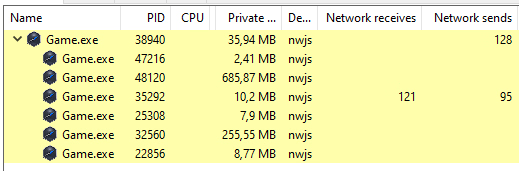
Anything that restarts automatically on a reboot is not from us.
We looked into the different connections and we can't replicate what you are showing in your screenshot on our build from patreon or steam, here is a screenshot with all the connections the game is having using system informer:
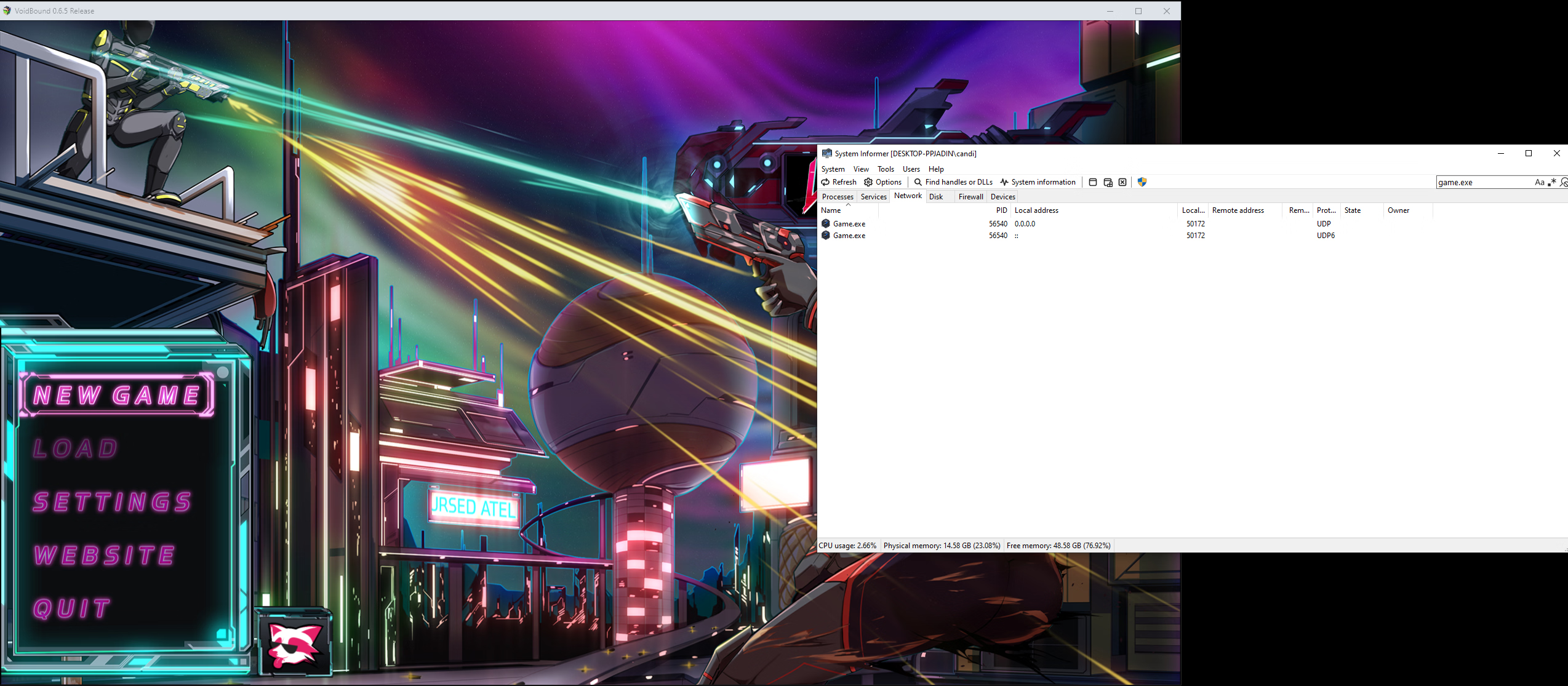
We found out that the appdata koster184 was reporting is from nwjs, this here in particular
You must be registered to see the links
We also confirmed the cause of the process not fully closing is also reported in 0.90 nwjs which VoidBound is running on.
You must be registered to see the links
We will be updating the NWJS version for the 0.6.6 release and monitor the behavior there again.
Will take a look at the build you linked and see what I can find there.
We want to note that we didn't send a build to F95 since 0.6.0.
Best Regards,
Cursed Atelier
Last edited:
SnoopyDoodlefoot
Newbie
- Oct 18, 2019
- 54
- 63
- 198
Thank you for researching this. I think what you found matches, at least in part, with what I saw. I re-extracted the zipped folder I have from F95 (VoidBound_English_-_0.6.5), launched the game to the main menu, and then closed it. The nwjs stayed active in processes, using around 250mb of memory and pinging the network at 0.1mb/s for one second a few times every minute (this happened even though the Game.exe process had ended, which I believe means it's the nwjs using network, not VoidBound's .exe). I watched it for ten or so minutes and observed this behavior consistently. Then I force quit the nwjs and re-ran the game's .exe to the main menu, closed it again, and the nwjs closed with the game this time. I'm not sure if it's intermittent or if it only happens the first time the .exe is launched, but the issue does seem to stem from the nwjs. Not sure if any of that helps, but that's what I can recreate.Hey,
I wanted to say thank you again for bringing it to my attention, I will keep a closer look on it in the future.
Here are so far the result:
As mentioned before, Voidbound doesn't connect to any external services or websites from within the game and non of our builds exhibit the same behavior you have observed.
Considering that there are several connections to different IPs and the google DNS server there is a chance that you might have downloaded a modified/tainted build that connects to external services for unknown reasons.
It is a bit hard for us to prove that we don't perform external communication, but attached is a screenshot of the games network traffic:
I had the game running for quiet a while now and that's all there is in terms of network traffic, and that's from the gforce telemetry.
View attachment 4755235
Anything that restarts automatically on a reboot is not from us.
We looked into the different connections and we can't replicate what you are showing in your screenshot on our build from patreon or steam, here is a screenshot with all the connections the game is having using system informer:
View attachment 4755239
We found out that the appdata koster184 was reporting is from nwjs, this here in particular
You must be registered to see the links
We also confirmed the cause of the process not fully closing is also reported in 0.90 nwjs which VoidBound is running on.
You must be registered to see the links
We will be updating the NWJS version for the 0.6.6 release and monitor the behavior there again.
Will take a look at the build you linked and see what I can find there.
We want to note that we didn't send a build to F95 since 0.6.0.
Best Regards,
Cursed Atelier
You can try to download the latest version from nwjs and overwrite the .exe and rename the nw to game.exe afterwards.Thank you for researching this. I think what you found matches, at least in part, with what I saw. I re-extracted the zipped folder I have from F95 (VoidBound_English_-_0.6.5), launched the game to the main menu, and then closed it. The nwjs stayed active in processes, using around 250mb of memory and pinging the network at 0.1mb/s for one second a few times every minute (this happened even though the Game.exe process had ended, which I believe means it's the nwjs using network, not VoidBound's .exe). I watched it for ten or so minutes and observed this behavior consistently. Then I force quit the nwjs and re-ran the game's .exe to the main menu, closed it again, and the nwjs closed with the game this time. I'm not sure if it's intermittent or if it only happens the first time the .exe is launched, but the issue does seem to stem from the nwjs. Not sure if any of that helps, but that's what I can recreate.
That fixed the nwjs not closing properly on the 0.6.6 build.
If you are interested I can send you the latest build for you to inspect if you want.
Just this year - "Sniper Phantom's Resolution" was an infostealer, published in Steam without a problem - been removed only after many reports and videos on youtubeAnyone complain on Steam? Cos this game is on Steam. I don't think Steam would allow a truly malicious program
Non-compressed 0.6.5 from there and GOG version from other site..on which version
Flugelbozz
Member
- Nov 12, 2018
- 437
- 408
- 309
upload 0.6.6 for us firstsomeone has a full gallery save for 6.6?
tx
ferocarilz
New Member
- May 18, 2024
- 4
- 2
- 89