

boolausus123
Newbie
- Apr 11, 2020
- 57
- 13
- 18
How come I can't unlock all h-scenes in the cheat engine? I literally see nothing that let's me unlock them all.


Easiest way would go with basic repack of the game and just apply HF patchDidnt realize how GIANT this file becomes. I want to trim the mods by removing clothing items I likely wont use or character assets I dont know, how would I go about that?

UserData\Studio\poseHelp me out, guys. Where do I put downloaded animations/poses for CharaStudio?
BumpHow come I can't unlock all h-scenes in the cheat engine? I literally see nothing that let's me unlock them all.
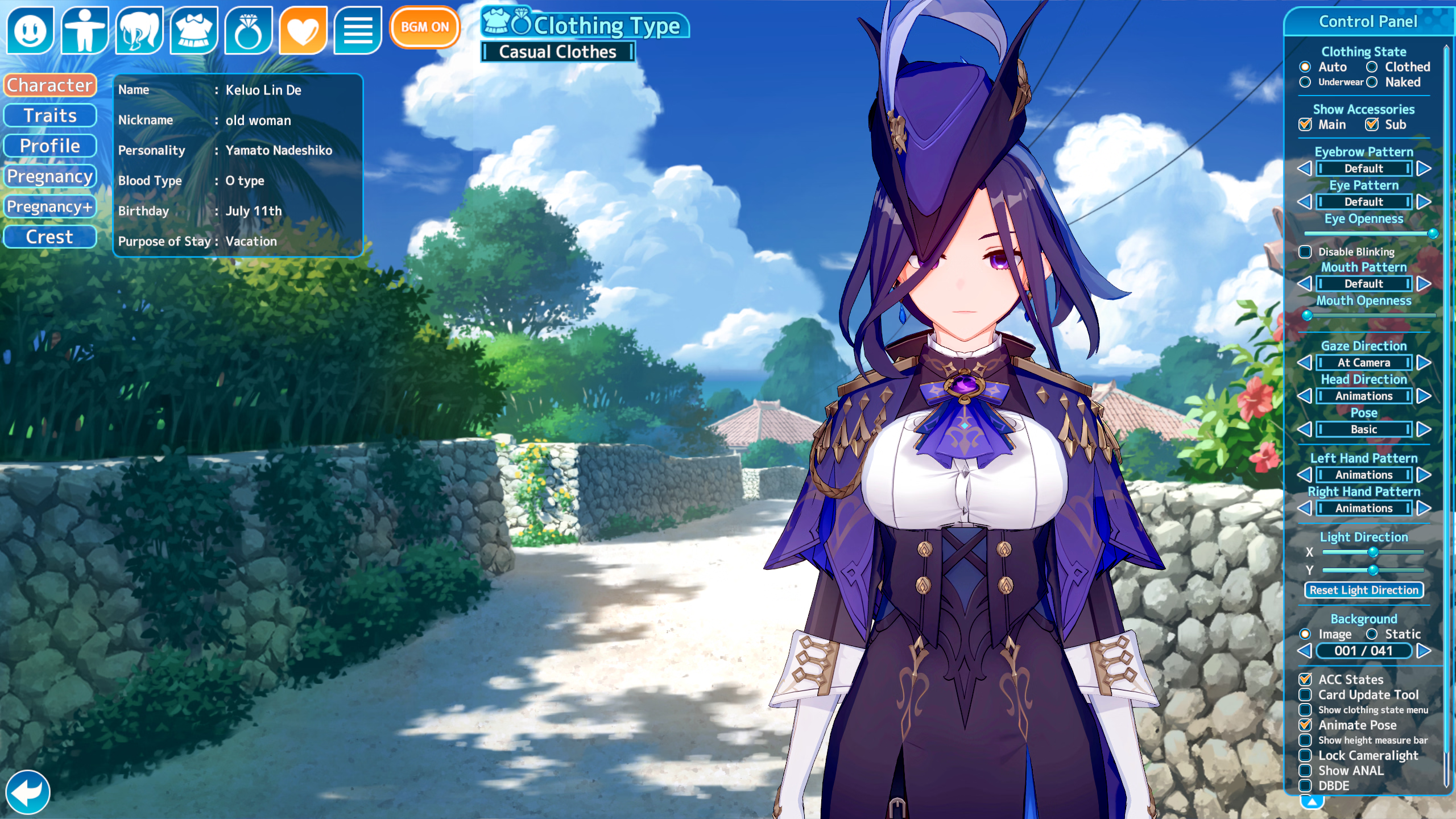

In the character creator from the main menu you can edit everything; if you open the character editor from story mode you can modify everything except the character informationIs there a way to rename the character name of a card?
For example, I have this one that I downloaded from a card creator:
View attachment 5528675
It says her name is "Keluo Lin De", maybe that's how it's spelt in some languages, idk.
I want to change it to Clorinde, because that's her actual name.
Bump. Also I have another question, is there a plugin that adjusts sex scenes to the character's height so I'm not constantly repositioning?I am using Koikatsu Sunshine Better Repack and there was a slider under Breasts 2 that changed the size of the entirety of breasts without turning weird when getting really big like nipples disappearing and whatnot. Now I can't even find the slider. Was there a setting I enabled that allowed me to do that?
You can and you can't. In the normal body model, you can only make the limbs and the overall body thinner or heavier. You can use a muscular body model, but most clothes won't fit well because your skin will show through the fabric due to the body model. So you'll have to opt for sportswear or see if any o the many outfits work without your skin showing through the clothing.Anyone knows how to make muscle girl? Like the exact number of each part of the body
I have noticed these problems with certain cards when you implement them. During the stage loading process, they often appear like this, but when interacting with the character, everything is normal. Some solutions involve creating the character from scratch and exporting the set, but editing the accessories used. Some of these errors then disappeared.Hello all how are u ?
Hope someone can help me :
Downloaded KKS repack R12 + light HF patch and downloaded some cards but in story mode I have a weird accessorie issue. Tried to force high heel is not working tried also to create new slot for the card not working.
Any idea please ?

Can we edit downloaded cards from character creator in the main menu or do we have to make a new one from scratch?In the character creator from the main menu you can edit everything; if you open the character editor from story mode you can modify everything except the character information
From the main menu, access the character creator, choose, and save the clothing sets you like.Can we edit downloaded cards from character creator in the main menu or do we have to make a new one from scratch?
Exactly that's the problem but there is a small difference for me, it's when interacting with the character I have also the problem.I have noticed these problems with certain cards when you implement them. During the stage loading process, they often appear like this, but when interacting with the character, everything is normal. Some solutions involve creating the character from scratch and exporting the set, but editing the accessories used. Some of these errors then disappeared.

