St3vo

Member
Dec 16, 2017
120
27
263
the best way to delete VAR files? i have over 11,000 in the addon packages folder so is there a way to view all the thumbnails like a program or plugin and click delete the ones i don't want to make it quicker? i used 'unreferenced var viewer' and ticked 'favourites' to highlight them green so i could delete them but it keeps crashing. i dont want to do them individually in addon packages if thats avoidable,thanks!

edit: i can see you can delete on 'package manager' with the favourites showing in the program. is there a way to delete multiple at once? thanks
 
Last edited:

oscarstg1

Newbie
Aug 12, 2018
72
6
113
recently released a drivers that allowed me to play again with the samsumg wmr glasses (you know they took off years ago the updates for these).now it is very simple to play with this driver to all games and as they are amoled they look with tremendous realism.
my doubt is if you can run vam without problems with these glasses.you know use oasis as a patch.really you see the real models with these glasses and not with the quest 3.i am delighted
 
  • Like
Reactions: fbass and Mirrora

theblackestguy

Active Member
Oct 29, 2020
787
721
309
guys, is there any new option for pixeldrain limit bypass? The script that I had now keeps sending me to a site called "gamedrive.org"
 

fbass

Active Member
May 18, 2017
776
1,170
439
guys, is there any new option for pixeldrain limit bypass? The script that I had now keeps sending me to a site called "gamedrive.org"
Same here...if possible..a pm'd code would be highly appreciated.
Download from here and use the key found in the spoiler on the first page. (Creator key is C91927)

Run the updater and it will download all the files.
 

ForumHopper29

Newbie
Aug 3, 2024
27
6
13
I still cannot figure out how to load up custom scenes like this one
pretty sure followed all instructions as normal but on menu i dont have anything except stock items, the UI is also real "work of art" maybe someone else can explain with basic tutorial how to load up these scenes and how to use them in UI pls
 

Vinegr1725

Well-Known Member
Jul 5, 2023
1,363
1,213
324
I still cannot figure out how to load up custom scenes like this one
pretty sure followed all instructions as normal but on menu i dont have anything except stock items, the UI is also real "work of art" maybe someone else can explain with basic tutorial how to load up these scenes and how to use them in UI pls
I don't know what your problem is. I downloaded it from the hub without any problems. It's in the library and shows up.
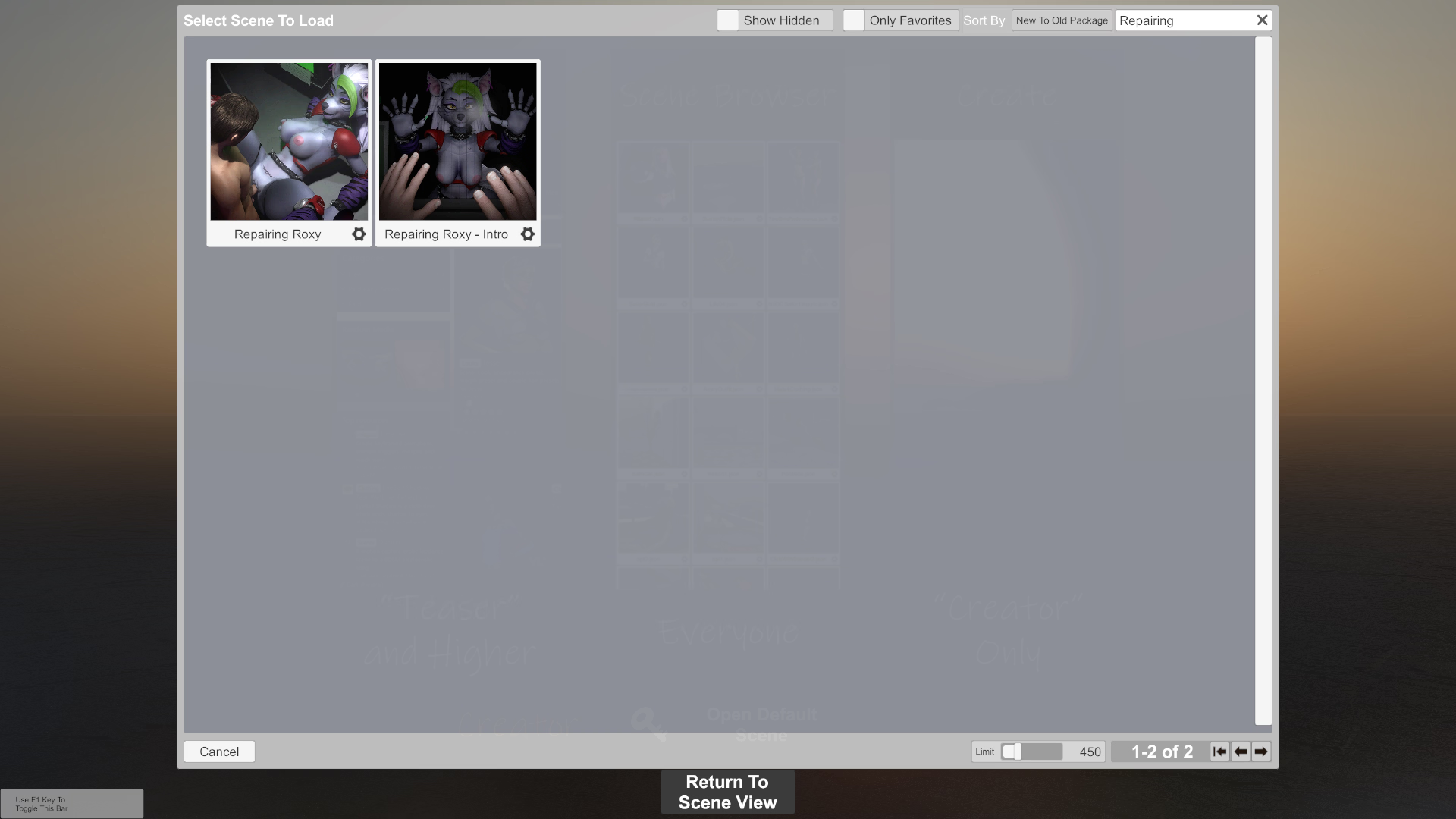
VaM 27.12.2025 1_58_13.png
 

Vinegr1725

Well-Known Member
Jul 5, 2023
1,363
1,213
324
how did you actually install it can you please explain how you did it and then load it up
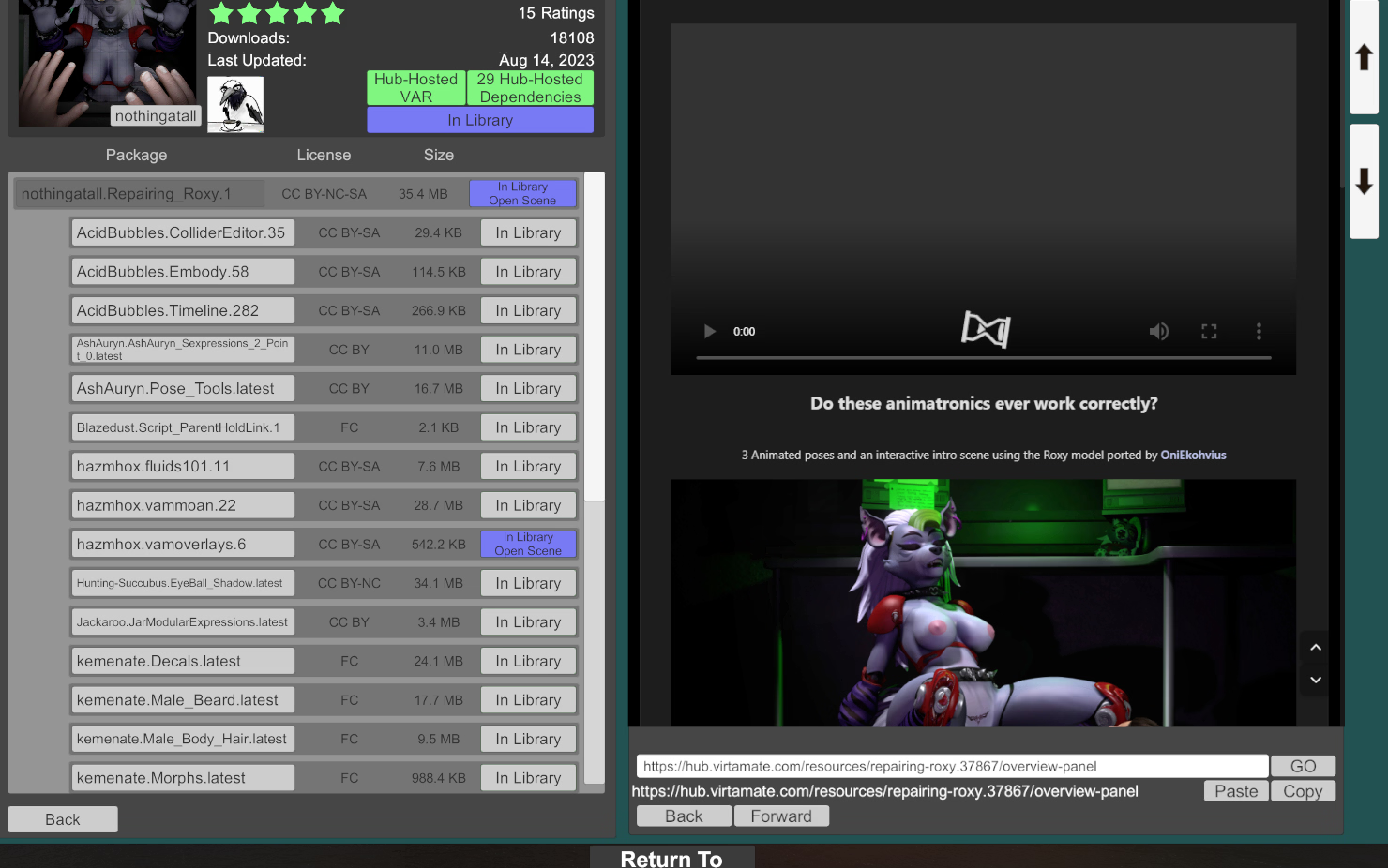
Well, first of all, I don't know how you downloaded this scene? Did you download it from the website and then place the file in a folder? Or did you find this scene in the program itself and download it from the hub? In any case, the file nothingatall.Repairing_Roxy.1.var with this scene should be in the "AddonPackages" folder. Look at the screenshot, is it the same for you?


VaM 27.12.2025 2_27_10.png
 
  • Like
Reactions: ForumHopper29

ForumHopper29

Newbie
Aug 3, 2024
27
6
13
Well, first of all, I don't know how you downloaded this scene? Did you download it from the website and then place the file in a folder? Or did you find this scene in the program itself and download it from the hub? In any case, the file nothingatall.Repairing_Roxy.1.var with this scene should be in the "AddonPackages" folder. Look at the screenshot, is it the same for you?


View attachment 5567003
yes basically i put inside the addonpackages folder inside the game directory then when i boot up the game its not showing in the scenes like in your screen i coudn't understand if its hidden or i head to search for it or my game is borked in which case i have to redownload 17gb again :/

While i redownload the game could you please let me know whats the next step to actually run the scenes i found very little info that explains step by step on how to load the scenes then get all the required files and then make the scene work
 

Vinegr1725

Well-Known Member
Jul 5, 2023
1,363
1,213
324
yes basically i put inside the addonpackages folder inside the game directory then when i boot up the game its not showing in the scenes like in your screen i coudn't understand if its hidden or i head to search for it or my game is borked in which case i have to redownload 17gb again :/

While i redownload the game could you please let me know whats the next step to actually run the scenes i found very little info that explains step by step on how to load the scenes then get all the required files and then make the scene work
Open the program and show me your screenshot of this scene in the hub.

VaM_27.12.2025_2_27_10.png
 

oscarstg1

Newbie
Aug 12, 2018
72
6
113
i just saw on youtube that you can use i.a in virt to mate.you can add it to the character models voice and ineligence to talk to them and they move too.i think it is gratsi.
anyone have a video tutorial on how to do it?
 

theMickey_

Engaged Member
Mar 19, 2020
2,395
3,227
357
anyone have a video tutorial on how to do it?
This is done using Voxta, and this scene in particular -- they just replaced the original model with Tifa. You can setup Voxta to run locally (needs a beefy GPU and lots of VRAM if you want to run VaM on the same system), or you can setup Voxta to use paid online hosted service, then you don't have to worry about AI using up all your system's resources, instead this will eat up all your money :ROFLMAO:.
 

oscarstg1

Newbie
Aug 12, 2018
72
6
113
This is done using Voxta, and this scene in particular -- they just replaced the original model with Tifa. You can setup Voxta to run locally (needs a beefy GPU and lots of VRAM if you want to run VaM on the same system), or you can setup Voxta to use paid online hosted service, then you don't have to worry about AI using up all your system's resources, instead this will eat up all your money :ROFLMAO:.
i would be very interested to know how it is used in local mode-is there any video tutorial on how to do it?.i just picked up a powerful pc and i could surely do it.thanks
 

yoyohoney

New Member
Jan 19, 2025
9
21
63
Hello guys, I'm new here, sorry for the trouble, but I'm a normal gooner, all I'm seeing is creations and shit, this is too complex (or maybe I'm a retard),
Can i simply load cards and change positions like Honey select or AI Shoujo or Koikatsu? or is this only for creators not people like me? please do let me know if there is some tutorial or link, thank you.
 
  • Hey there
Reactions: Vinegr1725

fbass

Active Member
May 18, 2017
776
1,170
439
Hello guys, I'm new here, sorry for the trouble, but I'm a normal gooner, all I'm seeing is creations and shit, this is too complex (or maybe I'm a retard),
Can i simply load cards and change positions like Honey select or AI Shoujo or Koikatsu? or is this only for creators not people like me? please do let me know if there is some tutorial or link, thank you.
It's not that hard to do entry level stuff. But it can definitely be overwhelming to go past that at first. I'm not that great at it, but I still have fun. Just give it a shot.
 

yoyohoney

New Member
Jan 19, 2025
9
21
63
It's not that hard to do entry level stuff. But it can definitely be overwhelming to go past that at first. I'm not that great at it, but I still have fun. Just give it a shot.
ic..
any tutorial links?
and answer to the question? can i simply load stuff like HS2/ AI Shoujo/ koikatsu ?
 
4.40 star(s) 25 Votes