sexymanx
Newbie
- Aug 4, 2018
- 50
- 57
- 96
If you check at the bottom of the screenshot, you'll notice that the dialog box is cut off and the rest is background of fzone. Basically, I can't see which answers I chooseI'm not sure what's the issue here, if you have any suspicions please let me know. Also if you could share a screenshot Iseiscream, that could help.
It worked! Thank you!Dammit there are tons of errors because of save file issues, guys just make sure to delete your save folder if game doesn't open. It's located at C:\users\'username'\appdata\roaming\kingdom_lost , you can quickly open appdata folder by pressing WIN+R and typing appdata, then navigate to roaming\kingdom_lost folder, delete the 'saves' folder.
Like this.and i cant find the settings in any data files to change the resolution our somthing.game settings doesnt help.
If chancing scale doesn't help then there is a problem, it's probably calculating aspect ratio wrong or something, I'll add it to the bug list.Like Iseiscream, none of the game options help. Fullscreen and all of the window sizes look the same. And this is the first version I've tried.
Thank you very much, I asked because it didn't make any sense when I saw it in the automated bug reports(and I still don't get it), I'll add it to my bug list and take a look at it again soon.Thank you for your fast reply
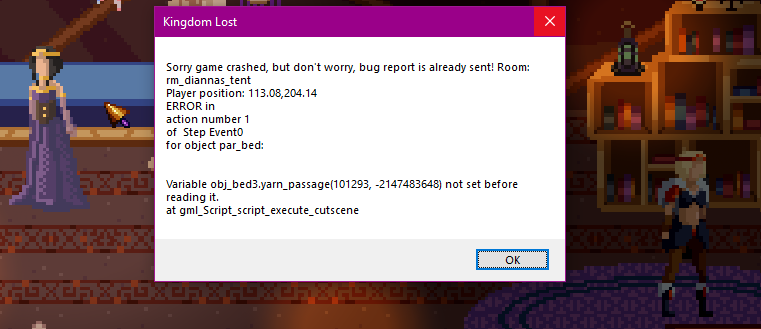
Here is another crashlog, maybe it will be helpful:
View attachment 1509737
I found the related issue and I'm working on it. Most of the bugs mentioned here are solved and I'll release a bugfix update soon.Resolution not scaling correctly in windowed mode. Cannot see any decisions in the various scenes.
Not working in fullscreen either. I can't see anything because its being cut off. I can't really play the game if I can't see what the heck I'm doing so I think I'll wait for this to be fixed.
No, messing with fullscreen, as well as screen scaling, did not work. Neither did trying to manually fix things in the "appdata/roaming" directory.
I'll give you even more headaches. Android version is a buggy mess. Only first dialog choice is visible, combat is literally unplayable (unresponsive no matter where you tap),I found the related issue and I'm working on it. Most of the bugs mentioned here are solved and I'll release a bugfix update soon.
Similar problem happened with linux users before, assets folder is not the issue but formatting is, I'll take a look.hang on lemme strangle the dev real quick, for having every file be in a folder that's named assets while the game looks in the game's root folder, every file that needs a space missing it instead of being a _ and game looks for files with a different case than they actually are and I'm not bothered to fix all that mess myself.![]()
This is probably related to the problem mentioned in the first post, please wait for the bugfix update.downloaded the linux version 0.56, crashes at starting point, I have the crashlog here =>if it has solved or if it's the same save file issue then either redirect me or you can tell me where the save file is saved on linuxYou don't have permission to view the spoiler content. Log in or register now.
If you mean saving in load screen numerous times, I triggered that bug once before but not sure what's the problem, if you have any ideas what might be the problem I'd like to know.This is actually unplayable to an absolutely ridiculous degree. I think the game locked up in 80% of my fights while playing the latest PC version. My favorite was when it put a save within a save within a save. Or that one time I made it crash to desktop by committing the crime of right clicking by accident.
Do people really give money to things like this? It's been in development since 2019 and I can speedrun it in under one minute by running to the town.
I just want to commend you for being able to take criticism on the chin like that, and immediately swap to debug mode. A+ dev, that is a beautiful and admirable trait to have.If you mean saving in load screen numerous times, I triggered that bug once before but not sure what's the problem, if you have any ideas what might be the problem I'd like to know.
What's wrong with fights?
You are forgiven, but where did you right click?
well the game doesn't look for the assets folder so it is part of the problem, as well as the other thingsSimilar problem happened with linux users before, assets folder is not the issue but formatting is, I'll take a look.
This is probably related to the problem mentioned in the first post, please wait for the bugfix update.
Commendable reaction to what was honestly an overly snippy post on my end.If you mean saving in load screen numerous times, I triggered that bug once before but not sure what's the problem, if you have any ideas what might be the problem I'd like to know.
What's wrong with fights?
You are forgiven, but where did you right click?