Deleted member 2240000
Member
- Apr 20, 2020
- 188
- 130
- 229
Probably means achievement. Don't think too hard.The hell does this mean? What's an ACH? Is this a specific event? Is it a general event?
Probably means achievement. Don't think too hard.The hell does this mean? What's an ACH? Is this a specific event? Is it a general event?

hard to say, games like this often just keep getting more content. new routes, new endings, and so on. Author might also just switch gears to a new game once happy with the state of this one. I'm kinda hoping there is a 'hero' ending where we kill the source of the abomination and live happily ever after. Granted this is grimdark so not likely the author will make an ending like that... but we'll see.Ooh so that means the game is almost complete?
I saw and the game is in English, is it bad and needs a patch? I don't put it because I see it in English.Is there an English patch for the latest version or we still having to do the MTL?
PS Is the MTL decent?

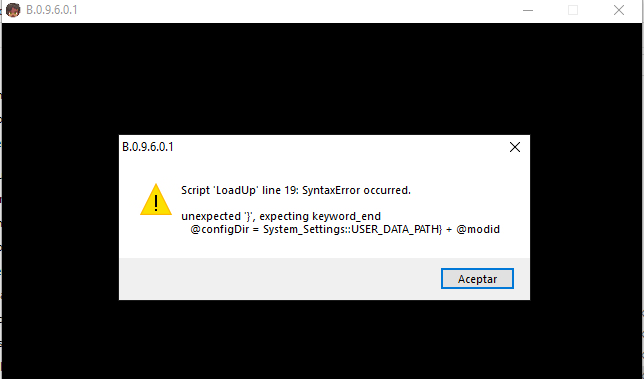
Oops... Missed aI installed the all in one mods, I activated it, it asked me to restart and it gave me that error. How do I solve it? View attachment 4480886
} in a last second edit... Should be fixed in v1.0-rc.11.1UMM is now built into the game, don't use the mod with it.Is UMM still being developed and should I use the 2023 github vers.?
It's not fully English. Newer content is still untranslated.I saw and the game is in English, is it bad and needs a patch? I don't put it because I see it in English.
The tutorials need updating, but essentially:Thank you for the mod.
But I'm having trouble figuring out where to place the whole "Cheat-Menu-Framework-1.0-rc.11" folder, after NyxLauncher was removed from the game.
I'm on B.0.9.4.0.4 . Have already booted the game once and haven't used any versions of your mod before.
I looked at your video tutorial but that video assumed NyxLauncher still is in the game, and that the mod folder was called "Modular Cheat Mod" or something.
I feel like I'm missing something obvious here, but I cannot for the life of me figure out where to put the cheat mod folder, the very latest one I just downloaded from Github.
Does it go in LonaRPG root folder? Inside ModScripts? _Mods ? It's entirely unclear.
Please help?
Cheats Mod in the archive should end up as ModScripts/_Mods/Cheats Mod/Cheats Mod as it is a reference to the mods origins. The mod does however support changing the folder name.Cheat-Menu-Framework-1.0-rc.11, you have downloaded a source code archive that will not work, the source is structured differently for development purposes.Thank you very much, I don't know if they changed it recently or the link guides you to the old version but I downloaded 11.1 and if I left it. thanks for the helpOops... Missed a}in a last second edit... Should be fixed in v1.0-rc.11.1
I didn't update the version number ingame, I only removed the forgottenThank you very much, I don't know if they changed it recently or the link guides you to the old version but I downloaded 11.1 and if I left it. thanks for the help
}Yes, the extraction instructions should all still apply despite the rename that happened since that video was made. The structure of the archives should pretty much be the same as back then, just different name and features.The installation of the mod is explained in the github, before the downloads it tells you where the files are and the mods go inside the mods folder, cheatmenu or the mods you use, go in the mod folder or does that work for me. I analyzed the video and discovered how to install it blindly because the tutorial only works halfway. ignoring the fact that nyx is not there, the rest of the tutorial is true.
Igot the good laughs from readme.txtView attachment 623020
Overview:
Cold... Grim... Unforgiving... Deadly... This is the world of LonaRPG.
Play the story of a young woman named Lona, who must survive in this gothic and cruel world.
Explore a grimdark, twisted, and open world where one little mistake can cost Lona her life...
Can you help Lona survive? (And protect her smile?)
Thread Updated: 2025-01-25
Release Date: 2025-01-05
Developer: EccmA417You must be registered to see the links-You must be registered to see the links-You must be registered to see the links
Censored: No
Version: 0.9.6.0.1 Beta
OS: Windows
Language: English, Chinese
Genre:
You don't have permission to view the spoiler content. Log in or register now.
Installation:
You don't have permission to view the spoiler content. Log in or register now.
Changelog:
You don't have permission to view the spoiler content. Log in or register now.
Any discussion or comments involving politics will be deleted.
Do NOT use the English patch until it gets updated, use the MTL tool instead (after applying the download of the Official Text Project).
***Will wipe all Save Patch. will not support saves before v0.7.5.0***
DOWNLOAD
Win: WORKUPLOAD - MEGA -You must be registered to see the links-You must be registered to see the links-You must be registered to see the links
Official Text Project:You must be registered to see the links- MEGA - PIXELDRAIN
Patch Tool:You must be registered to see the links
Extras: Guide - Cheat Mod* - - Guide -You must be registered to see the links- Big Booba Mod*
nackedsnake thanks for the link
*These unofficial extras are not released by developer, download at your own risk.
View attachment 623027 View attachment 623028 View attachment 623029 View attachment 623034 View attachment 623039 View attachment 623040


Oh my god I really just got the wrong download after all, how was I supposed to know I only required the AIO link among the 20 other links. What does AIO even stand for? Github doesn't make any sense to me so I just assumed you were supposed to download through the green button.The tutorials need updating, but essentially:
The folderCheats Modin the archive should end up asModScripts/_Mods/Cheats Mod/
The mod folder itself hasn't changed fromCheats Modas it is a reference to the mods origins. The mod does however support changing the folder name.
Also, if you are getting folders such asCheat-Menu-Framework-1.0-rc.11, you have downloaded a source code archive that will not work, the source is structured differently for development purposes.
Either download the core and module archives (for a custom install) or the AIO archive.