Doppio1234
New Member
- Jun 21, 2025
- 10
- 14
- 12
"else if" not "elseif"Anyone help me
I wondered I could edit "PenaltyVibrator" to change strength depending on distance where remocon left. But I can't.
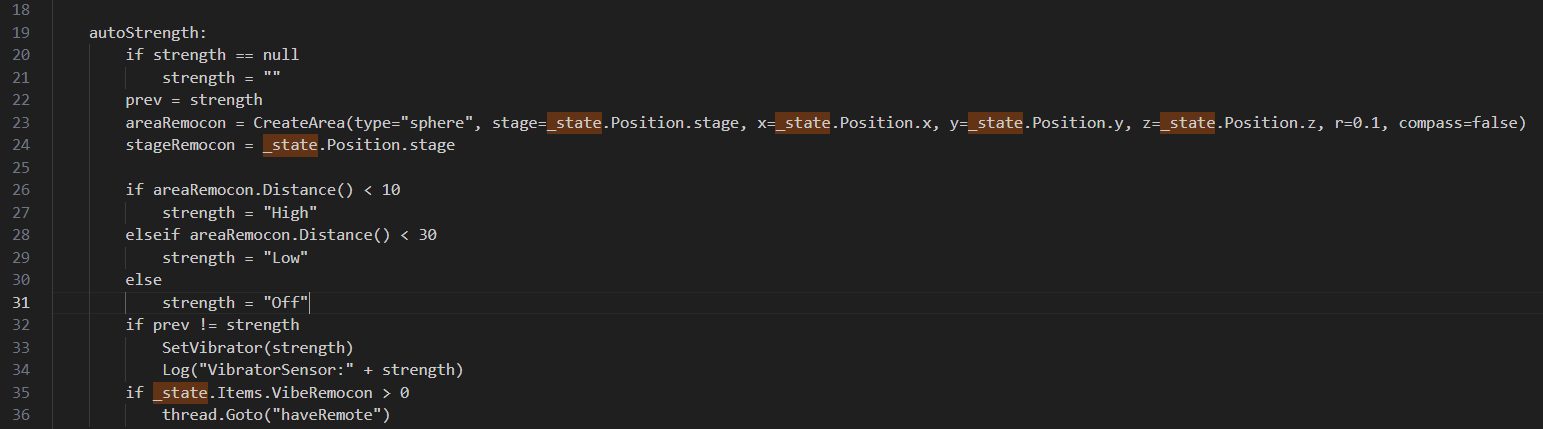
I think I have to edit this part in autoStrength:
View attachment 5436172
then now messages: [L28]Missing if statement...???
Mind the format, indention is strictly one tab character. If you're using vscode check out the bottom-right indention indicator is set to tab.Anyone help me
I wondered I could edit "PenaltyVibrator" to change strength depending on distance where remocon left. But I can't.
I'm a beginner on coding.
I think I have to edit this part in autoStrength:
View attachment 5436172
then now messages: [L28]Missing if statement...???
It is indeed elseif in this dsl. But acceptable, since choice of syntax really vary on taste."else if" not "elseif"
if "else if" doesn't work, then try "elif"
Hi! I looked at your code, and let me see if I understand your goal: you want the vibrator's strength to change based on the player's distance from a fixed point (where the remote was left), correct?Anyone help me
I wondered I could edit "PenaltyVibrator" to change strength depending on distance where remocon left. But I can't.
I'm a beginner on coding.
I think I have to edit this part in autoStrength:
View attachment 5436172
then now messages: [L28]Missing if statement...???
autoStrength:
if isInit == null
isInit = true # Use a temporary variable inside the listener for initialization
# It will only run once on the very first frame of the listener
# Let's assume the fixed point is your position when the listener starts
# (Note: This line now only runs on the first frame!)
areaRemocon = CreateArea(type="sphere", stage=_state.Position.stage, x=_state.Position.x, y=_state.Position.y, z=_state.Position.z, r=0.1, compass=false)
# Now, areaRemocon is a fixed point
# Your if/elseif/else logic will now work correctly
if areaRemocon.Distance() < 10
strength = "High"
elseif areaRemocon.Distance() < 30
strength = "Low"
else
strength = "Off"
if prev != strength
SetVibrator(strength)
Log("VibratorSensor: " + strength)
prev = strength
if _state.Items.VibeRemocon > 0
thread.Goto("haveRemote")
Data about items dropped on the ground are stored in _state.DroppedItems.Anyone help me
I wondered I could edit "PenaltyVibrator" to change strength depending on distance where remocon left. But I can't.
I'm a beginner on coding.
I think I have to edit this part in autoStrength:
View attachment 5436172
then now messages: [L28]Missing if statement...???
autoStrength:
if strength == null
strength = ""
prev = strength
item = getDroppedItem(type="VibeRemocon")
if item == null
strength = "Off"
elseif item.Position.stage != _state.Position.stage
strength = "Off"
else
dx = item.Position.x - _state.Position.x
dy = item.Position.y - _state.Position.y
dz = item.Position.z - _state.Position.z
d = dx*dx + dy*dy + dz*dz
if d < 10*10
strength = "High"
elseif d < 30*30
strength = "Low"
else
strength = "Off"
if prev != strength
SetVibrator(strength)
Log("penaltyVibrator: " + strength)
if _state.Items.VibeRemocon > 0
thread.Goto("haveRemote")
getDroppedItem:
_result = null
i = _state.DroppedItems.Count() - 1
while i >= 0
item = _state.DroppedItems[i]
if item.Type == type
_result = item
i = i - 1
Do you have the NotoSansKR-Regular.ttf in the game directory (the same where the .exe is)? The filename has to be exactly like that.Although I installed the Noto_Sans_KR.ttf font, the text on the smartphone still appears garbled, as shown in the attached photo
View attachment 5435206
This is the text.code file translated into Korean.
View attachment 5435208
There are also built-in vector functions btw. Vectors are still implemented as lists, but the functions take the x,y,z items and do the math with those. It also doesn't matter if there are other items in the list (like "stage"), those are just ignored. Though if the result is also a vector it will not contain those and only x,y,z.Data about items dropped on the ground are stored in _state.DroppedItems.
Using this makes things easier since you don't have to remember the position of the remocon yourself.
Code:autoStrength: if strength == null strength = "" prev = strength item = getDroppedItem(type="VibeRemocon") if item == null strength = "Off" elseif item.Position.stage != _state.Position.stage strength = "Off" else dx = item.Position.x - _state.Position.x dy = item.Position.y - _state.Position.y dz = item.Position.z - _state.Position.z d = dx*dx + dy*dy + dz*dz if d < 10*10 strength = "High" elseif d < 30*30 strength = "Low" else strength = "Off" if prev != strength SetVibrator(strength) Log("penaltyVibrator: " + strength) if _state.Items.VibeRemocon > 0 thread.Goto("haveRemote") getDroppedItem: _result = null i = _state.DroppedItems.Count() - 1 while i >= 0 item = _state.DroppedItems[i] if item.Type == type _result = item i = i - 1
d = Vector3SqrLength(Vector3Sub(item.Position, _state.Position))
Damn. that's a lot of sound.https://f95zone.to/threads/secret-flasher-manaka-v1-1-3-sheablesoft.256682/post-18448057
Someone made something like it... It's bit too much for me though.
Thank you so much for your reply, and I apologize for only just noticing it now. For the past couple of days, I've been completely focused on developing my converter tool. Even though not many people might need it, since I started, I really want to see it through to completion.I'm not entirely sure if that is the problem, but you have to set the area a few centimeters into the ground. Like -0.01 or -0.02.
The important point for the collision detection is on the ground and it might be that, because of the physics, the player slips slightly under the ground.
Will be fixed in the next version.
I also read your comment about SetAction, but I have yet to look into it. Partially that is expected and I didn't really pay it much attention. I'm only using the game function that was obvious and if some things didn't work then so be it. But I'll try to make it better.
Executing DumpVariables(5) displays the contents of _state.Thank you so much for your reply, and I apologize for only just noticing it now. For the past couple of days, I've been completely focused on developing my converter tool. Even though not many people might need it, since I started, I really want to see it through to completion.
The issue with the cuboid area does seem to be my fault. I've never actually written a V1 JSON mission; I just became really interested after seeing your V2 mod and dove straight into studying it. Because of this, I lack a lot of experience in certain areas, which led me to mistakenly believe the cuboid areas were unstable.
I think I understand the issue with SetAction. It's not a big deal, really. I'll just make sure to only call it where it's known to work, haha...
Regarding the issue where areas don't truly hide—I'm so happy to hear you'll be fixing it in the next version! It's been troubling me for a long time. While making my converter, I had to set the Alpha value of the area or zone to achieve a hiding effect. But even then, when the player first loads into the apartment, the circles still show up (even with the color set). I even tried refreshing it every frame, but that didn't seem to work. What I mean is, in a complex V1 mission I was testing, the original author had placed many hidden areas in the apartment as helpers. So, as soon as I loaded the game, my room was filled with a dense cluster of glowing circles... But for authors writing scripts directly in V2, this probably isn't a concern, since V2 doesn't seem to need so many hidden helpers.
I really wish I had seen your reply sooner. Handling travelCondition during the converter's development caused me a huge amount of trouble. I should have just asked you for advice. However, I've now done some reverse-analysis by testing V1 missions, and it seems the converter can finally handle that field in the JSON correctly.
And finally.... Regarding the _state list in V2, where can I find information on this? Maybe it's in the thread, and I just missed it? I'm sorry, my English isn't very good... It doesn't seem to be in the documentation, but I see many people who seem to know the details. Yes, I'm looking for this information—I urgently need it.
I think I did. Thanks bros. I'm on testing.Anyone help me
I wondered I could edit "PenaltyVibrator" to change strength depending on distance where remocon left. But I can't.
Please allow me to summarize those custom missions(CM in short) made by numerous talented members.
But before we start there's something you should know:
There's two version of CM, they require one of the following mod: V1(#1) and V2(#354), both made by Crisp2002, let's thank him again by making all these possible.
In short, "**.json" is v1, "**.code" is v2.
Read the guidelines before you have any questions.
DO NOT install them all at once, may cause lags, and other unforeseeable errors.
Clearly i cant have tested every single one of them, there maybe bugs that cause struggle, try read subsequent threads patiently before you ask any questions, or just simply skip to the next one.
All credits belong to the authors list below
"floor""author""mission name""Requirements""starting point"
#2 - drchainchair2 - v1 -
#3 - cutemiracle - v1 -
#4 - cactuar - v1 -
#5 - BannedOcto - v1 -
#10 - hacumefetitopikt.com - Manaka's Bathroom Streak. - v1 - the lamp near the toilets at the park
#11, #342 - Himiko054 - Manaka Greatest Adventure V5.1 - v1 -
#12 - BannedOcto - Lost Bet - v1 - outside your door
#26 - InvasionOfZeroes - RP+XP cheat mission. - v1 -
#33 - hacumefetitopikt.com - Manaka's Forgotten Wallet - v1 - downtown in the food area at the blue sign restaurant
#40 - hacumefetitopikt.com - Sideway Gambit - v1 - downtown head towards the food area
#46 - Soitat - ApartmentFun - v1 - beginning Area for the Apartment
#63 - hacumefetitopikt.com - Locked Out - v1 - outside the house located behind the vending machine to the left of Manaka's actual apartment
#70 - hacumefetitopikt.com - Park Stroll - v1 - in the park next to the toilets
#91 - Hilnar - Extreme Item Search - v1 -
#94 - doffin - Yakuza's Punishment - v1 - Downtown, near the kaisen-sakaba(海鮮酒場)
#120 - BGmkr - pet daytime dares - v1 -
#147 - Tghyt - SlaveToFate1 - v1 - outside your house
#154, #163 - cutemiracle - randomEventMistress_Lite - v1 - bed in the house
#174 - cfgvuh - schoolbet - v1 -
#175 - eroeroiz - Stealth Ninja Action - v1 - home, near the sofa
#180 - BGmkr - Conbini Climax - v1 - home at the small circle
#218 - Hilnar - CustomWarps - v1 - apartment front near the intersection
#234 - artemis31 - Performing task from my Master - v1 - apartment front near the intersection
#251 - jack7791101 - v1 - a pickup truck in the residential area
#257 - BGmkr - 挑战任务 - v1 - 家中的灯
#261 - 仙人掌 - 仰慕者 - v1 - 户外之家
#268 - artemis31 - 避孕套购物勒索 - v1 - 屋外
#274 - Muhdog - 深夜商店购物 - v1 - 你家角落,电脑后面
#275 - 仙人掌 - 在规定时间内从公寓外到达购物中心 - v2 -
#288 - 仙人掌 - 勒索 - v2 - 在她家右边外面
#323 - bergi - BratMissions - v1 - 你家左边
#332 - EvGem - 从一个商场入口走到另一个入口 - v2 - 购物中心,自动扶梯左侧
#381 - Figgobyom - 楼层展示 - v1 - 在公寓前
#386 - RazMon365 - 与未知者签订契约 - v1 - 位于住宅区你家门前的角落
#390 - StephenLana13 - 新增一组通往边界外区域的传送点 - v1 -
#393 - Suzutsuki117 - ShiftingCoat - v2 -
#398 - Suzutsuki117 - 多阶段物品搜索 - v2 -
#424 - Sam OuOB - 驱魔少女 - v1 - 在购物中心和车站前
#433 - himura1007 - 手铐姿势 - v2 -
第440话 铃月117 真中知事 - v2 -
#455 - Suzutsuki117 - AssaultConsequence - v2 -
#469,#476 - zizheng2019 - 失去控制的代价 - v2 - 在家前门左侧的圆圈里
#478 - cherry_sigma - MoreShifting - v2 -
#479 - cherry_sigma - AssaultConsequencesPlus - v2 -
#480 - raptorr64 - FetchQuest - v2 -
#482 - cherry_sigma - MultiStageItemSearch-v1.2 - v2 -
#489 - cherry_sigma - Aftermath - v2 - AssaultConsequence 的改进版本
#502 - cherry_sigma - ItemShifter - v2 - ShiftingCoat 的改进版本
#508 - cherry_sigma - 越界包装 - v2 -
#520 - 琵琶岛 - HM_Warp - v2 -
#534 - cherry_sigma - IncuffableManaka - v2 -
#536 - 松饼狂 - Kenji 任务 - v2 -
#550 - Suzutsuki117 - 惩罚振动器 - v2 -
#566 - cherry_sigma - NpcGotUsedToIt - v2 -
#572 - cherry_sigma - NothingLeftOutside - v2 -
#574 - cutemiracle - PenaltyVibratorHard - v2 -
#2626 - zzz4200 - 降低摇头丸价值 - v1 -
[/引用]
THX(y)

Nice one, the subtitles really improve this one, great setting.Fetch Quest adapted to version 2, finally becoming what I wanted from the start
If someone here liked the errand you run from your friendly neighborhood blackmailer, I'd recommend going in blind, but here's the changelog for those who want to see it
(Copy the "fetch" folder in "CustomMissions2" to install)You don't have permission to view the spoiler content. Log in or register now.
The Optimization. The script engine executes all scripts on each cycle of Unity scheduler, and some on each frame. Current implementation of the script language has nothing like common-expression-elimination or constant-folding or inlining, while every variable lookup happens to be a full C# Dictionary lookup on local or from global, and what makes things slower is that all of these happens on unoptimized dotnet vm and dotnet objects. Improvements might be achieve fast though. It depends on when this language become stable.When the SFM_custom_mission_v2.dll is enabled, the screen will drop frames for a very short time every few seconds in game, dose anyone know what caused it ?
Question. where do i install this? inside the Plugins folder?Handcuffed Poses !!
With the help of Doppio1234 above, I made a series of short scripts that allow Manaka to perform poses while handcuffed, which are normally impossible to do.
I am new at scripting so I could not figure out a way to make these more compact, hence you'll find that there are 104 JSON files (I made an individual script for 13 poses of my choice, each with a variation for the 8 available stages).
If you want to make a script for an additional pose not included in the zip, simply replace the Action (pose) and Stage (area/zone) values. The script is simple to understand, so it's easy to figure out what needs to be replaced and where.
To install, put the JSON files inside your CustomMissions folder. You can make these poses at any time and any place, I set the action radius for every stage at 1,000 meters.
How to use:
- Make sure the Fixed First Person Camera and Fixed Third Person Camera skills are both Disabled.
- Perform a pose (e.g. Spread-Leg Walk)
- Press the First Person Camera hotkey (R by default)
- Manaka is now on Spread-Leg Walk mode while handcuffed. Neat!
- Press the First Person Camera hotkey again to switch back to Third Person Camera. You will remain handcuffed with your pose.
View attachment 5392267 View attachment 5392269
In other words, Manaka will NOT be able to perform a pose AFTER being handcuffed (this is by the game's design), but she can perform the pose BEFORE being handcuffed with the help of this script.
To use another pose, either a normal one or a handcuffed pose, or perform another action, you'll need to uncuff yourself first with the Interact button. For your benefit, the script gives her a Keyed handcuff so that you can release her on the first try. For some poses (like Spread-Leg Walk) you'll need to press the Dash button once first to get in a position where you can uncuff yourself.
Why is the trigger the First Person Camera button?
The resulting pose requires a condition to be met, for which there are many options that the script allows but the most convenient I could find was the FPC state, as it's an action that you can normally perform in-game even if you're handcuffed, so you could press its hotkey at any time. TLDR just make a pose and press First Person Camera twice to switch to the handcuffed variation of that pose.
If you like this script, feel free to incorporate it in your future missions (e.g. "Spread-Leg Walk to the Park Toilet while handcuffed", "do an I-Balance Leg pose on the Downtown bridge while handcuffed", or some other kinky shit). Enjoy!